
The road-trip thread is long over, the work crew moved elsewhere, yet notifications keep coming. You want to delete a Telegram group, but all you find is Leave, and everyone else stays put. Sound familiar?
The catch is that Telegram has three different actions: leaving, wiping the history on your side, and destroying the community for everyone. Moreover, only the owner gets that last option, while admins never see it. So some people walk away thinking it is gone, and others clear their history and lose files they needed.
Below we cover how to delete a Telegram group for good, how to leave one quietly and how to tidy up the member list. We also show what an admin without ownership can do and how to exit a hundred communities at once on work accounts in 2026.
Delete a Telegram Group, Leave It or Clear It: The Difference
First, decide what you actually need, because each button does something else and others notice different things.
| Action | Who can | Result |
|---|---|---|
| Leave | Any member | You go, the space and its history stay for everyone else |
| Delete and leave | Any member | It vanishes from your list only |
| Delete for everyone | Owner only | The community, its messages and the link disappear for all |
| Clear history | Any member | Your copy of the messages goes, the space itself remains |

In other words, only the third option truly wipes the community out. The rest merely hide it from your app.
How to Delete a Telegram Group as the Owner
The removal button belongs to the owner alone, meaning whoever created it or received ownership later. So if you cannot find it, check your role first: the member list marks the creator as Owner.
On Android and iPhone
- Open the conversation and tap its name at the top.
- Tap Edit (a pencil icon on Android).
- Scroll down to the red Delete Group button.
- Confirm. Telegram warns you once more that nothing can be undone.
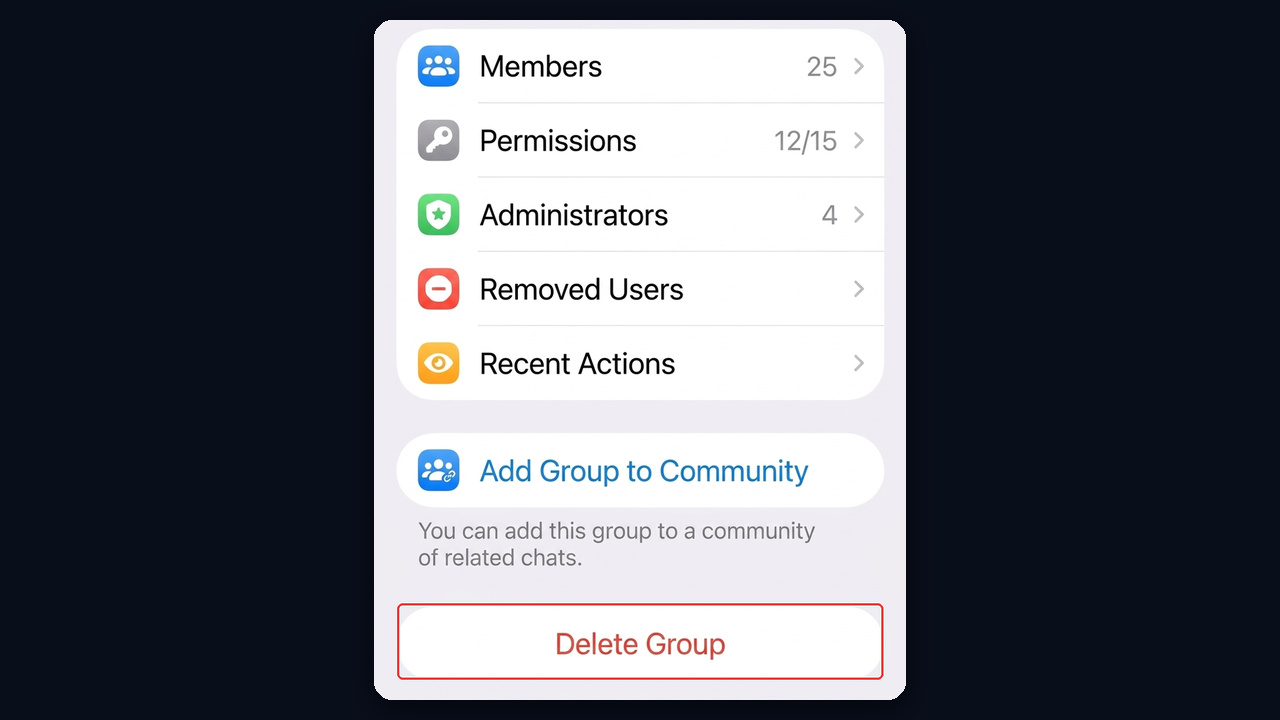
Small communities offer a shortcut. For example, long-press it in your list, tap Delete and Leave, then tick the option for all members, and it disappears for everyone at once.
On Telegram Desktop and the Web
Here, open the group profile and click Manage (or More → Manage Group). Next, click Delete Group at the very bottom of the settings and confirm: Telegram warns that all members will be removed and all messages lost. The browser version works the same way through the pencil in the info panel.
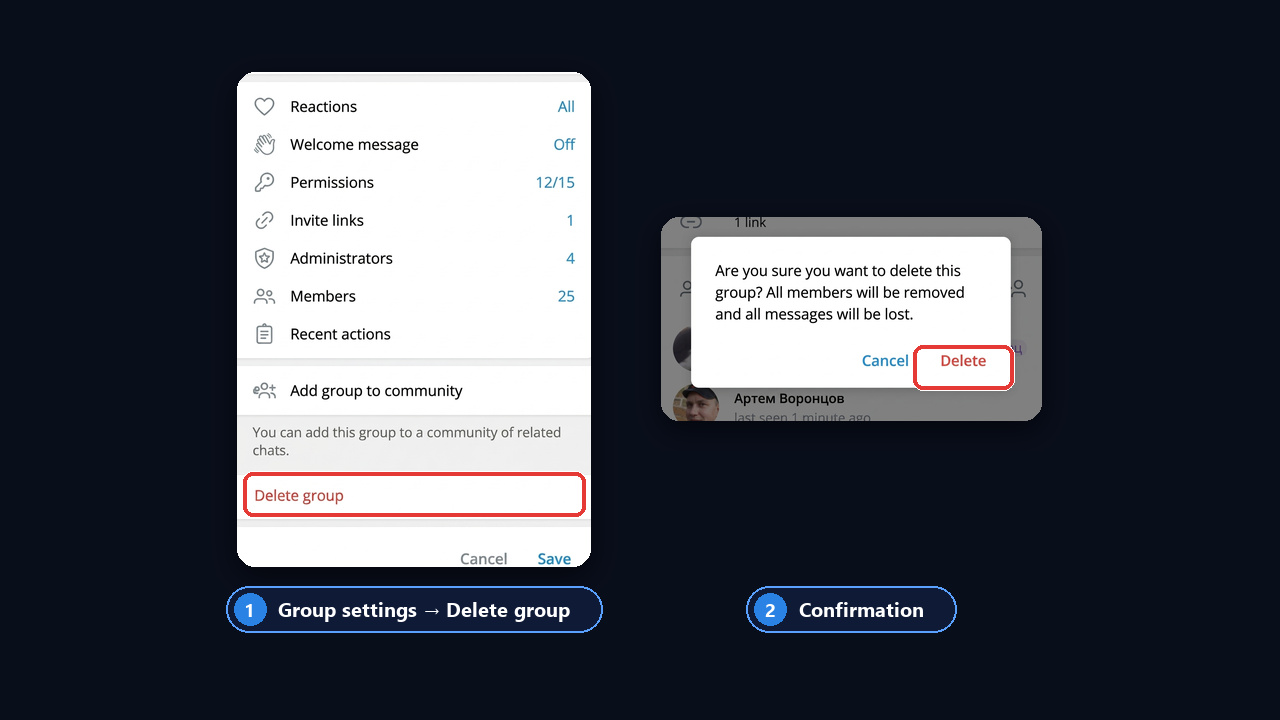
What Happens After You Delete It
As a result, messages, files and media vanish for every member, and the invite link stops working. There is no recycle bin, so nothing can be restored. Even support cannot bring it back, since the servers no longer hold it.
A Quick Checklist Before You Delete a Telegram Group
Deletion is final, so five minutes of prep saves headaches for you and your members.
- Export history. First, in Telegram Desktop open ⋮ → Export Chat History and save messages, photos and files.
- Warn people. Then pin a notice a day or two ahead, so nobody loses contacts.
- Share a new link. For instance, if the community is moving, pin an invite to the new space.
- Check bots. Switch off payment and work bots so they stop posting into the void.
Delete or Just Close It: What to Choose
Sometimes wiping a community feels wasteful, because it holds history, files and contacts. Softer options exist, though.
- Freeze it. In Permissions, stop members from posting, and it becomes a read-only archive.
- Make it private. Remove the public link, so newcomers can no longer find it in search.
- Archive it for yourself. Swipe it and tap Archive to get it out of your list.
- Rename it. Add "(archive)" to the title so members know the conversation moved.
Still, if you are sure the community is finished, deleting is safer, because abandoned spaces attract spam and bots.
Can an Admin Delete a Telegram Group?
No. An admin without ownership cannot remove the community. However, they can shut it down in practice by deleting messages, removing members, resetting the invite link and blocking newcomers from posting.
There is another route too. The owner can hand over ownership via Edit → Administrators → the chosen admin → Transfer Group Ownership. Telegram asks for two-step verification here, and the owner needs it switched on in advance. After that, the new owner can remove it.
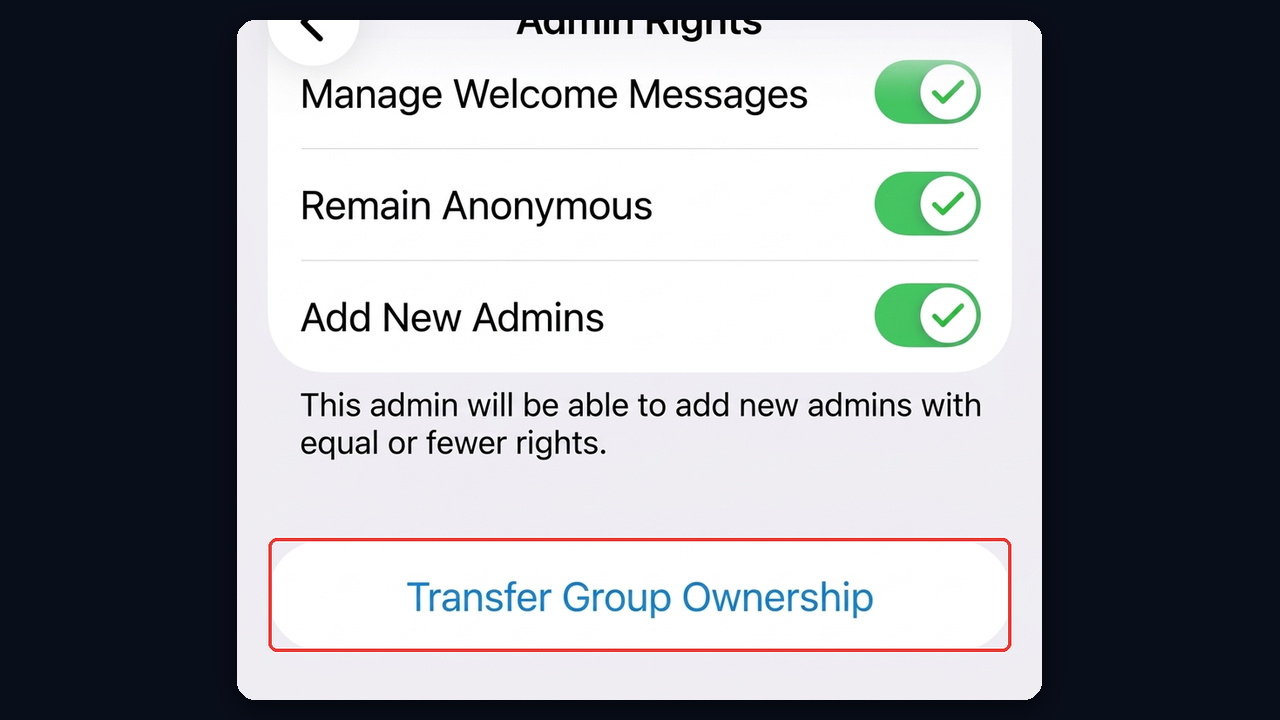
If the owner has vanished and the community breaks the rules, the only option left is Report in its menu. Moderators, however, remove communities for violations only, not on members' request.
How to Leave a Telegram Group
Exiting breaks nothing: the community lives on, and you simply stop getting messages. That makes it the way out when your role does not let you remove it.
On Phone and Desktop
- From the list. Long-press the community or swipe it left, then tap Delete and Leave.
- From inside. Tap ⋮ or the name, then Leave Group.
- Telegram Desktop. Right-click it in the list and pick Leave Group, or open the group profile and choose More → Leave Group.
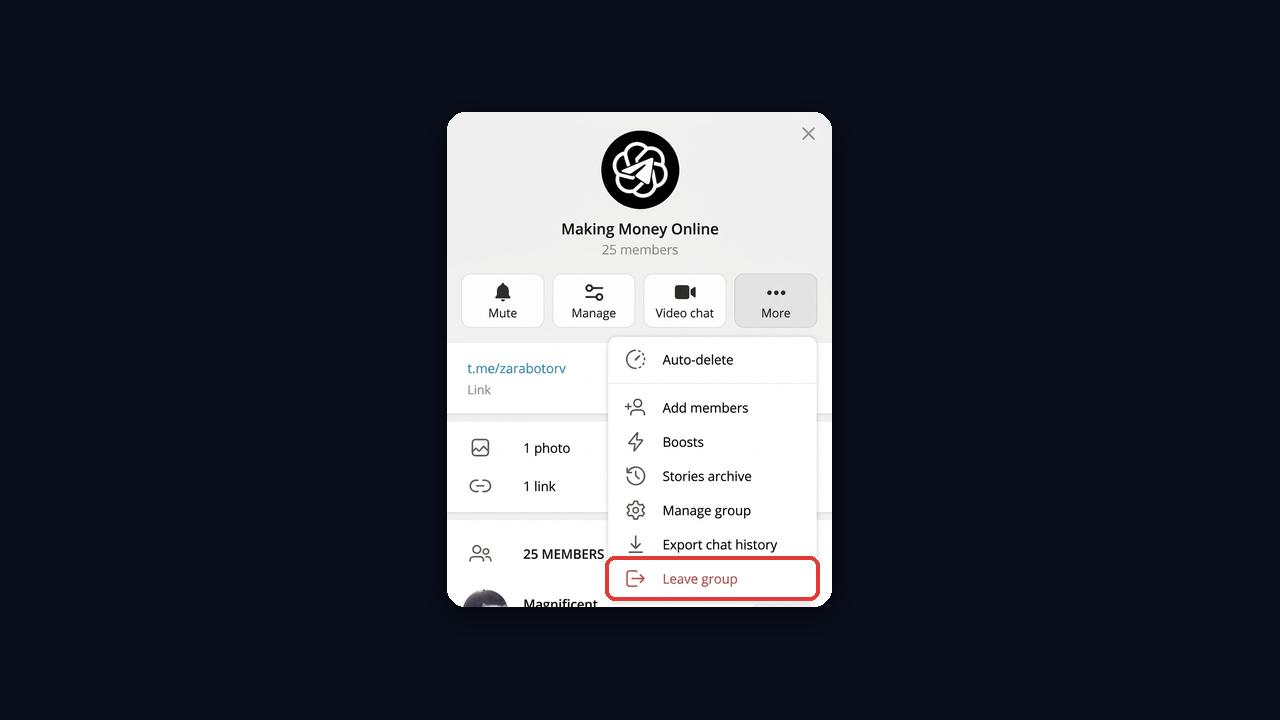
If you are the owner and you walk away, the community is not deleted and carries on without you. So appoint an admin or transfer ownership first, otherwise nobody will run it.
Can You Leave Quietly?
There is no fully silent exit: a service line saying you left usually appears there. That said, few people read it in busy groups, and nobody receives a personal alert. If all you want is peace, mute it instead via Notifications → Disable, and it stops bothering you while you stay.
How to Remove a Private Conversation on Telegram
Many people say "group" when they mean any conversation, so here is the short version for one-on-one chats.
- A dialog with a person. Swipe it left or long-press it and tap Delete. On iPhone, Telegram offers "Delete just for me" or "Delete for me and" the other person right away, while Android uses an "Also delete for" checkbox.
- Only for you. Pick the first option or leave the box unticked, and the messages disappear from your app alone.
- From the archive. Open Archived Chats at the top of the list and remove the dialog the same way.
- A secret chat. It vanishes for both sides at once, since it never lives in the cloud.
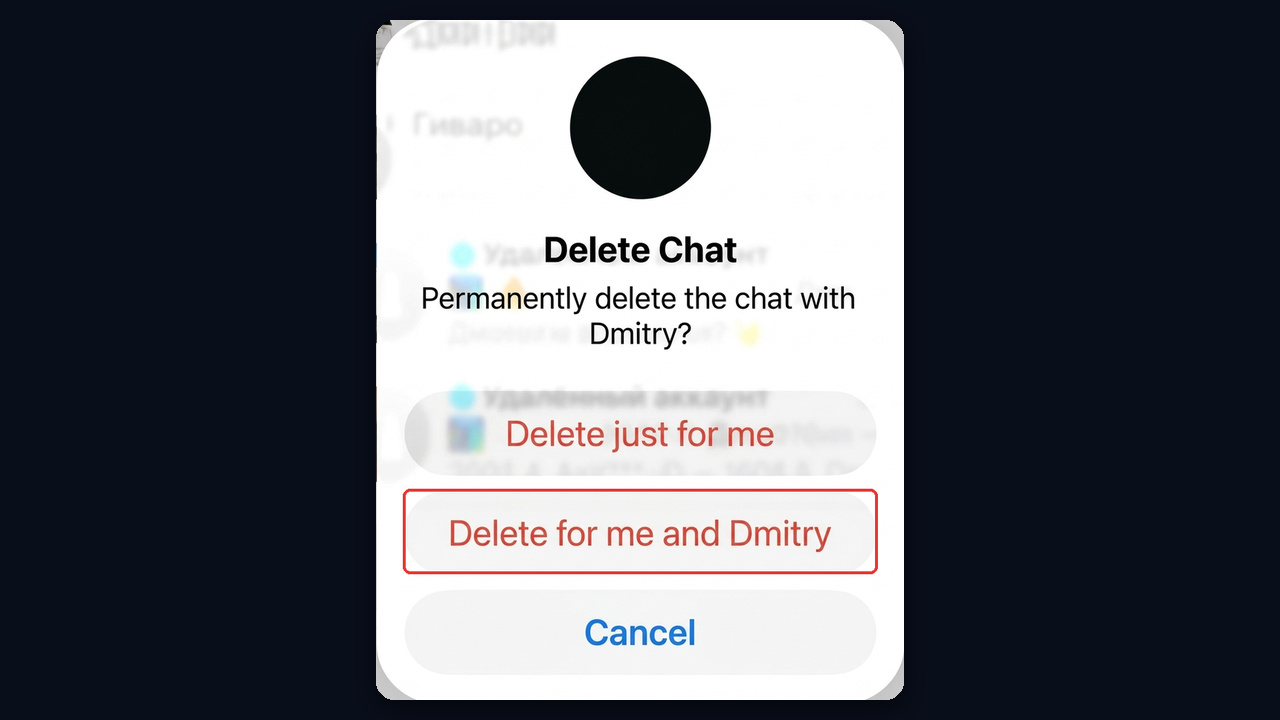
Once a dialog is erased for both people, it cannot come back, so save anything important first.
How to Remove Members From a Group
Sometimes you do not need to destroy the community, only to clean it up by getting rid of bots, deleted accounts and spammers.
- Remove a member. Open the list, long-press the person and tap Remove. The same menu offers Restrict when it is enough to block messages or media.
- Wipe their messages. Select a spam message and tick "Delete all messages from" that user.
- Close the door. Under Group Type, make it private and reset the invite.
- Limit rights. In Permissions, block links and media for newcomers and turn on slow mode.
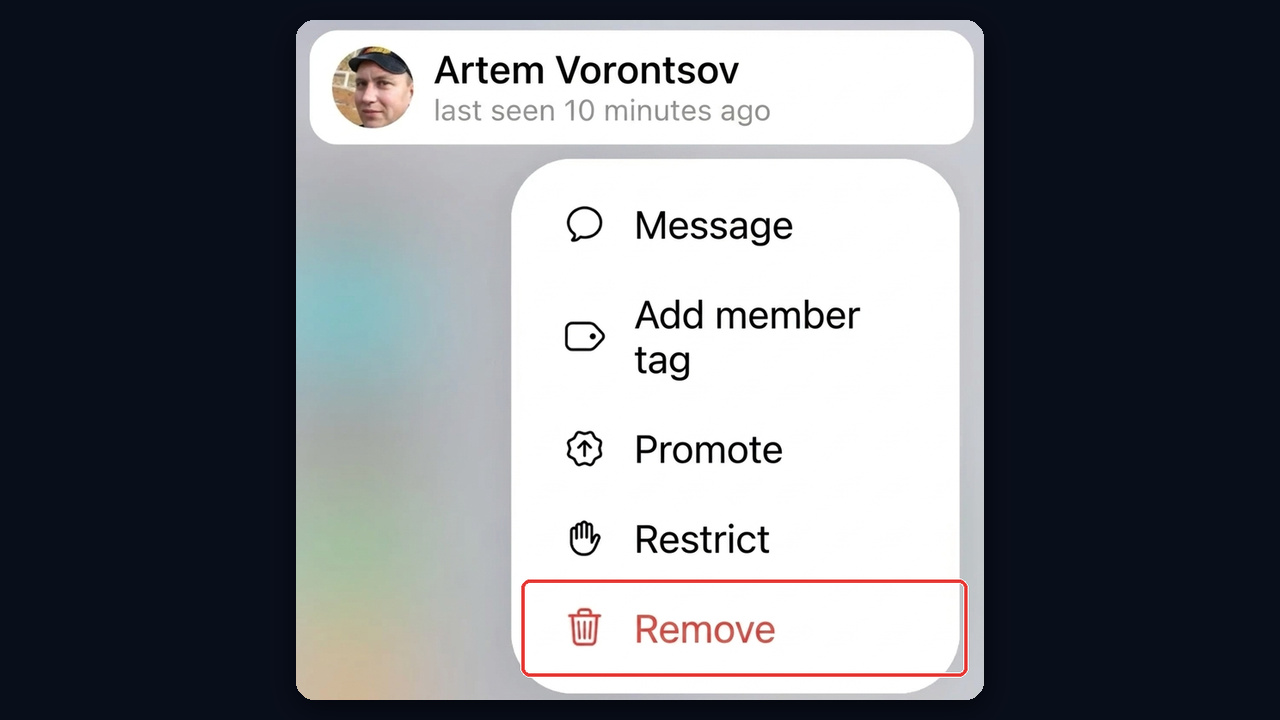
Telegram has no built-in bulk removal, however, so admins rely on moderation bots that clear deleted accounts and spam by rule.
Leaving Hundreds of Groups at Once With GramGPT.io
Exiting one community takes seconds. Work accounts, on the other hand, pile up hundreds of groups and channels after outreach, commenting and auto-joins. Doing it by hand on every account takes hours, and the clutter weighs down sessions. That is why the GramGPT account manager has bulk Leave actions.
- Select accounts in the list.
- Click Leave → Leave Groups. Next to it you will find Leave Channels, Leave Folders and Delete Private Chats.
- Set a delay between actions, for example 3–6 seconds, and launch.
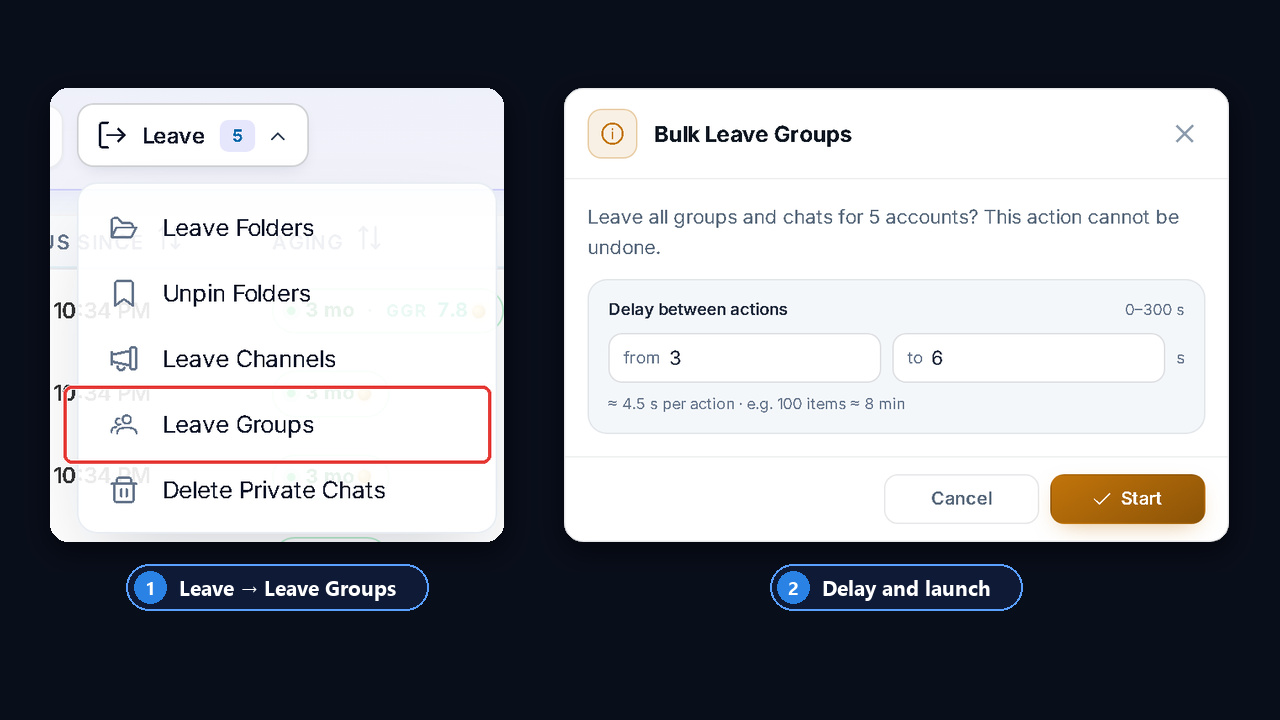
The module warns that the action cannot be undone and estimates the time: with roughly 4.5 seconds per step, a hundred communities go in about 8 minutes. These pauses make the exit look human, so accounts avoid limits. And when you need fresh communities later, the channel and chat parser collects them quickly.