Here's a scenario we see a lot. Someone gets fed up with notifications, looks up how to delete an account on Telegram, wipes everything in two minutes, and a week later realizes the family recipes chat and three years of photos from a friend are gone. Removal is final, so let's make sure it's really what you want before you press anything.
Below we walk through every route: the browser page that works on any device, the iPhone and Android menus, the desktop client, the built-in inactivity rule, and awkward situations like a lost SIM. We finish with a plain table of what survives and what doesn't in 2026.
Delete Telegram Account or Just Step Away?
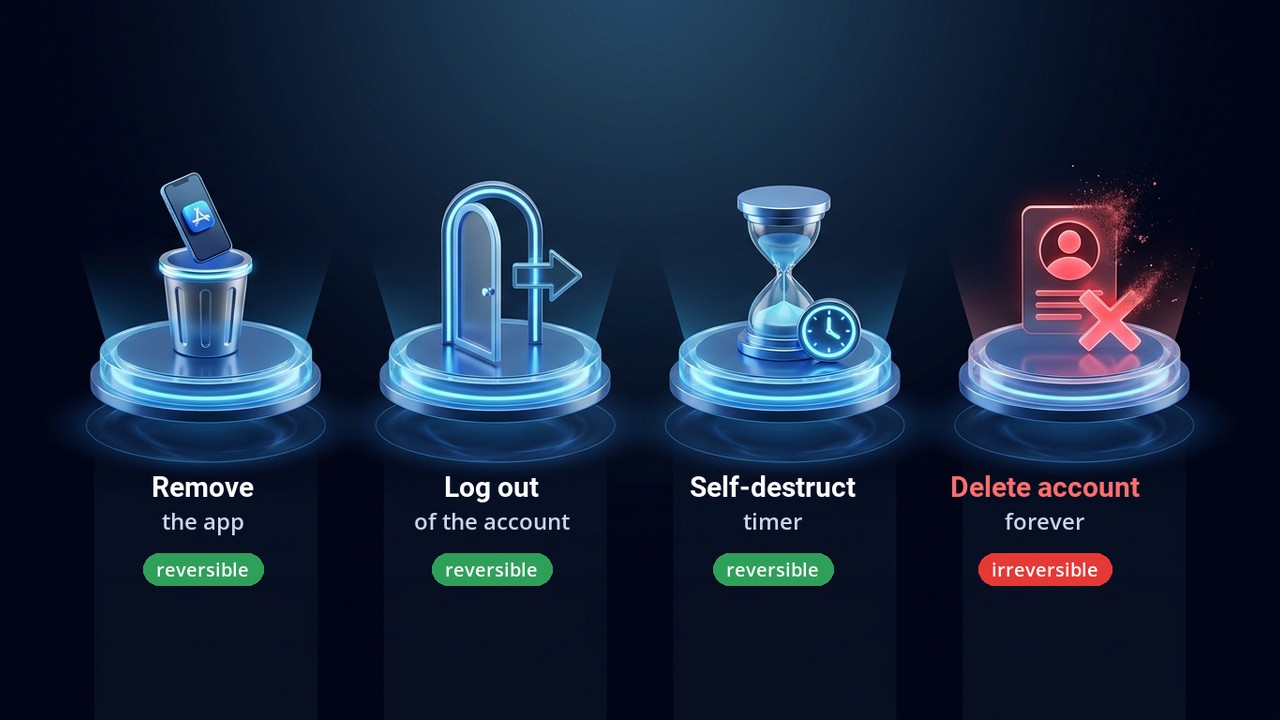
The messenger treats five actions very differently. Uninstalling the app, for instance, leaves your identity untouched: reinstall and every conversation is back. Meanwhile, signing out of one phone closes that session only. Wiping the profile, on the other hand, can't be undone by anyone.
| Action | Result | Undo? |
|---|---|---|
| Uninstall the app | Gone from the device, profile intact | Yes, sign in again |
| Sign out | One session closes | Yes, with a login code |
| Terminate other sessions | Strange devices get kicked out | Yes, it's a safety move |
| Inactivity rule | Profile erased after months of silence | Yes, until the clock runs out |
| Erase the profile | Chats, contacts and history vanish | Never |
Got a spare work profile you no longer need? Detaching it is usually enough, and we covered how to add and remove multiple Telegram accounts step by step.
Is Removal Truly Permanent?
Yes. However, only the owner can trigger it, because the confirmation digits arrive inside the messenger itself. In other words, a stranger can't erase you, and you can't erase it either without access to the app. The inactivity rule is the only exception, since it runs on its own.
The Browser Route: Delete Telegram Account in Two Minutes
First, the universal option. A small official page, my.telegram.org, opens on a phone, tablet or laptop alike, and it's what Telegram itself points people to.
- Visit my.telegram.org/deactivate.
- Type the full number, country code included: +1 555 123 4567.
- Grab the digits. Forget SMS — a service chat inside the messenger sends this code.
- Pick Delete Account. Explaining why you leave is optional.
- Confirm twice: the Delete My Account button, then the final pop-up.
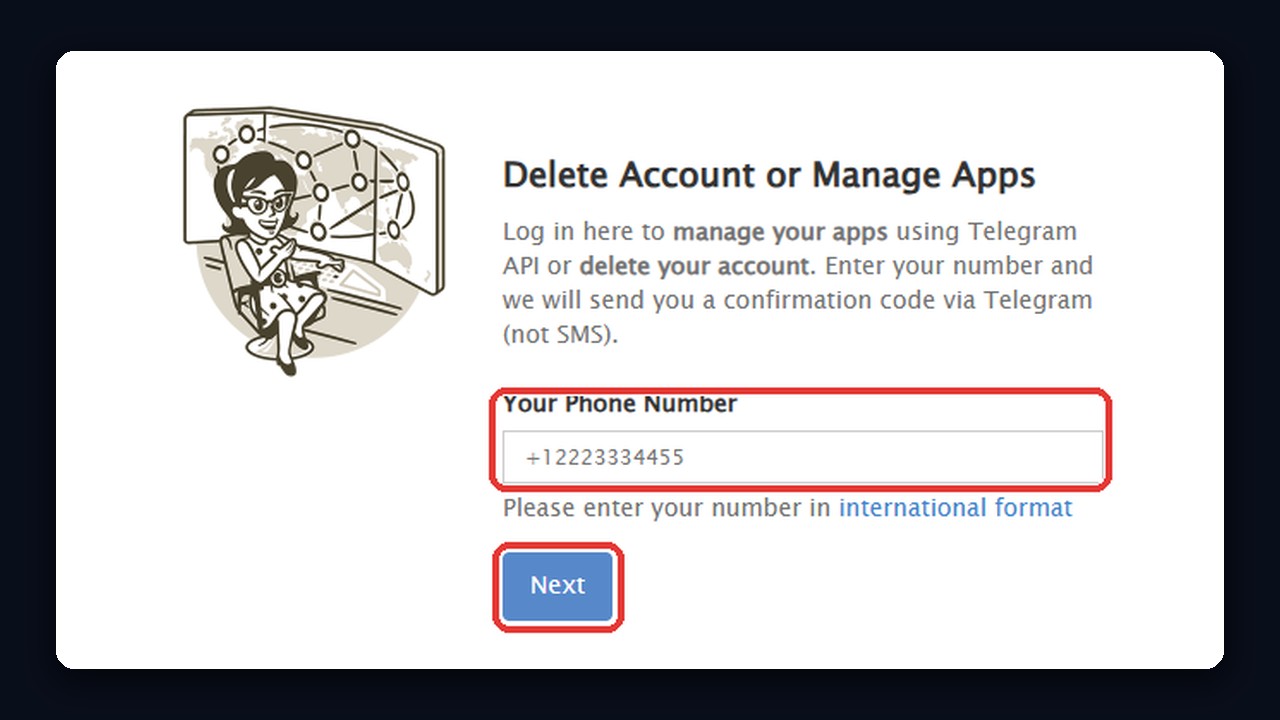
So that's all it takes, provided you can open the app to read the code. The page is English-only and tiny, so it's hard to click the wrong thing.
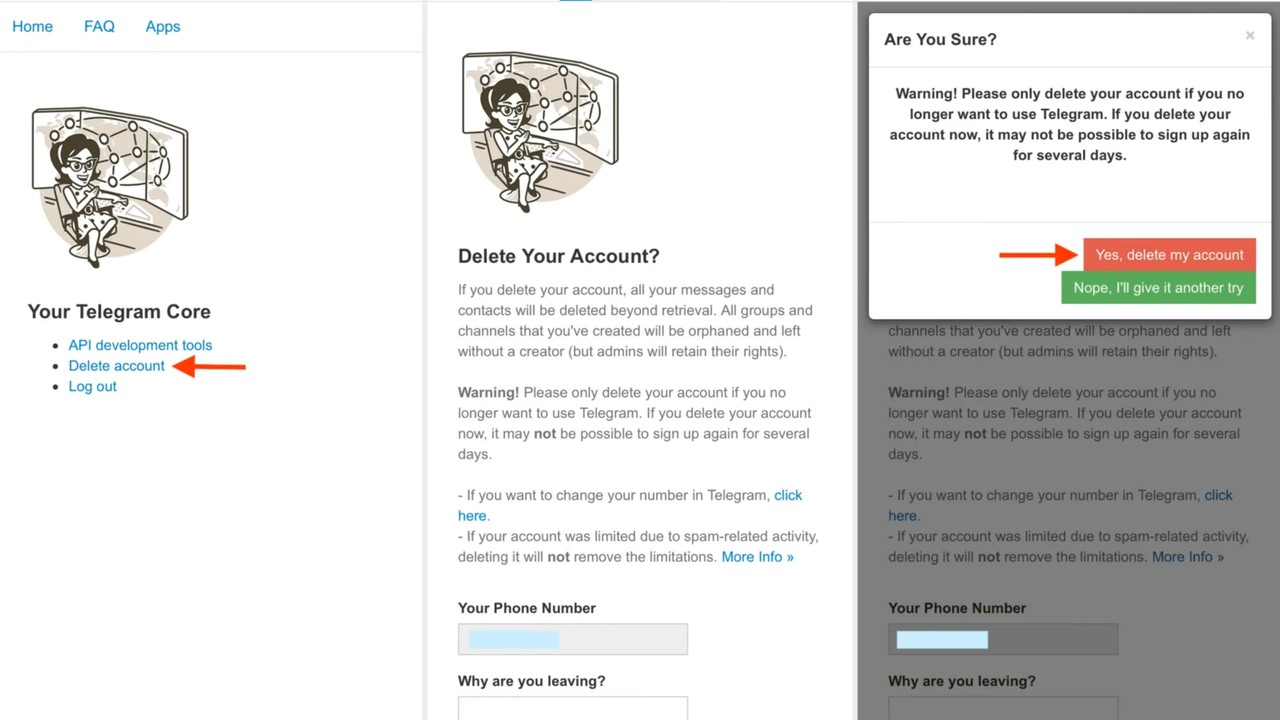
Heads-up: there's no cooling-off window. Everything is erased on the spot, so support has no way to bring conversations back.
Deleting on a Phone: iPhone and Android Menus
However, the two mobile apps hide the option in different places, so here they are one by one. Either way, then, you'll finish inside the app or on the same browser page.
How to Delete My Telegram Account on iPhone
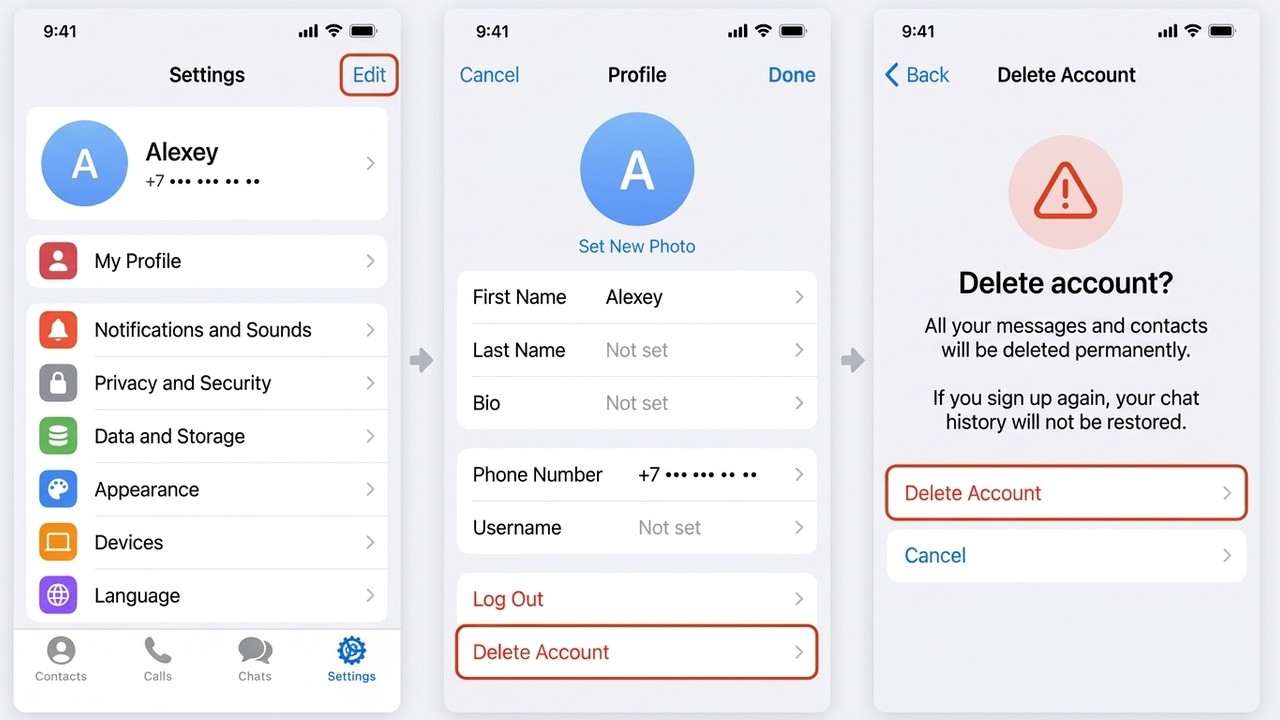
- Tap the Settings tab, then Edit near your photo.
- Swipe to the bottom of the profile editor and hit the red Delete Account row.
- The app then lists what you'll lose and offers gentler options like signing out.
- Get through the confirmations, and that's it.
How to Delete Telegram Account Permanently on Android
- Open the side menu and head to Privacy and Security.
- Near the bottom you'll find the Delete my account block.
- It sets the inactivity period, and some recent builds add an instant option.
- No instant option? The browser page from the previous section does the job.
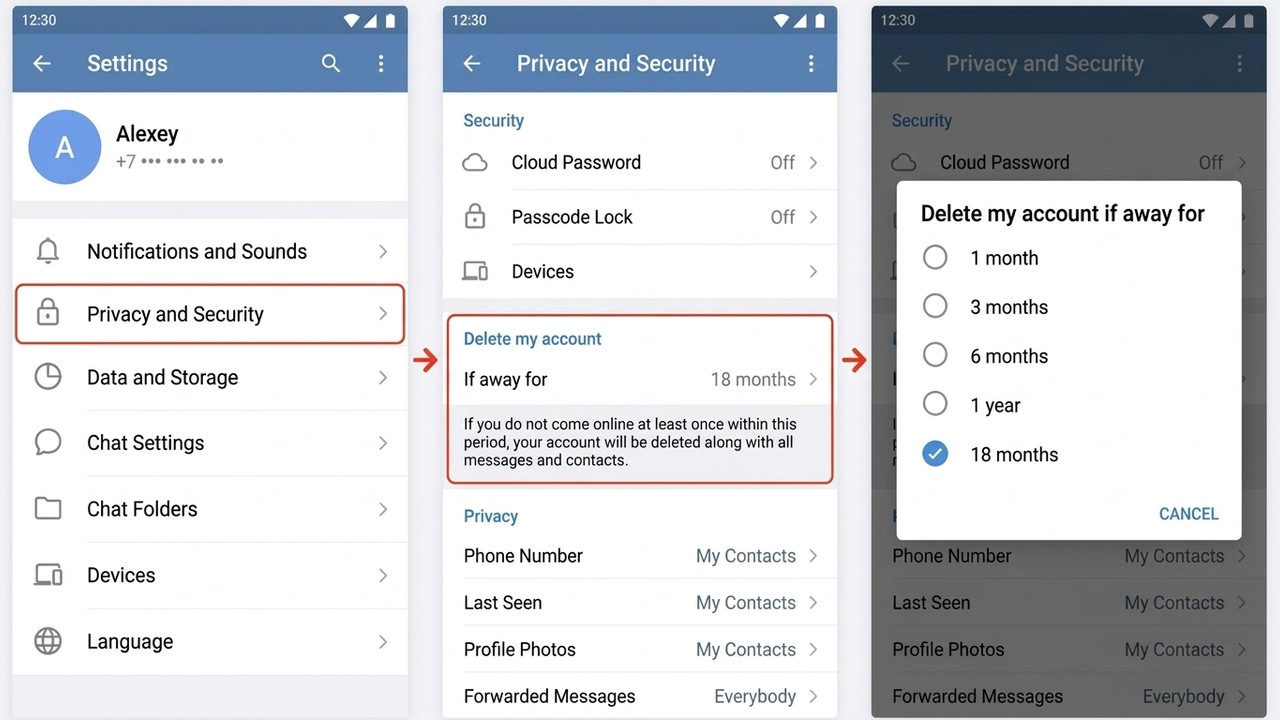
Besides, labels shift a little with every update. If a row seems missing, update the app or simply switch to the browser, which behaves identically on any handset.
Deleting From a Laptop or Desktop
Here's the catch: Telegram Desktop and the web client have no instant button at all. What they do have is the inactivity rule, under Settings → Privacy and Security, where you choose how long it may sit unused.
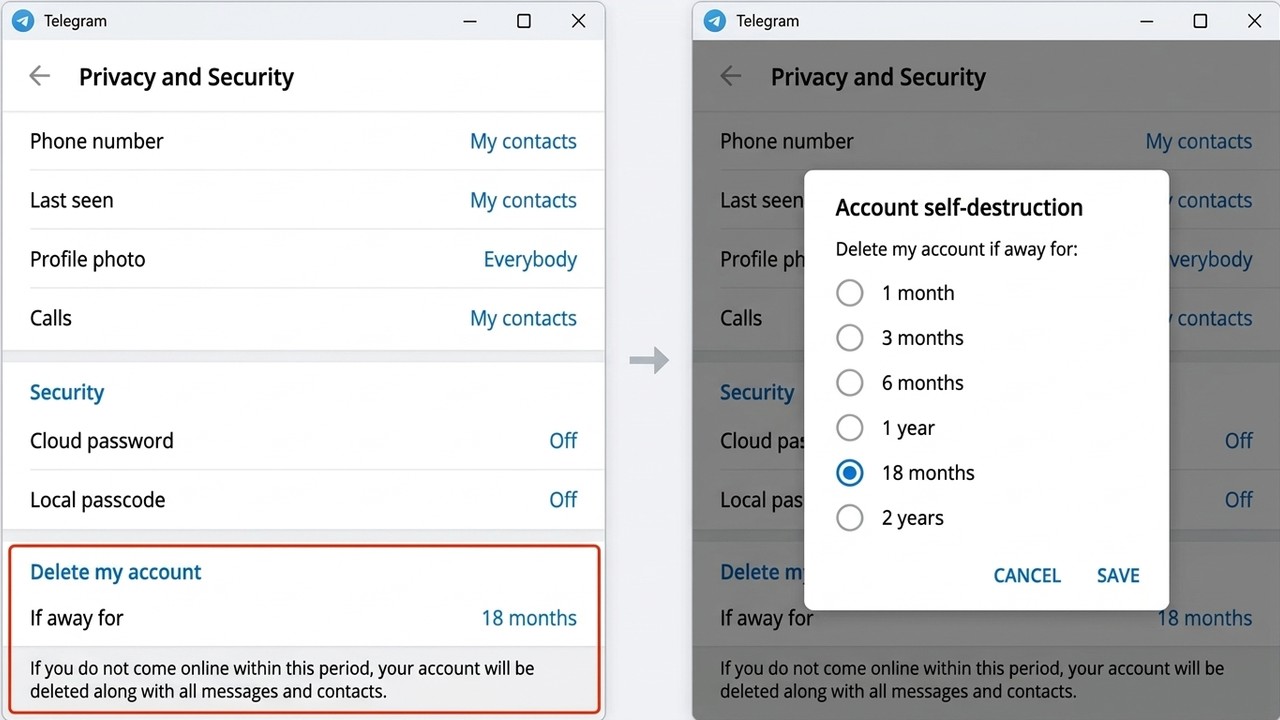
Need it gone today? Then open my.telegram.org in your computer's browser instead. Then the code pops up in whichever client you're signed into, the desktop one included.
Let the Profile Expire on Its Own
Also, Telegram quietly removes accounts nobody opens. By default that happens after six months, though you can choose anything from one month to a year. Therefore it suits anyone who has simply drifted away and can't be bothered with codes.
- 1 month — you've made up your mind but want a short buffer.
- 3–6 months — sensible for a spare or work number.
- 12 months — a cushion if you check in rarely.
One catch: every login resets the countdown. A laptop that keeps Telegram open and online will keep it alive indefinitely.
A Short Checklist Before You Delete Telegram Account Data
Because there's no undo, spend five minutes on the steps below. Future you will be grateful.
Save the History
Only the desktop program exports history: Settings → Advanced → Export Telegram data. Tick whatever matters, from one-on-one conversations to media and contacts. You'll get HTML or JSON files that open in any browser.
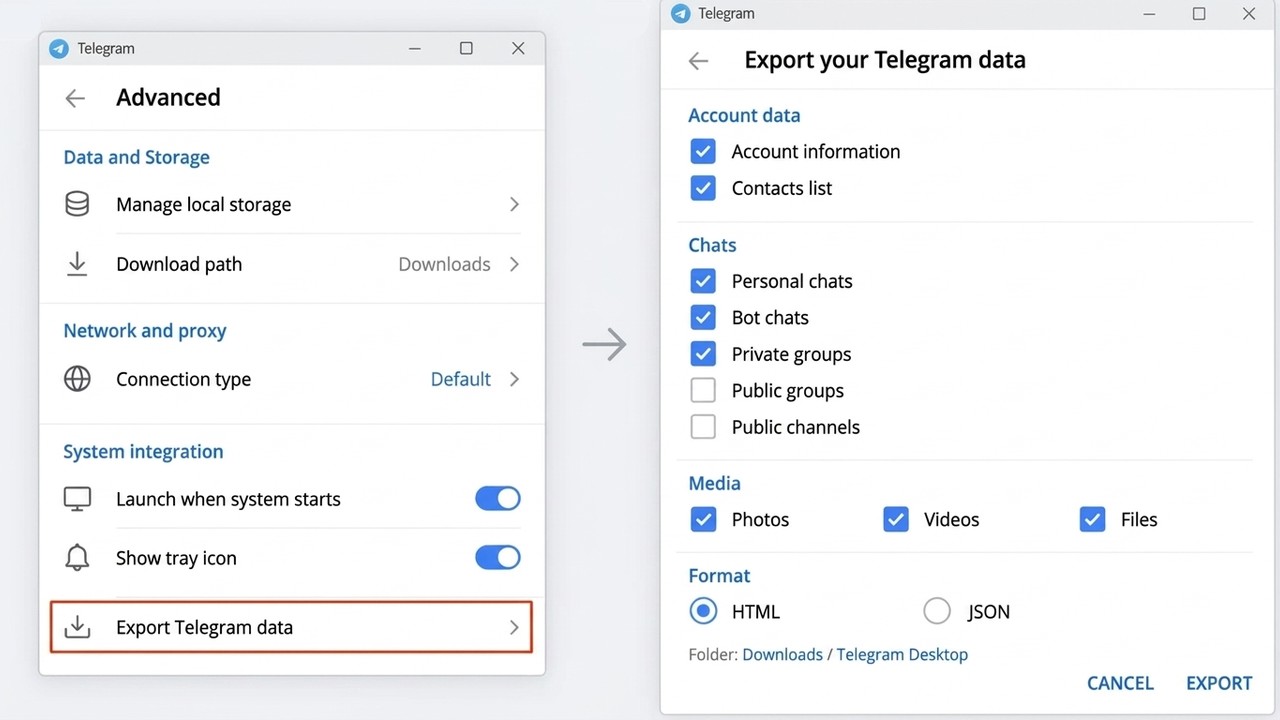
Occasionally the export waits 24 hours and needs approval from another device. It's an anti-theft measure, so plan ahead. Also, open the archive once to be sure it saved properly.
Pass Your Communities On
Running a channel or group? First, promote a co-admin to owner first, otherwise nobody will steer it afterwards. Worth a look too: Telegram's Legacy feature, which hands access to someone you trust.
Check Where You Log In With Telegram
Next, recall the websites, paid bots and payment tools where the messenger acts as your login. Those doors close for good afterwards.
After You Delete Telegram Account: What's Left Behind
A common fear, for example, is that your words disappear from everyone's phone. They don't. Your side goes away, while other people keep their copies.
| Item | Fate |
|---|---|
| Name, photo, @username | Erased; the username is up for grabs |
| Contact list and chat list | Erased |
| One-on-one conversations | Kept by the other person under a ghost label |
| Posts in groups | Kept, with an anonymous author |
| Your channels and groups | Live on if another admin exists |
| Phone number | Freed for a brand-new signup |

What is "Deleted Account" in Telegram? That ghost label is exactly what friends will see next to your old replies. As a result, registering again with that number gives you a blank slate, with no old threads or subscriptions.
Tricky Situations
No Phone, No SIM
Without that code, however, nobody can remove the profile by hand. So the inactivity rule becomes your friend: once the period ends, everything goes by itself.
Somebody Hijacked Your Profile
In that case, fight for it first: sign in with your number, kick out unknown devices in Devices, and set a cloud password. Our walkthrough on how to protect a Telegram account lists every step. Wipe it only if that fight is lost.
Frozen or Spam-Blocked
Restrictions won't block removal, yet many of them can be lifted without losing anything. Before taking drastic action, read our guide to spam blocks and account freezes.
Someone Else's Profile
That's impossible by design, because the code only reaches the owner. Spammers and scammers can be reported through their profile menu, and moderators take it from there.
A Whole Farm of Work Profiles
Finally, teams running dozens of marketing profiles rarely need to erase anything: idle accounts are easier to park and pause in one place. The GramGPT account manager imports them, assigns roles and checks their health in a single window.
Wrapping Up: Delete Telegram Account the Right Way in 2026
In short, for instant removal, visit my.telegram.org/deactivate and confirm with the code from the app. iPhone owners can do the same from the profile editor, while Android and desktop users rely on the browser or the inactivity rule. But export your history, pass on your channels and double-check that signing out wouldn't solve the problem first.
Our Telegram security section has more on keeping profiles safe.