In 2026, Telegram spam block has become one of the common problems for those who work with accounts, mailings, inviting, and Telegram automation. An account may look functional: chats, channels, and settings open, but the needed actions no longer go through. Messages do not get delivered, new users do not receive replies, the funnel stops, and the reason is not always visible right away.
The difficulty is that the word "spam block" often refers to different restrictions. There is a temporary spam block, a permanent spam block, a geo spam block, and a separate case — Telegram account freeze. They feel similar, but differ in reasons, duration, chances of recovery, and further actions.
In this article, we will break down why a spam block in Telegram appears, how to check an account through @SpamBot, what to write in an appeal, and how to reduce the risk of a repeated restriction after mailings, inviting, or other automation.
What is a Telegram spam block and what does it do to an account
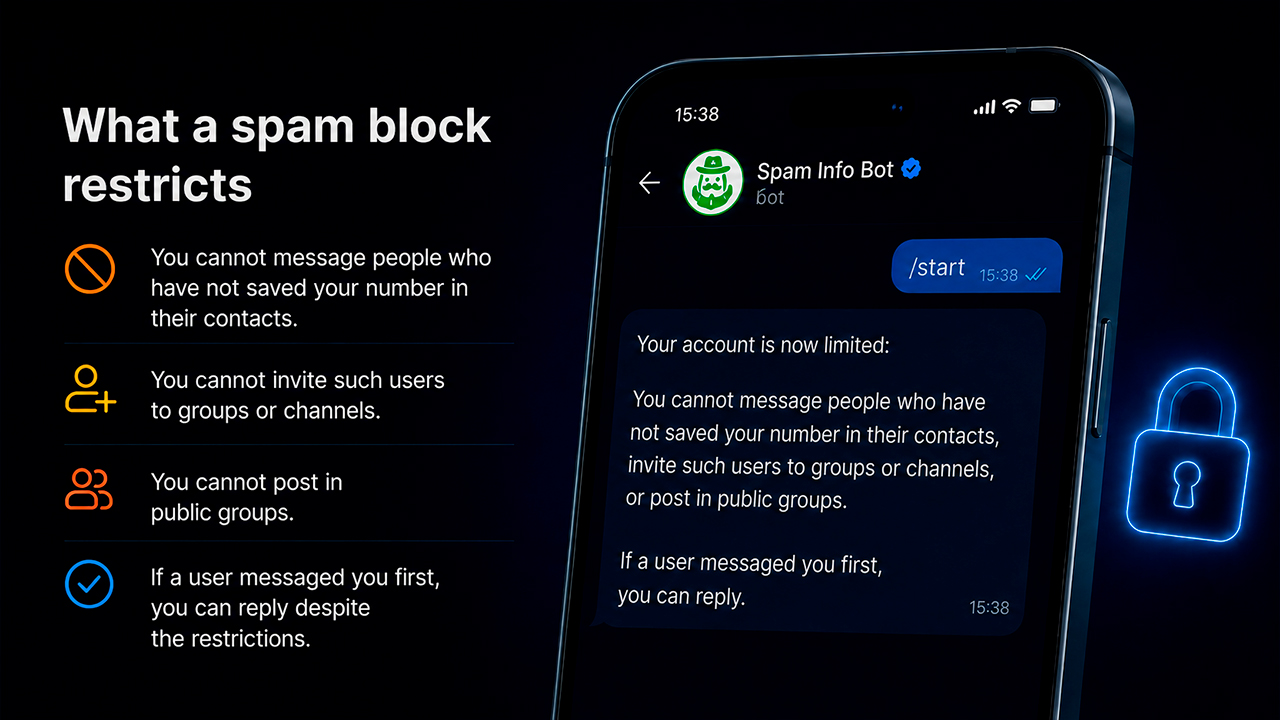
Spam block in Telegram is a restriction that causes an account to lose part of its active actions. Visually, everything may look normal: the profile opens, channels can be read, chats are available. But as soon as you need to write to a new person, send a message, launch inviting, or run automation, problems begin.
For an ordinary user, this is simply an unpleasant restriction. But for those who use Telegram software, a Telegram combine, mailings, inviting, parsing, or neurocommenting, such an account already loses its value. It seems to exist, but it cannot work properly in a funnel and consistently bring traffic.
That is why it is better to check a spam block right away, not after launch. This makes it easier to understand whether the account can still be returned to work or whether it is already more profitable to replace it.
Why Telegram gives spam blocks to accounts
Spam block in Telegram rarely happens “just like that” because of one message. More often, Telegram looks at the profile’s overall behavior: how quickly it started working, who it writes to, how many actions it performs, which IP it logs in from, and how users react to it.
Most often, the reasons are:
- a sudden start without preparation.
- mass mailing to a new database.
- many identical messages.
- mass complaints from users.
- device change, bad proxies, VPN, IP, or geo.
- a weak batch of accounts.
- lack of account warm-up.
- identical behavior across all accounts.
- high frequency of actions without pauses.
If an account was empty yesterday and today started writing to hundreds of people, Telegram quickly sees unnatural behavior. That is why before heavy actions you need account warm-up in Telegram: gradual activity, normal history, careful limits, and preparation before launch.
Types of spam blocks in Telegram
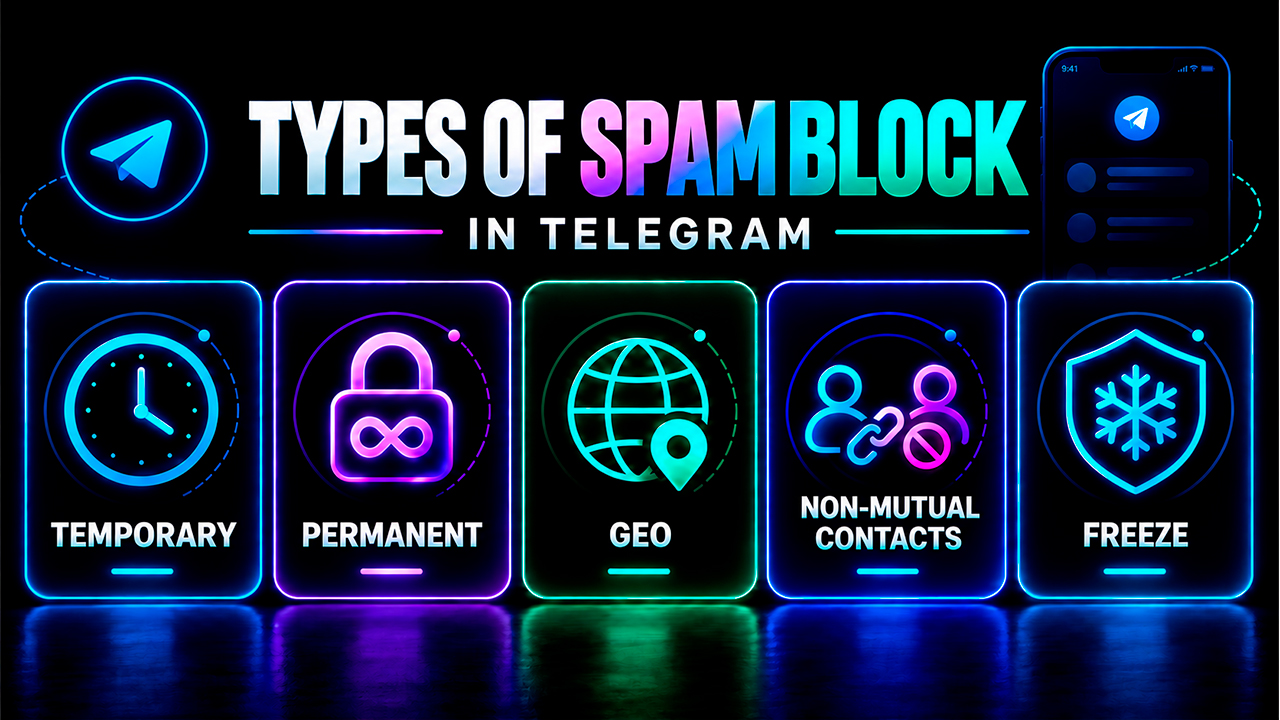
Spam blocks in Telegram can be divided into several types: temporary, permanent, geo spam block, and a spam block for working with non-mutual contacts. The latter restricts actions with users who are not in mutual contacts with the account, while some profile functions remain available. Account freezing should be considered separately — this is no longer a regular spam block, but a stricter restriction.
Temporary spam block: when you can simply wait
Temporary Telegram spam block is a time-based restriction. Usually, it lasts from several hours to several days, and sometimes it can reach up to a month. Most often, it is given for sudden activity: mass mailing, inviting, identical messages, complaints, or frequent IP changes.
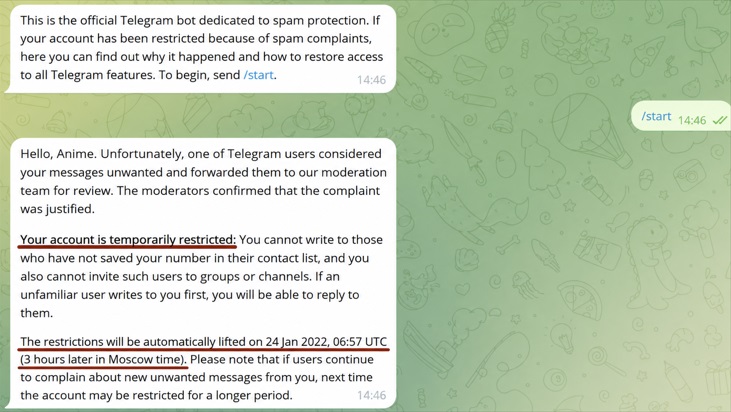
In this situation, the account may work partially: Telegram opens, chats are visible, but some actions are already unavailable. That is why the user searches for how long a spam block in Telegram lasts: whether to wait for removal, write to @SpamBot, or remove the account from work.
What is better to do:
- check the account through @SpamBot.
- stop mailings, inviting, and other active actions.
- do not launch the same scenario again.
- wait for the period to end, if it is specified.
- submit an appeal.
- after removal, return the account to work gradually.
The main mistake is to continue loading the account immediately after the restriction. If a spam block in Telegram has already appeared, repeated actions can only make the situation worse.
Permanent spam block: when the account is already in question
Permanent spam block or permanent Telegram spam block is already a more serious restriction. It is given to accounts that Telegram considers problematic: due to repeated complaints, mass spam, prohibited content, bad history, or frequent violations.
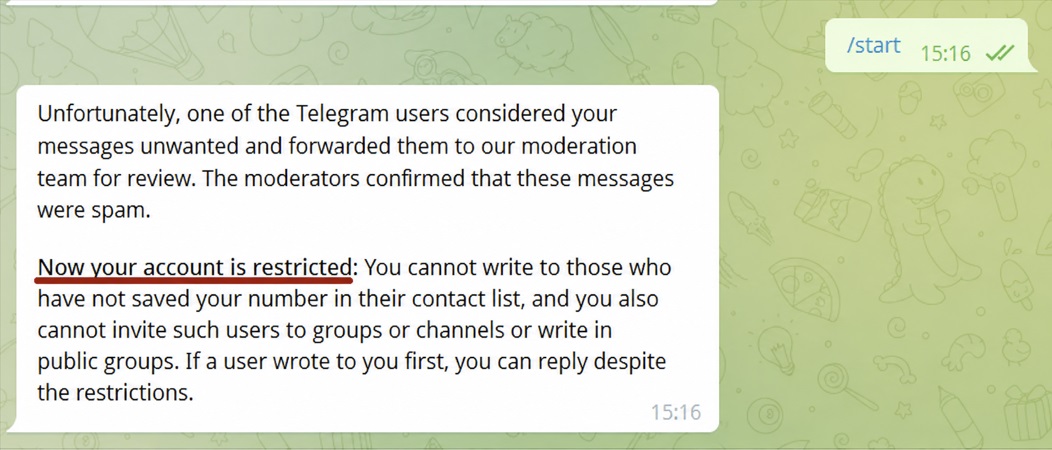
The main problem is that this restriction has no clear removal date. The account may look alive: login works, chats open, channels can be read. But it is already almost unsuitable for active actions. Mailings, inviting, comments, and other scenarios may not work properly.
For the query how to remove a permanent spam block in Telegram, there is no universal solution. You can try an appeal through SpamBot or the spam block removal function, but the result depends on the profile’s history.
What to do:
- check the status through SpamBot.
- submit an appeal if it is available.
- let the account rest.
- do not launch it into mailings, inviting, or comments.
- evaluate whether it makes sense to restore the account.
If the account is cheap, weak, and not catching restrictions for the first time, sometimes it is easier to replace it than to continue spending effort on recovery.
Spam block for non-mutual contacts: can you continue automation?
Telegram has introduced another type of restriction — a spam block for working with non-mutual contacts. It differs from the usual temporary and permanent spam blocks: @SpamBot does not show an exact removal date, while the restriction affects only some account actions.
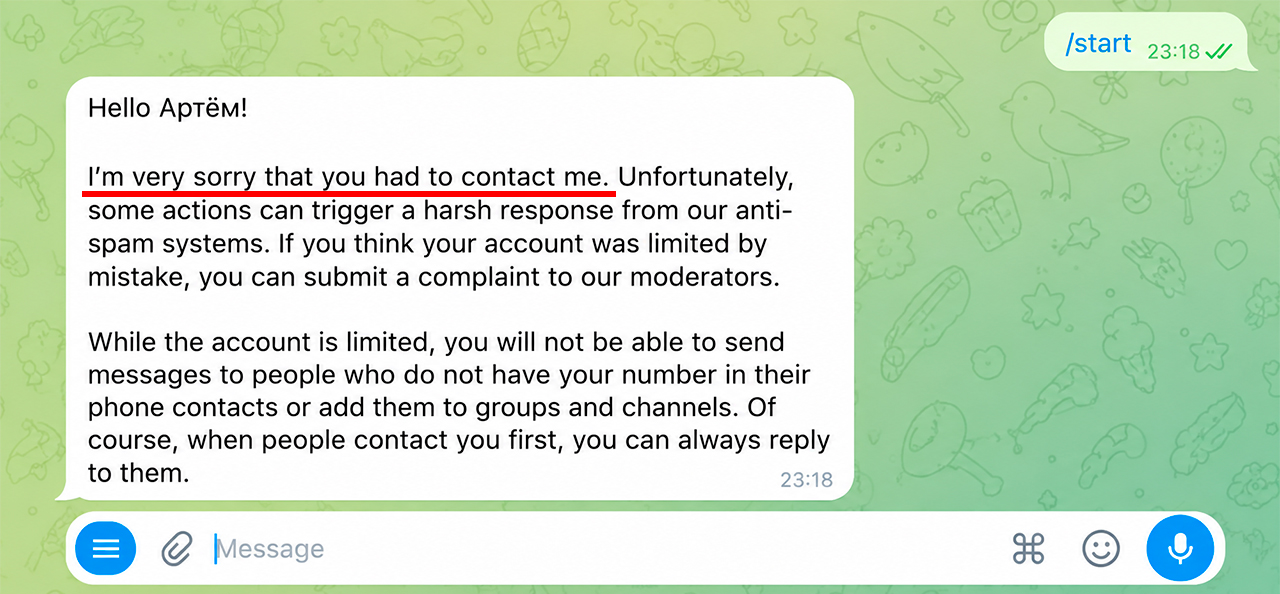
Simply put, the account remains active, but cannot message unfamiliar users first or add them to groups and channels. If a user messages the account first, it can still reply.
In @SpamBot, this restriction looks like this:
I’m very sorry that you had to contact me. Unfortunately, some actions can trigger a harsh response from our anti-spam systems. If you think your account was limited by mistake, you can submit a complaint to our moderators.
While the account is limited, you will not be able to send messages to people who do not have your number in their phone contacts or add them to groups and channels. Of course, when people contact you first, you can always reply to them.
Because there is no removal date, this status can easily be confused with a permanent spam block. In practice, however, it is a milder restriction: some automation scenarios continue to work as long as they do not involve direct interaction with @username users.
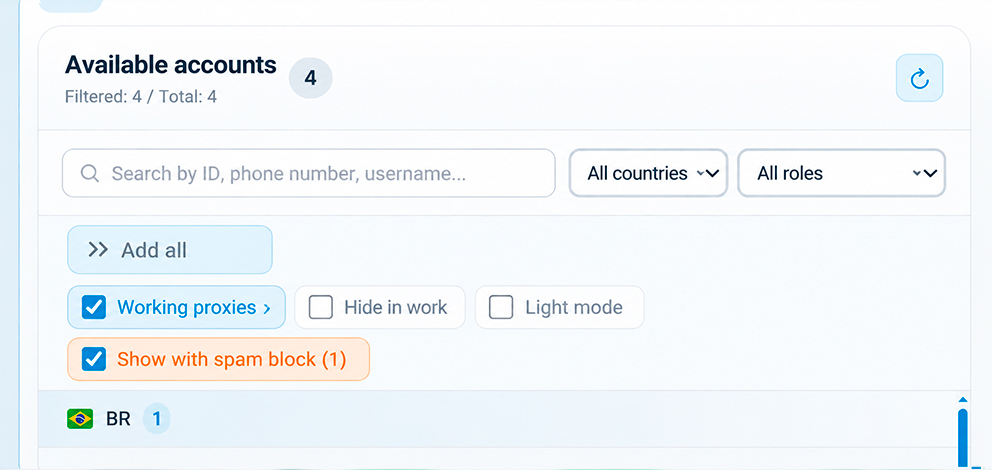
In GramGPT.io, this spam block is displayed separately:
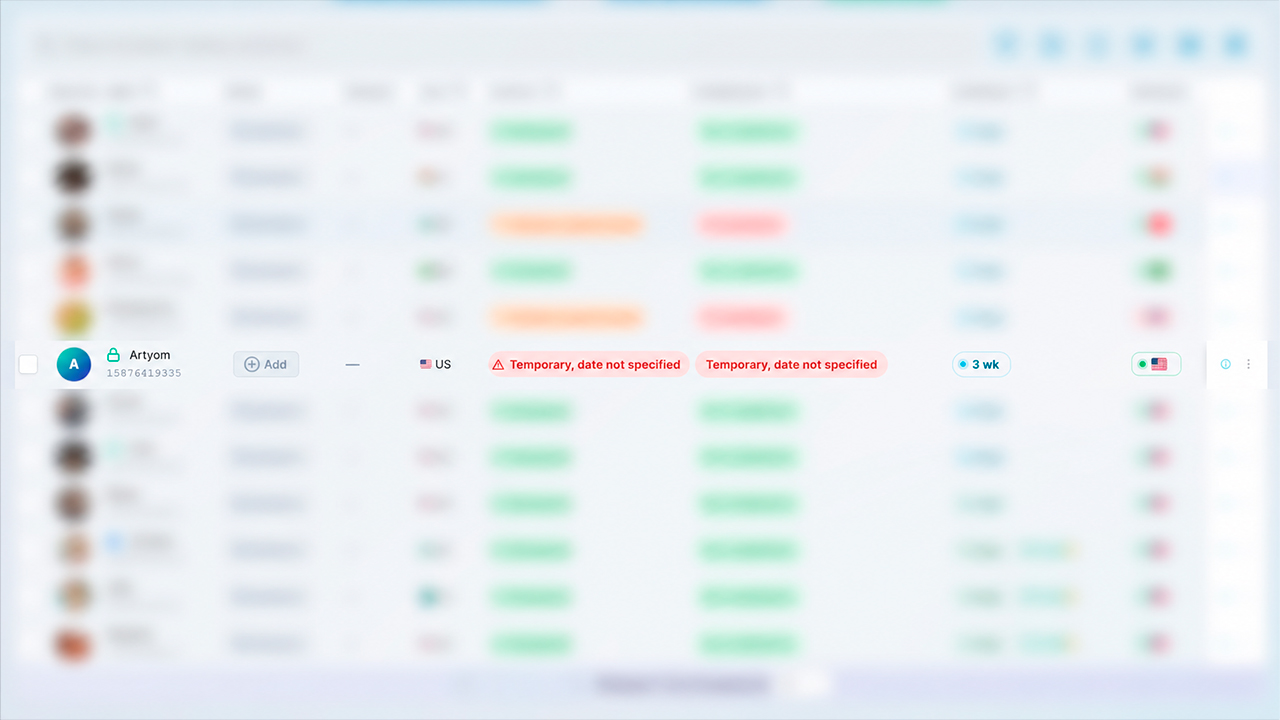
What can be launched with this spam block:
- Neurocommenting.
- Neurochatting.
- Mass reactions.
- Chat mailings.
- Other modules that do not directly work with @username users.
What cannot be done or will be limited:
- Inviting.
- DM mailings to new users.
- Creating channels.
- Other functions that require direct interaction with users.
So there is no need to immediately remove such an account from work. This is one of the mildest types of spam block: automation can continue in scenarios that do not require first contact with unfamiliar users.
In GramGPT, when selecting accounts, enable the “Show accounts with spam block” filter. After that, such accounts will appear in the list and can be added to suitable modules.
Geo spam block: why it is important to look at the account country
Geo spam block is a restriction that may depend on the account region, phone number, IP, and proxies. Most often, it appears on new profiles if numbers from this geo have already often been flagged for spam or if the account is launched unnaturally: one geo, another proxy, and active actions begin immediately.
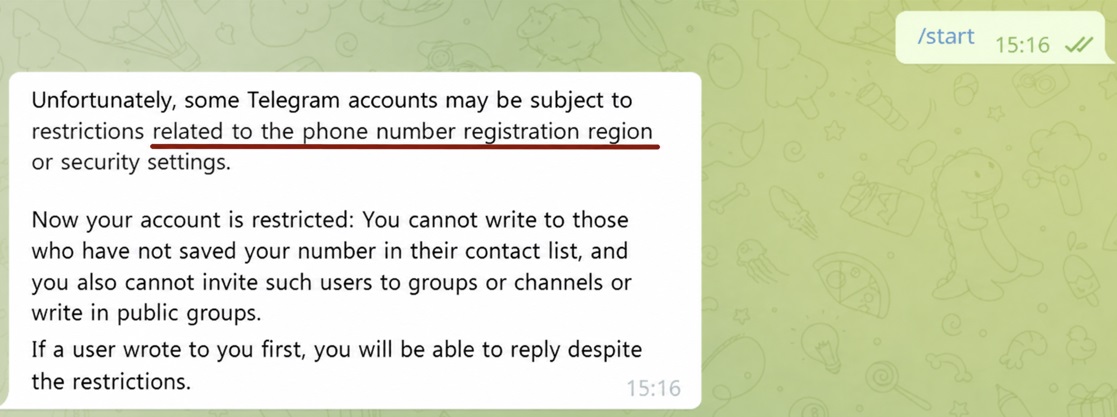
Usually, such a spam block lasts from 1 day to a week and can be removed automatically if you do not load the profile. With repeated violations, the period may grow to several months, so before mailings, inviting, or other automation, it is important to take into account the account geo and proxy quality.
The risk is higher when the account geo and proxy do not match. For example, the profile is registered for one country, but logs in through an IP from another country and immediately receives active load. For Telegram, this looks suspicious.
That is why geo spam block in Telegram should be taken into account even before buying a batch of accounts. Geo affects the profile lifespan, restriction speed, and stability in mailings, inviting, parsing, or neuro-commenting.
What to check before the first launch:
- account country.
- proxy quality.
- account geo match, meaning the country of registration.
- account history and past actions.
- whether the account drops after the first light actions.
- how the profile behaves at the start.
The list of “best geos” changes quickly: Telegram updates its anti-spam logic, sellers change account quality, and individual countries start holding load worse over time.
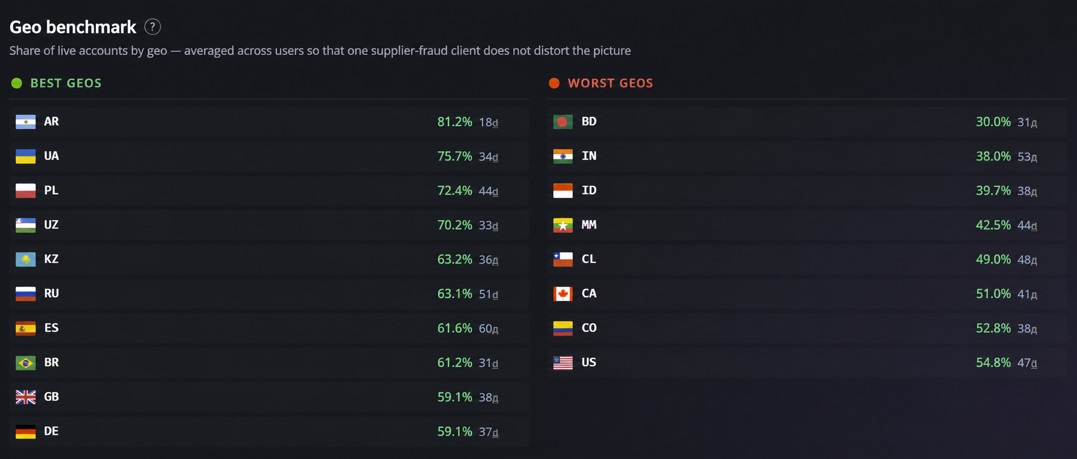
That is why before buying a batch, it is better not to rely on old advice, but to look at fresh statistics. In the GGR rating - you can check account survivability, as well as which geos are currently more stable for automation and which ones more often go into restrictions.
Telegram account freeze: why it is not a regular spam block
Telegram account freeze is not a regular Telegram spam block. Here, the problem is more often not in one message or one mailing, but in general distrust toward the account: strange logins, IP changes, bad proxies, sudden activity, mass actions, or suspicious history.
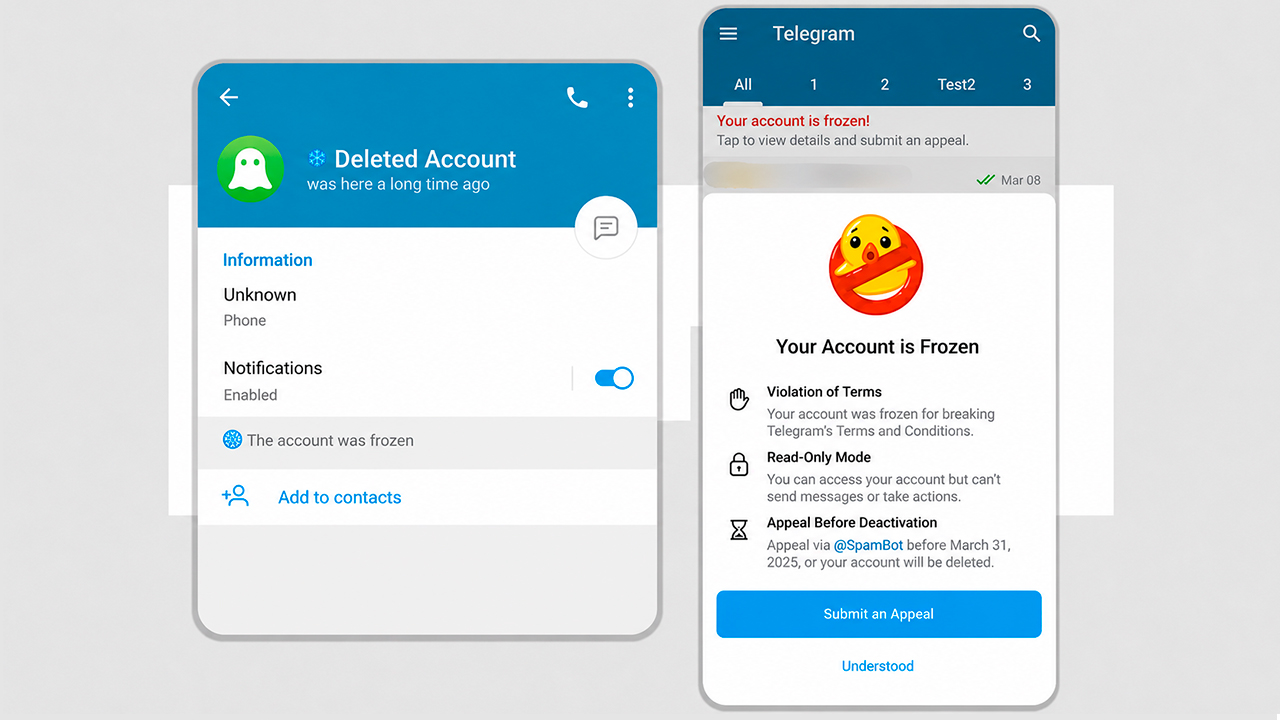
Now a freeze often works as an intermediate option between a regular restriction and a full ban: Telegram does not delete the account immediately, but temporarily blocks its activity and checks whether the profile can be returned to work.
After unfreezing, the account should not be immediately returned to heavy work. Even if access has been restored, it does not mean that the account is ready for mailing, inviting, or other automation.
There is an opinion among Telegram users that accounts sometimes live longer after unfreezing because they have passed an additional check. This is indeed discussed, but there is no proper statistics on it. Therefore, you should not count on “100% immunity” after unfreezing.
It is better to look at practice:
- how the account behaves after recovery.
- whether it withstands light actions.
- whether IP, proxy, VPN, and geo match.
- whether there is a normal history.
- whether the account has gone through warm-up.
- whether it can be gradually returned to work.
If an account is sent back into mailings, inviting, or neuro-commenting immediately after a freeze, it can quickly go back into a freeze. Earlier in one of the reviews, we already discussed how to bypass Telegram account freeze and extend their working lifespan.
How temporary, permanent, geo spam block, spam block for non-mutual contacts, and freeze differ
Restrictions in Telegram may look the same: the account seems alive, but it no longer lets you work normally. The difference is how serious the internal problem is. Temporary spam block can often be waited out, permanent spam block is harder to restore, geo spam block depends on launch conditions, and freeze indicates stronger distrust toward the profile.
| Types of restrictions | What is the difference | What to do with the account |
|---|---|---|
| Temporary spam block | The restriction has a duration. The account temporarily loses some actions: sending messages, mailing, inviting, or working with new users. | It is better not to load the profile and wait for the restriction to be removed. If you continue the same actions, the period may grow or the restriction may become stricter. |
| Permanent spam block | There is no clear removal date. The account may open, read channels, and look alive, but it is no longer suitable for active work. | You can try an appeal, but if the profile has already caught complaints or violations, sometimes it is easier to replace it. |
| Spam block for non-mutual contacts | The account cannot message users first if they are not in mutual contacts or add them to groups and channels. At the same time, some profile functions remain available. | You can continue working in scenarios that do not involve direct interaction with new users: Neurocommenting, Neurochatting, mass reactions, and chat mailings. DM mailings and inviting should not be launched. |
| Geo spam block | The problem is connected not only with actions, but also with the account geo, more often the country of registration, number, IP, proxy, and VPN. | It is important to check whether the profile geo matches the proxy country. If the profile is registered for one country, but logs in through another and immediately starts active actions, this looks unnatural to Telegram. |
| Freeze | This is a stricter account check, not a regular ban on separate actions. | After recovery, you should not immediately return the account to mailings, inviting, or load it with other tools. It is better to let the account rest and launch it carefully later. |
How to check a spam block through SpamBot
If you need a Telegram spam block bot, @SpamBot is usually used in Telegram. It shows whether there is a restriction on the account, whether an appeal is available, and what is approximately happening with the profile.
What to do:
- open @SpamBot.
- start the dialogue.
- check the account status.
- if there is a restriction, check whether an appeal is available.
- after the response, do not launch the account immediately into the same scenario.

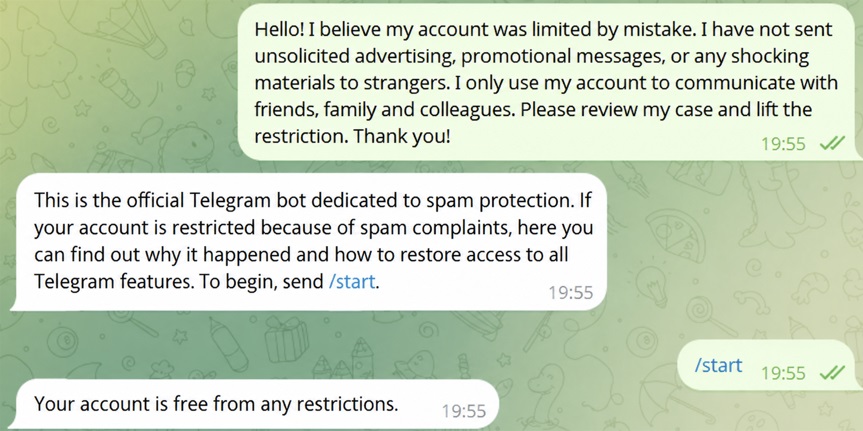
This is what a clean account free from restrictions looks like
The bot’s wording may differ, so it is important to look at the meaning. If a period is specified, you can wait for removal. If an appeal is available, it is better to send a short, calm message. If the restriction is serious, it is already worth evaluating whether it makes sense to restore the account or whether it is easier to replace it.
Text for removing a spam block in Telegram
If SpamBot gives the option to contact support, you can send a short, calm text. There is no need to write aggressively, argue, send 20 messages in a row, or promise something you are not going to follow.
For the query text for removing a spam block in Telegram, you can use this option:
Hello! I believe my account was limited by mistake. I have not sent unsolicited advertising, promotional messages, or any shocking materials to strangers. I only use my account to communicate with friends, family and colleagues. Please review my case and lift the restriction. Thank you!
If the account was used for testing your own Telegram development, bot, or internal tool, you can write this:
Hello! I believe my account was limited by mistake. I was testing my own Telegram tool and did not intend to send spam or disturb other users. Please review my account and lift the restriction if possible. Thank you!
This text does not guarantee removal. It is simply normal in tone: without pressure, without aggression, and without unnecessary fluff. For an appeal, this is better than a long emotional message.
How to remove spam blocks in bulk through GramGPT
If there is one account, it can be checked manually through SpamBot. If there are dozens or hundreds of accounts, the manual approach quickly turns into a loss of valuable time. Recently, a new function for bulk spam block removal and appeal submission was added to the GramGPT.io service.
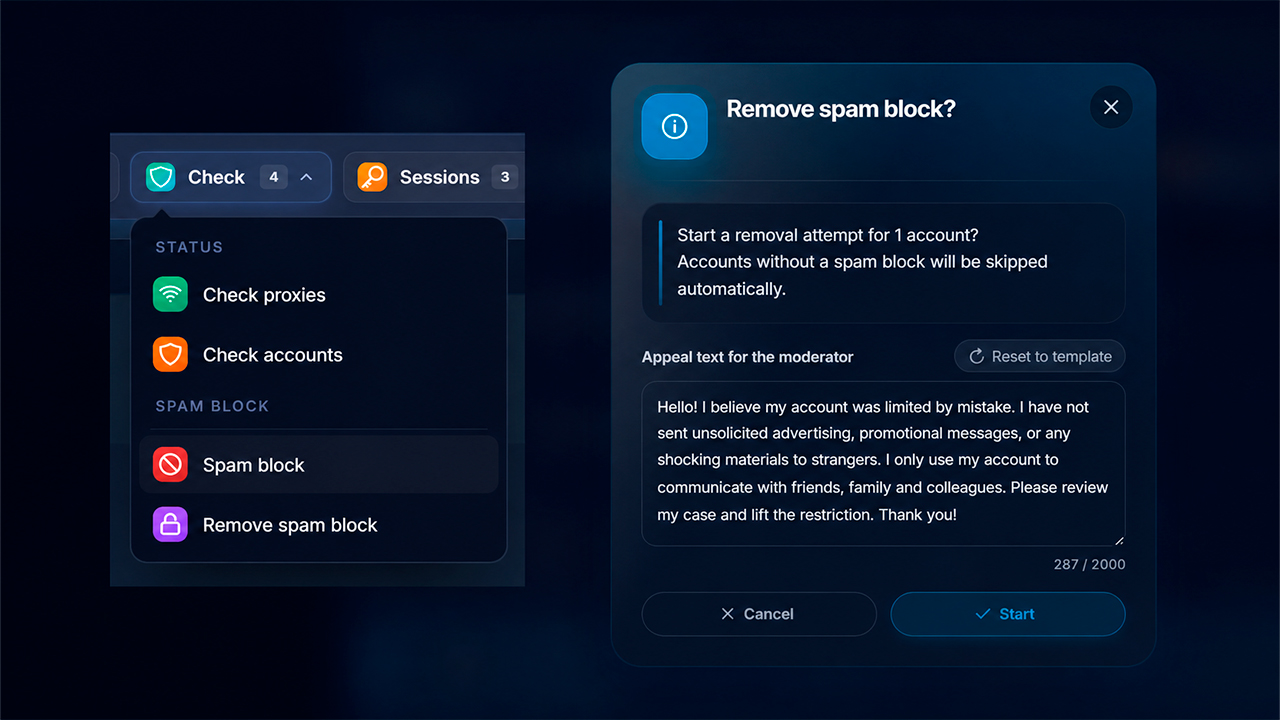
In GramGPT, bulk work is built through the account manager. First, accounts are imported into the personal account through TData or Session + JSON. After that, you can select the needed group of accounts and launch the check.
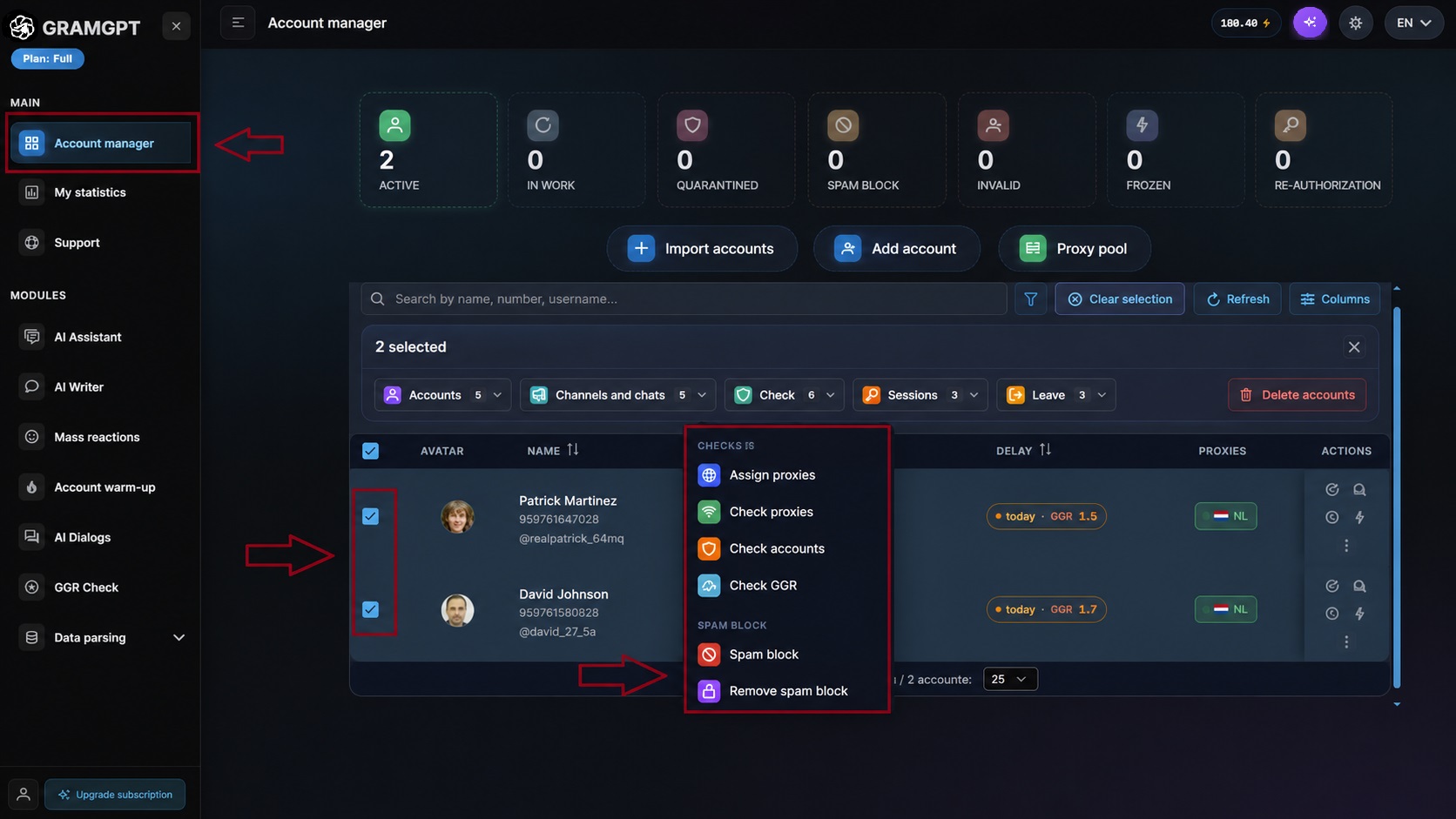
The logic is simple:
- go to the Telegram account manager.
- import accounts through TData or Session + JSON.
- select the needed accounts.
- launch the “spam block” action for bulk checking.
- for restricted accounts, launch “remove spam block”.
- watch statuses and do not return weak accounts to the same scenario without preparation.