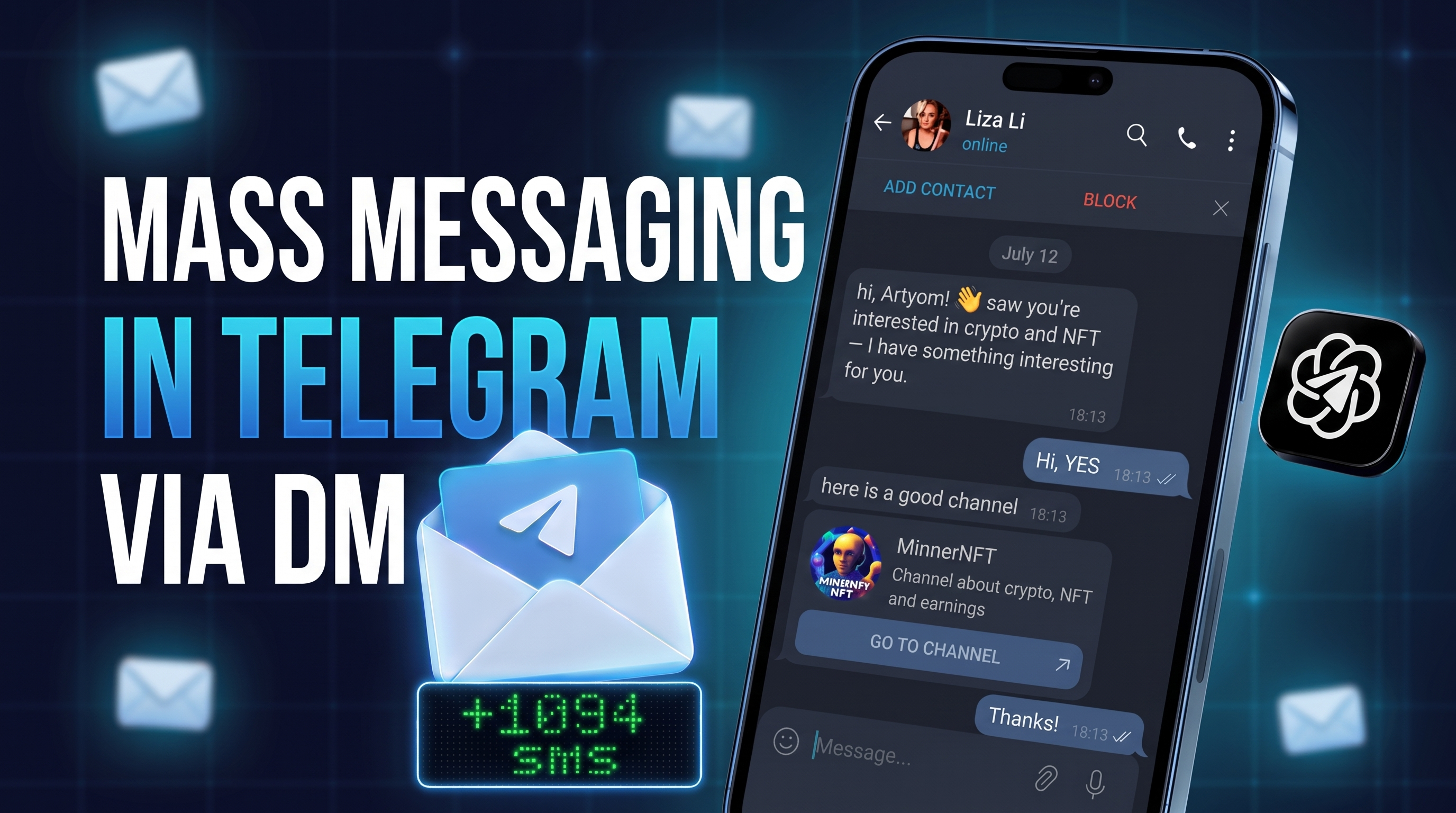
A careless Telegram mass DM rarely pays off. People react sharply to notes from strangers and hit "report", while the messenger quickly cuts off suspicious activity. Identical texts, unprepared profiles and a URL in the opening line all raise the odds of a spam block.
That is why this kind of campaign needs a complete system. Account quality, a precise audience list and a thoughtful conversation flow matter more than raw volume. In other words, the goal is not to fire off as many texts as possible but to guide an interested person toward a single target action.

Below, we walk through the setup in GramGPT.io: preparing profiles, building and filtering a base, limits, delays, randomization, trigger sequences and AI dialogues. We also show how to share links, count clicks and lead someone from a first hello to a real request.
What a Telegram Mass DM Is
A Telegram mass DM is outreach through private chats with users already tied to your topic. We take prepared senders, collect and clean a user list, then send a short opener. Its job is not to sell but to start a natural conversation.
People describe it in many ways: a DM campaign, bulk direct messaging or even a Telegram spammer. However, the idea is the same: you write to specific users instead of posting in public chats.
For the base, we pick active users from niche channels, groups and comment threads. Bots, deleted and blocked users are removed, so your texts reach those who might actually care.
After a response, the talk continues through a chain, auto-answers, an offer, a button or a URL. Results depend on three things:
- profile preparation and warm-up;
- the quality of your audience list;
- a logical path from the opener to the offer.
Types of Messaging
Messaging comes in several forms, and the type decides who gets it. Moreover, each has its own tools and rules.
| Type | Who gets the message | When it fits |
|---|---|---|
| Direct messages | Specific people in their DMs | Finding clients, channel invites, outreach |
| Group broadcast | Every member of a group | Ads in niche and local groups |
| Bot broadcast | Only people who started the bot | Working with your own bot subscribers |
| Channel post | Your channel subscribers | News and offers for your audience |
From here on we focus on direct outreach: how to write so recipients reply and accounts stay safe.
How a Telegram Mass DM Works
If you are wondering how to send direct messages at scale, remember: this is not blasting a single text to a ready list. Instead, you build a funnel. First, prepare the senders and collect the right audience, then send a short topical opener and continue only based on the person's reaction.
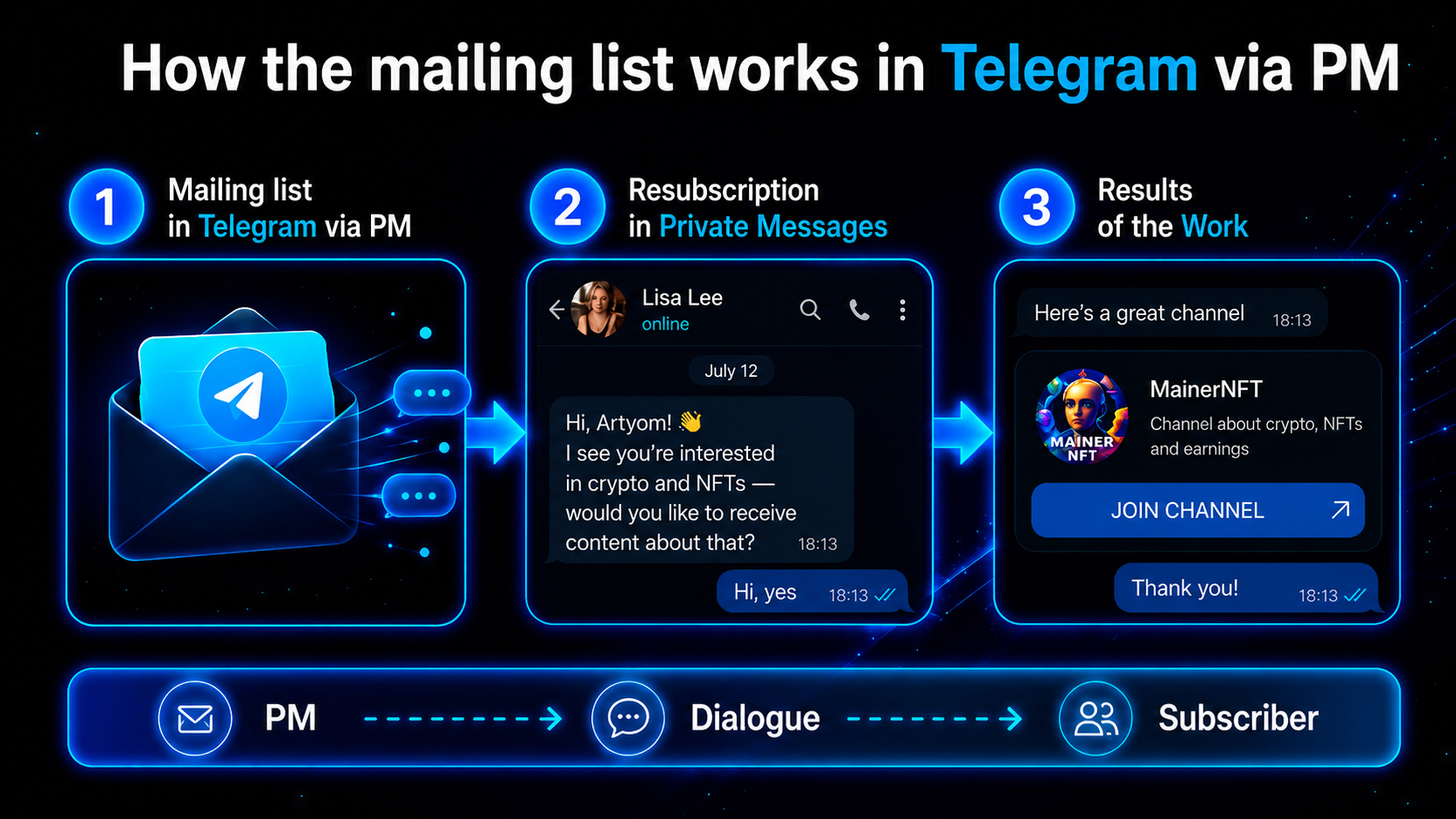
The opener must spark interest, and the reply tells you which path to take next. After that, a ready chain, a trigger message, auto-answers, a button or a URL take over.
The Telegram Mass DM Flow Step by Step
The working process looks like this:
- Import and check the senders.
- Let them rest after connecting proxies.
- Run a warm-up with ordinary activity.
- Collect and filter the target list.
- Set daily limits and delays.
- Write a varied opener or chain.
- Configure what happens after a response.
- Add a smart dialogue, a button or a URL if needed.
- Track responses, clicks and results.
As a result, you get a managed funnel rather than a stream of texts. Accounts start topical chats, handle responses and move interested users toward a subscription, a request or a click. Next, we cover each stage in detail.
Accounts or a Bot?
Many users look for a bot to send a mass message. However, a Telegram bot cannot write to someone first: it only replies to users who started it. So a bot works for broadcasting to your own audience that already pressed "Start".
| Method | Who you can write to | Volume | Risks | Best for |
|---|---|---|---|---|
| Manual sending | Any user with a username | Dozens of contacts a day | Repetitive copy from one profile soon leads to a block | One-off personal offers |
| A bot | Only those who started it | Its whole audience | Cannot reach a cold base | News and promos for your own subscribers |
| Account-based software | A filtered audience from chats and comments | 20–30 openers per account per day | Needs preparation, warm-up and limits | Large-scale cold outreach |
For a cold Telegram mass DM, you need software that runs on user profiles. That is exactly how the outreach module in GramGPT.io works: every profile contacts users from your base with pauses and limits.
Why DM Campaigns Fail
The platform watches private chats much more closely than activity in groups or comments. An profile can chat in a group for months, but first-time notes to many strangers are a far more sensitive signal.
The same mistakes keep repeating:
- using cold profiles right after purchase or an IP change;
- sending too much per day;
- minimal pauses between new chats;
- a single template for everyone;
- including a URL in the very first note;
- a base that still contains bots, deleted and inactive profiles;
- trying to reach thousands of contacts with a couple of profiles and no limits.
So bulk direct messaging is not a magic "reach everyone" switch. It is precise one-to-one communication, where profile safety beats speed.
If an profile already has a restriction, stop sending: repeated violations lead to a longer spam block or a ban. Before launch, make sure you use a Telegram profile without a spam block. Learn how to check the status and restore access in our guide “How to remove a spam block”.
Outreach Software: Setting Up GramGPT.io
To get started, we use the GramGPT.io combine. In the panel, you import profiles in tdata or session+json format, check their status and rating, open the outreach module, build a list, set restrictions, configure sequences and connect smart auto-answers. A short summary of the module is in our DM sender overview.
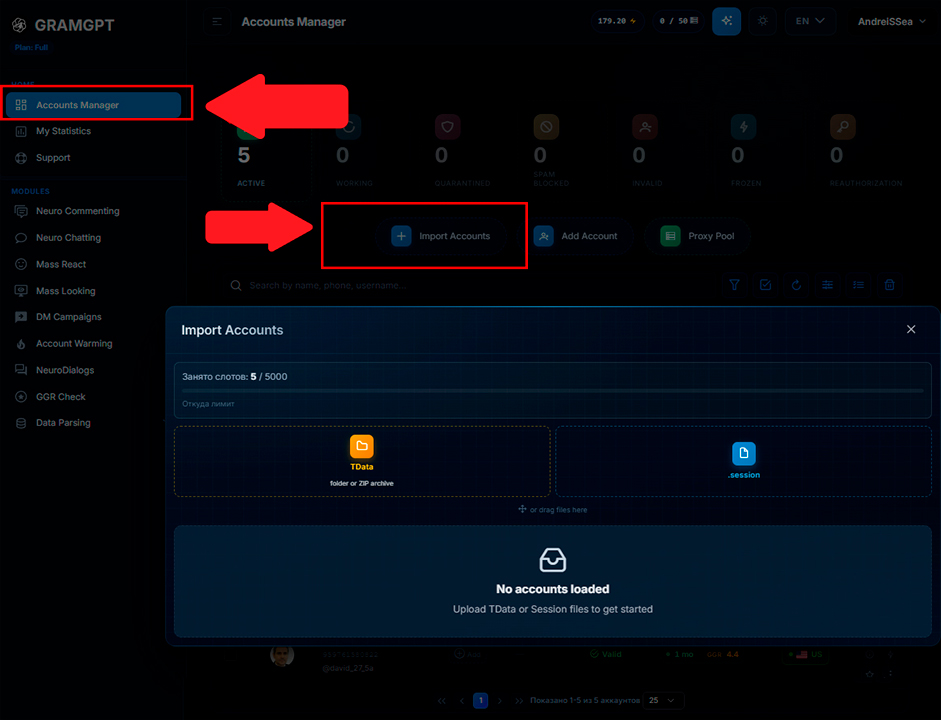
Here, automation is not about sending for its own sake. What matters is control over every risky setting: recipients, delays, hourly and daily caps, text variety, triggers and actions after a response.
1. Preparing Accounts for a Telegram Mass DM
After import, check the country, registration age and score in GramGPT Rating. It shows how resilient a profile is and which modules suit it. Not every account is ready for private outreach, so check this before launch.
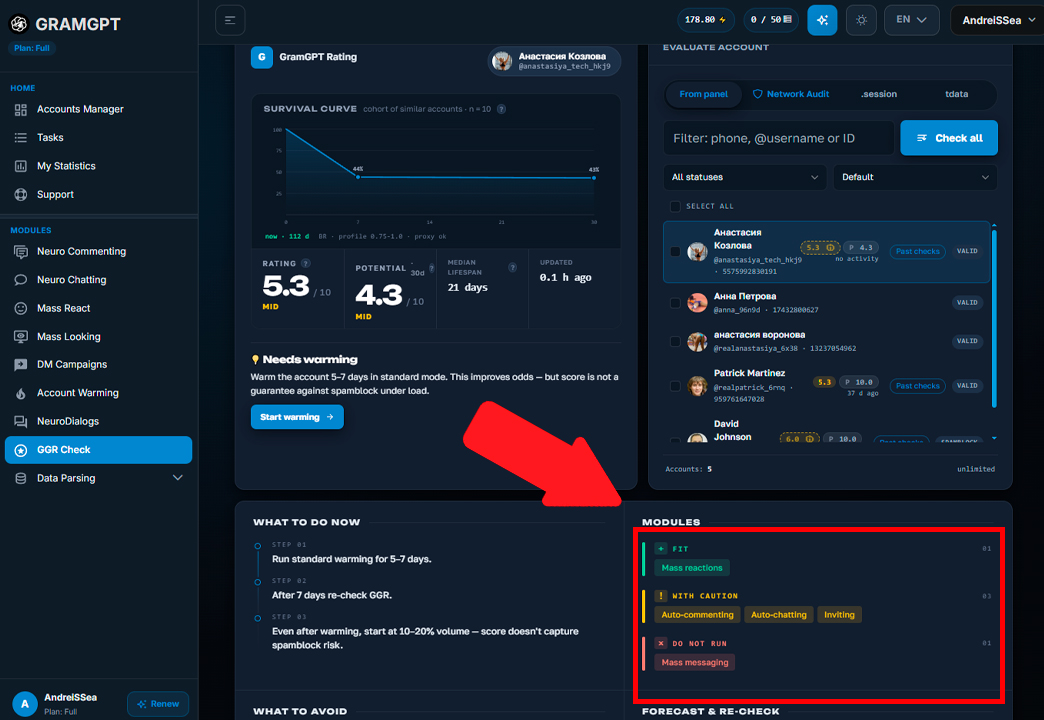
After linking a new proxy, do not start right away. Let the account rest for at least 24 hours. Otherwise, the platform sees a sudden IP change followed by a burst of new chats, and that pattern often ends in restrictions.
Also, after buying an account, we recommend protecting the account from hacking by going through every security step.
Then start the warm-up. For several days, give them 1–2 hours of natural activity: reading channels, reacting and chatting with each other. We covered account warming in a separate guide.
2. Building a Base for a Telegram Mass DM
You can add targets by hand or collect them with a parser.
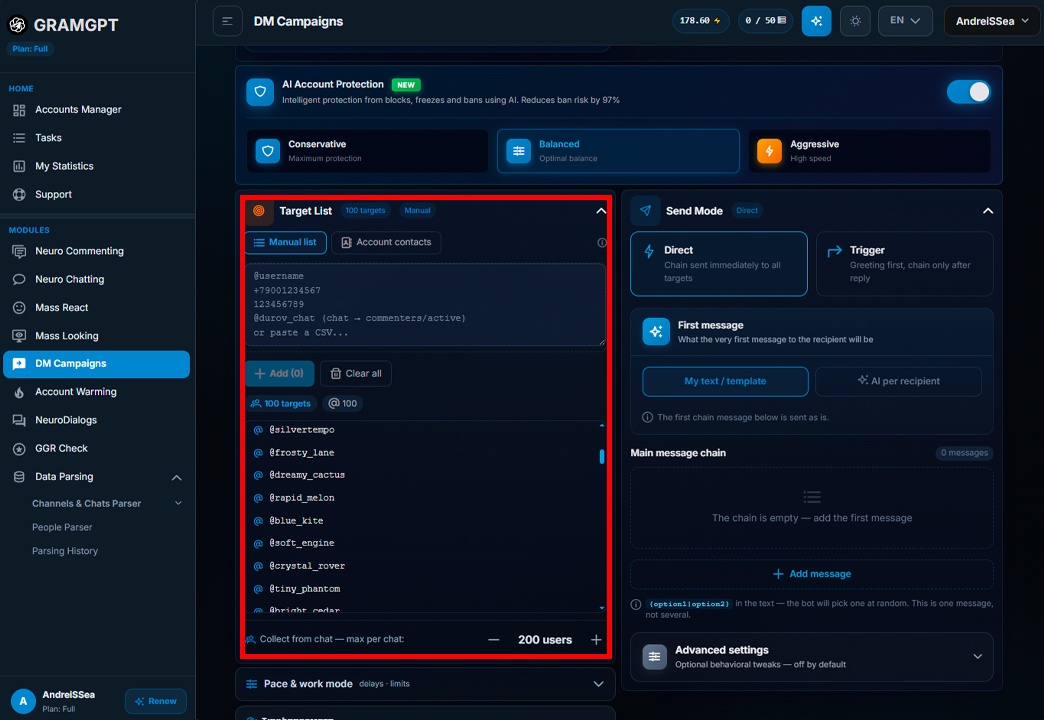
A practical approach looks like this. First, parse thematic channels or chats, then pull the commenters and load them into the user parser.
For example, for a crypto audience, take people who commented in crypto channels. Still, you cannot load everyone: the base has to be filtered.
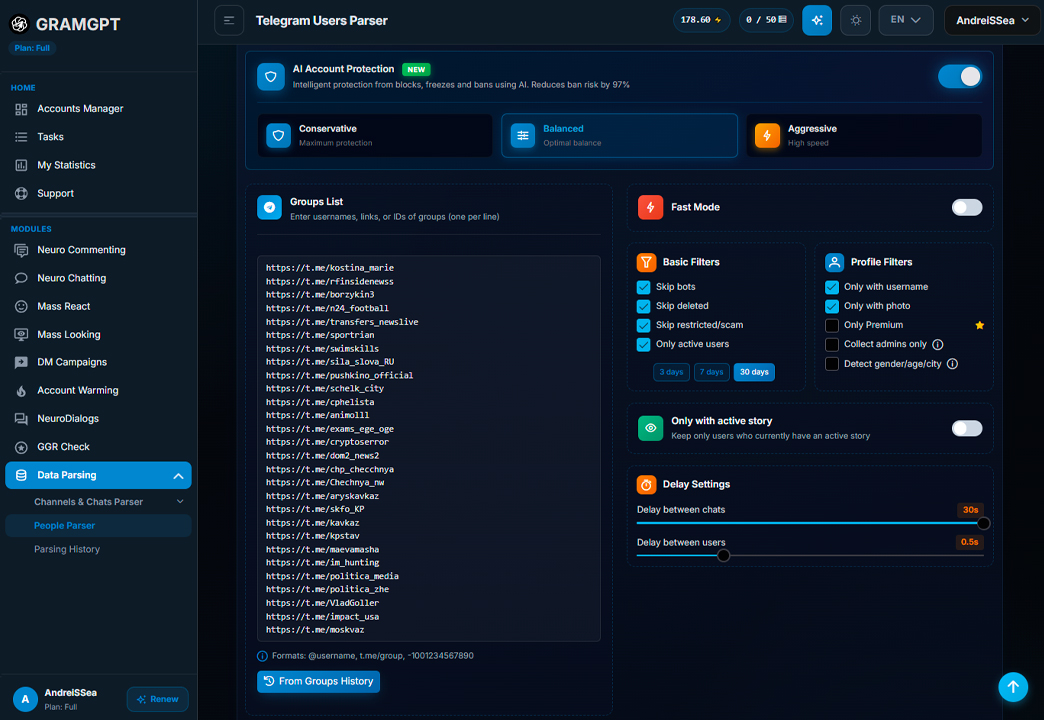
Turn on these filters:
- skip bots;
- drop deleted profiles;
- remove blocked and spam profiles;
- keep only active users;
- keep only profiles with a username;
- optionally require a photo or Telegram Premium;
- collect admins separately if your offer targets them.
The more precise the base, the higher the chance of a response and the fewer wasted contacts. Your campaign should reach real people linked to the chosen topic.
3. Telegram Mass DM Limits
Message limits are calculated for each account separately. The official benchmark is about 40 new contacts per day for a single profile. That is a ceiling, though, not a safe working mode.
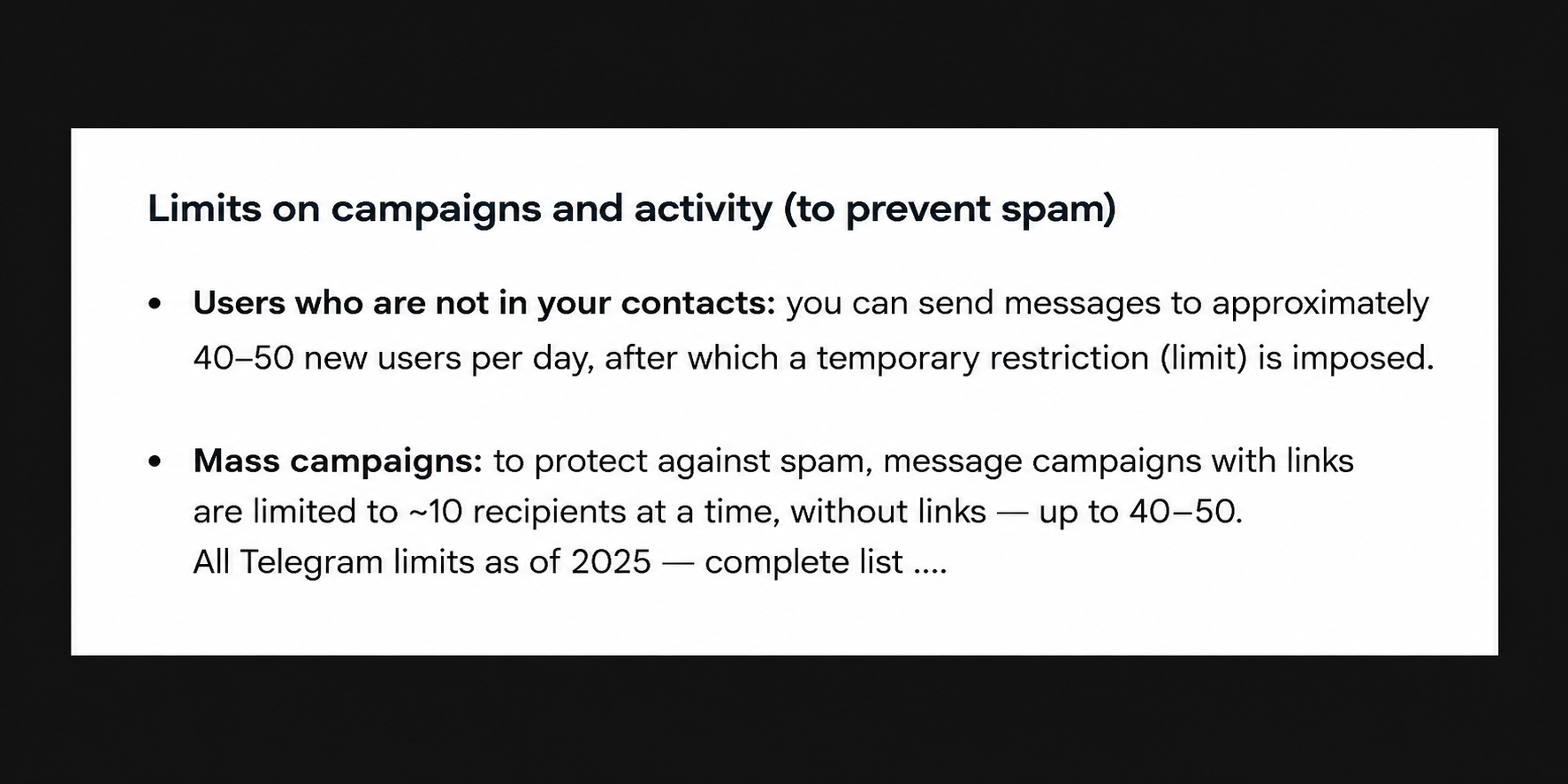
We recommend keeping a buffer: 20 to 30 openers per day per account. For example, two accounts physically cannot work through 200 people in a day with sensible limits.
Therefore, always plan the number of targets from the number of prepared accounts and the daily cap. That way, you never create a task that cannot be finished.
4. Delays
The pause between new recipients directly affects stability. Thirty seconds is often too aggressive for private chats. A safer range is 100 to 300 seconds between targets.

Test the exact value against your accounts' history. Strong senders handle a faster pace, but chasing speed usually costs more than steady work.
Separately, you set the pause inside a single chain. A short interval of 5–10 seconds works, but it should still feel natural for the conversation.
5. Operating Mode
There are two modes: by number of sends or by time. Choose whichever suits the task. Either way, we stick to strict safety caps.

Safety Limits
Besides the total, it helps to set internal caps. For example:
- no more than 5 openers per hour from one account;
- no more than 25 per day.

A cap of 25 is roughly 65% of the nominal maximum of 40. This buffer keeps you away from the edge. In short, outreach should be controlled and safe rather than as fast as possible.
Direct Telegram Mass DM
In direct mode, you start with a template or a chain. Besides text, you can add a photo, video, GIF, sticker, voice note, file or an inline post with buttons.
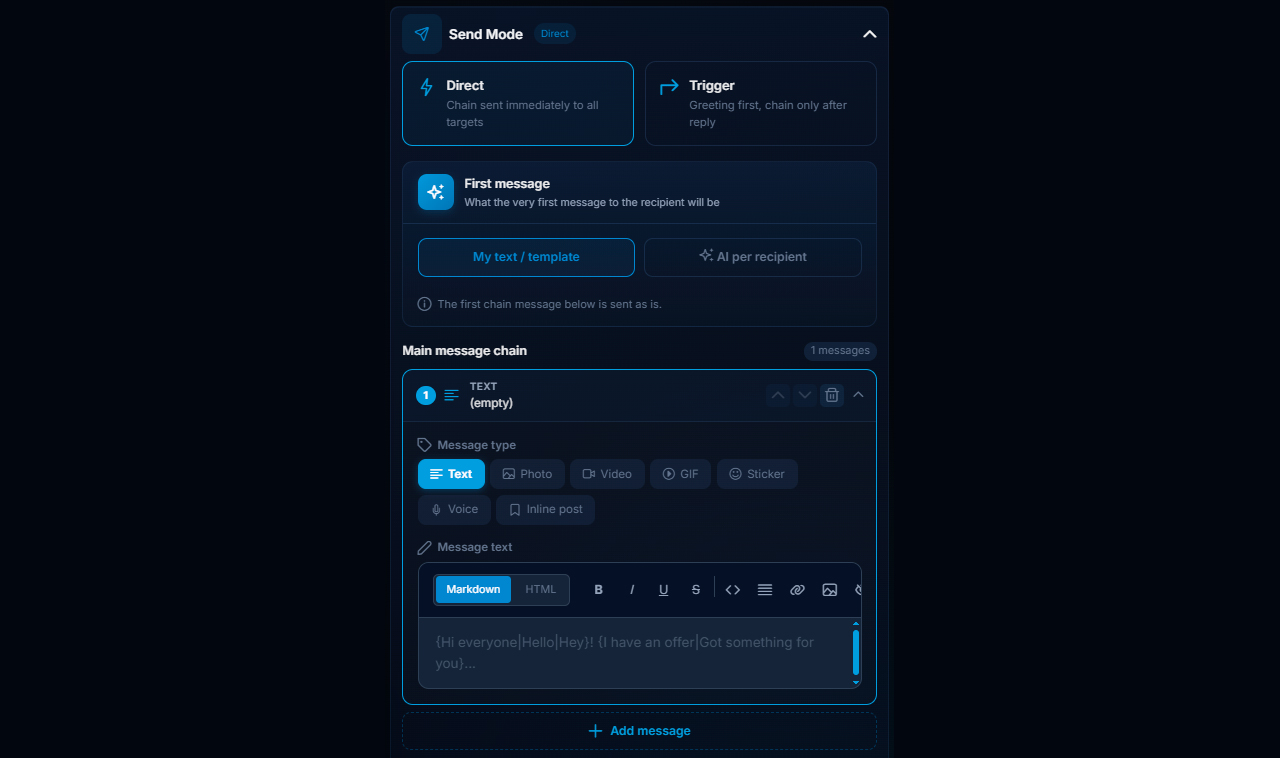
First, write a short opener. Its goal is to open a dialogue, not to pitch. For instance, ask a topical question, clarify context or mention the person's activity in a niche chat.
Before launch, use the preview. It shows how the template looks to the recipient and helps you check the sequence structure.
Randomizing a Telegram Mass DM
Randomization is essential once you run many dialogues. The same text sent to dozens of people quickly turns weak and risky.
A template can include the recipient's name and phrase options. For example, instead of a lone greeting, set several: "Hi", "Good afternoon", "Hey, quick question". Add options for the next part too: "do you know?", "could you help?", "got a minute?".
The format is "{first_name|hi|Hey, quick question}! {1|2|3}", where 1 is the user's name, 2 is the second line after the name, and 3 is the third.
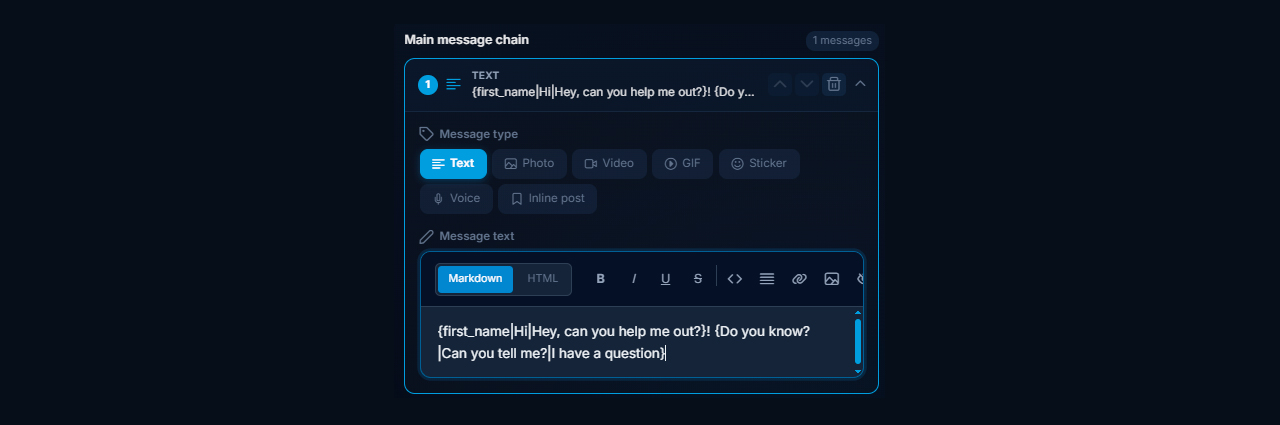
The system picks options at random, so combinations differ. Vary the whole structure, not a single word: the greeting, the reason to reach out, the question and the topic.
Building Chains
A chain can have two, three, five or more notes. The first goes out at once, then a pause passes, and the next one follows.
Each element should vary as well. If you need complex logic with many wordings, describe it to ChatGPT and ask for a ready set of constructions.
Sample request for ChatGPT:
{first_name|hi|how are you}! {1|2|3} — create a randomized message using this construction with an invitation to join a channel on the topic “Topic or Niche.”
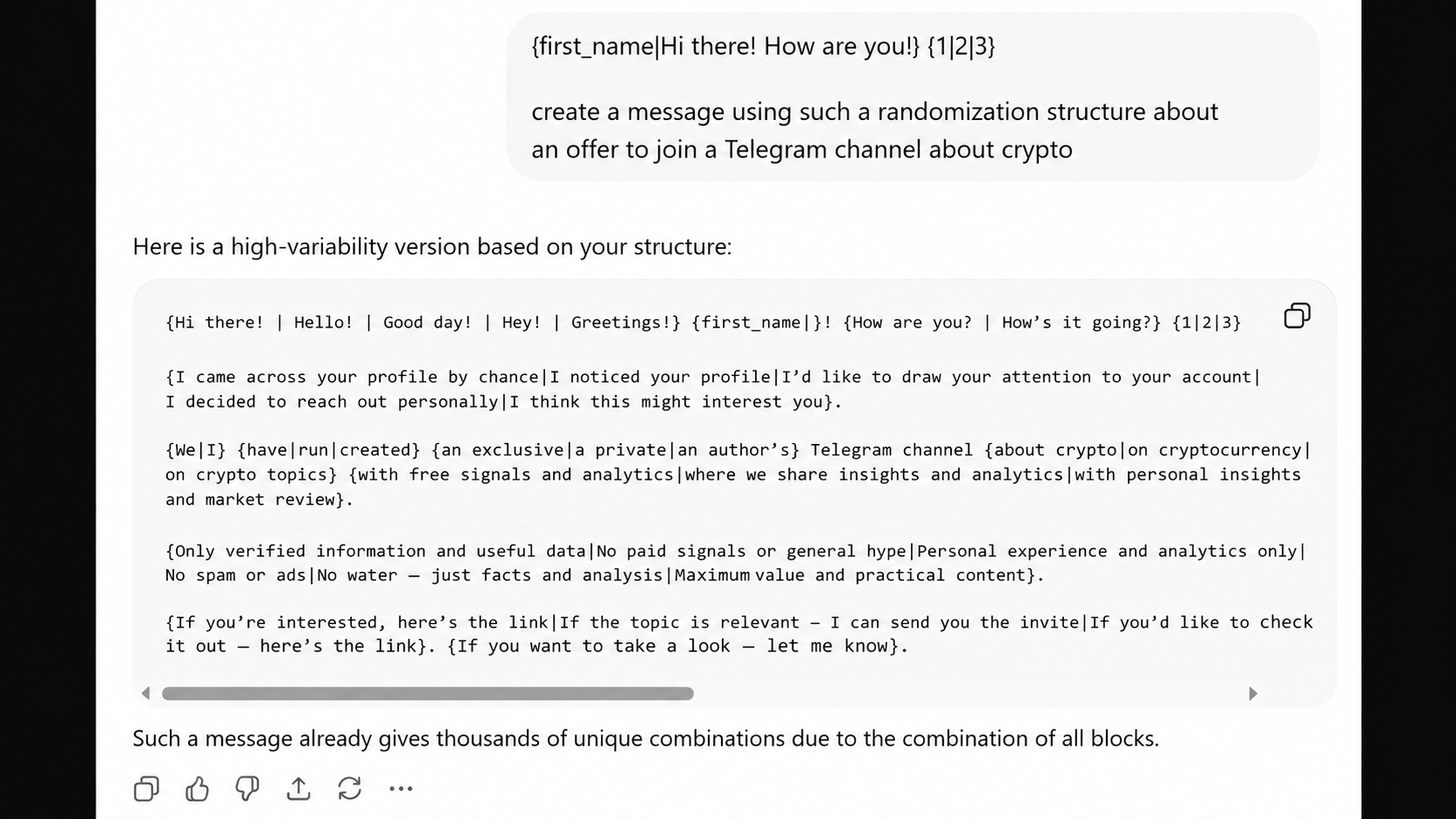
Still, a chain is not an excuse to be pushy. It unfolds an idea after someone shows interest rather than flooding them with identical lines.
Direct Mode Demo
In the test, the initial chain reaches one recipient, and after the set pause the second element arrives. Add a second sender, and work runs in parallel.
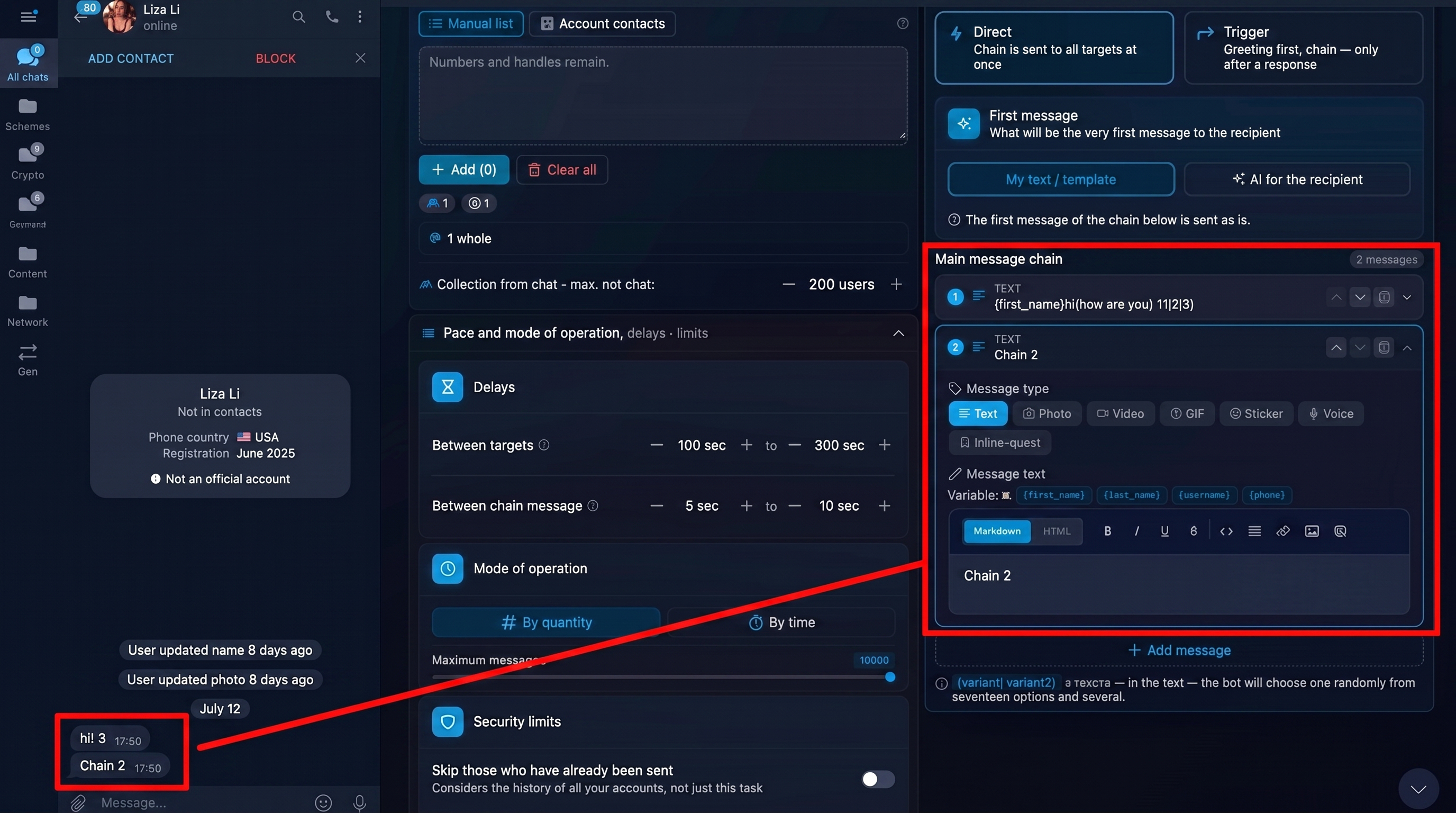
Moreover, special settings simulate typing and send notes one after another.

If a username was already contacted in an earlier campaign, the repeat send can be skipped. This protects you from duplicates.

AI-Written Openers
You can let AI write the opener for each recipient. In the prompt field, specify the topic, context and format. The more precise the task, the better the result.
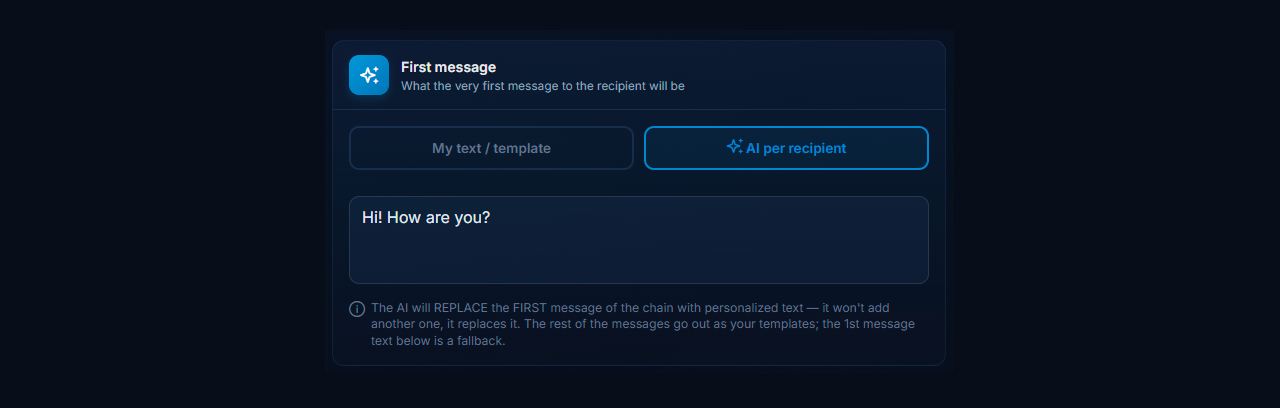
Instead of a generic "How are you?", give concrete context: "Saw you in the crypto chat, can I ask a couple of questions?" or "Are you into AI?". If the base comes from crypto communities, lock in crypto; for an artificial intelligence audience, lock in that theme. Then the note matches the base and does not look random.
AI Generation Demo
Unlike a template, the model writes different openers. One version mentions the crypto chat, another asks how the person got into the topic or requests a quick tip.
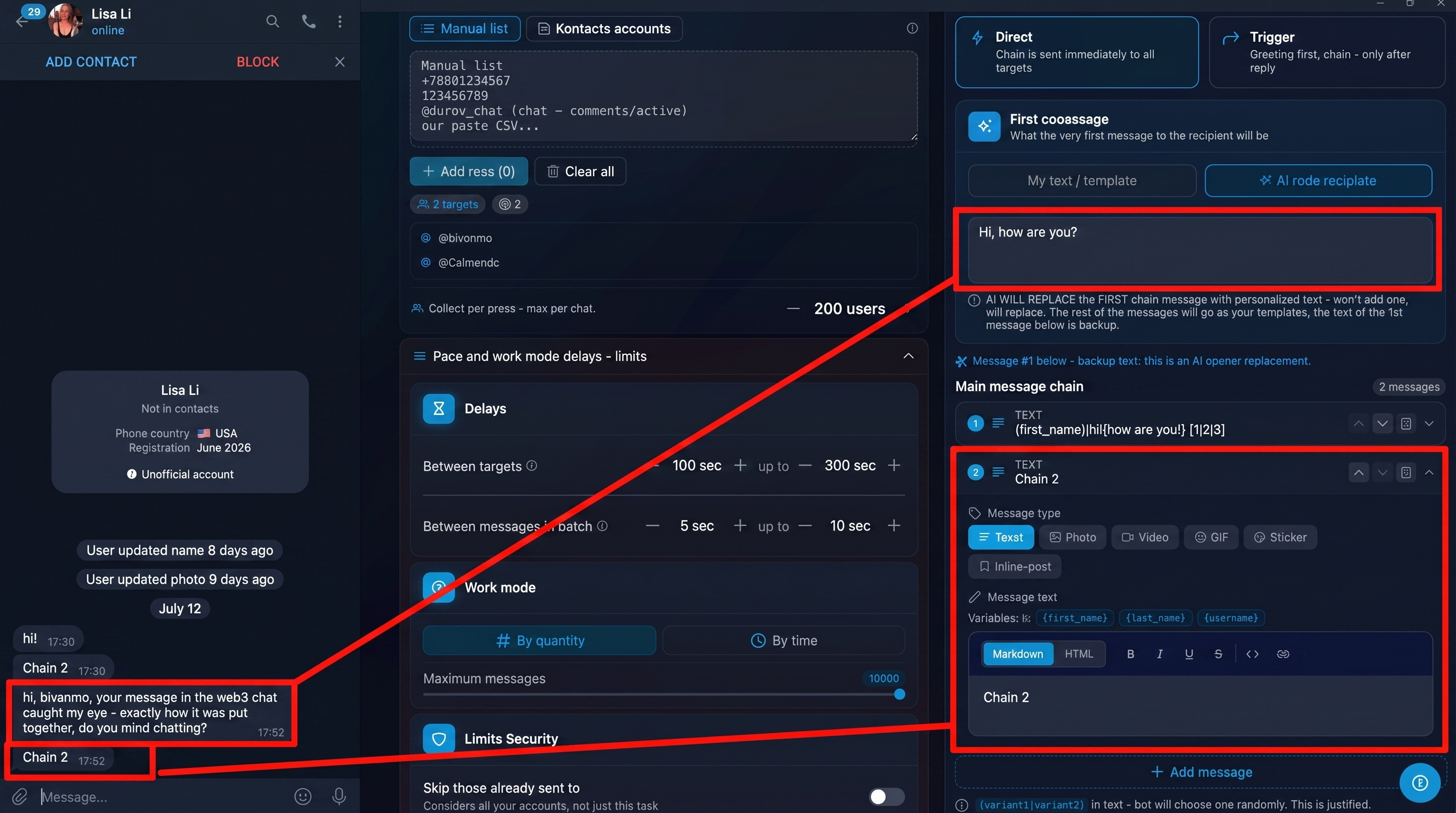
The difference lies in context. A vague prompt drifts into random topics. So state it plainly: which audience, why you are writing, what you ask and what answer you expect.
Trigger Mode for a Telegram Mass DM
When you need follow-up after a reply, trigger mode fires the next step only once the person answers. In the settings, write the opener, choose the action after a reply and put the offer in a second chain. Also set a waiting window, for example up to 60 minutes. Late replies follow separate rules for queued messages.
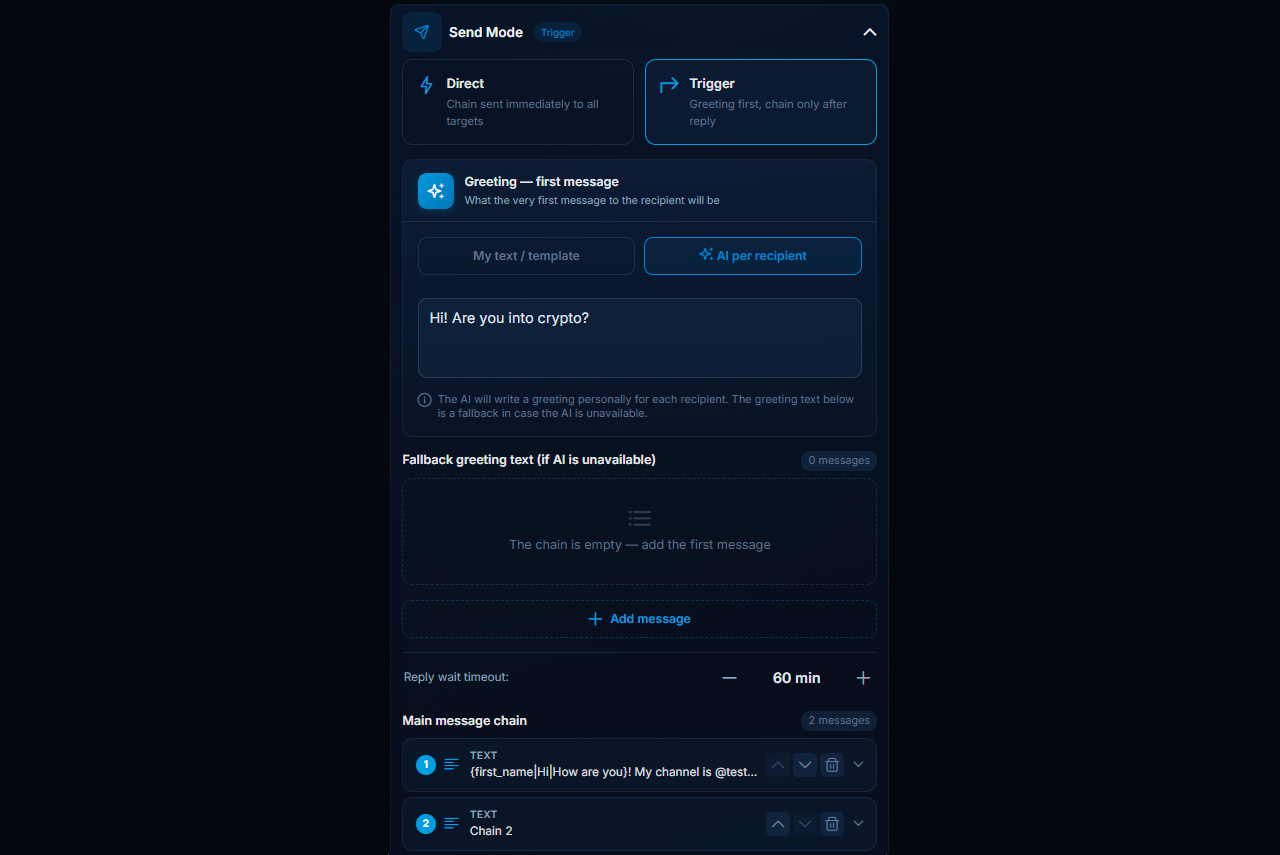
Follow-up can continue to the second, third, fifth or tenth note. After the initial reply, the system either follows the sequence or hands the dialogue to smart auto-answers.

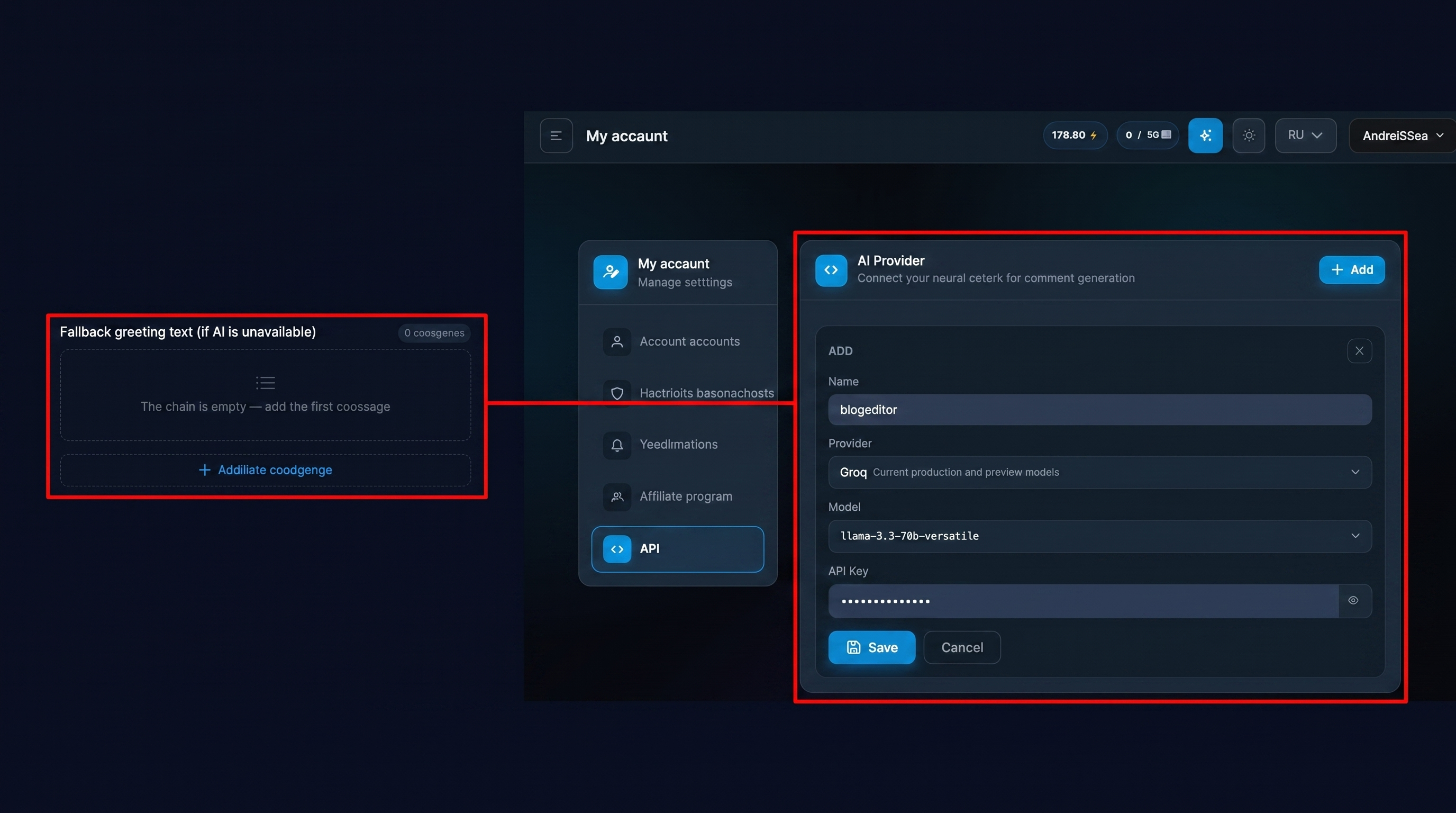
It is also worth adding fallback text for AI generation. It kicks in if your AI provider runs out of tokens mid-campaign.
Trigger Mode Demo
The logic is simple. First comes a question about crypto. The recipient says they are happy to help. Only then does the offer arrive.
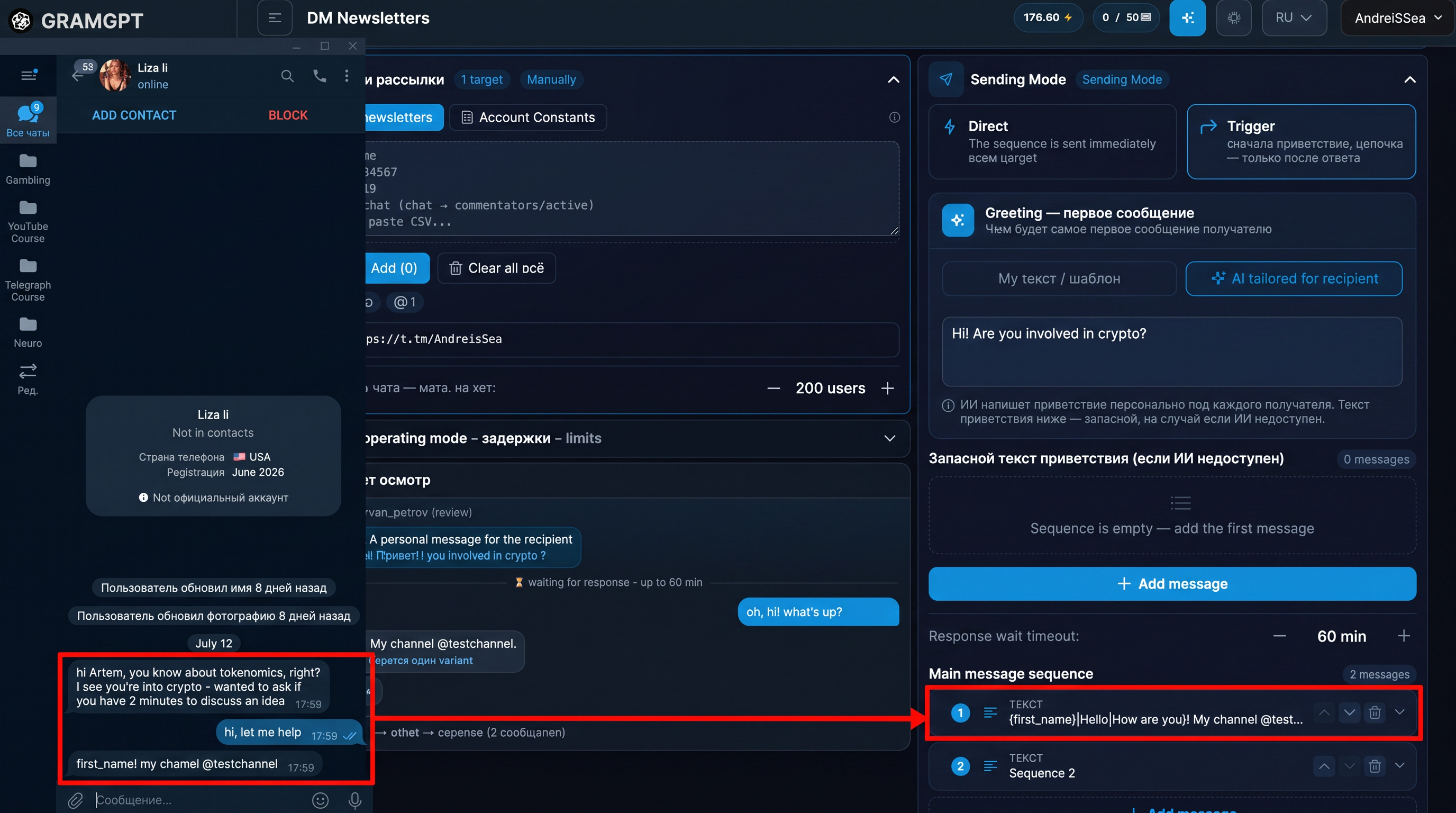
The opener exists to get a reply. If it does not invite an answer, no chain will work. That is why it needs a clear topical reason, not ad copy.
Sending Links and Buttons
Never put a URL in the initial note. It is one of the most common reasons accounts get into trouble, and the contact looks like obvious spam.
Use two steps:
- Draw the person into a simple topical chat.
- After a reply, send the offer with a link or button.
Once someone replies, the platform treats the exchange as more natural, because the person has agreed to talk. So the whole campaign is built around getting that reply, not an instant click.
The Non-Clickable Link Problem
A link in the second note may show up as plain text in Telegram Desktop, even though it works on phones. That hurts conversion, because many people will not copy an address by hand.
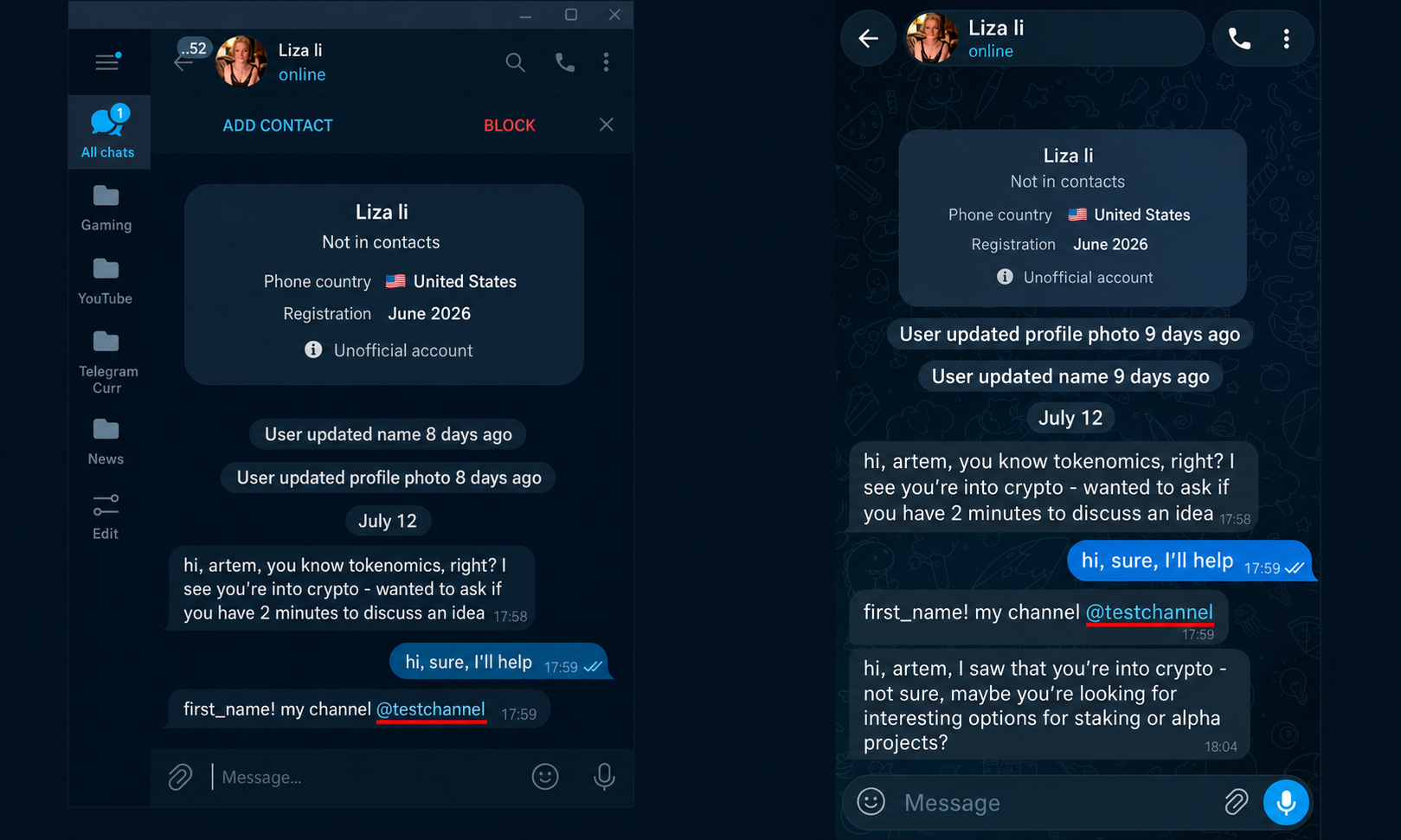
One workaround is a second note like: "I started a crypto community, mind taking a look? Link in my profile." The person then opens the profile, where the link or a pinned channel is waiting.
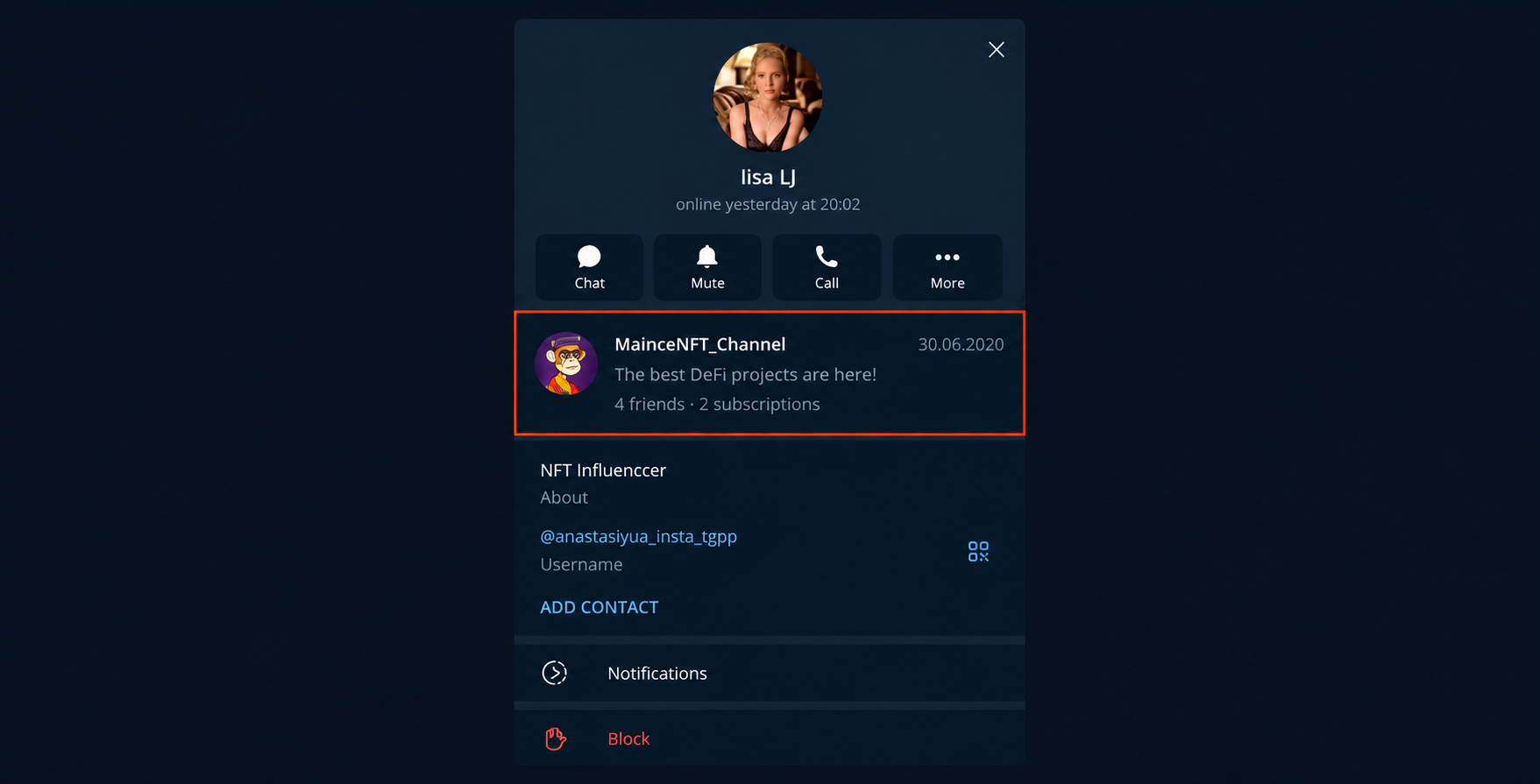
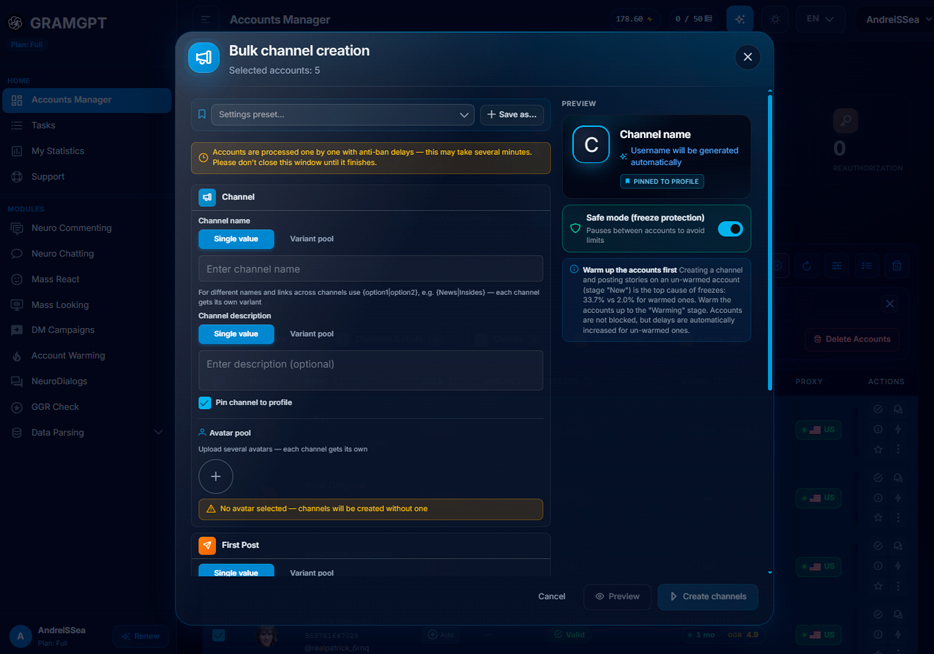
Set up profiles in advance: add a bio, a redirect link and a pinned channel. With several accounts, the account manager handles this in bulk.
Yes, the path gets longer. But it is easier for the person than copying a dead link, searching for the channel and joining it.
A Link Inside a Button
For a link that is always clickable, use an inline post with a button. In the editor, write the text, add a CTA and point it to a channel, site or other URL.
The template gets an ID. Later, paste the ID and all fields fill in automatically.
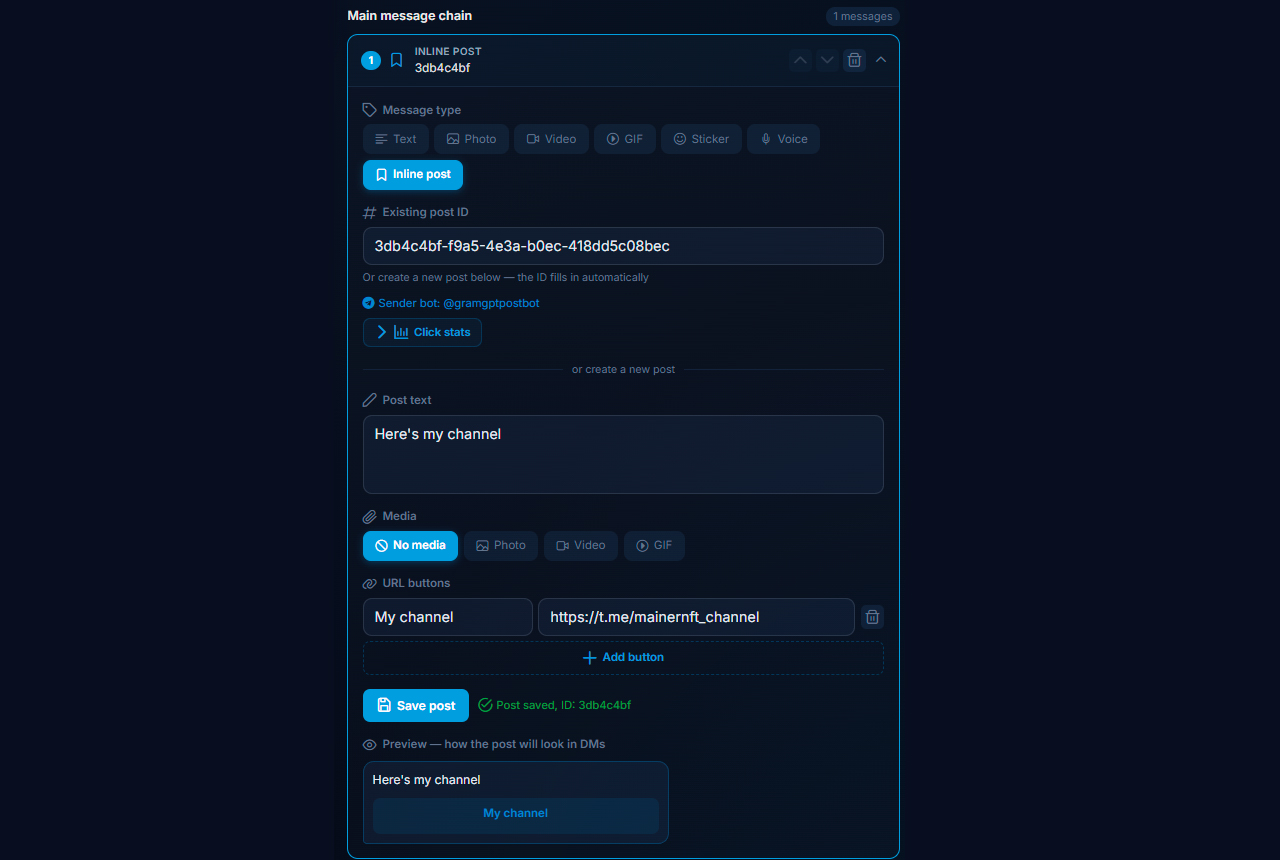
The button stays in the chat even if the sending account is later deleted or blocked. That makes it sturdier than a plain address.
Button Demo
Everything starts with a standard opener. After a reply, a second note arrives with an inline button leading to the channel or another resource.
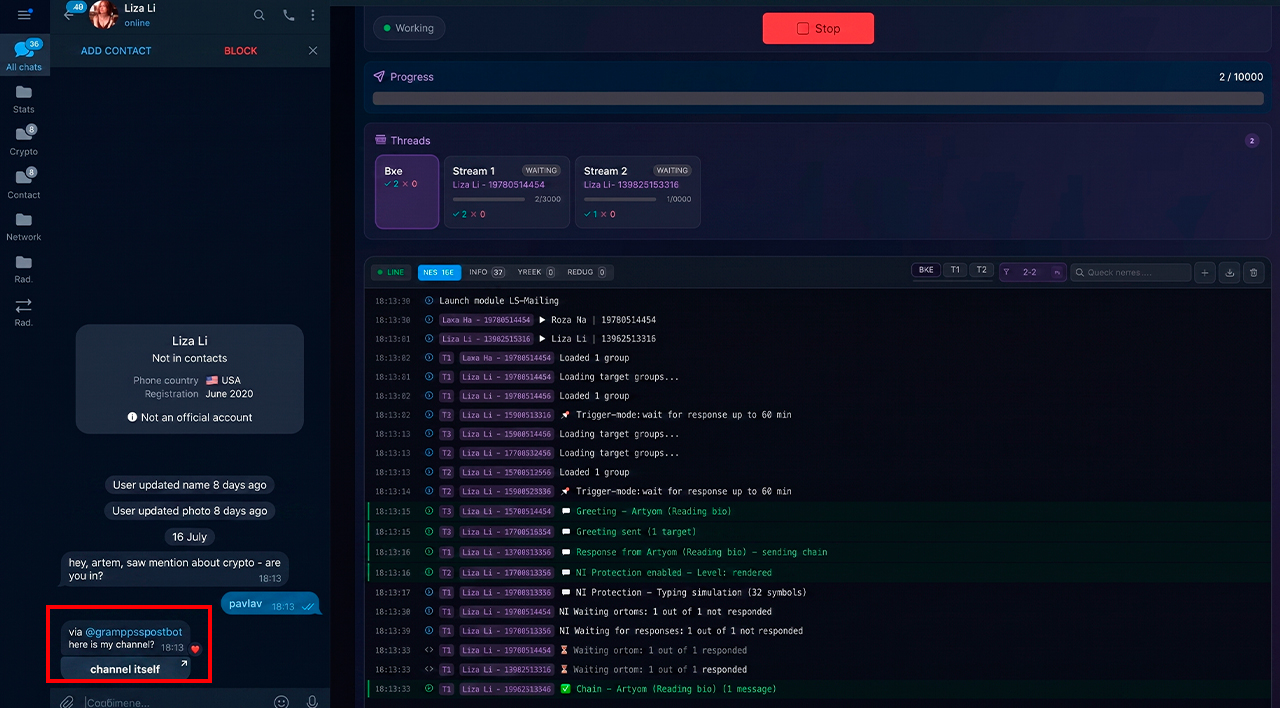
This solves the clickability issue and shortens the path to the target action. The person simply taps it.
Click Tracking
You can enable statistics here. Then the link goes through a redirect that records the click, its time and the source.
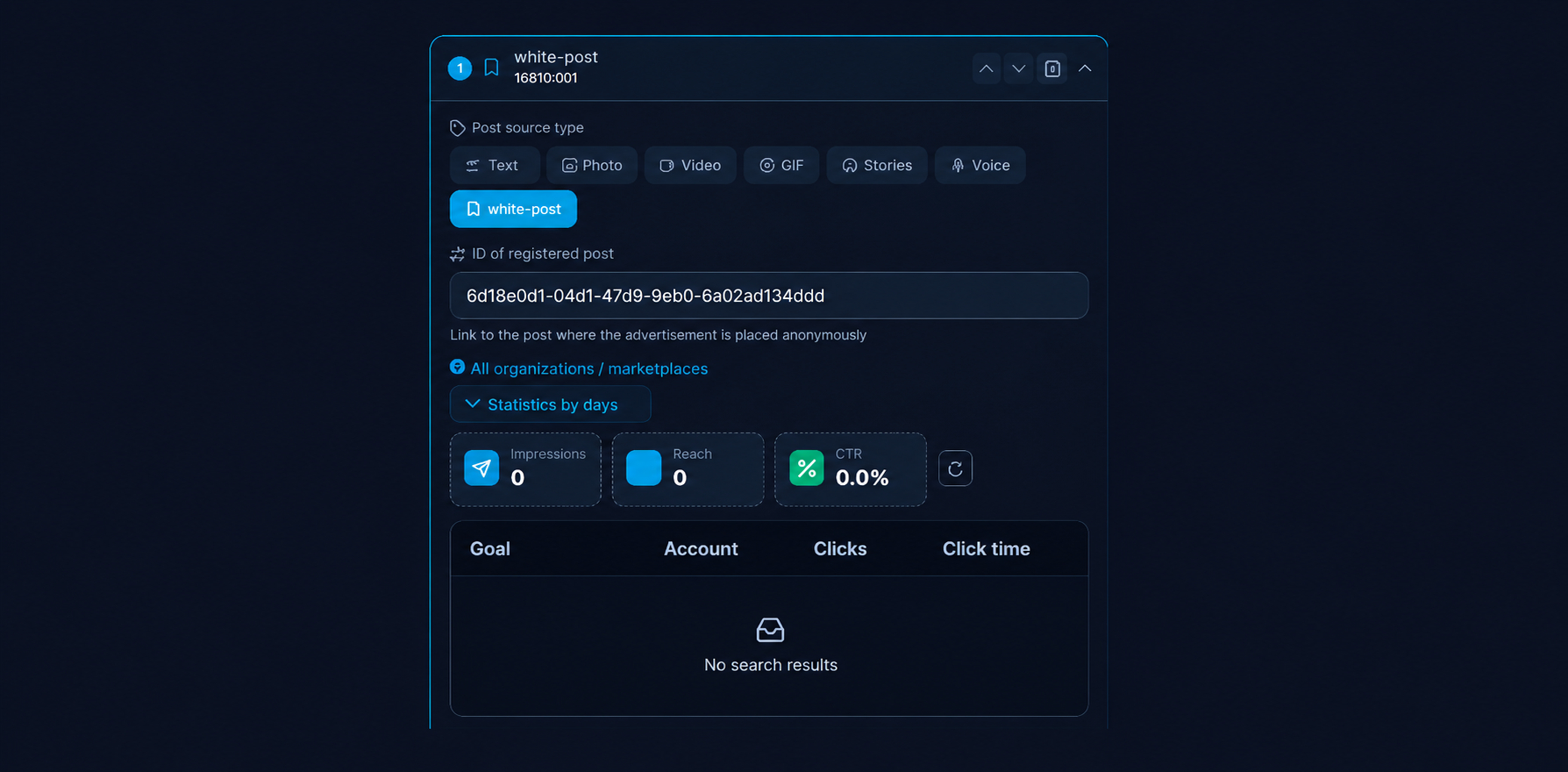
If you do not need analytics, turn tracking off, and the button leads straight to the channel or site. It depends on whether you want to measure specific chains and senders.
What to Send: Text, Voice or Video Note
The opener decides whether someone replies or scrolls past. In a telegram mass DM, three formats are common, and they all fit into one sequence: the module has Text, Voice, Video note, Inline post and other types.
A Short Text With a Hook
If you write text, keep it as short and catchy as possible, with one clear action. After all, they should be able to answer in a second. For example:
Hi! I put together 5 setups that bring crypto traffic right now. Want them?
Then a "yes" opens the dialog, and the offer arrives with the second message. It does not look like an ad, so people reply more often.
A Voice Message
Voice messages are the most common choice in direct mode. A real voice for 20–30 seconds sounds personal rather than templated, and people answer it more readily. Besides, voice is added to the chain as a separate message type.
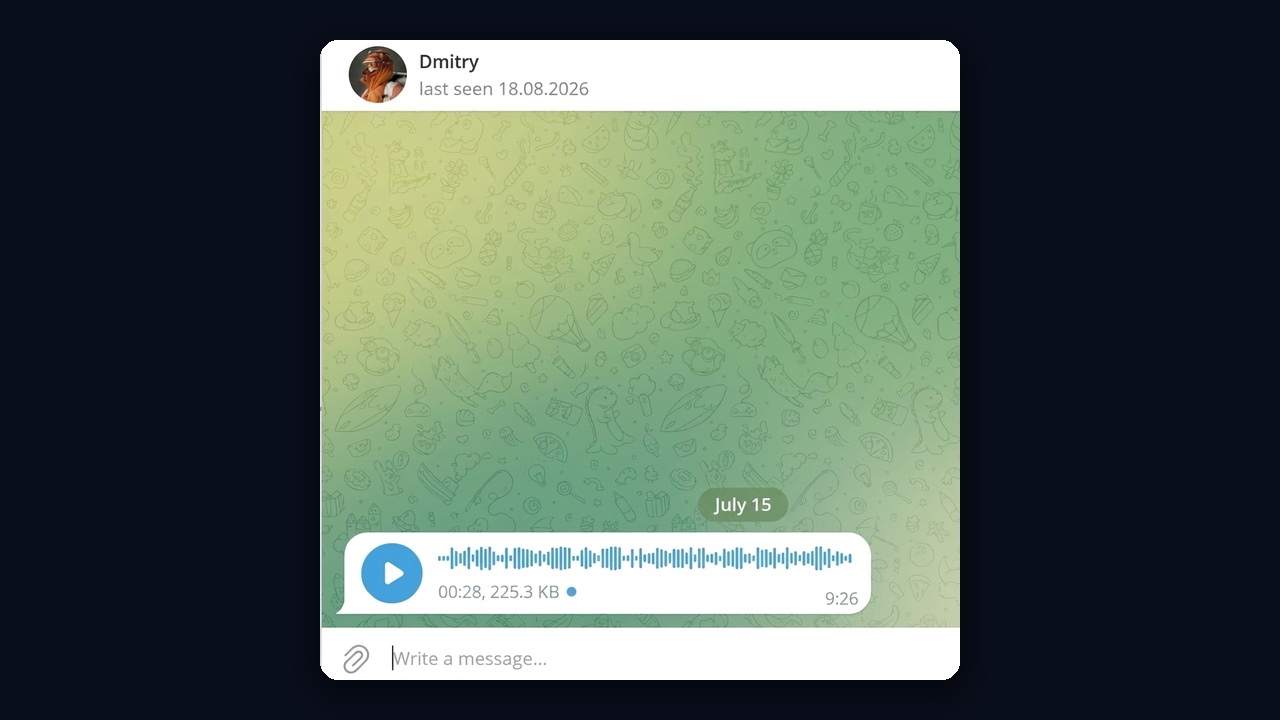
After the voice note, add a text with the offer: they hear a real human, then get a concrete next step.
A Video Note With a Link via Post ID
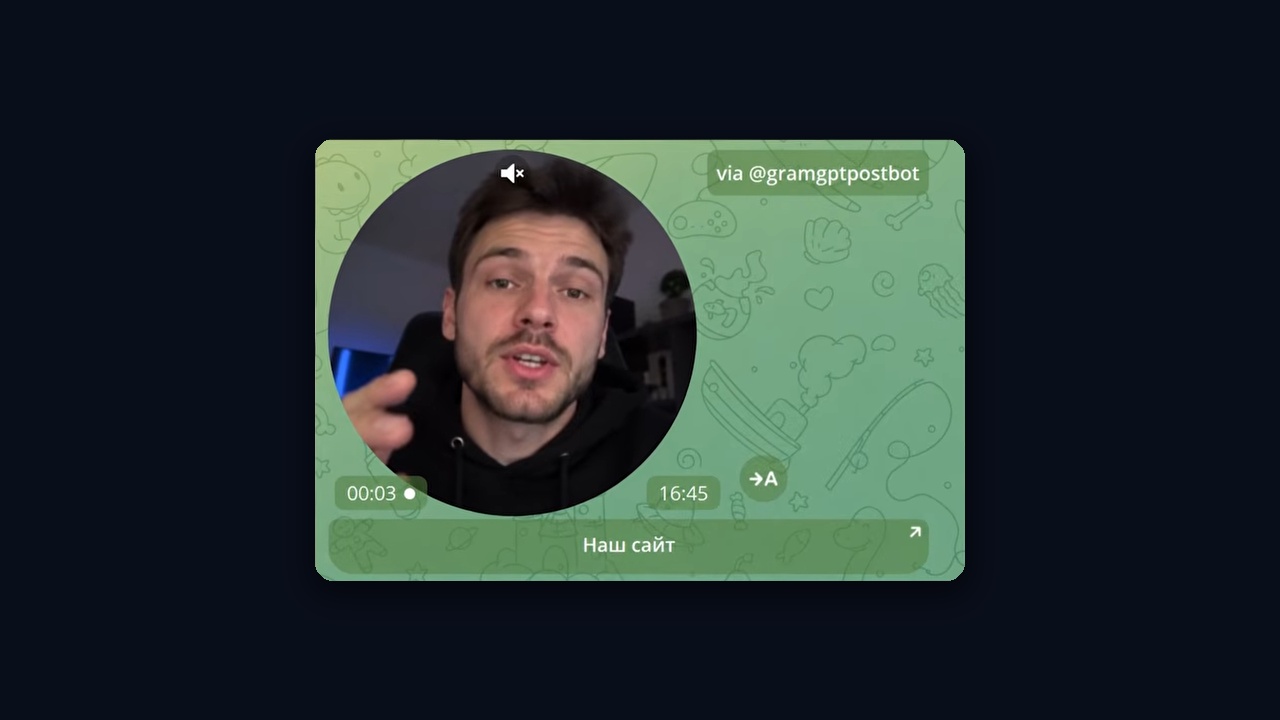
The second popular format is a video note that leads to your resource. It is sent through @gramgptpostbot: pick the Inline post type, the Our bot tab, and paste the existing post ID. Alternatively, create a new post below, and the ID fills in automatically. Finally, Show preview by ID displays what the recipient will see.
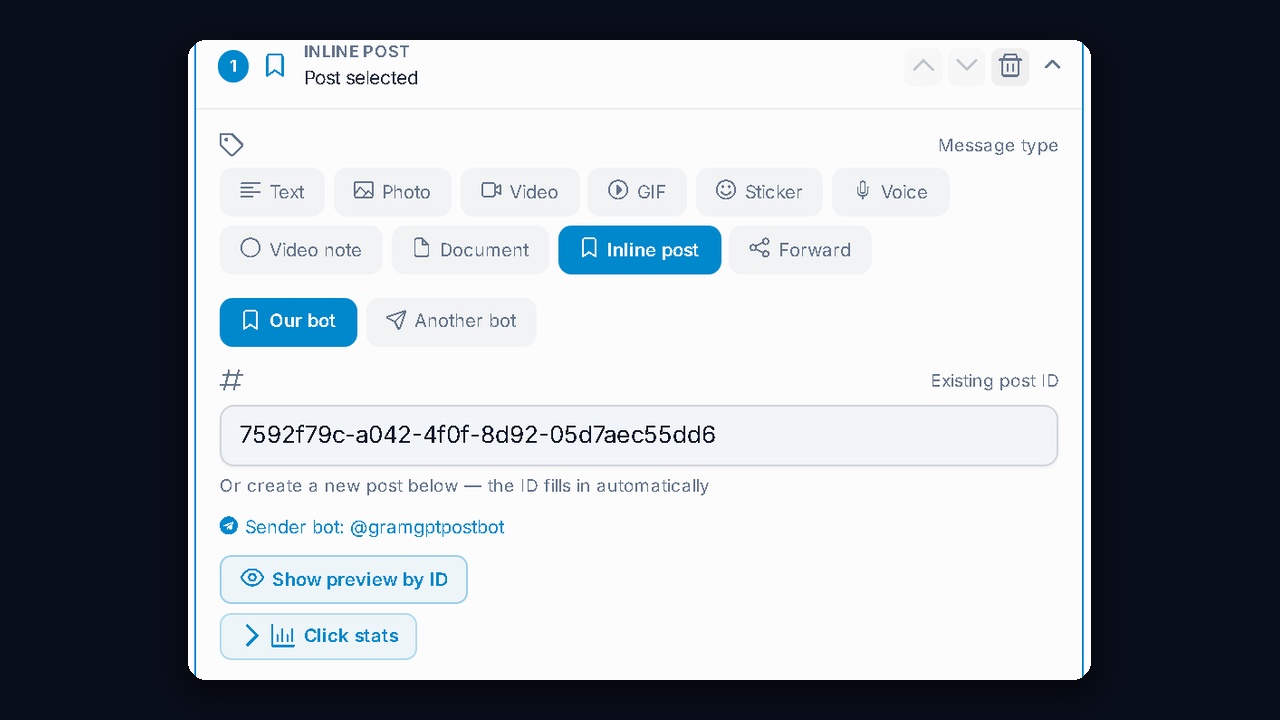
The recipient sees the video note marked "via @gramgptpostbot" with a tap target below it. Video catches the eye better than text, and this solves the non-clickable link problem.
How to Measure a Telegram Mass DM: Clicks and CTR
The simplest metric is clicks. Under the inline post step there is a Click stats toggle: it shows how many messages were sent, how many people clicked and the CTR. Below is a table for each target: who sent it, how many clicks it got and when.
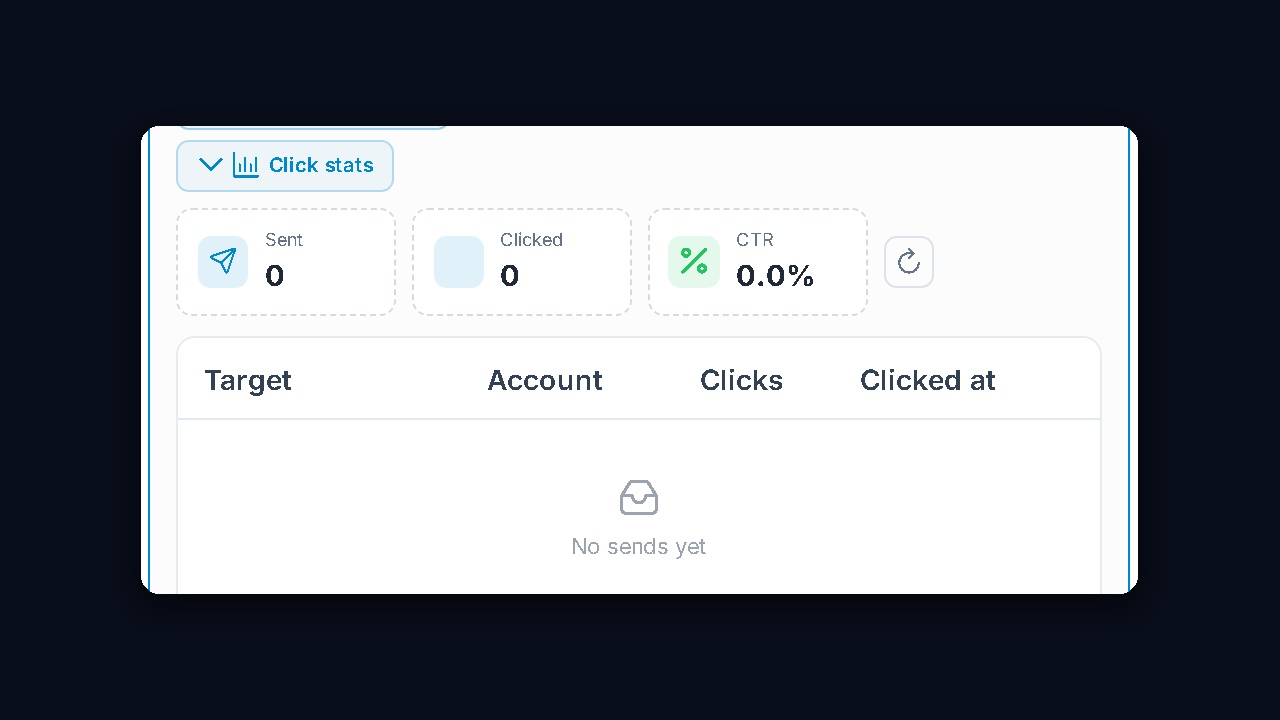
Therefore, compare the CTR of different texts, voice notes, video notes and senders, and keep the setups where it is higher. That way a telegram mass DM improves on numbers, not guesswork.
Example Result: 114 Requests in Two Weeks
From our practice: in two weeks, the «Схемный трафик» feed received 114 join requests. The header still shows 1 subscriber because the requests are not approved.
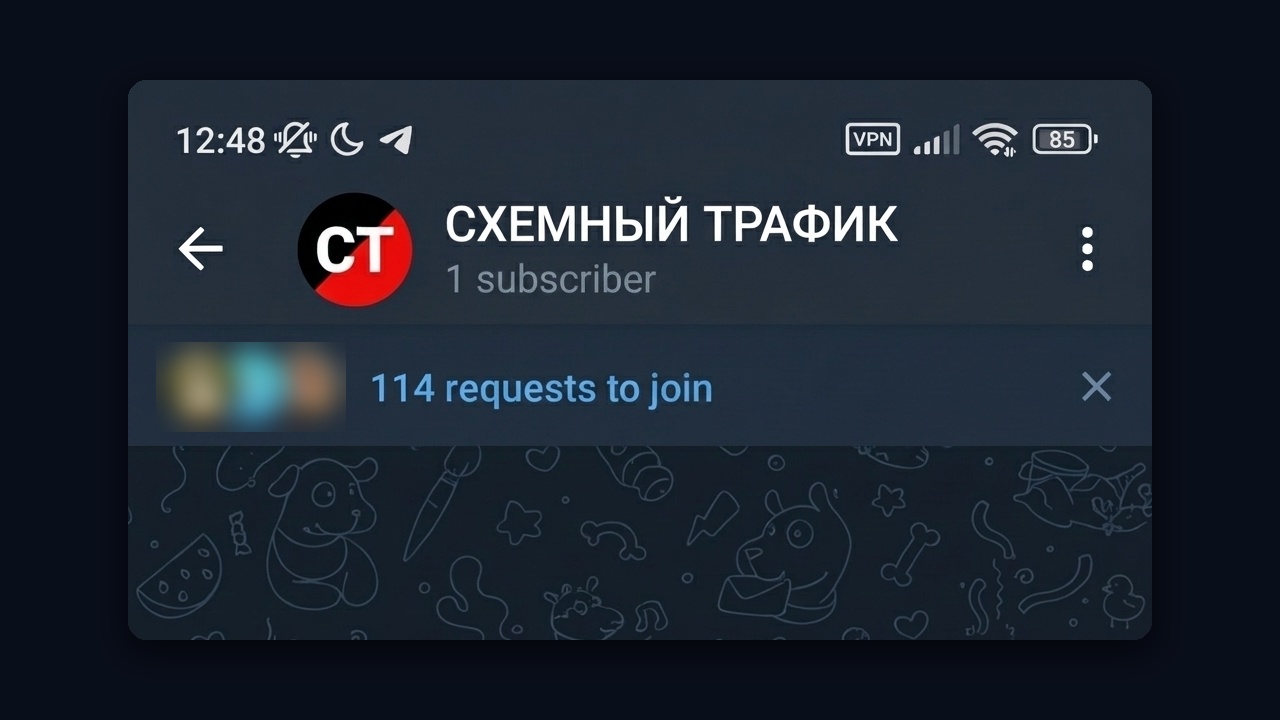
So the opener itself brought these people.
NeuroDialogues for Replies
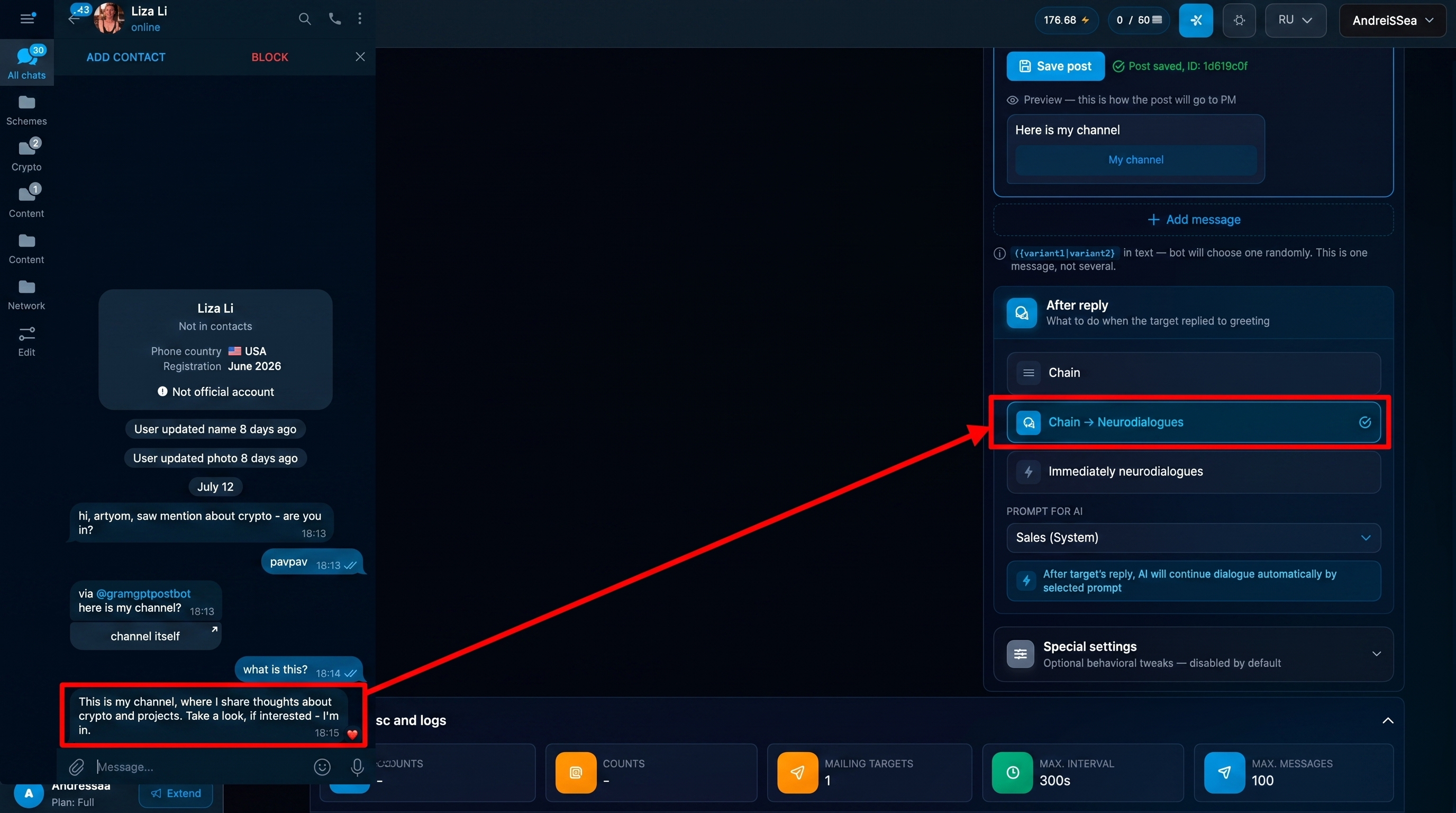
NeuroDialogues help when, after a reply, you need a meaningful conversation instead of a canned text. In the AI autoresponder module, write a prompt: what to talk about, how to answer questions and which tone to keep.
You can also script logic by reply number. For example, explain in the initial answer, reveal the offer in the second and share a link in the fifth. Extra rules steer the conversation more precisely.
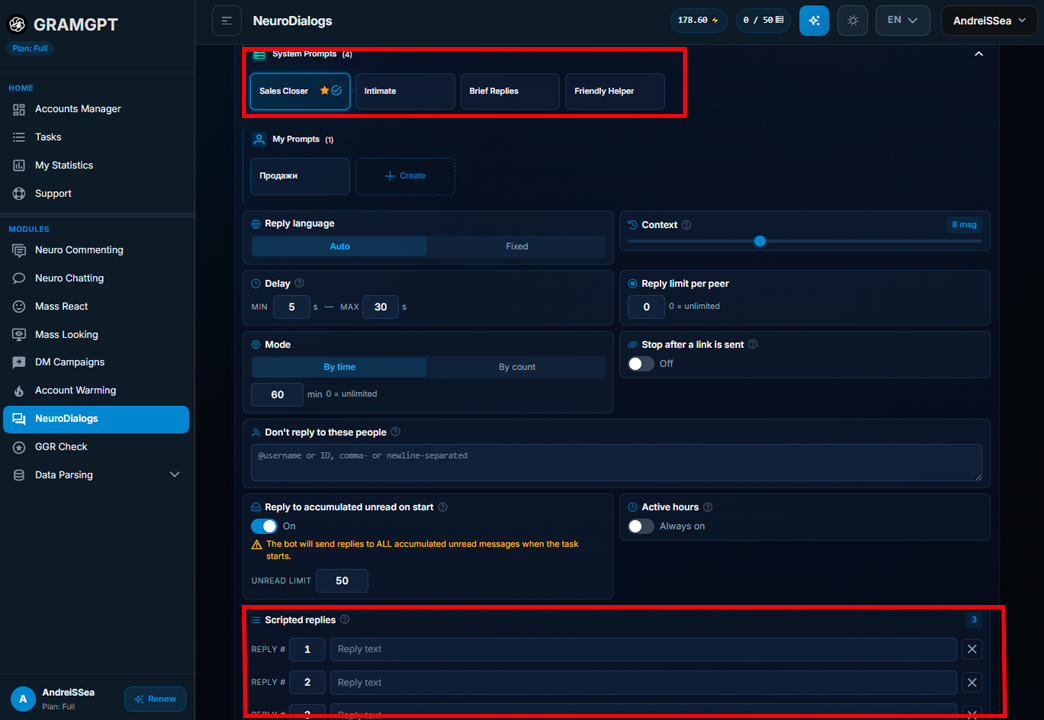
The module works with NeuroDialogues in two modes:
- AI dialogues start right after the first reply;
- a ready chain runs first, and then the AI autoresponder takes over.
NeuroDialogues Demo
After the sequence ends, the model reads the whole history and answers with context. That beats inserting a template without understanding earlier lines.
In the example, the model answers the person's question by explaining that the channel covers crypto and projects. Meanwhile, typing is simulated, so the chat feels more natural.
Working With Those Who Replied
People who replied are the most valuable part of your base. They have confirmed interest, so further contact continues a conversation rather than starting cold.
Sometimes people keep writing after the module has finished. If someone did not answer within the 60-minute window, the chat is not lost. Once processing of queued messages is enabled, NeuroDialogues reply to whatever came in later.

The key is that each reply continues the previous thought. Then the campaign becomes a coherent funnel, not a set of unrelated templates.
Which Niches Suit a Telegram Mass DM
Private outreach makes sense for channel growth where each lead is valuable. These are fields where reaching the right contact pays off through a specific client.
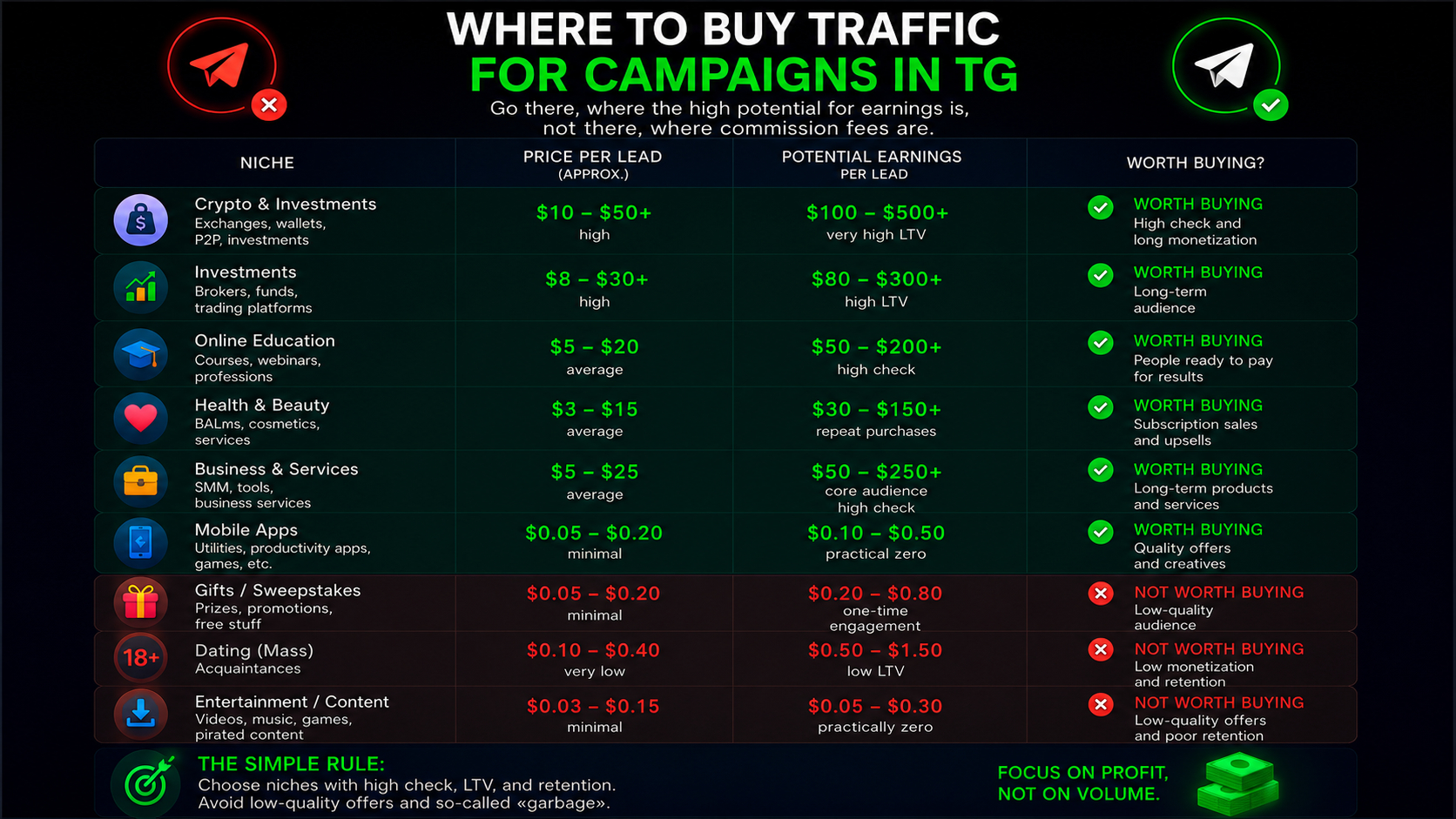
Such categories include:
- crypto;
- betting and gambling;
- business services and other niches with expensive leads.
For meme or 18+ channels that need cheap mass reach, the tool is not always sensible. There, account costs, risks and the effort of handling replies may not pay off.
Conclusion: Telegram Mass DM in 2026
A Telegram mass DM works only as a system. It rests on careful audience selection, a natural opener and a follow-up once interest appears. Account preparation, sensible limits and automated replies turn it into a managed acquisition channel where the quality of each contact matters more than volume. We cover every detail, from choosing a batch to ramping up accounts, in our mass DM course.
This growth method fits niches with valuable subscribers. If your project needs broad reach, other modules will serve better. The main thing is to pick the tool for the task and judge it by replies and target clicks, not by the number of actions. You can buy the mass DM software on the module page.