Want to create Telegram stickers of your own but assume it takes a designer and pricey software? It doesn't. For this guide we built a three-piece fox pack from zero in about forty minutes, and in 2026 any beginner can repeat that on a phone or a laptop.
Still, first attempts usually break on tiny details. A wrong canvas size, a white box behind the character or a compressed upload, and the official bot refuses the file. Besides, few people realise that a finished pack can quietly bring readers to a channel.
So below we retrace our own run. First, the artwork and the phone method. Then the desktop route, publishing, the File ID and, finally, sending the result to topic groups where it attracts subscribers.
What Telegram Sticker Packs Are and Which Types You Can Create
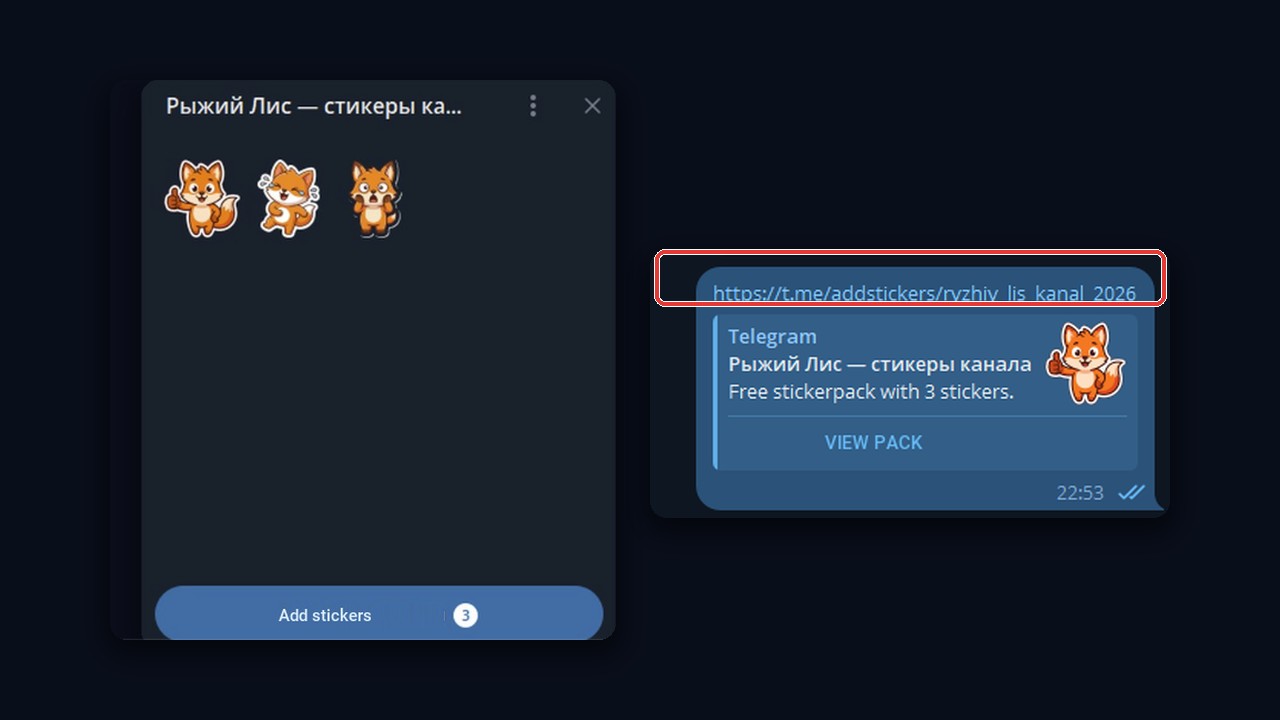
A sticker pack is a named bundle of images that anybody can save to their panel with a single tap. Each bundle lives at its own t.me/addstickers/ address. Therefore, one forwarded image is enough for a friend to grab the entire collection.
On the left is the pack itself; on the right is how its link looks in a chat: a preview with the title and a "View pack" button.
So what are Telegram stickers under the hood? There are four formats, and the bot checks each against different limits:
| Format | File type | Limits the bot checks | Command |
|---|---|---|---|
| Static | PNG or WEBP | longest edge of 512 px, empty pixels around the figure | /newpack |
| Animated | TGS | 512 by 512 canvas, three seconds or shorter, 64 KB ceiling | /newanimated |
| Video | WEBM, VP9 codec | three-second clip, 256 KB ceiling, muted | /newvideo |
| Custom emoji | PNG, TGS or WEBM | 100 by 100 square placed inline with words | /newemojipack |
For a debut, static artwork wins. First, it is quick to prepare. Second, a bold still image reads just as well in a busy group as an animation. That is why motion formats wait until the basic set is live.
Preparing Images: Drawing, Photos or AI
Before you create Telegram stickers, settle on a hero and a short list of moods. Good packs orbit one character or one theme: a brand mascot, a pet, the author's face, a catchphrase. For example, our fox got three moods: thumbs up, crying with laughter and frozen in shock. Those reactions fit almost any thread, so people actually reach for them.
If the set serves a community, picture how its readers reply to each other. For instance, football fans need "goal", "VAR again?" and "we believe", while a therapist's audience prefers "hug", "breathing" and "pause". The tighter the moods match real talk, the further the images travel.
Meme packs: what people create for Telegram most often
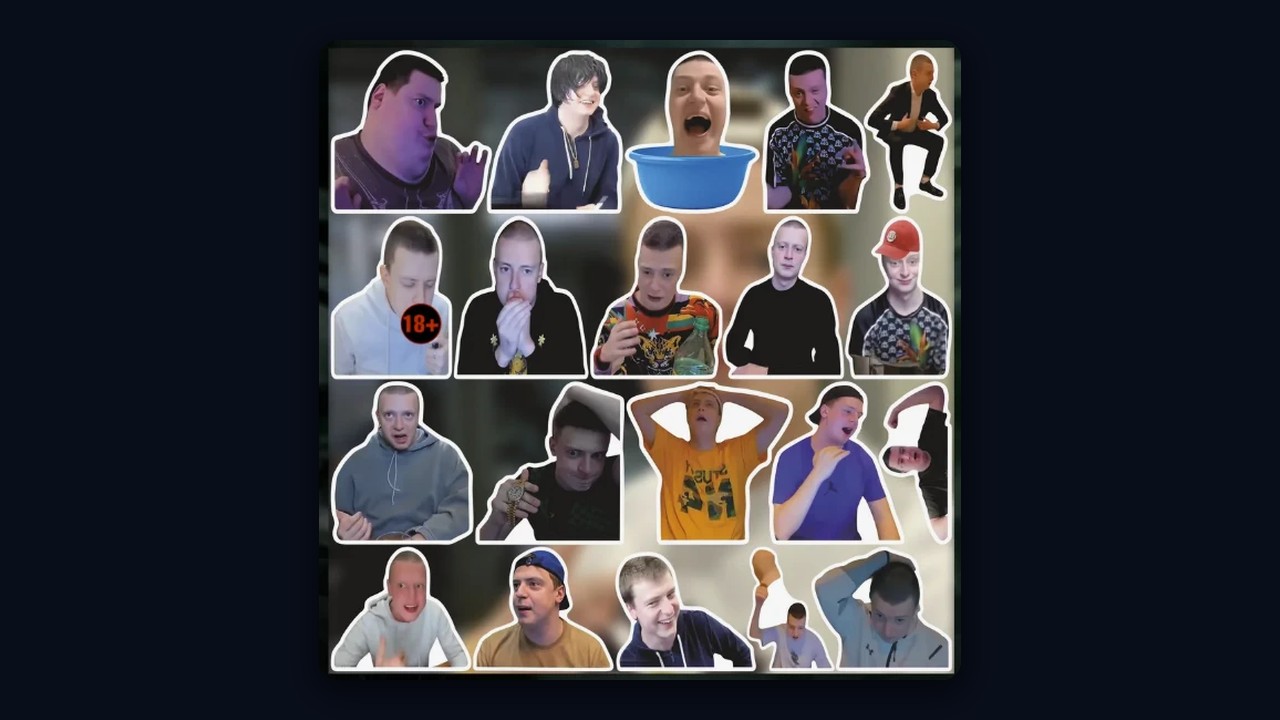
However, nothing grabs attention like a meme. For example, packs built around streamer Mellstroy or fighter Asxab Tamaev are recognised by almost every Russian-speaking user, which is why such sets get made and forwarded most often. A global meme beats any mascot: a familiar face makes people laugh and hit save.
Next, decide where the pictures come from:
- Draw by hand. Procreate on iPad, Canva, Figma or Photoshop all do the job. In addition, give the figure a fat white outline and a silhouette that survives thumbnail size.
- Start from a snapshot. The messenger and most modern galleries lift a subject off its background. Web tools like remove.bg are a fallback.
- Prompt an AI model. Ask for a character "in sticker style on a flat backdrop", then delete that backdrop. Our foxes came from exactly this prompt, and the whole batch took about ten minutes of retries until the poses looked consistent.
Export rules to create Telegram stickers the bot accepts
After that, export each picture as PNG with nothing behind the figure. One side must hit 512 pixels while the other stays at or below it. Our fox files weighed between 230 and 290 KB, well under the half-megabyte cap.
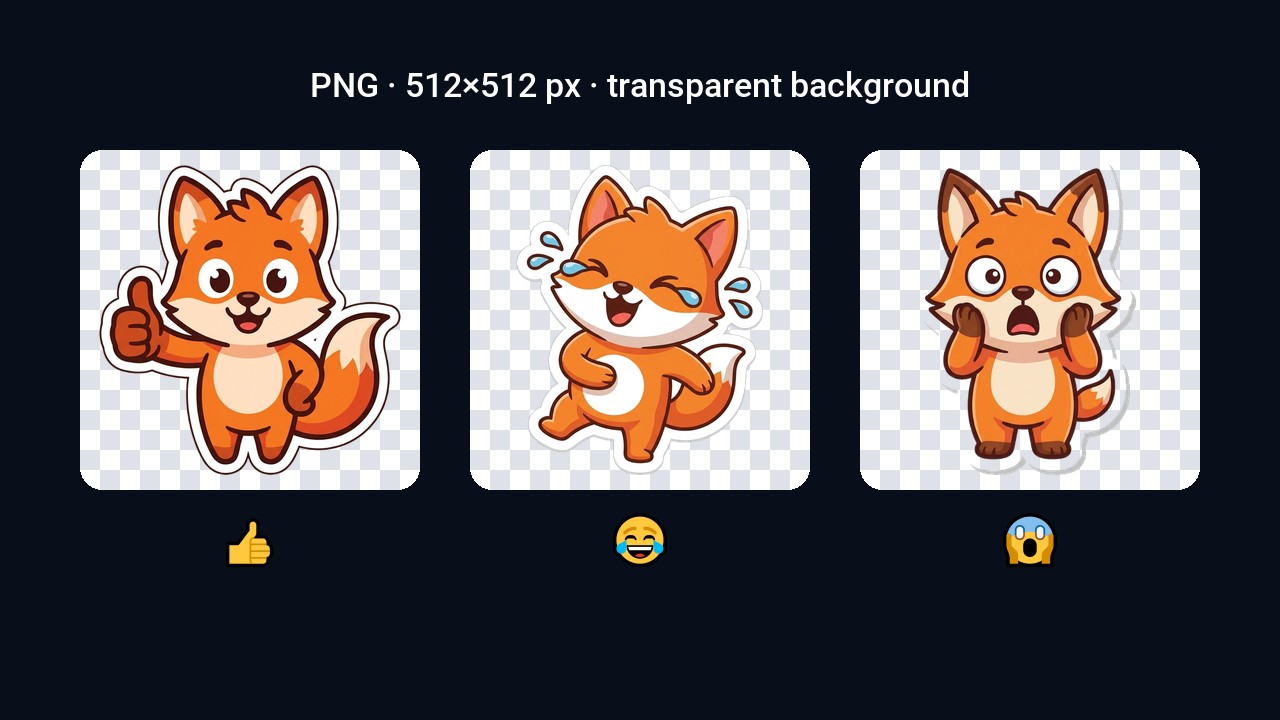
Important: upload the file as a document. Sent as an ordinary photo, it loses transparency, and the bot asks for a fresh image.
Round artwork needs no switch either. Instead, paint a circle on a clear 512×512 canvas and keep the corners empty.
How to Create Telegram Stickers on a Phone from a Photo
The fastest entry point is the phone itself: it can lift a subject out of a picture, and then you only hand the result to @Stickers. Thus a snapshot becomes a reaction without a computer or any graphics software.
On iPhone
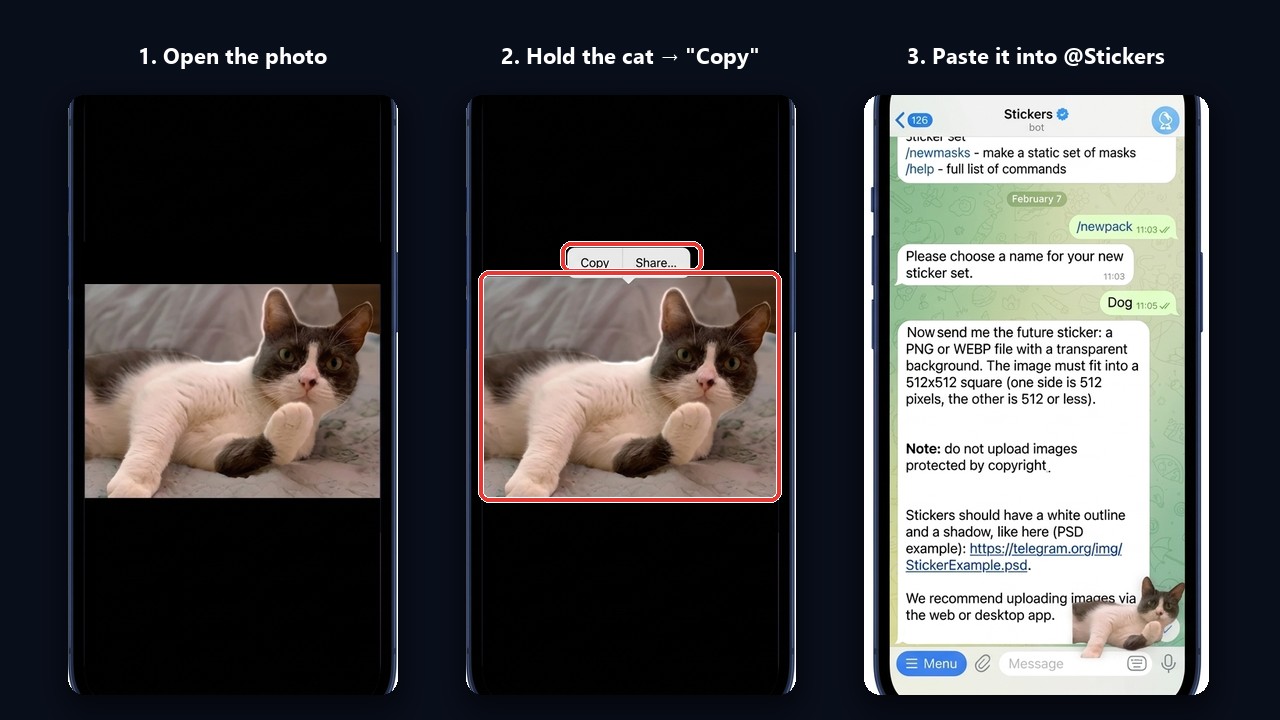
- Open the shot in Photos and press and hold the main subject: a person, a pet or an object.
- The phone cuts it out by itself and shows a menu; tap "Copy".
- Go to the @Stickers chat and start a set with /newpack, or add to an existing one with /addsticker.
- Paste the copied subject into the message field, send it to the bot and then pick an emoji.
On Android
Here, search does the trick. Google "remove background", open any free service from the results and upload the photo. Then download the transparent PNG and send it to @Stickers the same way, as a file rather than a photo.
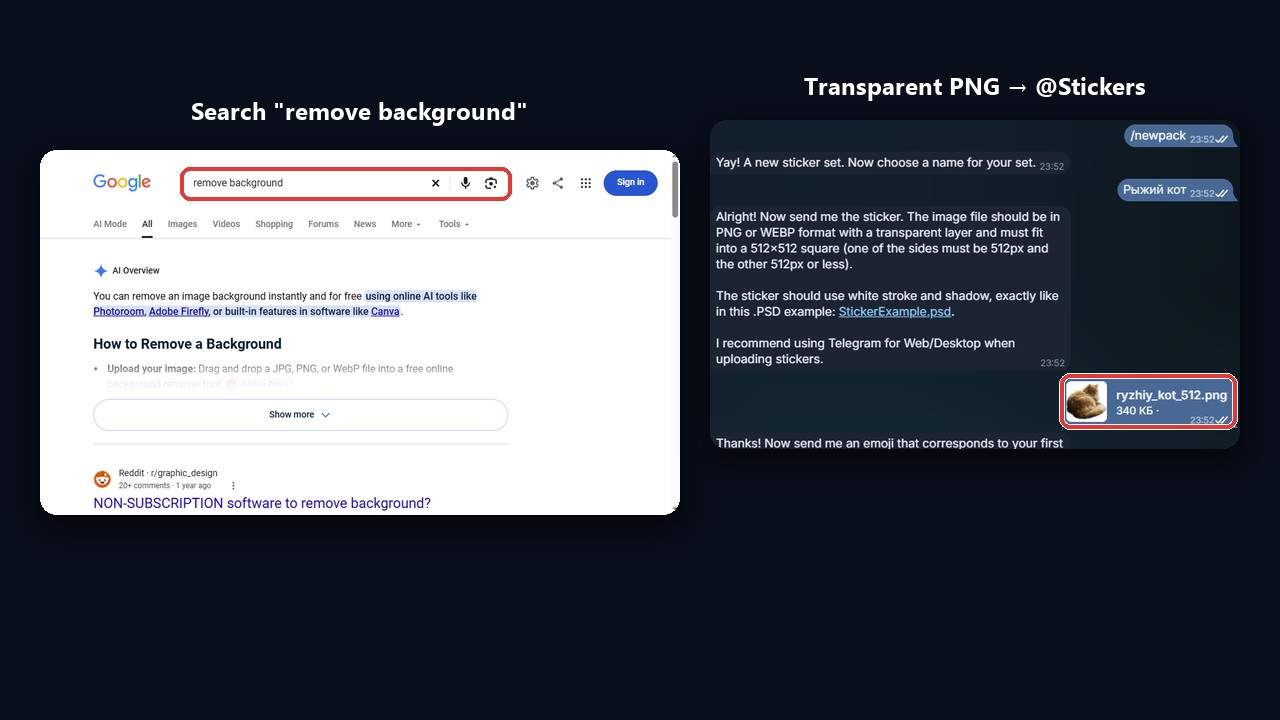
To top up a collection you already have, send /addsticker and choose it. Besides, recent app versions add a built-in editor with a "Create Sticker" button in the sticker panel. In other words, you create Telegram stickers on either phone the same way.
However, the phone has a ceiling. It shines for quick snapshots, but a polished brand series with equal margins and outlines is easier on a computer.
How to Create a Telegram Sticker Pack on PC with @Stickers
On a laptop, everything goes through the official @Stickers bot, both in the desktop client and in the browser version. We ran the whole flow on a demo account, so every screenshot below is from that real conversation.
Step 1. Start a new set with /newpack
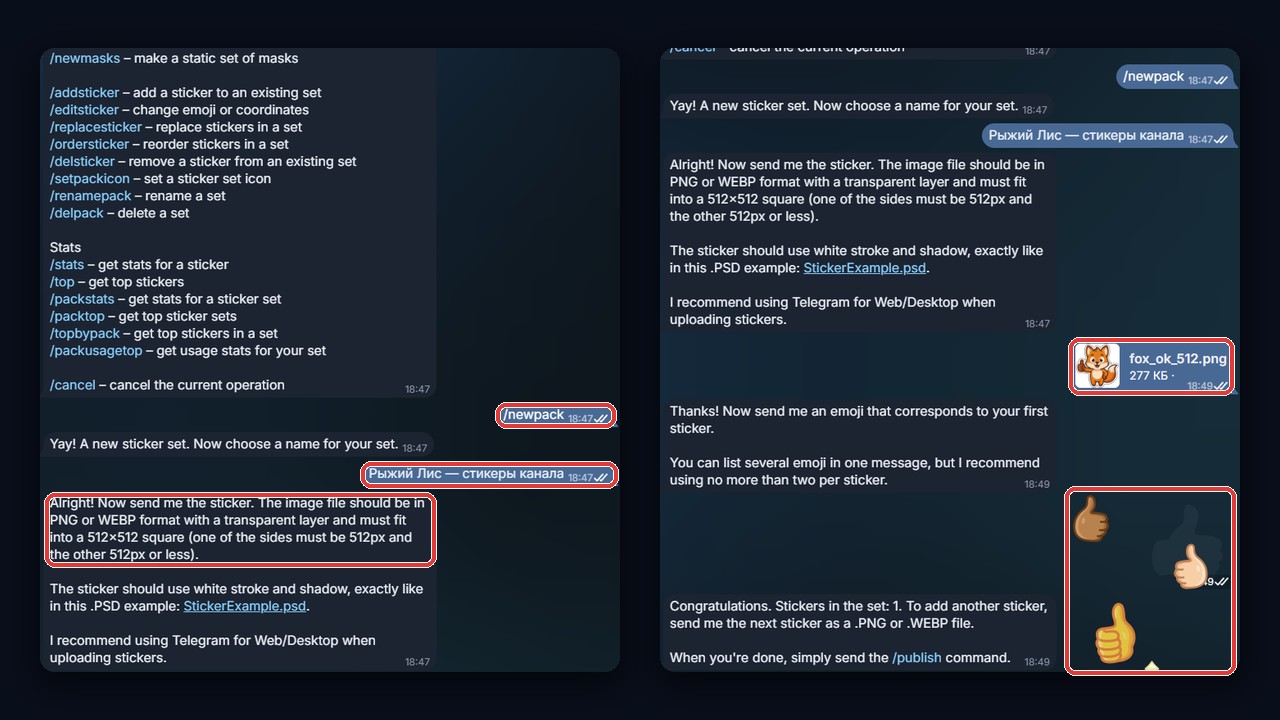
Search for @Stickers and press Start. The bot answers with its command list: static sets, short clips, animated packs, masks and emoji.
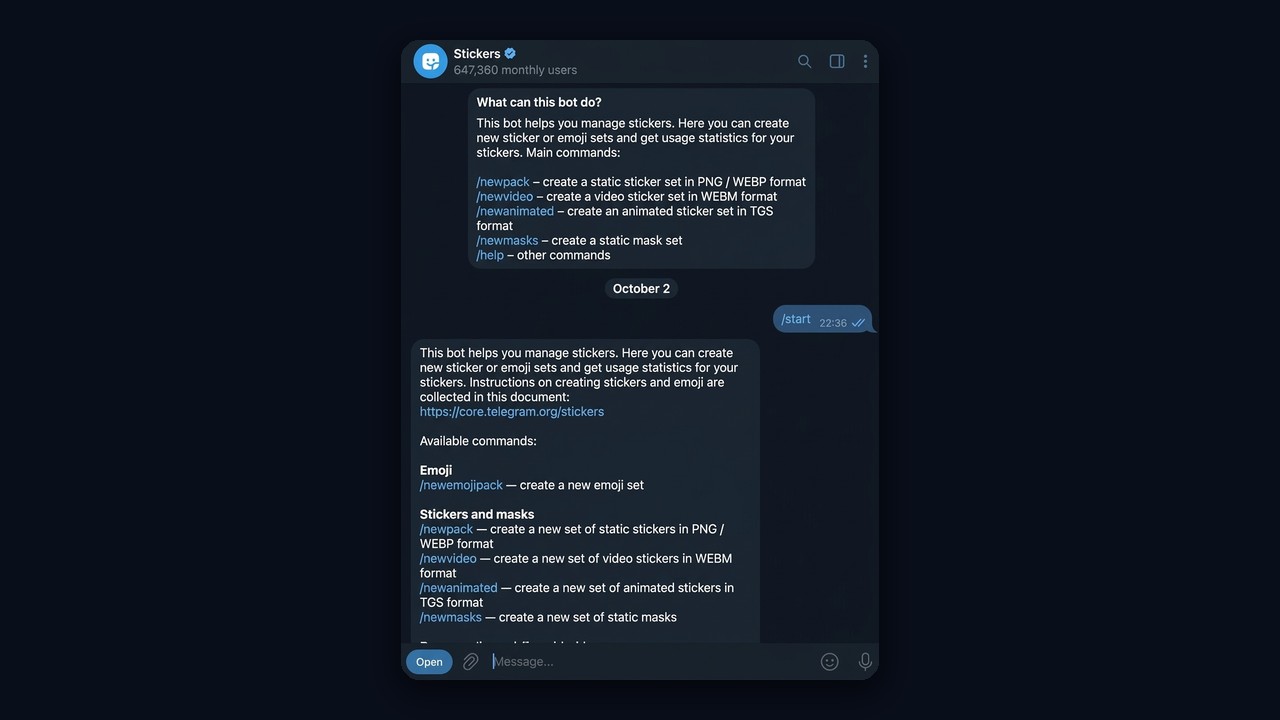
Type /newpack. The bot then wants a title. Visitors read it every time they open the bundle, so put your brand name there. Ours became "Рыжий Лис — стикеры канала", that is, Ginger Fox channel pack.
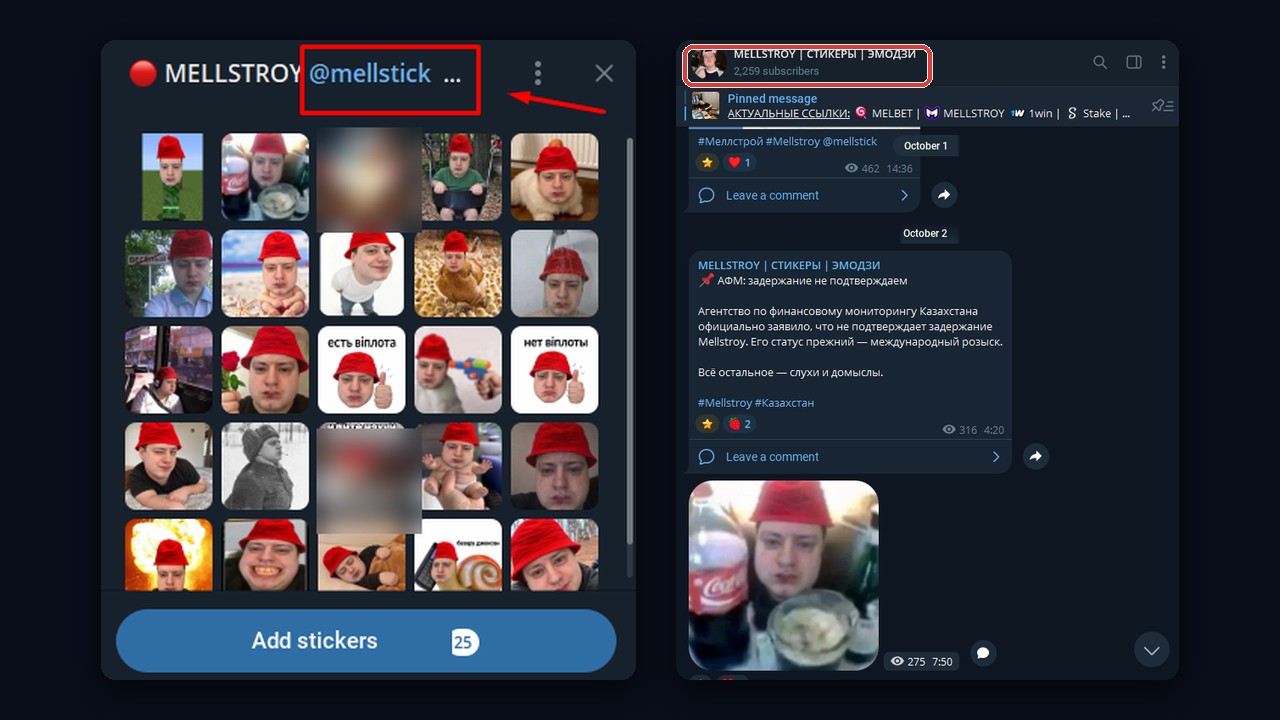
A clickable link next to the title. Append your @username to the title, for example "Ginger Fox @channelname". Telegram turns the mention into a clickable link, so anyone who opens the bundle reaches you in one tap. For a published set, change the title with /renamepack.
That is how a popular meme pack with Mellstroy works: after the name, the title carries @channelname (here it is @mellstick), and the link opens the "МЕЛЛСТРОЙ ЭМОДЗИ" channel with thousands of subscribers. In other words, the author gets traffic from everyone who scrolls the set.
Step 2. Upload images and assign emoji
Next, attach the first PNG through the paperclip menu, choosing the document option so nothing gets compressed. The bot replies by requesting a matching emoji; we sent a thumbs up. Later, that emoji is the trigger that suggests the artwork while somebody types. Repeat for each file.
Step 3. Publish and get the link
With all three foxes accepted, we typed /publish. The bot offered a 100-pixel icon, and /skip handed that role to the first image. Finally, it asked for a short Latin name. We entered ryzhiy_lis_kanal_2026 and got the cheerful "Kaboom!" reply with a working link.
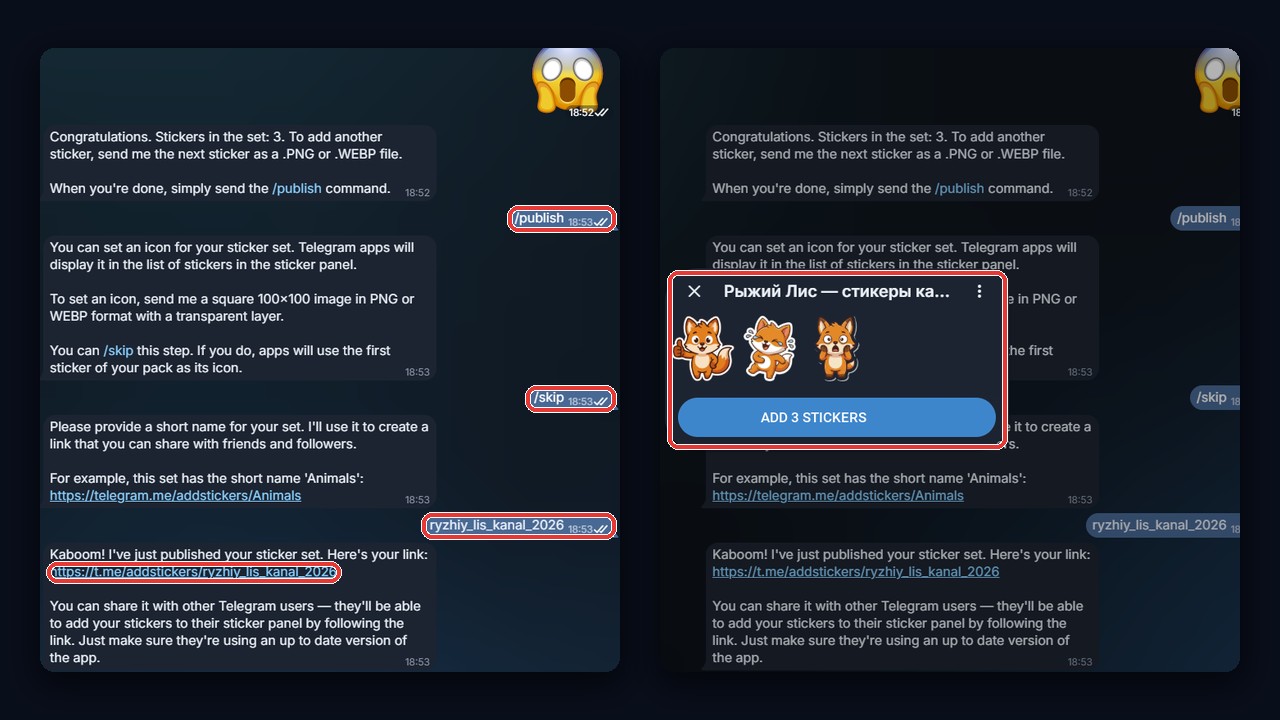
That covers how to make a sticker pack on Telegram from a computer, and it is the tidiest way to create Telegram stickers for a brand. Besides, the bot keeps several maintenance commands:
| Command | Use it to |
|---|---|
| /addsticker | drop one more picture into a published bundle |
| /editsticker | swap the linked emoji |
| /delsticker | pull a single picture out |
| /ordersticker | shuffle the running order |
| /setpackicon | replace the thumbnail |
| /renamepack | retitle the bundle |
| /packstats | see how often people send it |
| /delpack | erase everything for good |
Animated and Video Stickers: How to Create Moving Telegram Stickers
If you want to create Telegram stickers that move, budget more time; the payoff is a livelier chat. There are two routes. First, TGS animation: designers build it in After Effects, export through the Bodymovin-TG plugin and register the set with /newanimated.
Second, video clips, which suit newcomers better. Any short footage with a removed backdrop works. Convert it to WEBM on VP9, cut it to three seconds, keep it under 256 KB and hand it over via /newvideo. For example, CapCut erases backgrounds on a phone, and a web converter finishes the job.
Separately, about Premium. Those full-screen "premium" effects are Telegram's own and cannot be made by users. Instead, anyone may publish a custom emoji collection through /newemojipack, though only subscribers can type those emoji into messages.
How to Add Stickers to Telegram: Yours and Others
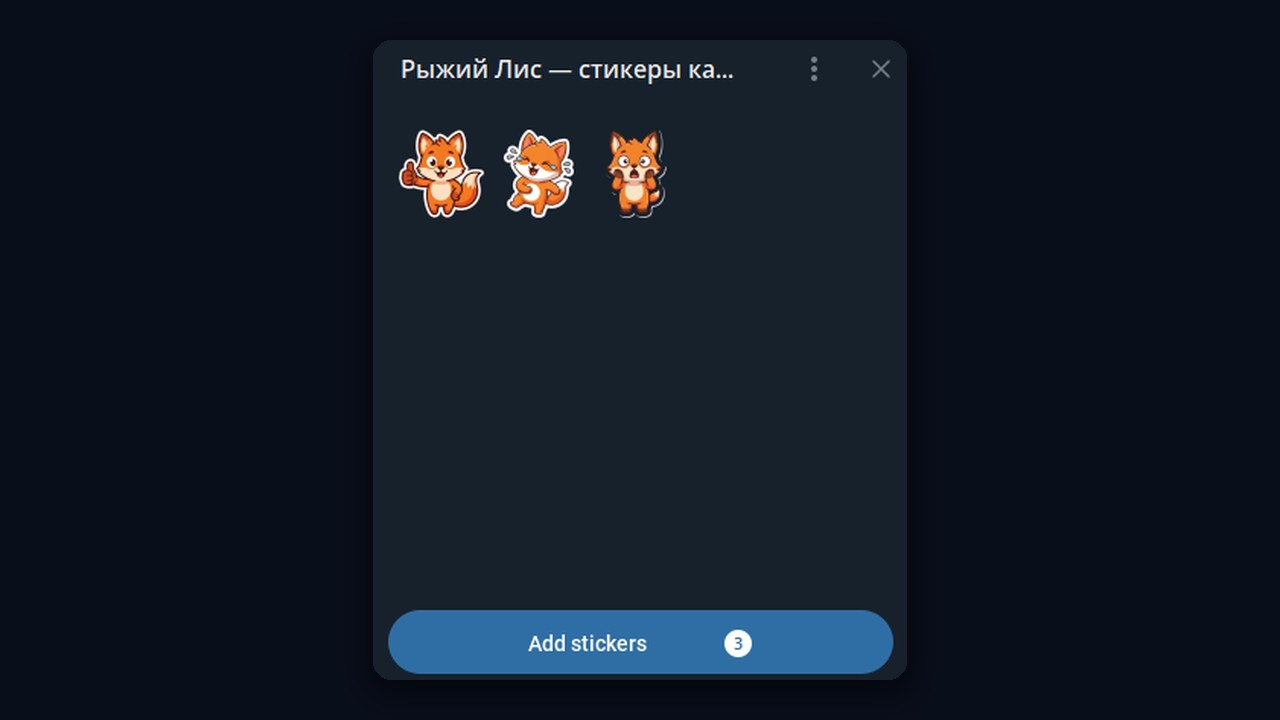
To add stickers in Telegram, there are two routes. First, open a direct link to the bundle. Second, if one shows up in a chat, simply tap it. A preview card then pops up with every item and an "Add stickers" button. After that, the collection shows up on all of your devices.
Want to extend your own bundle later? Send /addsticker or pick the bundle while saving in the mobile editor. The address stays unchanged, so everyone who saved it receives the newcomers automatically.
About privacy: hidden collections do not exist. Whoever holds the address, or simply receives one item, can save the lot. So the only real protection is not posting it in public groups.
Promoting Your Pack and Channel with Chat Broadcasts
This is where it pays to create Telegram stickers with your brand on them. First, everyone who opens the bundle reads its title, which carries the channel name. Second, the pictures spread on their own as people forward them to friends. We explained how a channel grows alongside its artwork in our piece on how to promote a psychology Telegram channel.
However, word of mouth is slow. To speed it up, show the artwork where your audience already chats, in niche groups. Our guide on how to find Telegram groups shows where to look and how to spot a dead community.
Why a sticker makes a good first message
Readers skim past ad copy dropped into someone else's group. A cheerful fox, by contrast, grabs attention and feels like a reaction rather than an advert. Curious members tap it, see the title with the link and follow it on their own. So the message needs no URL at all: the title does the job.
Where to Get a Sticker File ID
A File ID is the platform's internal reference to an uploaded file, a long string that begins like CAACAgEAAxkBAAER… Services reuse it to deliver an image without uploading it again. In particular, an automated broadcast needs it to post your fox.
We used @idstickerbot, listed as Get Sticker ID. After pressing Start, we forwarded the thumbs-up fox, and the reply was one line of characters. Copy that line in full, with no spaces.
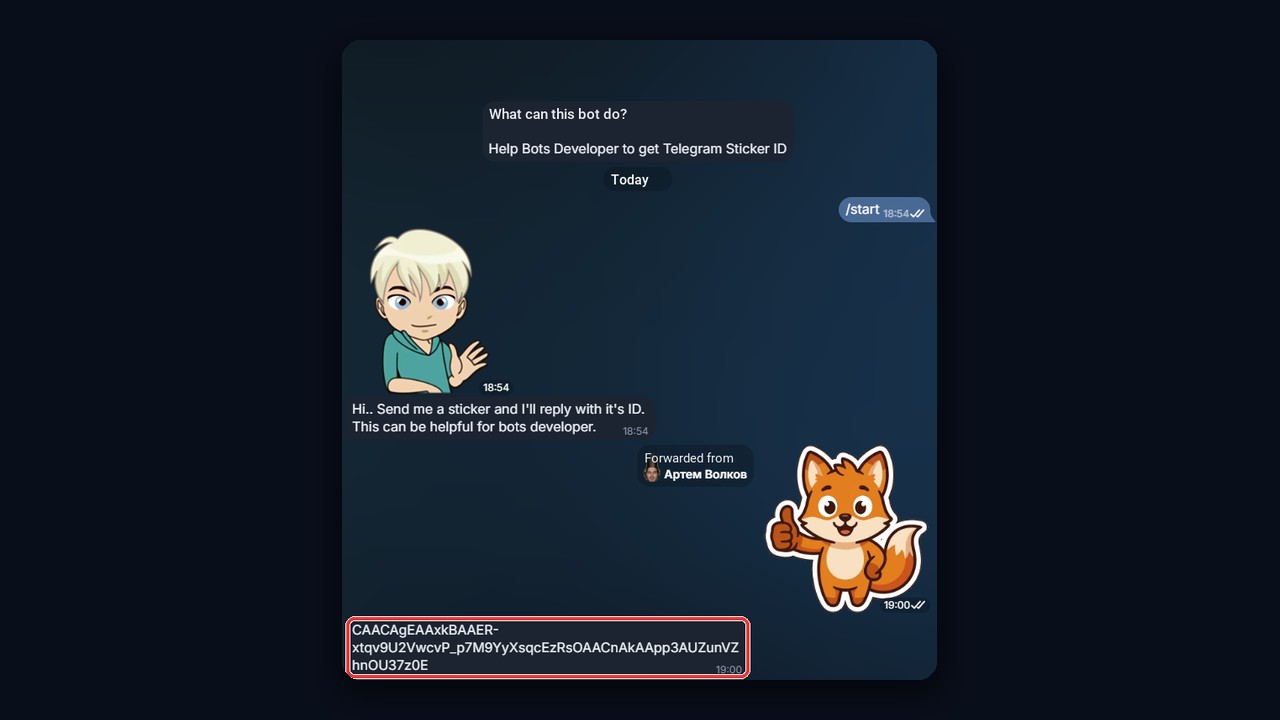
Other developer bots return the same value, and the logic never changes: forward an item, receive a string. Therefore, keep a note with the IDs of every item in the bundle. A simple spreadsheet works well here: one column for the emoji, one for the ID and one for the date it ran in a campaign. Later, that log shows which reaction drew the most replies.
Setting up a sticker chain in Chat Broadcast
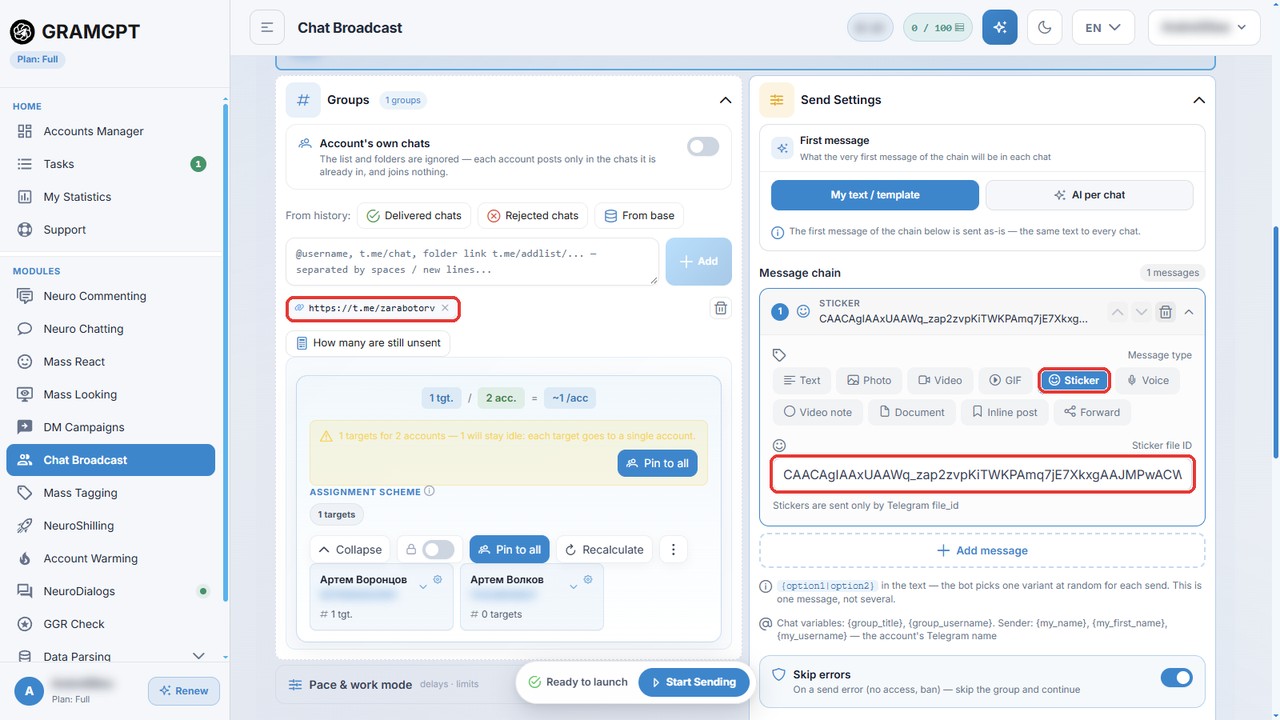
Posting into hundreds of groups by hand eats days, so the GramGPT chat broadcast module takes it over. Each send there is a chain of items: text, photo, video, voice or an image from your bundle. For the fox, choose the "Sticker" type and paste the File ID from the bot.
- Add working accounts and load target groups: chat links, folders or a list from the chat parser. Any chats and channels with comments will do: the audience is everywhere, and the topic matters less than you think.
- In "Send Settings", open the message chain and click "Add message".
- Choose "Sticker" and paste the value into "Sticker file ID".
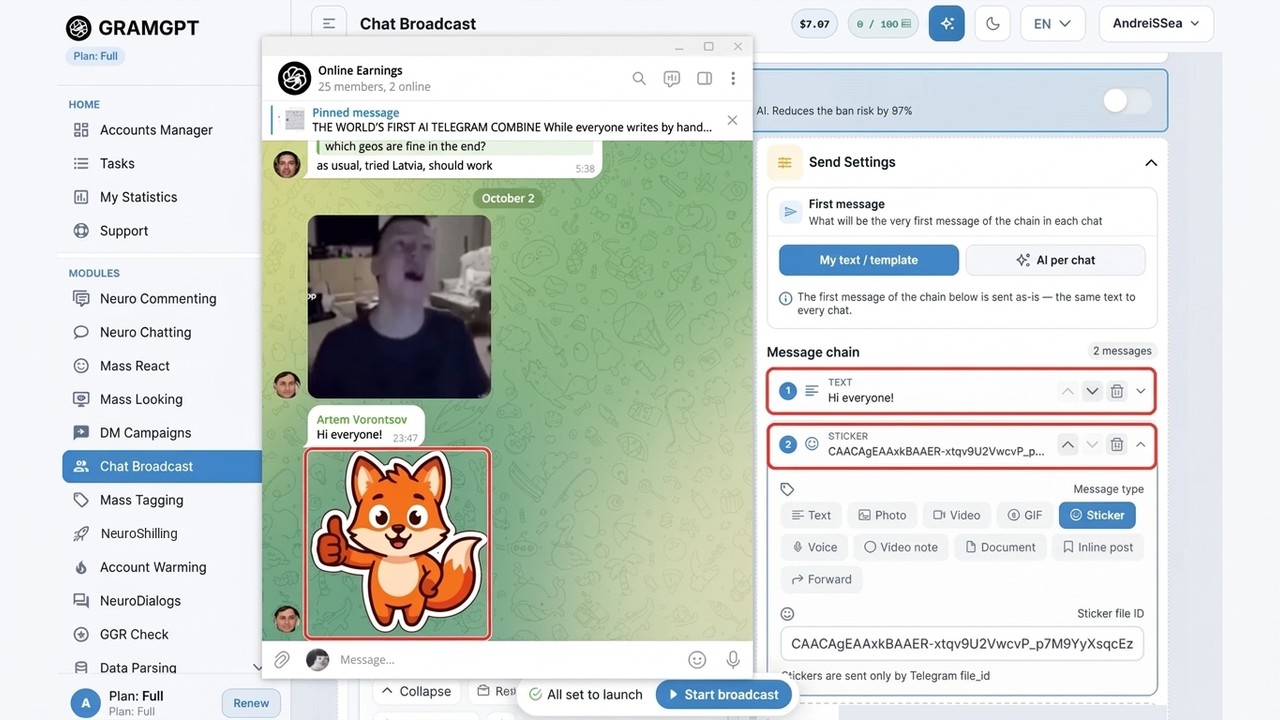
- The chain can hold two items: a short "Hi everyone!" first, then the sticker. A single sticker also works on its own.
- Enable AI protection plus the balanced mode, which adds pauses and respects limits.
The result: the sticker in a group chat
Here is the result in a real chat: the account posted a greeting and right after it sent our fox. Nothing about it looks like an ad, yet the sticker leads to the pack and the channel.
The pack itself is the key. To win attention, build an engaging set, ideally around a global meme or simply something funny. People save and forward such sets, so subscribers keep arriving after the campaign ends.
Accounts don't have to join each group in advance, either. For that, there is auto-joining chats in the account manager, and the profiles themselves sit in the Telegram account manager. The video below walks through delays, limits and round-robin sending; it is in Russian, with YouTube auto-dubbing available.

In the end, the fox works like an invitation: people notice it, save the bundle and discover the channel on the way. You can start such a campaign from the Chat Broadcast module page.