Tap your own name in the app and look just below it. A tiny number now sits in a pill there, and for some people it has turned into a red warning sign. That number is your Telegram rating, and it has nothing to do with followers or likes. Instead, it is a score built from what you have paid for with Stars.
This guide walks through where the score comes from, what pushes it up, what drags it below zero, and whether you should care about it in 2026. We also separate the Telegram rating from a very different kind of score that people who run several accounts actually need.
What the Telegram Rating Is and Why It Exists
The Telegram rating is a payment-reliability score: the number next to your name, worked out from what you buy with Stars. More successful payments and fewer refunds mean a higher level and more trust in paid deals.
The feature arrived with the update of 31 July 2025. The company described it in one line: users now carry a badge whose value depends on successful purchases made with Telegram Stars. So the badge is a compressed history of your spending inside the app.
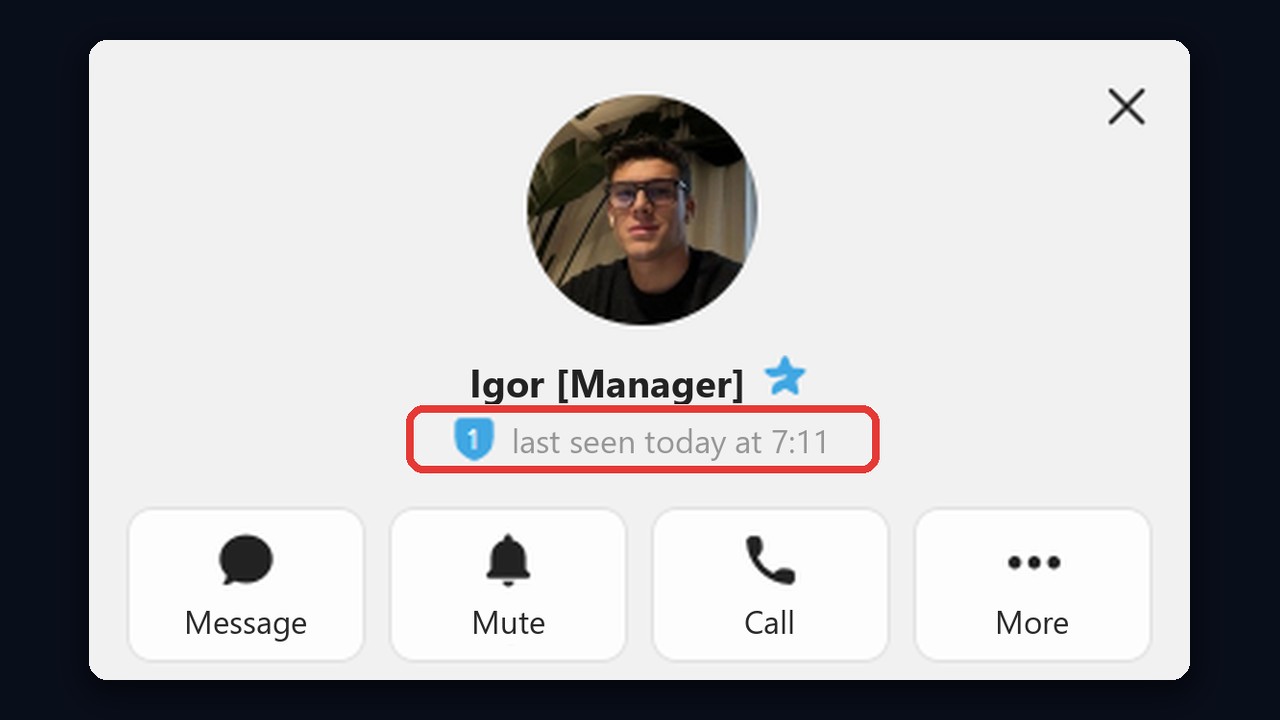
Here is how the icon looks on someone else's profile: the number in a blue shield next to the status.
Why bother? Because paid actions have multiplied: gifts, paid messages, suggested posts in channels. When a stranger offers to fund a post, a channel owner wants a quick hint that this person pays and does not claw money back. The Telegram rating is that hint, a trust signal for payments rather than a popularity contest.
Still, keep its limits in mind. It ignores your follower count, account age and chat activity. In addition, it is unrelated to channel rankings in catalogs and to account quality scores, which we cover further down.
Where to See Your Score and Who Else Can
On a Phone or Computer
First, open your own profile or someone else's. The rank sits in a small shield icon with a number right under the name, to the left of the "last seen" status. It looks the same on iPhone, Android and desktop, but the menus differ.
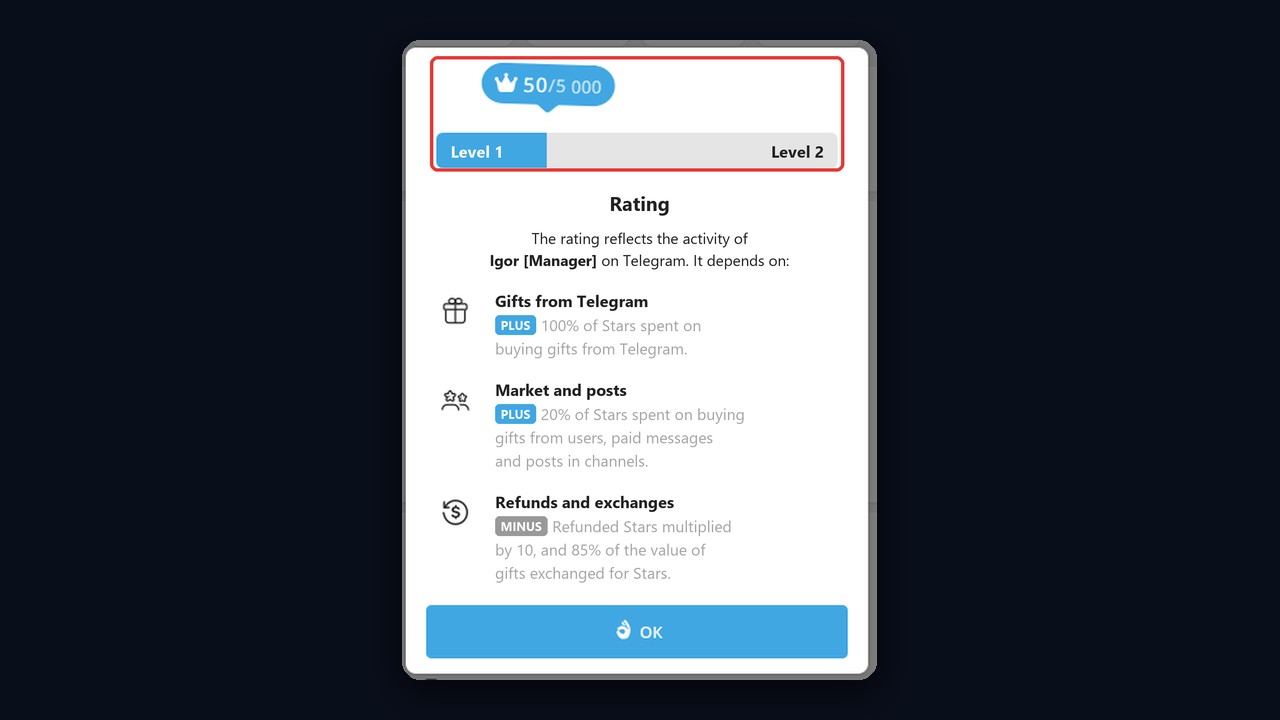
Then tap the icon, and a window titled Rating opens. At the top, for instance, it shows your points and the threshold for the next step. For example, "50/5,000" means 4,950 points are still missing for level two. Below that, the app also lists what affects the score and describes the rating as a reflection of the user's activity.
Updates are not instant, though: according to tech outlets, points for a purchase land roughly 21 days later. So if the number refuses to move, patience usually fixes it, and the same window shows the date.
Why the Badge Is Not Showing
If there is no icon under your name, your score is most likely still zero. Until you buy something with Stars, or while the first points are still pending, the profile shows no level. So after a first purchase the icon appears only once the points are credited.
Can Others See It, and Can You Hide It?
The icon is part of your public profile, so people you chat with notice it; the first screenshot above, in fact, shows another user ranked 1. Pending points and their date, however, are visible only to you. The developers have not documented any switch for hiding the badge, so treat any service promising to remove it with suspicion.
How Telegram Rating Points Are Counted
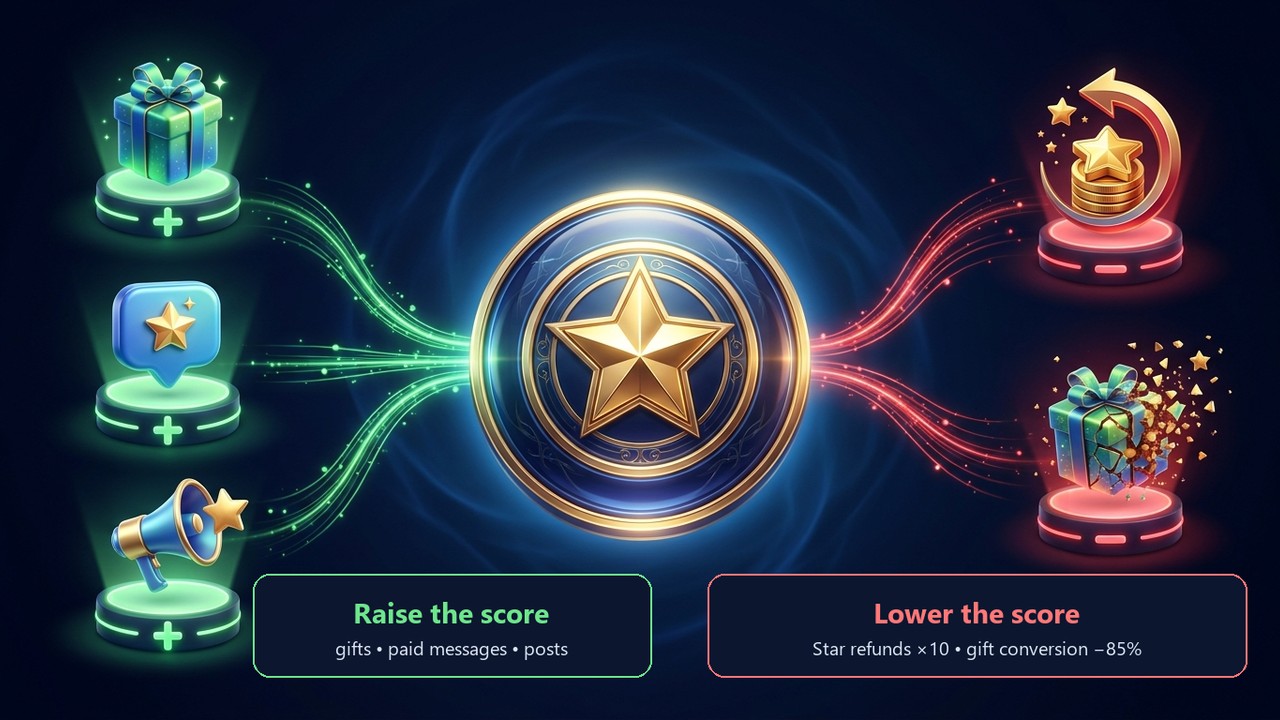
No guesswork is needed here, because the Rating window spells the rules out. Moreover, actions fall into three groups, and their weights differ sharply.
| Group in the Rating window | Spending it covers | Effect on the score |
|---|---|---|
| Gifts from Telegram | purchases in the official gift store | the full amount counts |
| Market and posts | resold gifts, paying for messages and for publications in other people's channels | one fifth counts (20%) |
| Refunds and exchanges | getting paid Stars back; turning a gift back into Stars | minus ten times the refund; minus 85% of the gift price |
Take the screenshot as a worked example. The user has 50 points, while level two needs 5,000. So the missing 4,950 points can come from 4,950 Stars spent on official gifts or about 24,750 Stars spent on paid messages and the market. That fivefold gap makes official gifts the cheapest route up.
Refunds, however, work the other way round. A single 100-Star refund wipes out 1,000 points, so refund-heavy users see their Telegram rating hit hardest.
Note: the rules in the table come straight from the Rating window in the app. The rules can change, so check that window before a large purchase.
Levels: Reading the Number in Your Profile
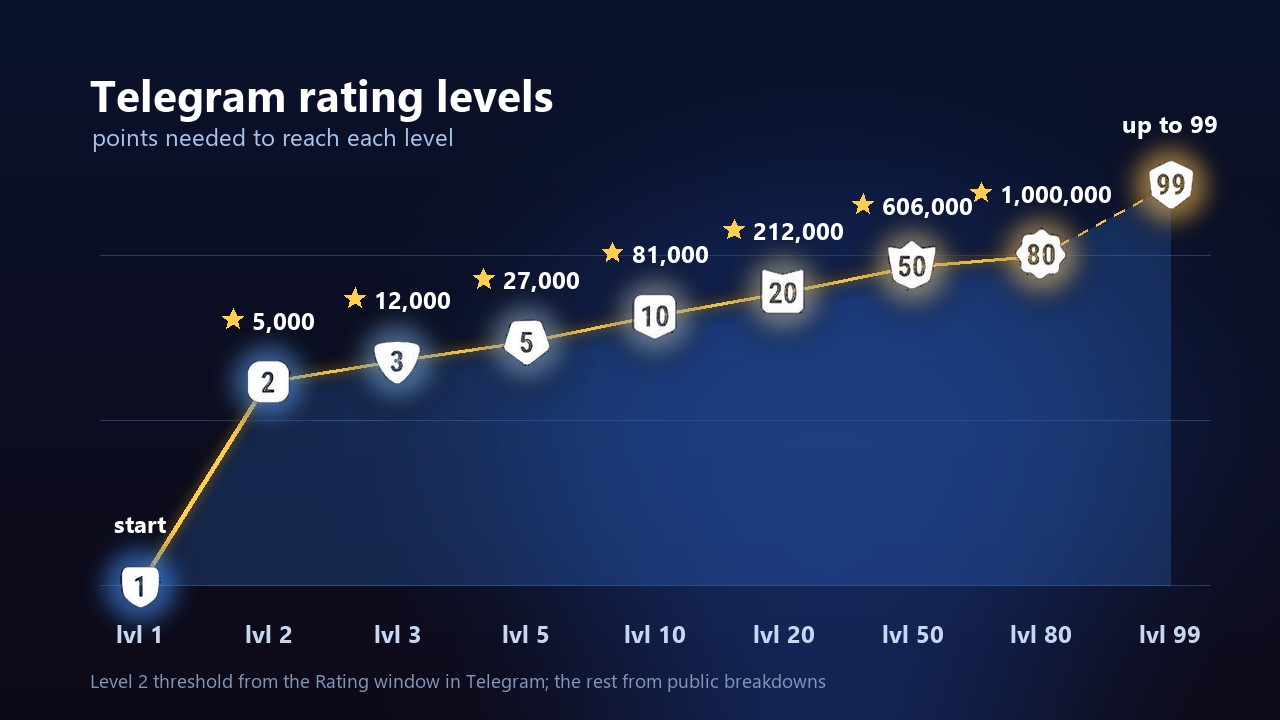
Points stack into levels. Tier one arrives with the first points; tier two, as the Rating window shows, unlocks at 5,000. After that each threshold climbs, and every step costs more than the last.
How Many Levels Exist and What They Cost
How many levels are there? The icon set in the app runs up to 99, and the icon shape changes every ten steps: shields and simple shapes first, then polygons and spiky badges. As a result, a single glance at the icon tells you how actively its owner pays with Stars.
| Level | Points needed | Stars on market and paid messages |
|---|---|---|
| 1 | first points | 5+ |
| 2 | 5k | 25k |
| 3 | 12k | 60k |
| 4 | 19k | 95k |
| 5 | 27k | 135k |
| 10 | 81k | 405k |
| 20 | 212k | 1.06M |
| 50 | 606k | 3.03M |
| 80 | 1M | 5M |
For official gifts the number of Stars equals the number of points, so the table only shows the second, pricier route.
However, only the level-two threshold is confirmed by the Rating window; the rest come from public breakdowns and may shift over time.
So what does a higher rank give you? Officially, the developers frame the rating as a sign of activity and payment reliability and publish no perk list. Instead, in practice it works as a reputation: a channel owner or seller sees that this person has paid with Stars for a long time without refunds. Coverage of the update also mentions that higher levels relax some caps on buying newly released gifts.
Who Has the Highest Telegram Rating
In summer 2025, shortly after launch, reviews named a record holder at level 92 with about 60.6 million Stars spent. The figures may have moved since, but the picture is clear: the top tiers belong to heavy gift buyers. Still, the icon set goes up to 99, so there is headroom left.
Don't confuse your profile rank with a channel boost level. The first reflects your own spending, while the second depends on boosts from subscribers. One cannot be raised through the other.
Negative Telegram Rating: Causes and Consequences
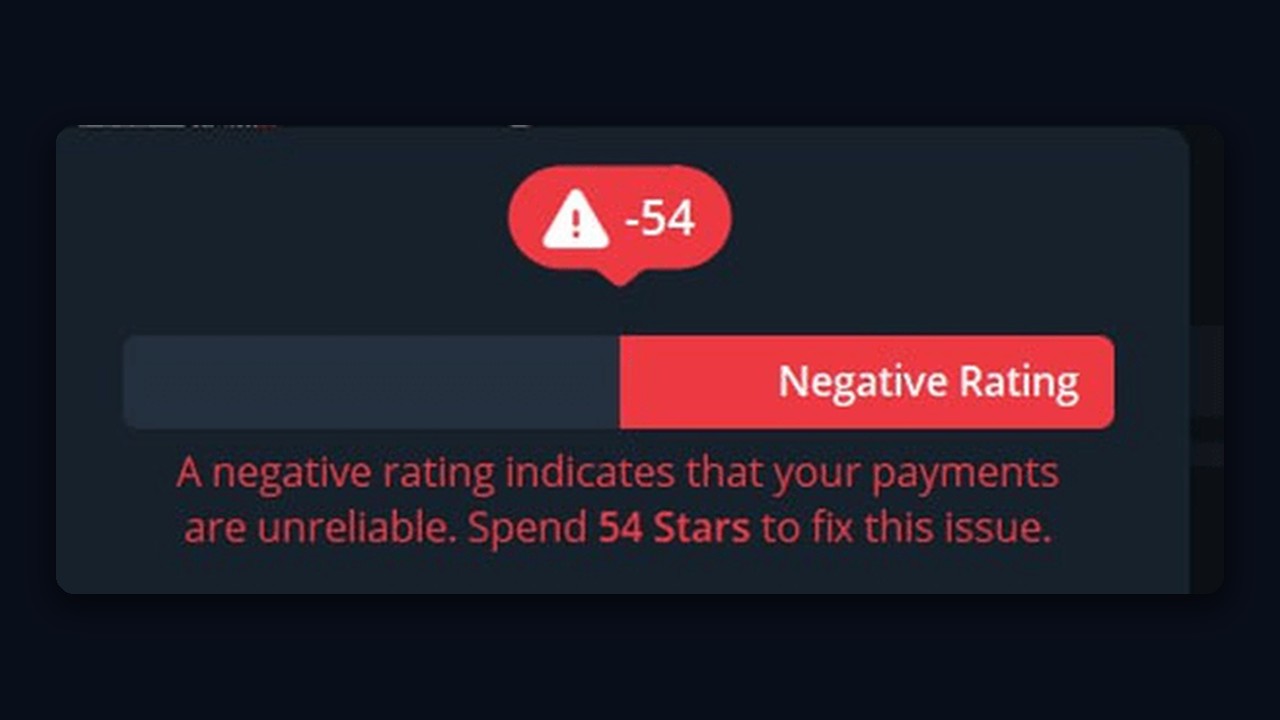
A score below zero is allowed by design; the API documentation states plainly that it may be negative. When that happens, the number turns into a red triangle icon with a minus value, and the level bar goes red. Underneath, the app also says it directly: a negative rating indicates that your payments are unreliable.
What Pushes the Score Below Zero
- Refunds. The usual culprit. Because of the tenfold penalty, two refunds can erase months of purchases.
- Gift exchanges. Every gift traded back into Stars costs 85% of its value.
- A thin purchase history. With almost no spending on record, even one refund sends you negative.
So what happens next? Nothing is blocked: chats, channels and calls keep working. But a channel owner who receives your post offer sees the red icon and may decline. In other words, the damage is to trust in paid deals, not to access.
Getting Back Above Zero
Moreover, the app names the amount itself. For instance, in the screenshot below, a rating of −54 comes with the advice to spend 54 Stars to fix it. Official gifts count one point per Star, which makes them the fastest way out. Meanwhile, stop refunding and exchanging, or the hole will reopen.
Raising Your Telegram Rating Without Overspending
Money is the only lever for a Telegram rating, but you can pull it wisely:
- Send gifts from the official store. Every Star counts fully, and somebody gets a present.
- Keep the gifts you receive. Converting them costs almost their entire value in points.
- Avoid refunds. Bought too many Stars by mistake? Spending them beats a tenfold deduction.
- Allow for the delay. Fresh points arrive about three weeks later, so don't keep buying because the figure stayed put that day.
Some sellers advertise logins with a ready-made rank. However, that rank belongs to someone else's payment history, and the previous owner may still be able to log back in. Our guide on choosing accounts for automation explains how to vet bought profiles.
Be equally wary of "instant rank boosts". For instance, a common trick is asking you to send Stars or a gift "for verification" and then vanishing. Similar tricks are listed in our piece on common Telegram scams.
Myths About the Badge
Rumours spread fast around the new pill. Here are the common ones next to the facts.
| Myth | Reality |
|---|---|
| A high level protects you from bans | No. Restrictions follow account behaviour, not spending. |
| Chatting a lot raises the score | No. Only payments in the in-app currency count. |
| A negative Telegram rating means a ban | No. The account works; only trust in paid deals suffers. |
| Premium lifts your level | The subscription itself adds no points. Spending Stars on gifts and paid features does. |
| You can hide the number in settings | Telegram has not documented such a switch. |
| The rating is a hidden account "trust score" shown by third-party bots | No. The official score sits in the profile and counts only Stars payments. Third-party "trust checkers" measure something else; the survival odds of work accounts are better judged by behavioural signals, the way GGR does it. |
Profile Score vs Account Survival Score
People searching for an account rating usually mean one of two things. The first is the badge described above. The other matters to anyone promoting on Telegram with a pool of profiles: will this one survive real workload, or get restricted tomorrow?
Unfortunately, the badge says nothing about that. A tier-ten user can catch a spam block on its first mailing, while a fresh one with zero purchases may run for months. Instead, survival depends on different signals: age, session history, device, country, proxy quality and past behaviour.
Checking Survival Odds With GramGPT.io
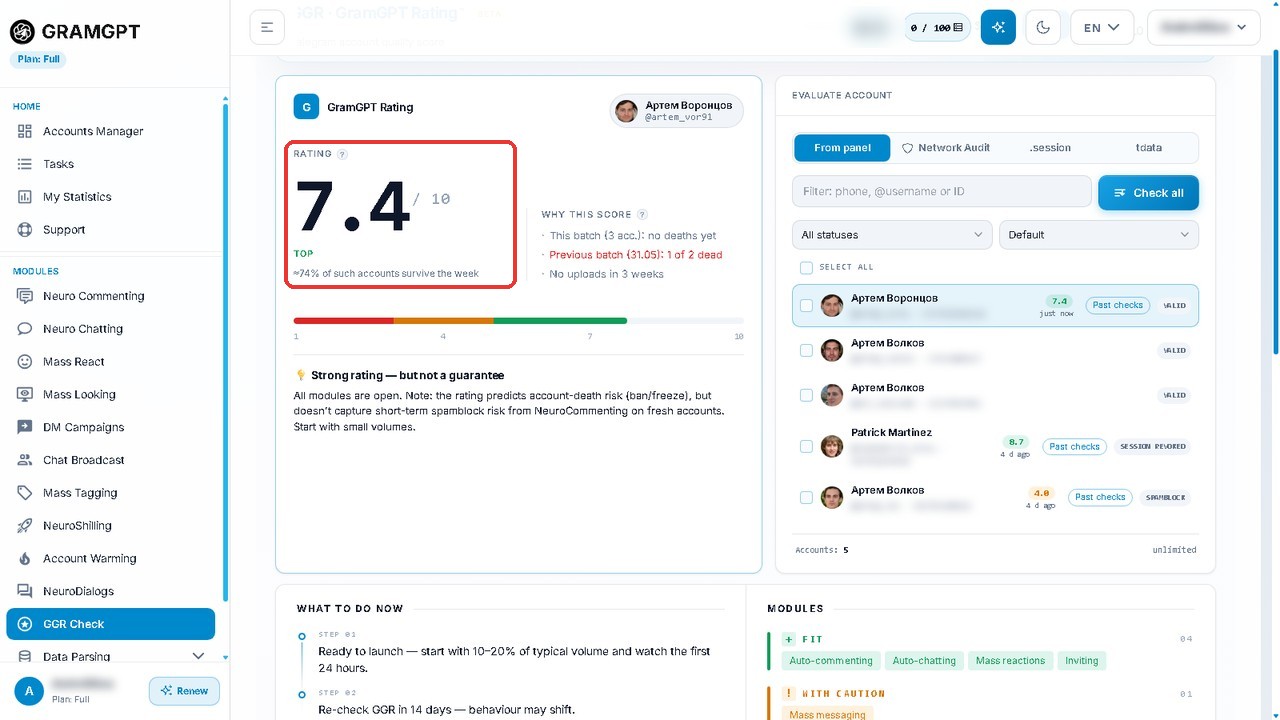
GramGPT Rating (GGR) measures how likely a profile is to survive and how ready it is for promotion work. To that end, it checks the account against many criteria, analyses the risk of a ban or other restrictions and forecasts how long it will last in work.
The check runs in the GGR checker on GramGPT.io. It grades each one from 1 to 10 and also explains the grade. The flow takes three steps:
- Load them from the manager, as .session files or as a tdata folder.
- Press "Check all" and wait for a verdict on each one.
- Open an account card to see the score, the share of similar profiles that last a week, the expected lifetime and the next recheck date.
In the example below an account scored 7.4 out of 10, labelled TOP. Then the report suggests starting at 10–20% of your usual volume and lists which modules suit it and which call for caution.
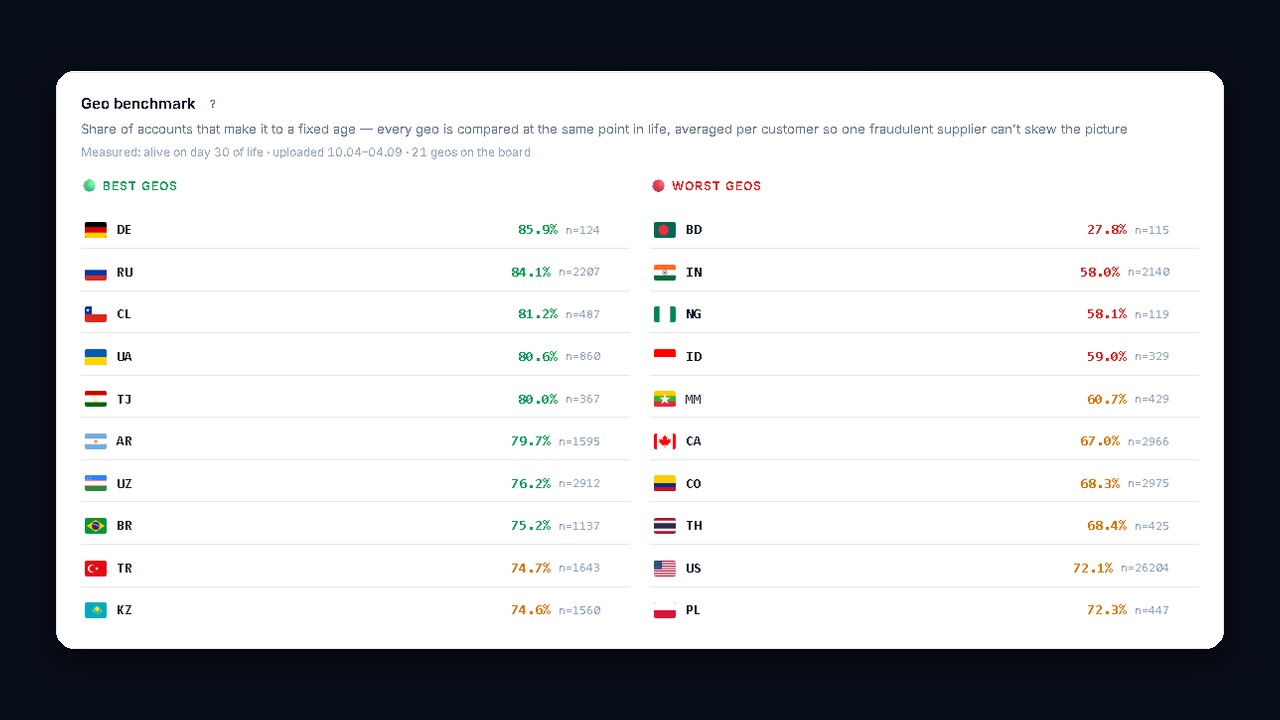
Another handy part of the report is a country benchmark showing what share of numbers from each country stay alive. As a result, you can pick a country before buying a batch rather than learning the hard way. For a one-off check without the dashboard, try the free GGR tool.