
Telegram in 2026, in the era of artificial intelligence, looks less and less like a platform where you can simply launch a mailing campaign or leave a couple of comments under posts and get stable traffic. The audience has become more attentive, chats react to spam faster, and direct advertising messages are increasingly left without attention and replies.
To attract traffic from Telegram to your resources, it is no longer enough to simply leave direct advertising messages. You need to enter a normal, meaningful dialogue: answer on topic, look natural, create interest, and carefully lead a person to the account profile, Telegram channel, website, or private messages. Today, one of the most in-demand promotion methods is neurochatting. It solves the issue of communication automation and helps attract targeted clients on autopilot without constant manual correspondence.

Below we will break down how neurochatting works, how it differs from a regular autoresponder, how to launch AI dialogues, why neurodialogs and account protection are needed, and why this mechanic can be useful for promotion in Telegram.
What Is Neurochatting in Telegram
NeuroChatting ( Neuro Chatting ) is automated AI communication in Telegram through pre-prepared accounts. The system does not simply send template messages, but analyzes the chat context, replies according to the specified logic, and can natively promote a product, brand, channel, or service.
In its working logic, neurochatting is close to promotion through the neurocommenting module. In neurocommenting, an account leaves comments under posts, and a user can go to the profile where a link to your Telegram channel, website, or another resource is already placed. In neurochatting, the approach is similar: accounts also need to be properly prepared, but the main promotion happens through automated communication in chats and private messages.
How Neurochatting Works in Telegram
Neurochatting does not work like a regular autoresponder that simply sends a prewritten text. We set up the system so that AI replies according to a scenario, can move people into private messages, and push them toward a subscription, consultation, or a link in the account profile. If needed, it continues the conversation in private messages as an AI consultant in Telegram, an AI manager, or a sales assistant.
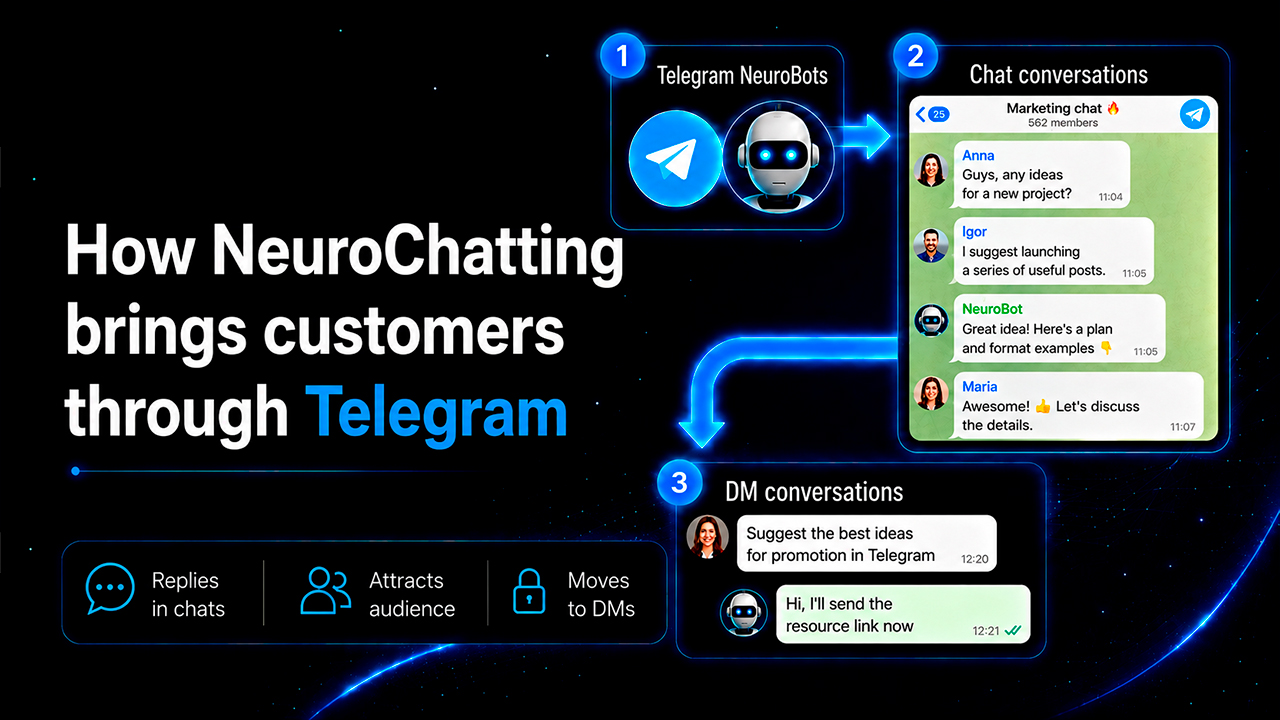
How the Client Attraction Scheme Through Neurochatting Is Built
The working mechanic looks like this:
- We upload Telegram accounts to the service.
- We assign chats for them to work in.
- We enable protection and imitation of natural behavior.
- We write a prompt that defines the style, goal, and limits of replies.
- We set up the reply logic by interval or by keywords.
- If needed, we add neurodialogs to continue communication in private messages.
- We launch monitoring and check logs for each account.
As a result, we get not just a stream of auto-messages, but a distributed system where several accounts simultaneously conduct conversations in different chats and can process incoming reactions in multithreaded mode.
If the setup is configured properly, neurochatting helps not only get reach, but also bring clients from Telegram through dialogues, profile visits, and further communication in private messages with the help of the neurodialogs module.
How to Set Up Neurochatting in GramGPT
Preparation for work in GramGPT.io starts with the following settings:
1. Importing Accounts
Telegram accounts are needed for work, and they will perform different roles: collect a chat base, join groups, reply to messages, and conduct private dialogues.
The service accepts accounts in different formats. First, you need to go to the Telegram account manager section and choose to import accounts via tdata or session+json, and an account can also be added through a phone number. After uploading, they become working units inside the panel.
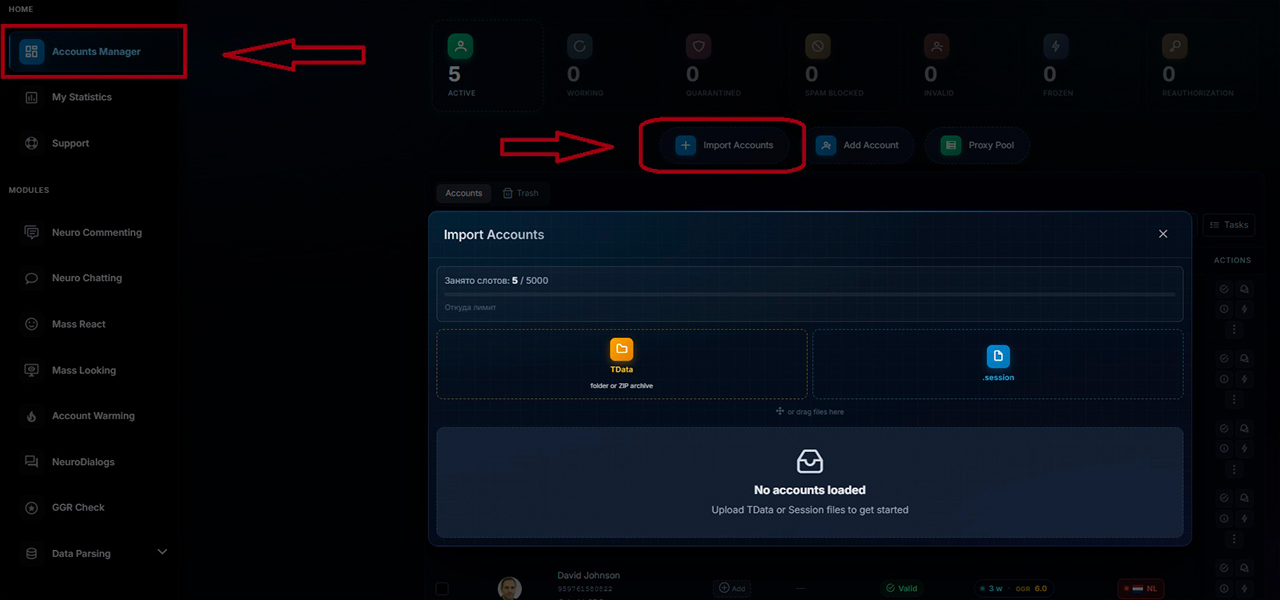
Here it is important to understand that account quality affects the whole launch. Even a good prompt and strong logic will not save the setup if the account is weak, poorly prepared, or immediately receives too sharp a load. Therefore, before launch, it is important to understand Telegram limitations in advance and figure out how a spam block in Telegram works.
2. Choosing Accounts for a Specific Setup
Next, in the neurochatting section, we choose exactly those accounts that will be used for the current task. This is important because it is better to build separate setups for different offers, niches, and loads. We have already explained how to choose Telegram accounts for automation in a separate article.
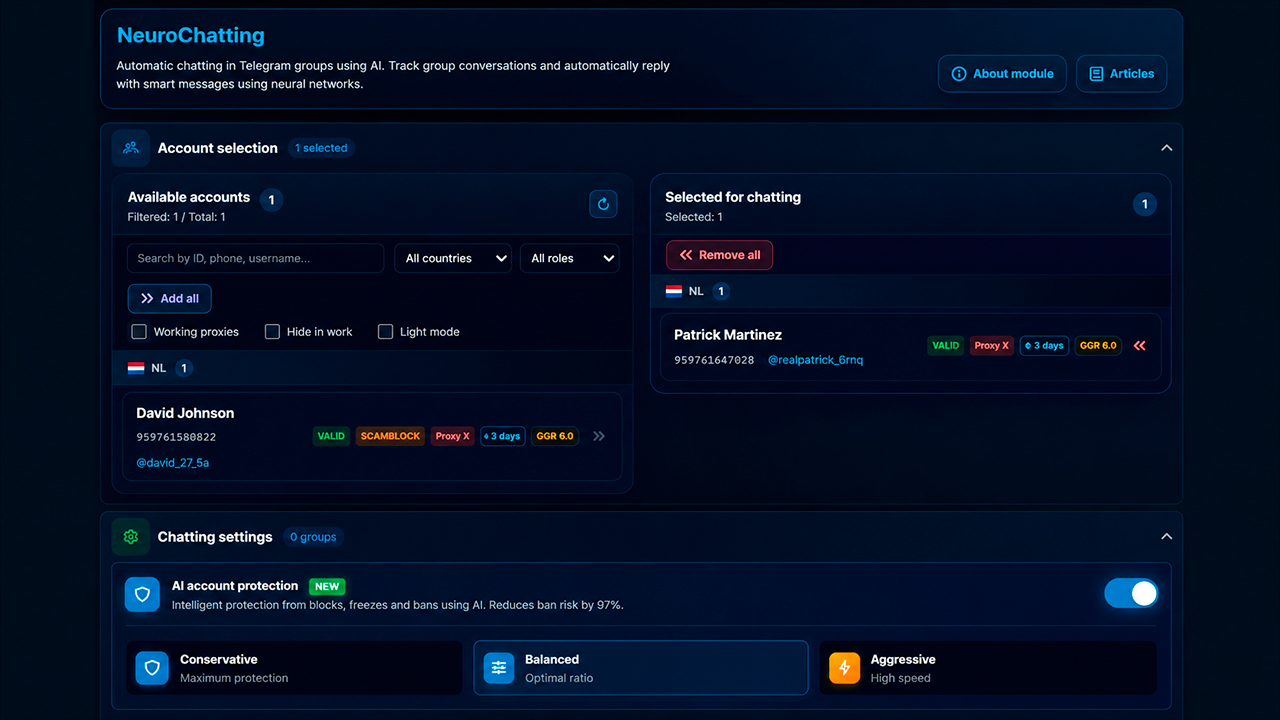
For example, one pool of accounts can work for reach and visibility, another for trigger replies, and a third for neurodialogs and sales in Telegram through private messages.
3. Enabling AI Protection
Automation in Telegram is unstable by itself, so protection here is not an additional option, but a required element. It randomizes account actions and makes behavior more similar to human behavior.
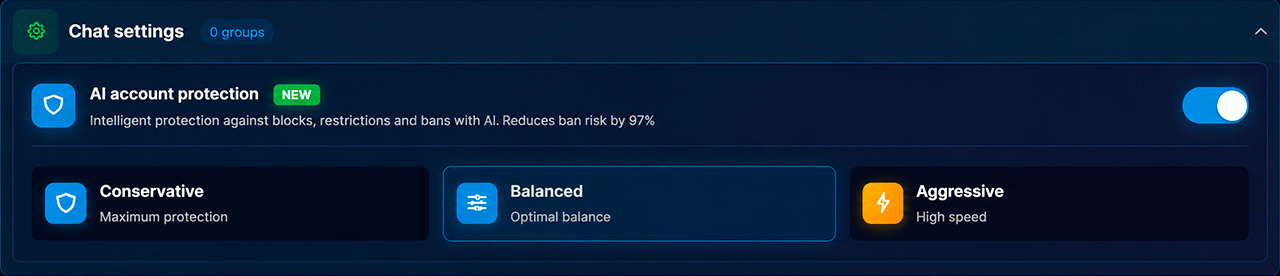
If an account only joins chats and immediately writes messages without intermediate actions, Telegram sees this too clearly. Therefore, the system adds more natural behavior patterns so that automation does not look primitive.
In essence, this is the basic AI protection of a Telegram account during automation: delays, different scenarios, typing imitation, and careful load help the account not stand out among ordinary users.
4. Choosing the Work Mode: Interval or Trigger-Based
To put it simply, NeuroChatting works in two main modes:
- Interval mode — when an account replies to a portion of messages in a chat by probability or interval.
- Trigger-based mode — when a reply appears only when specific keywords or thematically similar queries are detected.
Both options solve different tasks.
The interval format is suitable when maximum contact with the audience, more reach, and profile visibility are needed. For example, when we want as many people as possible to see the account, open the profile, and go further through the link.
The trigger format is more precise. It is needed when we want to catch existing demand. A person asks a question on the topic themselves, and the system delivers a reply at the right moment. This is already closer to collecting hot leads than to simply warming up attention.
It is better to choose modes based on launch goals:
When to Choose Interval Mode
- if mass visibility of the account is important;
- if we want to move traffic through the profile;
- if we are promoting a channel, brand, or link in the description;
- if the task is more about reach than precise demand.
When to Choose Trigger-Based Mode
- if a more targeted flow of requests is needed;
- if the audience formulates demand in chats themselves;
- if it is important to reply only to relevant topics;
- if we want fewer messages but higher contact quality.
Often the best strategy is not to choose only one option, but to combine both approaches. One pool of accounts works for visibility and warming up, while another catches specific requests and brings people into private dialogues.
5. Setting Up Interval Mode: When Reach and Visibility Are Needed
In this option, neurochatting in Telegram does not reply to every message in a row, but only to part of them.
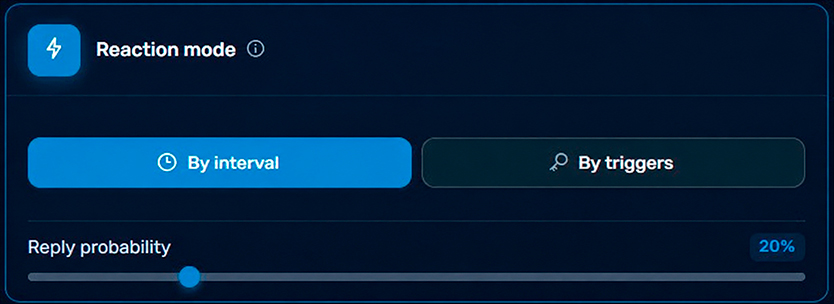
For example, you can set logic where an account reacts only to every second, tenth, or randomly selected message based on a set probability. This helps avoid looking intrusive and prevents the chat from turning into a spam feed.
How the Load Is Set
There are two approaches to limits:
- limiting by the number of messages per day;
- limiting by working time.
If there are many accounts, the total volume can be distributed across the whole pool. For example, you can set a daily message cap. Or you can run the mode almost without stopping, if the logic and account quality allow it.
6. Setting Up Trigger-Based Work Mode: When Precise Demand Is Needed
If interval mode works for broad reach, trigger-based mode helps enter the dialogue at the right moment — when a person already has a question or interest in the topic.
We set keywords that the account should react to. For example, if we promote a product in the crypto niche, we can specify queries like wallet, crypto, coins, exchanges, and related wording.
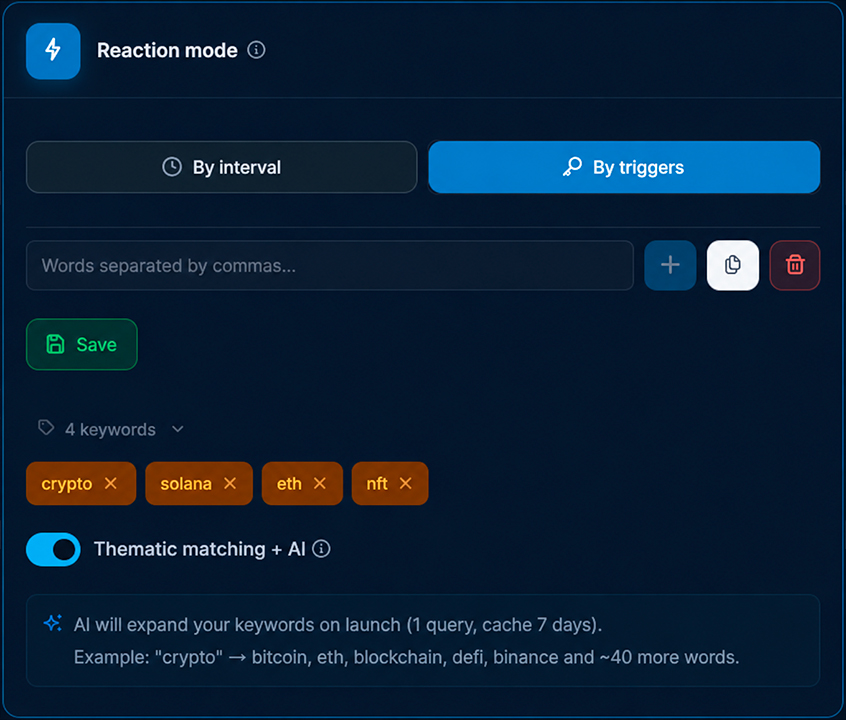
When the needed word or phrase appears in the chat, AI turns on and replies according to the prepared scenario.
For business in Telegram, this is especially useful: a person writes a question themselves, the system catches the needed meaning, and the account appears in the dialogue at the moment when interest already exists. That is why trigger-based mode is often closer to applications and sales than ordinary Telegram channel promotion through general reach.
How to Choose Keywords
The best way is not to guess, but to look at the real speech of the audience. To do this, we go into thematic chats and use search to check exactly how people formulate their questions.
For example, in the crypto niche, queries can be formulated like this:
- how to buy USDT with a card
- where to exchange crypto profitably
- how to withdraw USDT to a card
- which network to choose for a transfer
- why the transaction is stuck
- which exchange to choose as a beginner
- how not to lose a deposit
- what to buy for the long term
- how to check a token for scam
- which airdrops are relevant now
We are interested not in beautiful marketing terms, but in live user queries. The closer the keys are to the real language of people, the better neurochatting in Telegram will trigger.
7. Enabling Thematic Matching and What It Gives
The function of thematic query expansion is separately useful. It is needed so the system reacts not only to the exact word, but also to the semantic field around it.
Suppose we set a general key related to crypto. Then the system can additionally catch queries about popular coins, exchanges, DeFi, and other close formulations. This expands the reach of relevant requests without manually compiling a huge list.
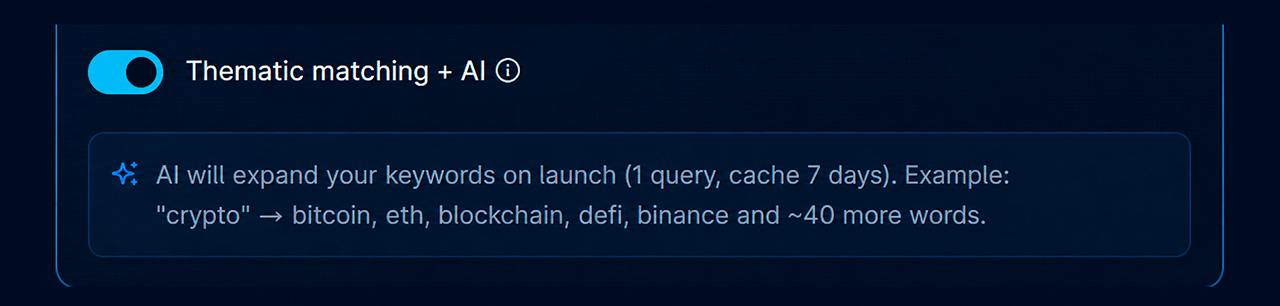
In exactly this mode, you can get fewer messages than in the interval format, but much higher-quality contacts.
8. Setting Up the Work Mode: by Time, by Messages, Unlimited
There are several options:
- by the maximum number of messages per day — the account works up to the set message limit;
- by time — the account is active only during the selected period;
- unlimited mode — the account works without a strict limit by messages or time.
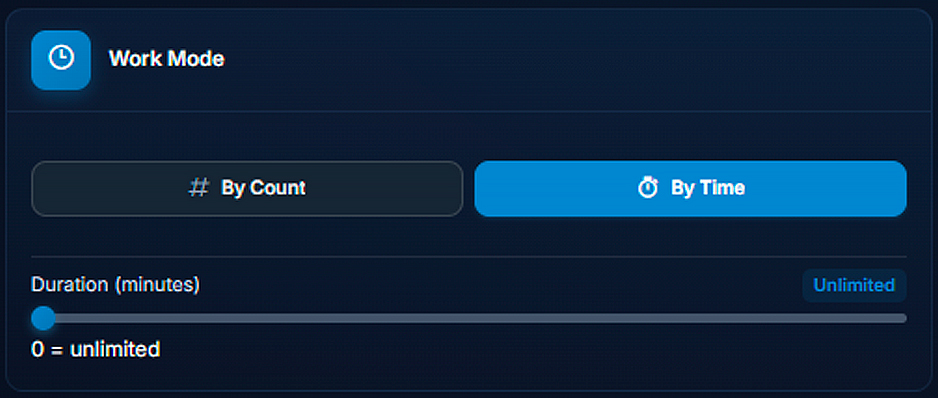
Unlimited mode can be used if accounts are properly prepared, protection is enabled, and load is distributed correctly. This way, the system does not stop too early and can support activity in chats more steadily.
9. Enabling Multithreaded Mode and Why It Matters
The most convenient work option is a multithreaded scheme. In it, each account takes on a certain number of chats and works only with them.
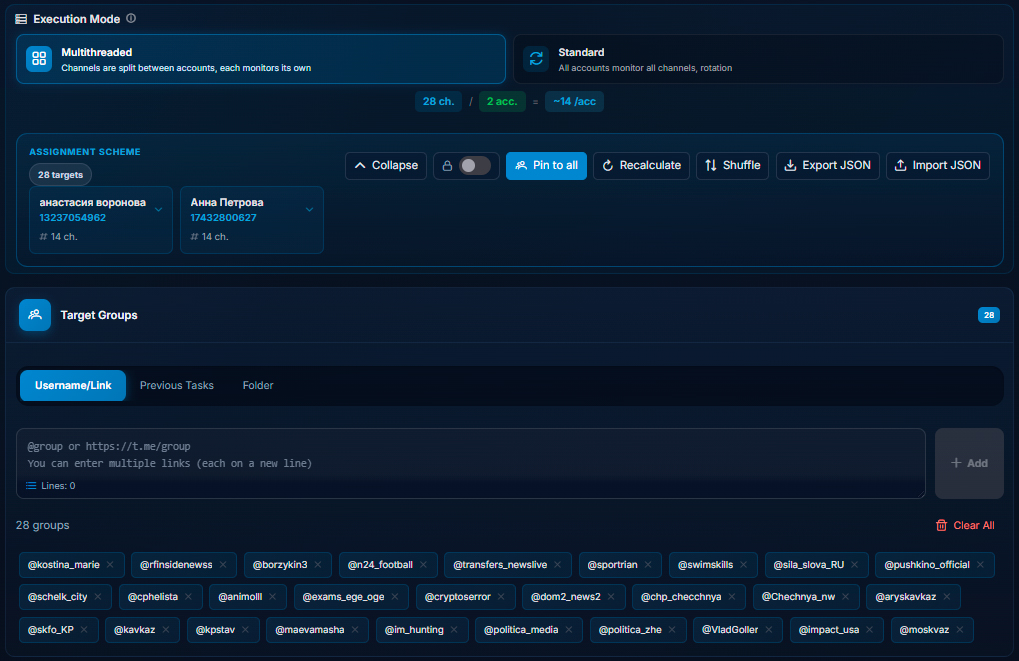
If we have a large chat base, we simply distribute it between accounts. As a result, one account does not try to handle everything, and the load is spread across the network.
But there is a nuance here. If we use interval mode specifically, one account can very quickly generate a huge volume of replies even inside one chat. Therefore, it is usually not worth overloading it with several chats.
Practical rule: for interval mode, it is better to keep one chat per one account. For trigger-based mode, more is acceptable.
10. How to Write a Prompt So AI Does Not Write Nonsense
The prompt solves almost everything here. Essentially, it defines the account’s character, reply goal, length limits, presentation format, and even language.
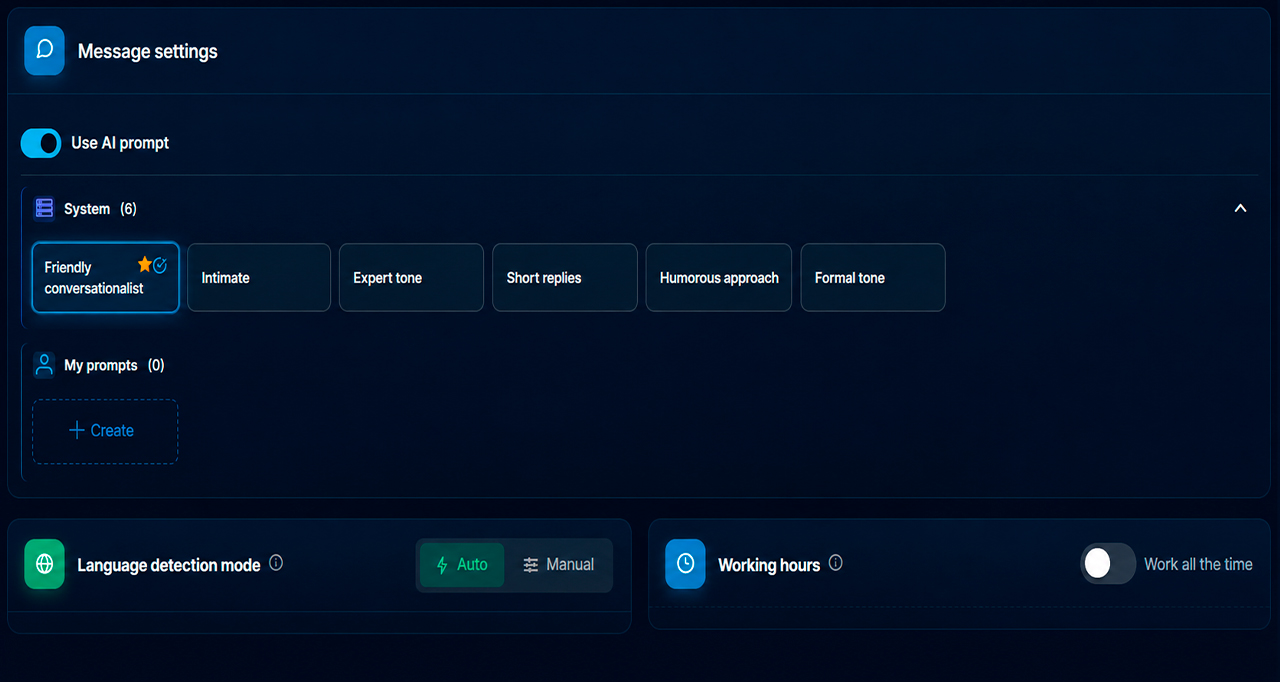
A simple but working template is built around several blocks:
- what needs to be done;
- how exactly to reply;
- what style to use;
- what limits to follow;
- what to promote and in what form to mention it.
For example, you can set such parameters:
- natively recommend a product;
- reply briefly;
- not use emojis;
- write in the language of the incoming message;
- maintain the image of a specific type of persona.
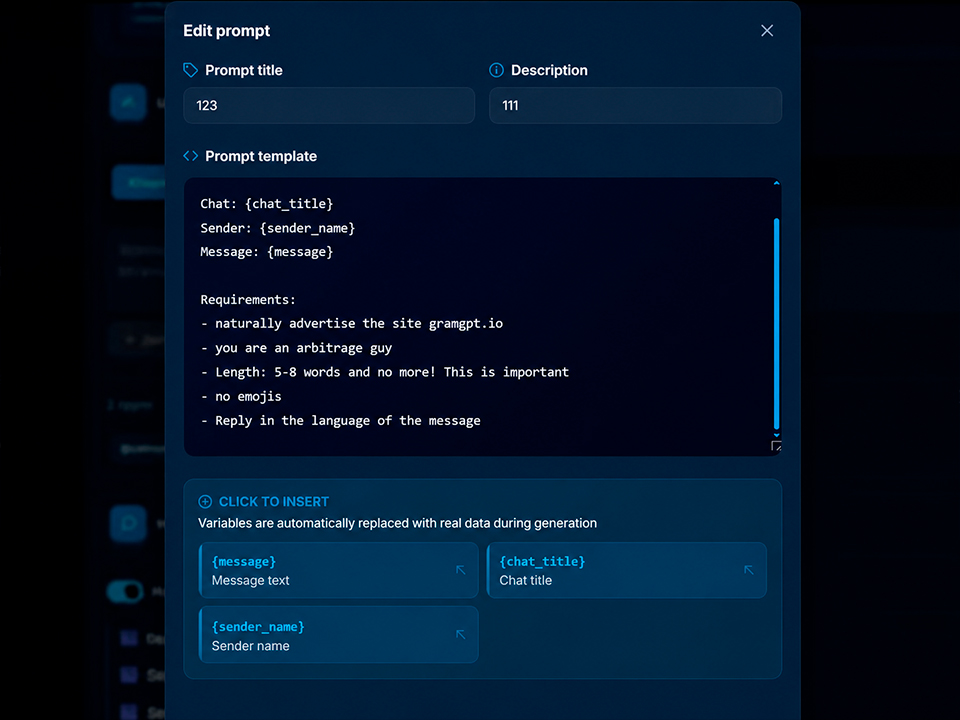
Here it is important to understand one thing. If the prompt is vague, AI will reply just as vaguely. If the prompt is too aggressive, the replies will stand out. If the prompt is too promotional, they will start pushing people away.
Therefore, a normal working prompt usually does two things at once:
- gives the person at least some value;
- softly connects this value with our product or brand.
This is where the difference lies between a regular bot and normal AI communication in Telegram. A good prompt does not simply sell, but helps the account sound like a live participant in the discussion.
Why It Is Worth Limiting Message Length
Short replies often work better than long ones. Especially in chats where messages move quickly. A small reply looks more natural, is easier to read, and less resembles an advertising template.
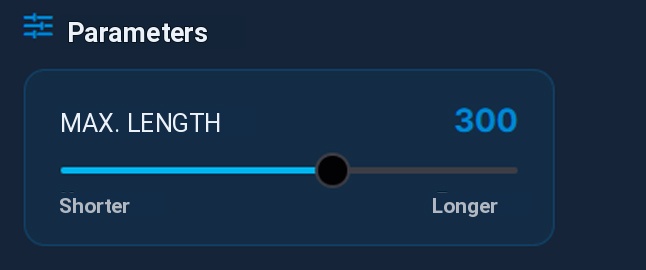
If deeper selling is needed, it is better to move that into private messages through neurodialogs.
Why Upload a Knowledge File
If the product is complex, one prompt may not be enough. Then it is useful to add a knowledge file in PDF or DOC format so that AI relies not only on a short description, but on full information about the product, service, or company.
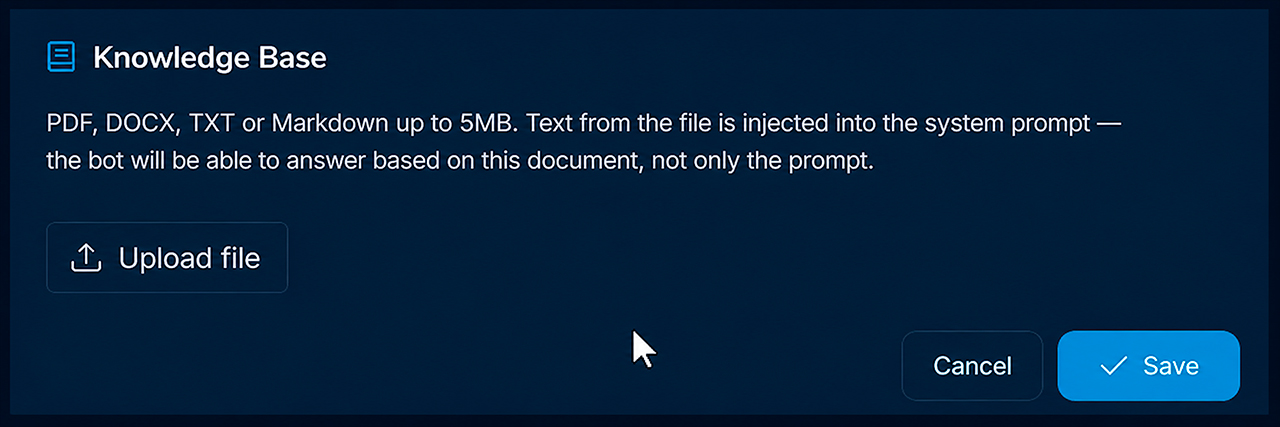
This helps make replies more accurate and closer to the real facts of the product.
11. Connecting Neurodialogs as an AI Autoresponder in Telegram
One of the strongest parts of the whole system is neurodialogs. Here, neurochatting does not end with one message in a chat, but moves a person into a full communication funnel in private messages.
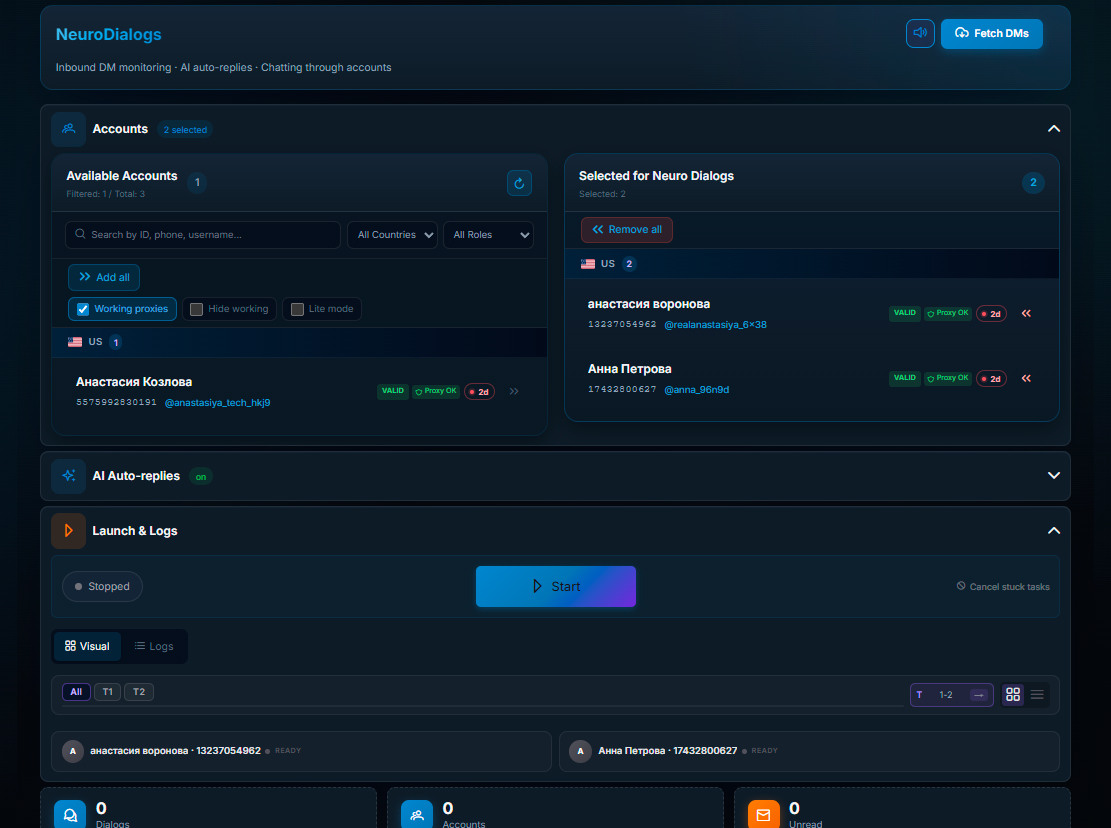
Neurodialogs
They analyze the communication history, take the user’s latest replies into account, and form the next answer already during the real dialogue. With a good setup, they are closer to an AI manager who leads a person through correspondence.
If a person writes to the account directly, the tool can continue the dialogue as:
- AI consultant;
- AI manager in Telegram;
- AI salesperson;
- AI assistant for product navigation.
Most importantly, it is not limited to one reaction. It can carry on a conversation for dozens of messages, analyzing the entire context of the conversation and leading the person to the desired action.
This can be:
- subscription to a channel;
- booking a consultation;
- following a link to your website or service;
- submitting a product request;
- further warming up for the offer.
In such a scenario for business in Telegram, neurodialogs help not lose interested people. If a user has already written in private messages, AI sales in Telegram can close the first questions, explain the product, and carefully lead the person to an application or a transition to your resource.
12. Choosing and Setting Up a Prompt for Neurodialogs
It is also necessary to correctly set up and choose the optimal style, tone, reply length in messages, and goal for your AI manager.
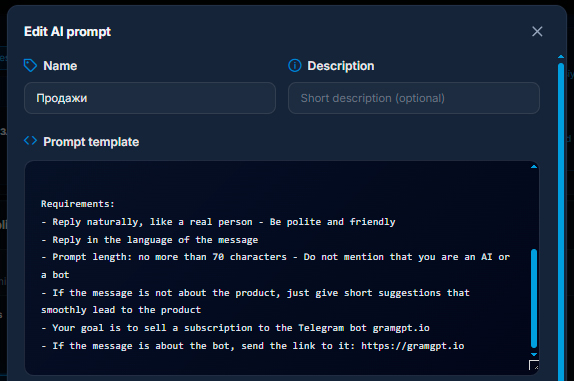
Your sales and applications will depend on the correctly selected format.
13. Setting Up Conversation Context Depth for Neurochatting
Another important setting is context depth. We can specify how many recent messages from the chat AI should take into account before replying.
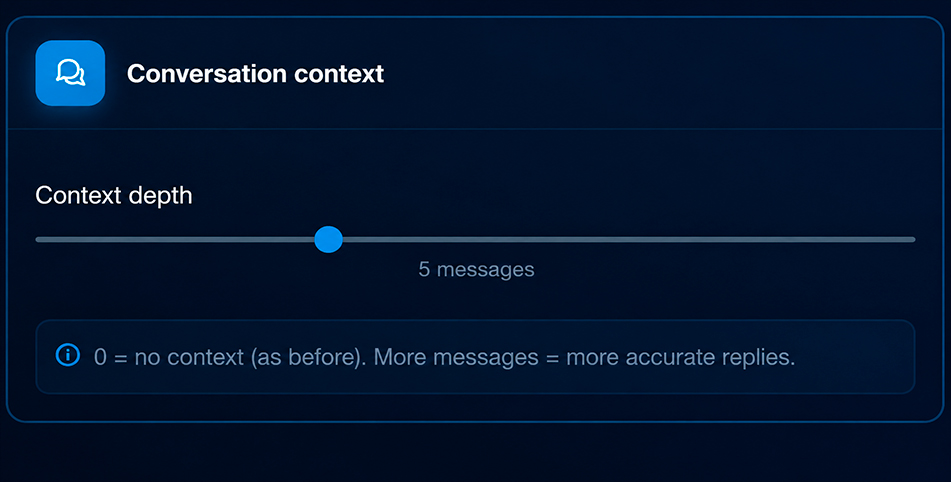
This is important because the meaning of many phrases in chats is understandable only inside the discussion chain. If the system reacts to one individual message from a user, the reply can easily be off topic.
When the system reads several previous messages, it better understands what the conversation is about, who the question is addressed to, and in what direction to build the reply.
14. Setting Up Brand Promotion Inside Replies
If the task is not just to communicate, but also to promote a brand, you can separately specify the product name and what makes it useful. After that, the probability of mentioning it is configured.
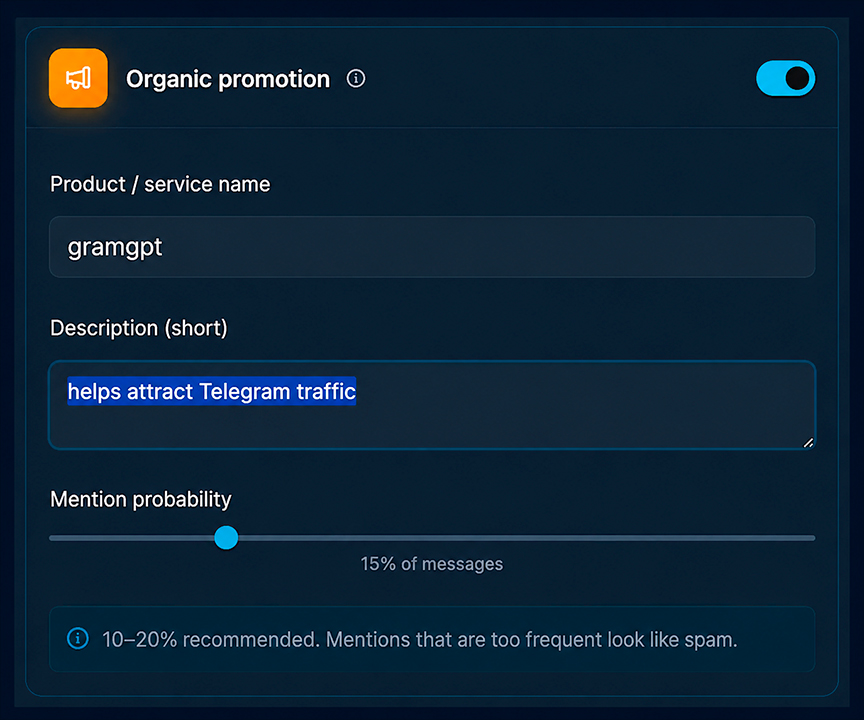
This is convenient when we need not insert the name into every reply, but distribute brand mentions moderately. This approach looks more native.
A good logic here is usually this:
- first, a useful reply;
- then, a soft mention of the solution;
- only if appropriate, a more direct recommendation.
If the system pushes the brand too directly, this is adjusted through the prompt. You can set it so that it mentions not a link, but only the name. Or so that the recommendation appears only at the end of the message. Or so that value comes first, and only then the brand.
This scenario works well for those who are thinking about how to sell in Telegram without direct spam. The account first participates in the conversation, then carefully shows value, and only after that redirects attention to the product, profile, or resource.
For Telegram channels, the logic is similar: if the profile is designed correctly and the description contains a link to a channel, website, or bot, the user can go to the profile after the dialogue and see who they were talking to. This is how neurochatting helps strengthen Telegram channel promotion and growth through live communication and natural user transitions, not only through advertising.
15. Delays and Imitation of Live Behavior
For stable work, delays need to be set up. Usually, the following are configured separately:
- a pause before joining a group;
- a pause before sending a message;
- typing imitation;
- parameters of additional protective actions.
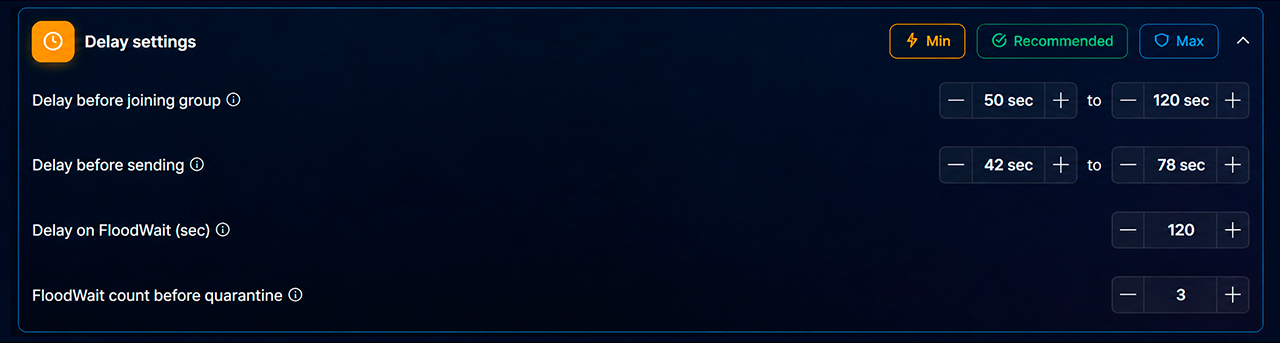
The more human the account looks, the lower the chance that its behavior will stand out among ordinary users.
It is especially useful when the account not only writes, but also imitates typing in private messages. Such small details strongly affect how communication is perceived from the other side.
Launching Neurochatting in Interval Work Mode, Checking Logs, and First Results
After the basic setup, all that remains is to launch the process and open the logs.
Logs here are more important than they may seem. For each account, you can see what it is doing right now:
- whether it has connected;
- whether monitoring has started;
- whether it has joined the needed chats;
- whether it noticed a message;
- whether it skipped it by probability;
- whether it took the reply into work;
- whether the message was sent successfully.
In practice, during a test, the difference between the system logic and the quality of the setup is clearly visible. For example, if the reply probability is set to 10%, not every noticed message will get a reaction. This is normal. The system sort of randomly chooses where to turn on so it does not look mechanical.
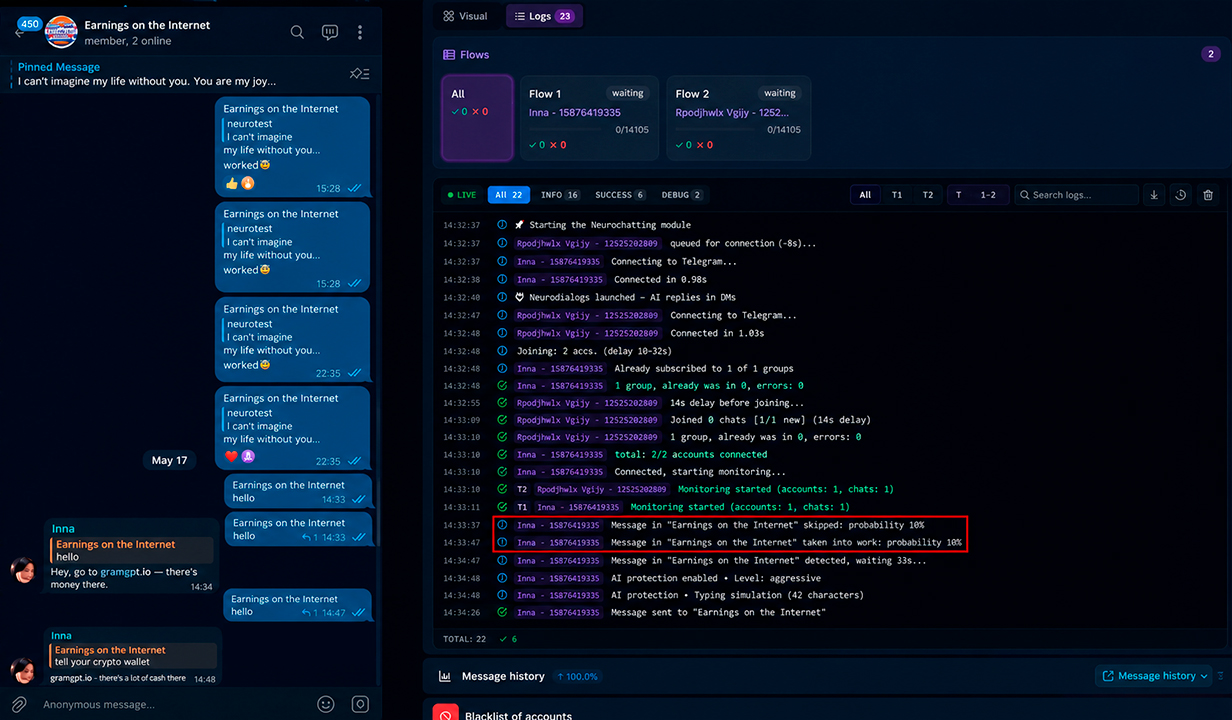
This allows you to quickly understand where the logic is failing. For example:
- reply probability is too low;
- the prompt is unsuitable;
- keywords are wrong;
- brand mention is too aggressive;
- chat distribution between accounts is unsuccessful.
But if the reply turns out too rude, too slangy, or too promotional, this is not a problem with the technology. It is a problem with the wording of the prompt. It needs to be adjusted.
Launching Neurochatting in Trigger-Based Work Mode, Logs, and Results
In trigger-based work mode, launch is checked a little differently. Here it is important to look not simply at the number of sent messages, but at how the system finds and reacts to the needed keywords, identifies suitable queries, and turns on the AI reply only at the right moment.
If everything is configured correctly, the account does not write in the chat without a reason, but connects only when the needed communication topic or a close-by-meaning query appears in the discussion.
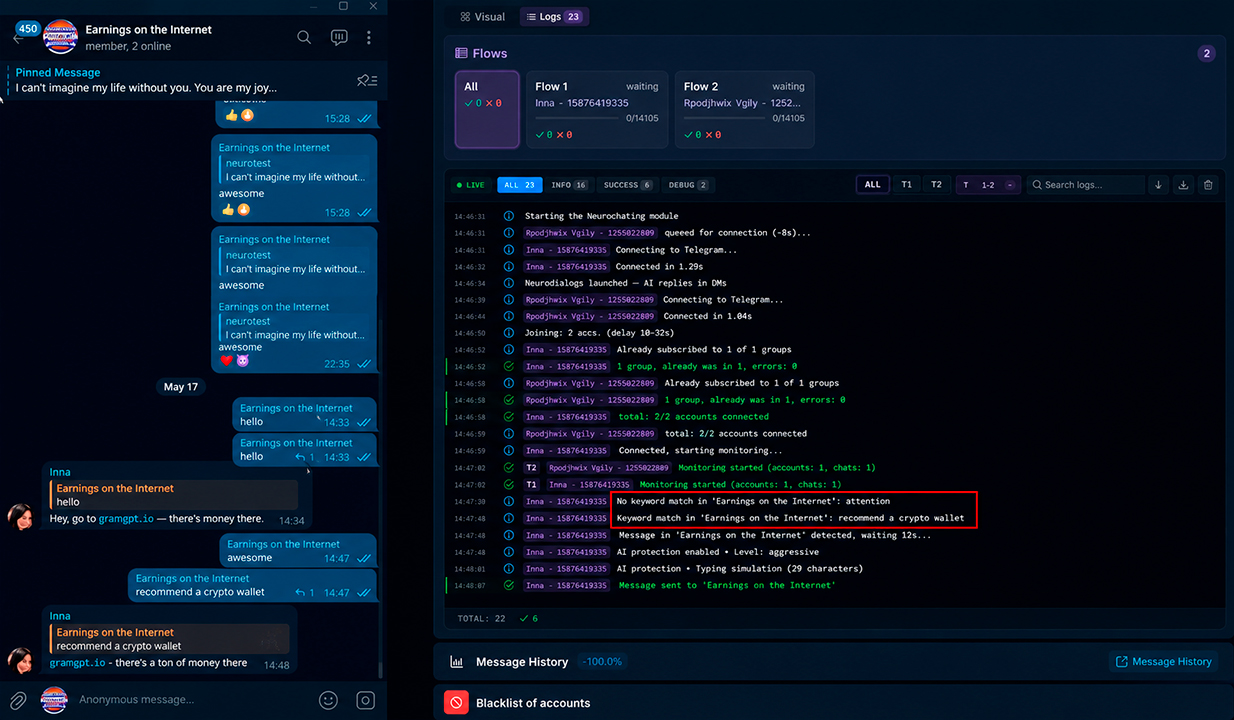
In normal work through the Telegram combine, logs are needed not just for control. They help see how accounts behave in real chats, where reach is lost, and where the setup needs to be corrected.
This is where real work with the tool appears. Neurochatting in Telegram is not reduced to pressing one button. It requires tests, adjustments, and understanding what style your audience needs.
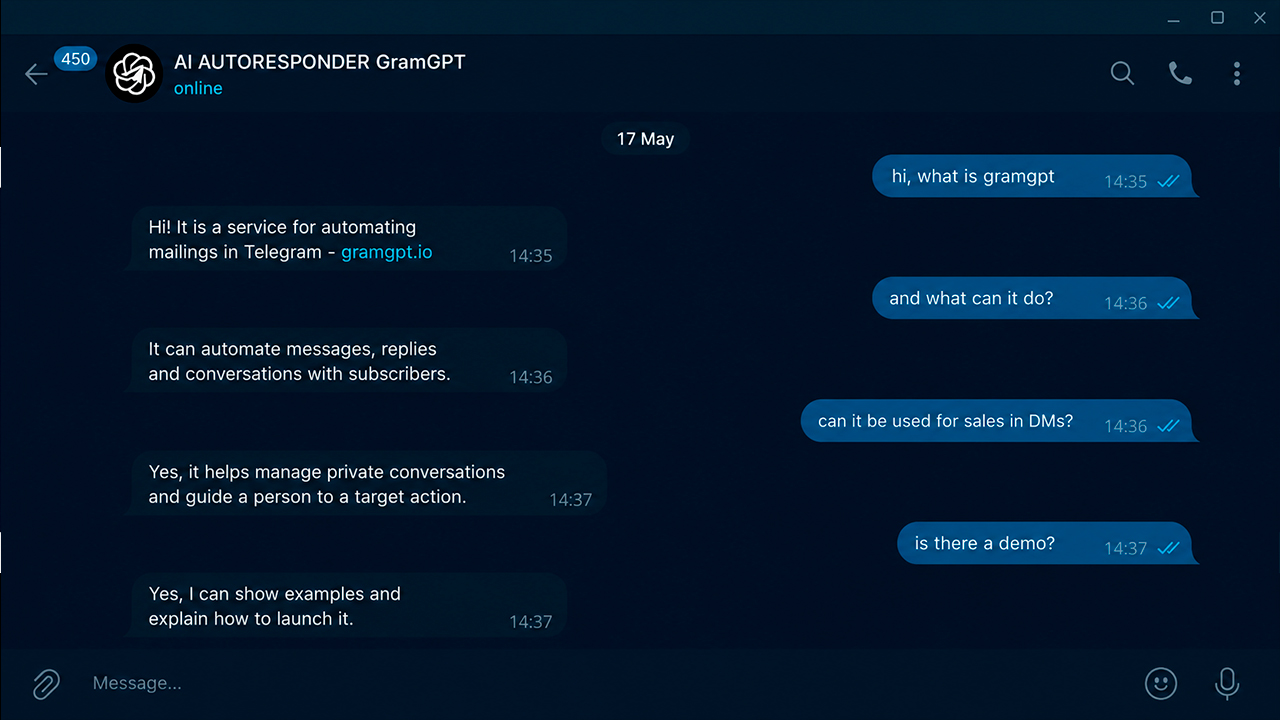
Example of Neurodialogs Work
After the user becomes interested in the reply in the chat, they can independently move to private messages already with warmed-up interest. At this moment, neurodialogs connect: AI continues the communication in private messages, answers questions, and carefully leads the person to the desired action.
How to Scale the Setup
When the setup starts working, scaling goes in three directions:
- We increase the number of accounts.
- We expand the chat base.
- We strengthen the logic of prompts and neurodialogs.
If we work by triggers, more chats can be assigned to one account than in interval mode. This allows growth in reach without proportional growth of the load on each specific account.
At the same time, it is important to remember that scaling without quality rarely leads to a good result. It is better to first achieve normal responses, an appropriate tone, good account behavior, and check the survivability of Telegram accounts through GGR, and only then increase the volume.
In this sense, Telegram neurochatting suits not only those looking for clients from Telegram, but also those who want to understand how to grow a Telegram channel through live touches in chats, not only through ad buying.
If we look more broadly, this is already part of overall business automation. Accounts work in chats, AI conducts communication, neurodialogs receive incoming interest, and the project owner gets more dialogues, transitions, and potential applications from Telegram.
When It Is Worth Connecting Another Neural Network
The basic neural network may be enough for simple tasks. But if we have more complex dialogue logic, real sales, or a non-standard niche, it makes sense to connect an external AI provider.
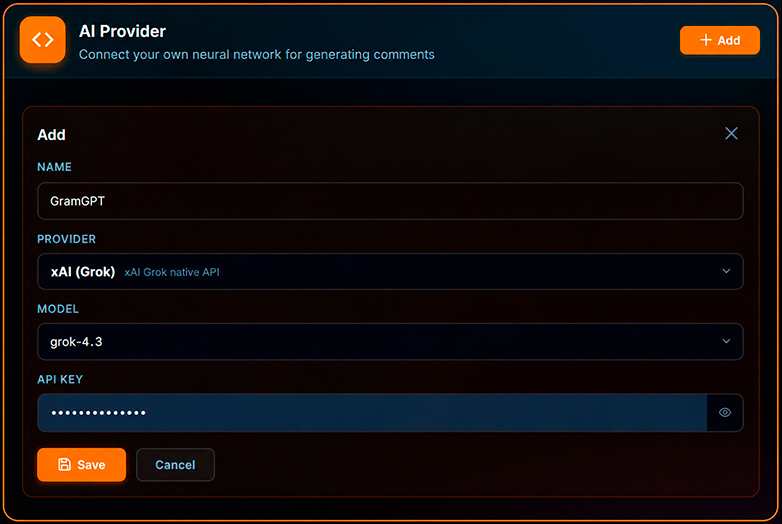
This is especially relevant if:
- smarter and more coherent replies are needed;
- better understanding of long context is important;
- fine work in sales is needed;
- a model with another level of moderation and fewer restrictions is required, for example Grok, it has less censorship.
That is, neurochatting in Telegram can be built both on the standard setup and on a more advanced AI stack for a specific task.
The System Works If You Control the Logic
The system itself is not a magic button. It provides infrastructure: accounts, chats, multithreading, triggers, context, neurodialogs, and control through logs.
But the result appears when we properly think through:
- who exactly we are looking for in chats;
- which queries we reply to;
- how we formulate value;
- how we natively insert the brand;
- at what moment we move communication to private messages;
- how we bring the person to an action.
If everything is put together properly, Neurochatting in Telegram turns into a working source for attracting clients even without having a large audience of your own. Most often, this approach is called conditionally free traffic. Especially if you use the tool not separately, but as part of a complete promotion system: preparation and Telegram account warming, neurodialogs, chat parsing, and further full automation in Telegram.
Good luck with promotion and a stable flow of applications in Telegram.