If you need to understand how to revive a Telegram chat, simply inflating the number of members is not enough. A person enters the group and first of all looks at whether meaningful communication is taking place inside, not just at the number in the counter. If there is no activity, attention is quickly lost, and the user may simply leave without ever engaging with the community.
To revive a chat or group in GramGPT, Neuroshilling is used. The function allows you to connect Telegram accounts, set the topic, communication style, pace, and restrictions, and then launch automated communication inside the group.

In essence, Neuroshilling in Telegram helps configure controlled AI conversations inside the community. Below, we will examine in detail how to configure a Telegram chat using this function: prepare accounts, set topics, create personas, configure intensity, connect chats, and launch a campaign.
What Reviving a Telegram Chat with Neuroshilling Is
Reviving a Telegram chat with Neuroshilling is communication automation in which connected accounts use AI to communicate with one another, respond to real users, and maintain dialogue on specified topics and scenarios.
The main task of the function is not simply to increase the number of messages, but to create and continue meaningful discussions inside the group. All main parameters of such a scenario are configured before launch.
How to Make a Telegram Chat Active and Lively
Chat activity is created not by numbers, but by context: questions, answers, different points of view, and continued discussions. When a conversation is already taking place in the group, it is easier for a new member to join in, ask a question, or support the topic.
If you are interested in how to make a Telegram chat active, the number of members alone is not enough. Even a large Telegram chat can look empty if there are no fresh messages and no one maintains communication.
Telegram Neuroshilling can be used in different niches where regular communication is important:
- Traffic arbitrage — discussing funnels, traffic sources, creatives, and results;
- Cryptocurrencies — market news, coins, strategies, and event analysis;
- Dating — questions, discussions, and maintaining communication between members;
- Professional communities — sharing experience, cases, tools, and practical advice;
- Education and online courses — questions about materials, discussing assignments, and sharing experience;
- Services and products — discussing functions, use cases, and frequently asked user questions.
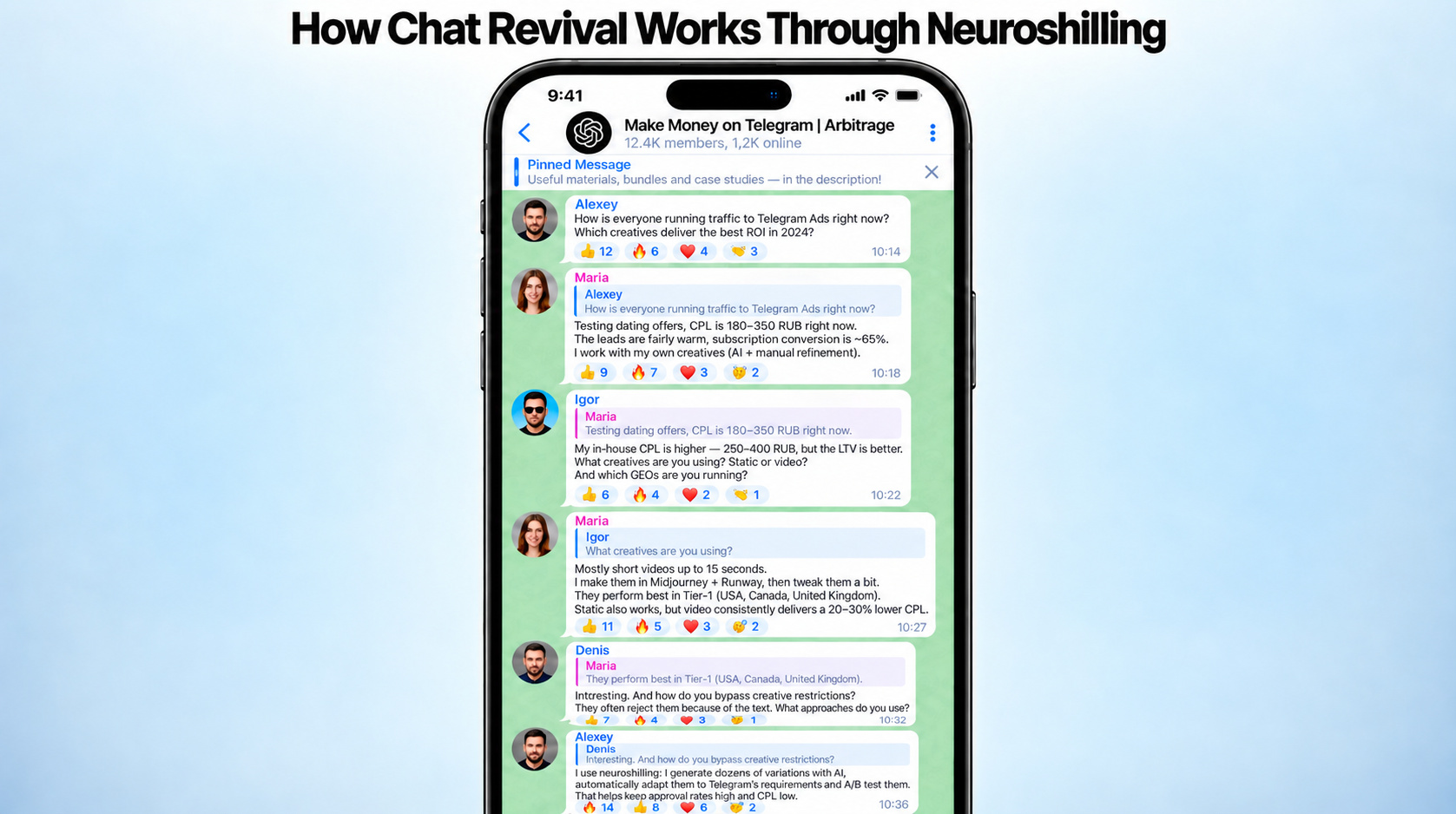
The task of Neuroshilling is not to create a stream of identical messages, but to maintain a meaningful pace of communication for a specific Telegram chat and form an active Telegram chat that new members can join more easily.
How to Launch Chat Revival through Neuroshilling in GramGPT.io
Chat revival is configured step by step: we prepare accounts, set communication parameters, and launch the campaign. Below, we will examine each stage separately.
To configure the entire setup, we use GramGPT.io software for Telegram. It combines work with accounts, communication scenarios, chats, and campaigns in one interface, so all stages can be configured and controlled sequentially from one place.
Step 1. Prepare Telegram Accounts
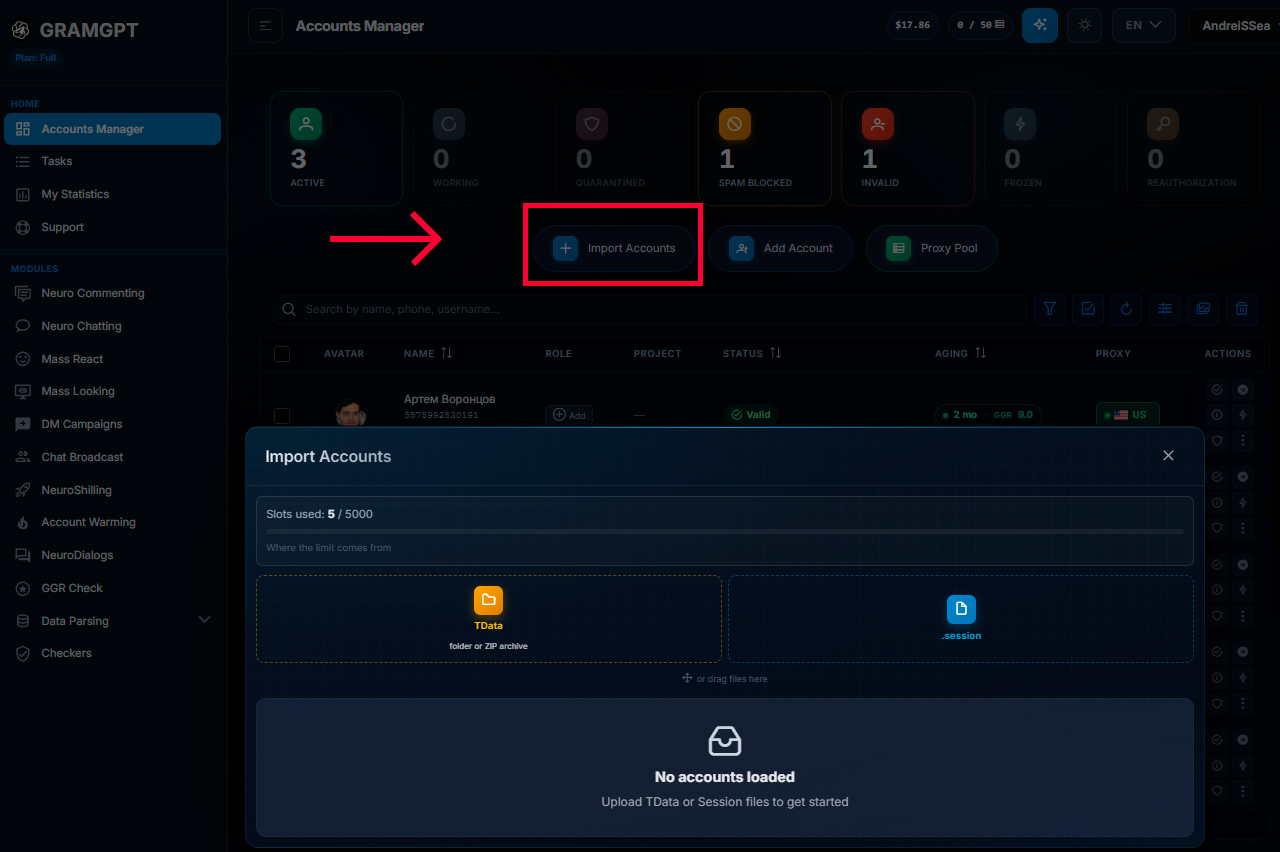
First, we add working Telegram accounts to the Combine and let them rest for 24 hours. Before launch, it is also useful to review materials on how to buy Telegram accounts for automation and how to protect a Telegram account after purchase so that you can prepare them properly for work in advance.
After that, go to the “Neuroshilling” section, create a new campaign, select the chat revival mode and select the accounts that will participate in the campaign. It is optimal to add 5–8 accounts or more so that some of them can be left in reserve.
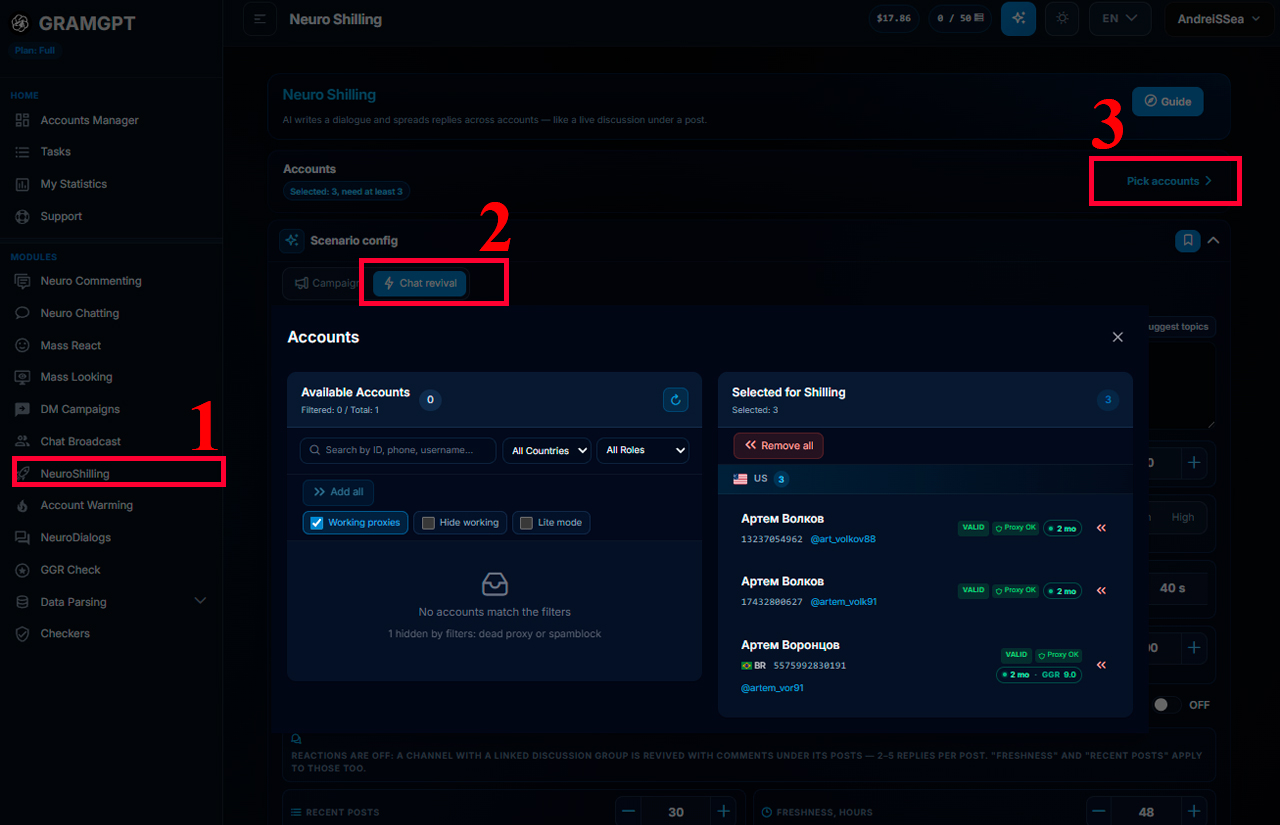
In the “How many personas” parameter, specify how many accounts will simultaneously participate in communication.

For example, if 8 accounts are added, you can select 4 personas — they will participate in the dialogue, while the rest will remain in reserve. If you work with other people’s chats and one of the main accounts is blocked or becomes unavailable, the system can connect a free account from the reserve.
This immediately forms the main group of accounts for communication and the reserve, after which you can proceed to configuring topics and the AI conversation scenario.
Step 2. Set Topics for AI Conversations
Proceed to the scenario configuration settings. In the “What is the chat about (topic)” parameter, specify the main direction of communication. For example: traffic arbitrage around gambling offers. Then click “Suggest topics” on the right — AI will generate starting questions and discussion prompts. If the options are not suitable, they can be edited or replaced with your own.
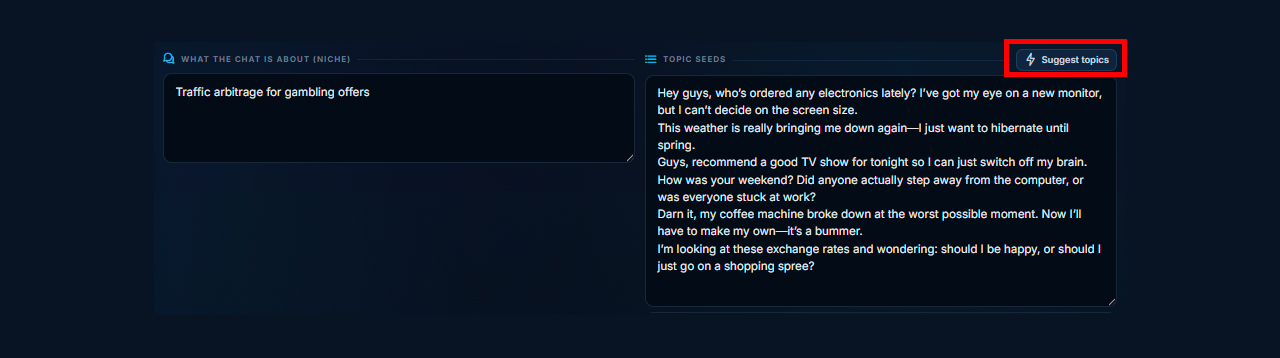
The more precisely the topic is specified, the more naturally the conversation will develop. It is better to immediately specify concrete directions: case analyses, questions about tools, niche news, practical observations, and common participant problems.
This gives GramGPT Neuroshilling clear context for communication, while AI conversations can develop and continue sequentially between different accounts.
Step 3. Configure Activity in a Telegram Chat
After selecting topics, proceed to configuring communication intensity. Here we set the main parameters that determine message frequency, replies, and the overall pace of the dialogue:
- Total number of messages per day. The total number of messages from all active accounts per day.

- Ramp-up, days. Specify how many days it will take for the daily limit to reach full capacity. With a value of 3, one quarter of the limit is available on the first day — this is safer for fresh accounts. If you set 0, it will work at full capacity immediately.

- Reply activity. You can choose one of three modes: low, medium, or high — this determines how actively accounts will reply to participant messages.

- Conversation pace. Calm — replies approximately every 15 seconds, lively — every ~8 seconds, hot — every ~4 seconds. You can also select a custom mode and set the required intervals yourself.

- Total message limit. Determines how many messages the campaign will send over its entire operating period. For example, if you set 1,000 messages per day and a total limit of 5,000 messages, the work will end after 5,000 messages have been reached.

These parameters allow you to configure activity in a Telegram chat for a specific community and form an active chat with a suitable communication pace. This way, Telegram chat automation is not reduced to maximum sending speed — intensity, replies, and intervals can be selected for the required scenario.
Step 4. Generate Personas for Automated Conversations in a Telegram Chat
Next, create personas for the connected accounts. Neuroshilling assigns each persona a role, age range, nickname, personality, and communication style.
For example, one persona can be a calm person who writes briefly and to the point. If necessary, the finished version can be changed manually: configure manner of speech, emotionality, words used, and position in the discussion.

To prevent automated conversations in a Telegram chat from looking identical, it is better to assign different roles to accounts:
- one asks questions;
- the second answers briefly and factually;
- the third supplements the discussion with examples.
This gives each account its own communication style and makes the dialogue develop in a more varied way.
Useful: persona generation is especially suitable for dating chats, where you can create, for example, a flirtatious or dominant personality and set a suitable communication style for it in advance. This helps attract attention to the profile, engage the audience in dialogue, and hold their attention longer. We previously covered methods of promoting 18+ Telegram channels, where we also discussed ways to attract users.
Step 5. Connect Chats, Delays, and Limits
Before launching the campaign, specify the chats where AI conversations will take place and set delays between them.

Additionally, you can configure:
- Message limits per account. Specify the maximum number of messages per day and the total limit for the account. In ordinary correspondence, there are generally no strict restrictions, but before promotion it is still better to review the message limits in Telegram in advance and set values according to the required communication intensity.

- Reserve accounts. Especially useful when working in other people’s chats. If one of the main accounts is blocked or becomes unavailable, the system will connect a free account from the reserve. The campaign will continue without stopping and will preserve the specified communication structure.
For different chats, you can set your own delays and restrictions: for example, maintain a calm pace in one and more active communication in another.
Step 6. Connect an AI Autoresponder for Private Messages
In the settings, you can connect an autoresponder through NeuroDialogues. Then the account will be able to continue communication in private messages: answer questions on the specified topic, explain conditions, provide additional information, or direct the user to the required resource.
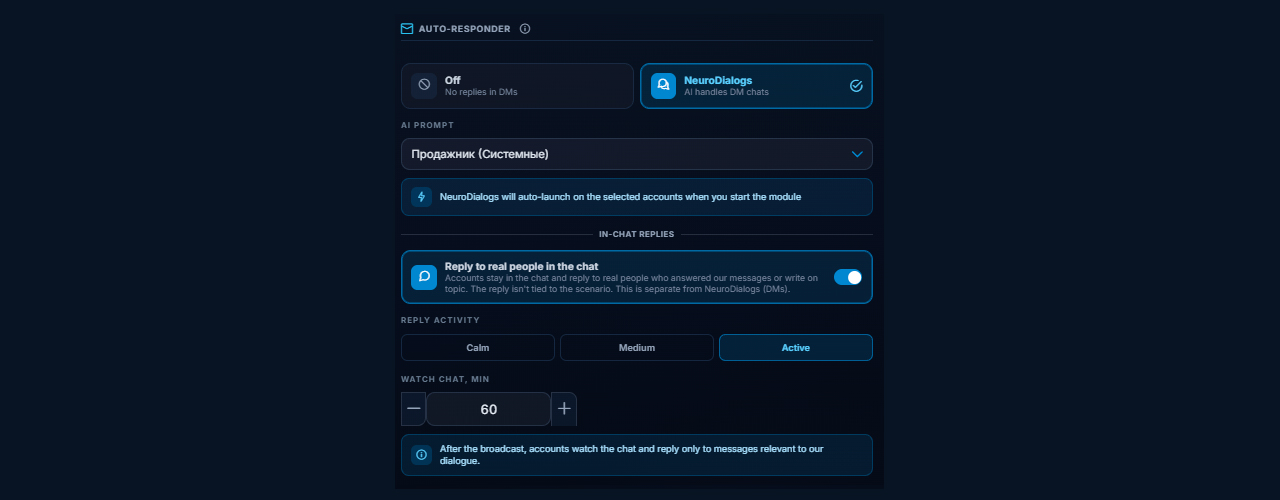
For example, if you are promoting a Telegram channel about sports betting, after communicating in the chat, the user may write to the account in private messages:
- User message: “What do you think about this tipster?”
- Autoresponder reply: “A good tipster, he has a high percentage of winning bets and overall strong results.”
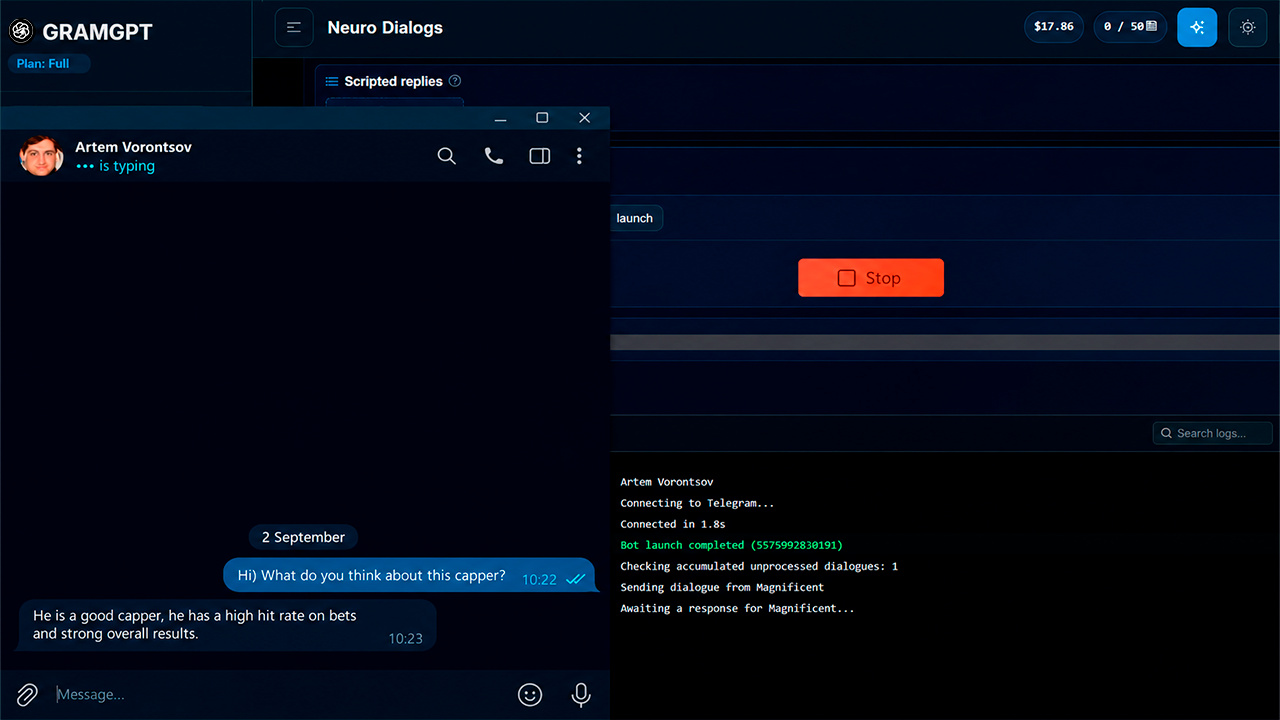
This way, Neuroshilling in Telegram together with NeuroDialogues works in two directions at once: it maintains activity in the general chat and helps continue communication with interested users in private messages.
Step 7. Launch Neuroshilling and Monitor AI Conversations
After all settings are configured, click “Launch shilling”. The working window displays campaign actions: which accounts send messages, whom they reply to, and how the dialogue develops.
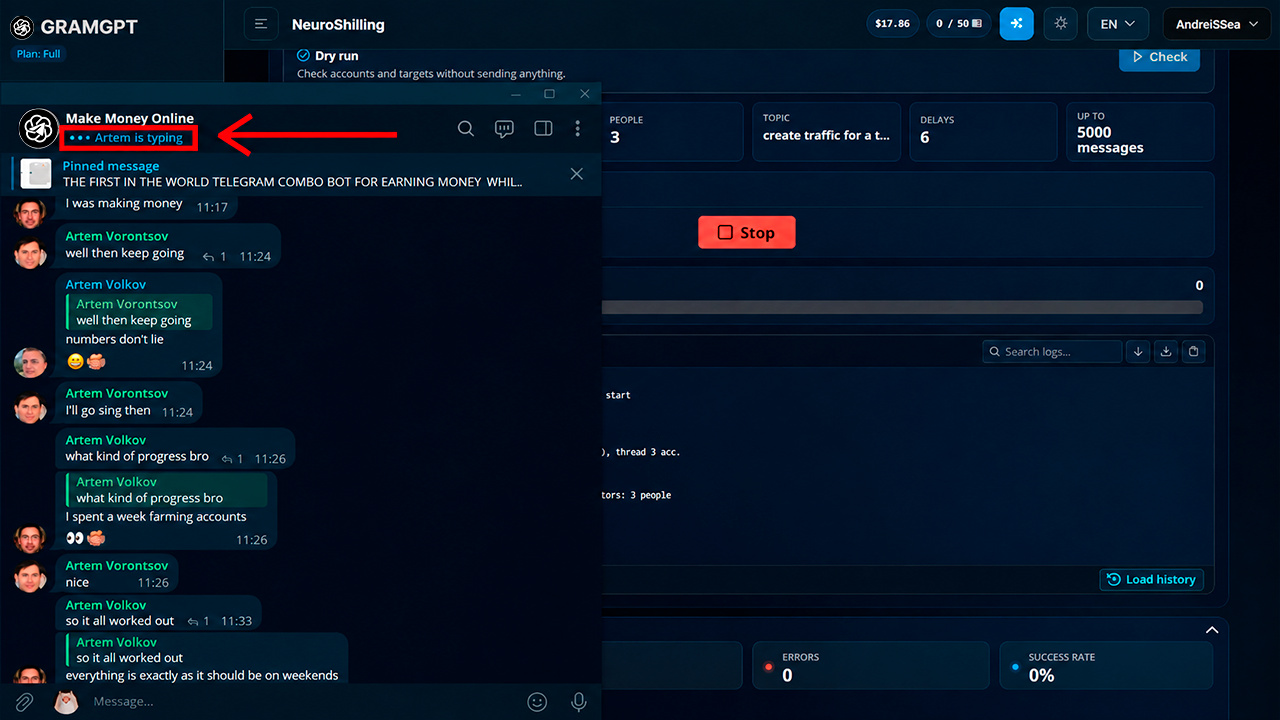
The mechanics are built around continuing the conversation. One account raises a topic, another replies, the third adds its comment, after which the first can return with a clarification. This creates a long discussion thread instead of a set of disconnected phrases.
For chat revival through Neuroshilling to work naturally, it is better to think through topics, account roles, and communication pace in advance. Do not use identical scenarios or overload the chat with messages — the more natural the settings, the better the dialogue develops.
How Neuroshilling Helps Promote a Chat and Retain an Audience
Neuroshilling solves two tasks at once: it helps promote a Telegram channel, chat, group, or product and simultaneously retain user attention by reviving communication inside the community. We covered in more detail how promotion through this tool works in the article “Neuroshilling in Telegram”.
- Audience attraction. Before promoting a Telegram chat, it is important to consider not only transitions from new users. Neuroshilling helps maintain thematic discussions, respond to participants, and attract traffic through communication to a channel, group, or your resource.
- Engagement and retention. If subscribers come to a Telegram chat from advertising, other channels, or external platforms, Telegram chat promotion continues inside the community: Neuroshilling helps maintain dialogue, answer questions, and keep users’ attention longer.
Therefore, Telegram promotion through Neuroshilling can be built in two directions at once: attracting attention to the required project and working with the audience that has already arrived. More broadly, when talking about how to promote on Telegram, the module can be used independently or strengthened with advertising, content, and other traffic sources.
Conclusion: What Is Important for Reviving a Telegram Chat
If we talk about how to revive a Telegram chat and achieve activity from real users, there is no universal scenario here. What works well in one community may produce almost no response in another.
After launch, it is better to look at audience behavior:
- which topics participants pick up themselves and continue discussing;
- which messages real users reply to more often;
- which scenarios create a natural continuation of the dialogue and which quickly fade out.
Then the chat revival scenario can be gradually adapted to the audience’s reaction. Over time, it becomes clear which topics and communication format actually work specifically in your community.