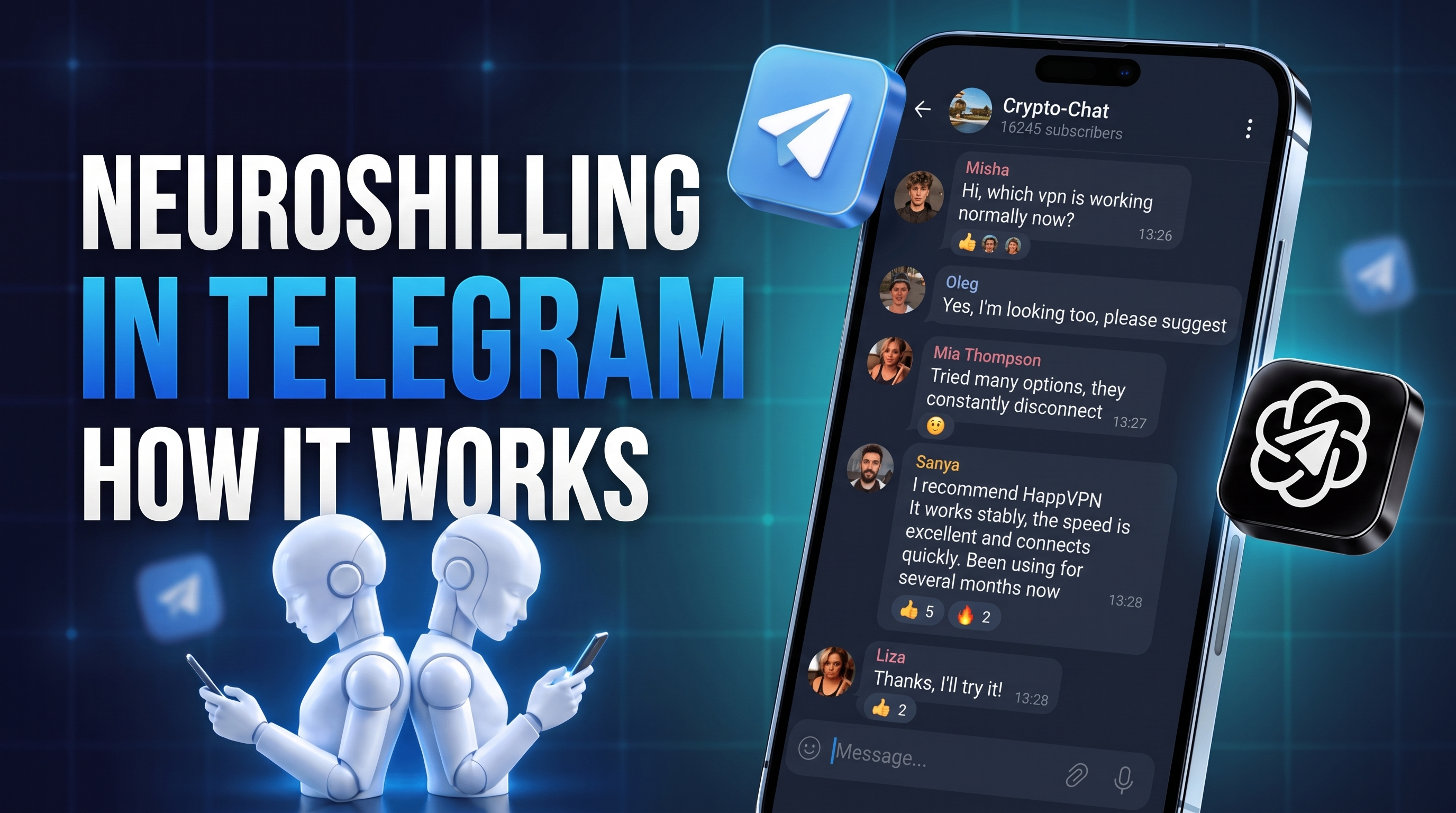
Attracting an audience from Telegram using only familiar advertising methods is becoming increasingly difficult. The platform regularly changes restrictions on account activity, users recognize direct advertising messages more quickly, and competition for attention is growing. Therefore, native mechanics that are integrated into ordinary communication and do not look like a separate advertising publication are playing an increasingly important role.
One such tool is Neuroshilling in Telegram. Here, interest in a product is formed through a sequential AI dialogue between several accounts: one starts the topic, another supports the conversation, a third shares a recommendation, and additional participants help develop the discussion. As a result, the product, service, or channel appears within a natural conversation.
Next, we will examine what Neuroshilling in Telegram is, the logic by which this mechanism works, and how to launch it in GramGPT.io. We will show account and proxy preparation, scenario creation, collection of a channel and chat database, delay and limit configuration, reserve connection, and campaign launch.
What Neuroshilling in Telegram Is
Neuroshilling in Telegram is a promotion method based on pre-planned AI conversation scenarios between several accounts. Within such communication, a product, service, channel, website, or other resource is mentioned natively — directly in a thematic chat or comments where the required audience is already present.
In terms of the promotion principle, Neuroshilling is similar to Neurochatting in Telegram. In Neurochatting, an AI account joins a conversation with a user, reacts to the context, and during communication can carefully suggest a product or service. Neuroshilling uses a different, more engaging model: several prepared accounts communicate with one another according to a scenario, while the advertising recommendation appears organically within this conversation.
The main idea of Neuroshilling is not to send a single message with a link, but to create a sequential discussion that develops according to a clear logic:
- Initiator sets the direction of the conversation or identifies a problem.
- Responder supports the topic and shows additional interest.
- Expert shares experience and leads the conversation toward a recommendation.
- Additional participants can clarify details, react to messages, and support the conversation.
The scenario can consist of four or five messages or unfold into a longer thread of 10 or more replies. What matters more is not the number of messages, but the natural sequence: question → interest → experience → clarification → conclusion.
How Neuroshilling Works in Telegram
Promotion in Telegram through Neuroshilling is built around the distribution of roles and the sequence of replies. Several accounts develop the topic in turn, while the automation tool reproduces the prepared scenario in selected chats or channel comments.
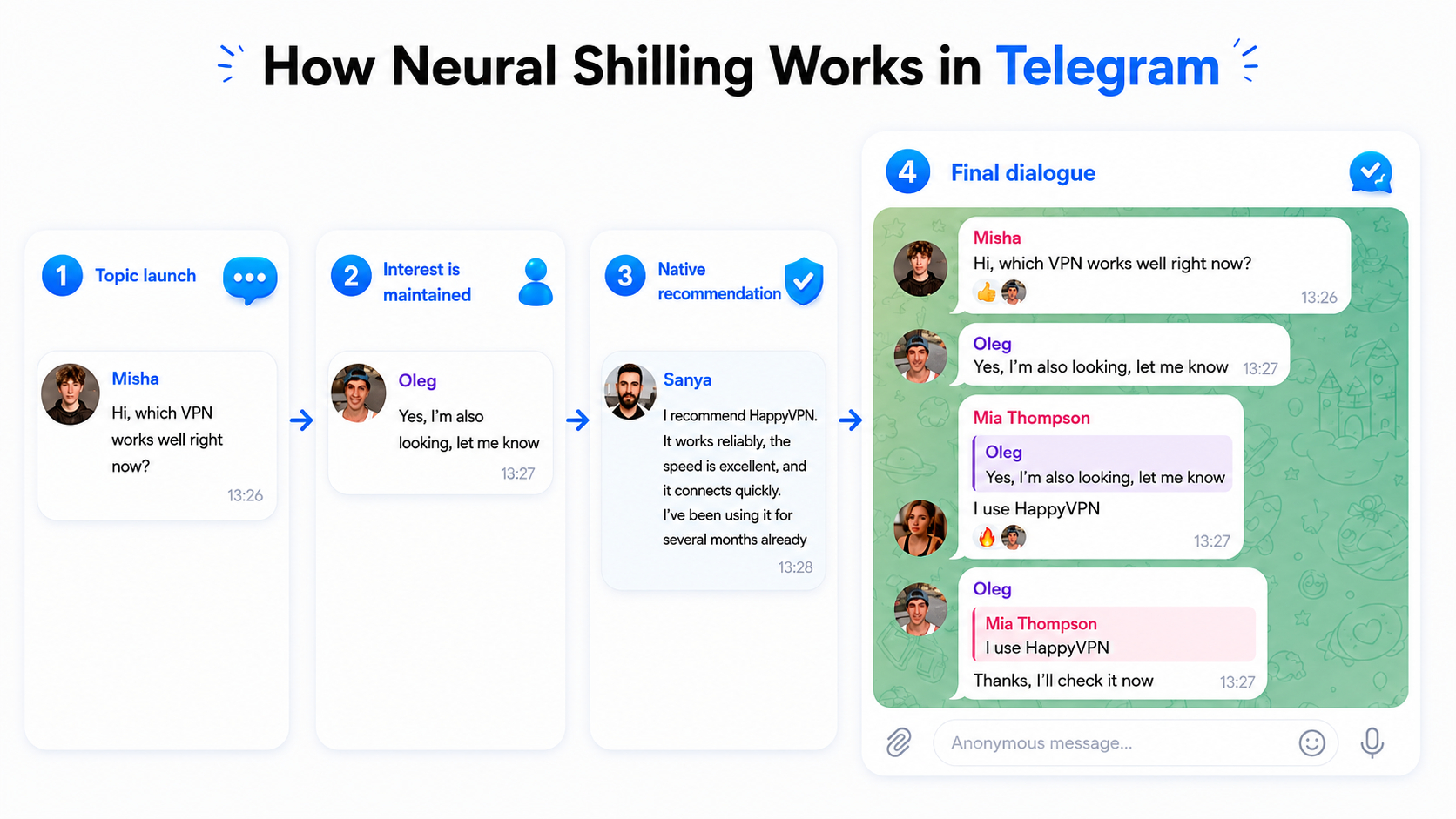
For example, one account asks in a thematic chat which VPN is currently working reliably. The second joins the topic and says that it is looking for the same thing. The third shares its option and names the service it uses. The same principle can be applied to local businesses, online services, bots, experts, and digital products.
How the Neuroshilling Scheme in Telegram Is Structured
The basic mechanics can be reduced to three sequential actions:
- Starting the discussion. The first account asks a question, raises a topic, or formulates a problem.
- Supporting interest. The second account joins the conversation, confirms the relevance of the issue, or asks for clarification.
- Native recommendation. The third account shares experience and appropriately mentions the required product, service, or resource.
For each reply, you can define the addressee: a specific message, a separate account, or the entire chat without a direct reply. Reactions can also be used. A thread of the required length and complexity is assembled from these elements.
Why Neuroshilling in Telegram Is Used to Attract Clients
Neuroshilling is a new promotion method developed by the GramGPT team. Its strength is the ability to work with a large number of natural conversations and obtain inexpensive traffic. Dialogues are a normal part of user behavior in Telegram, so this mechanism looks less like direct advertising. At the same time, the product appears directly within a thematic discussion where a potential client is already present.
In GramGPT, Neuroshilling is connected with account management, profile generation, platform parsing, and neurodialogue scenarios. This makes it possible to assemble the main stages of a campaign within one working environment.
This format can also be used as a tool for UBT traffic: traffic from Telegram comes from thematic discussions without necessarily starting with the purchase of advertising placements.
Two cases can be given as examples:
- For a VPN bot, the cost of one acquired subscriber was about 3 cents, while its real value is dozens of times higher.
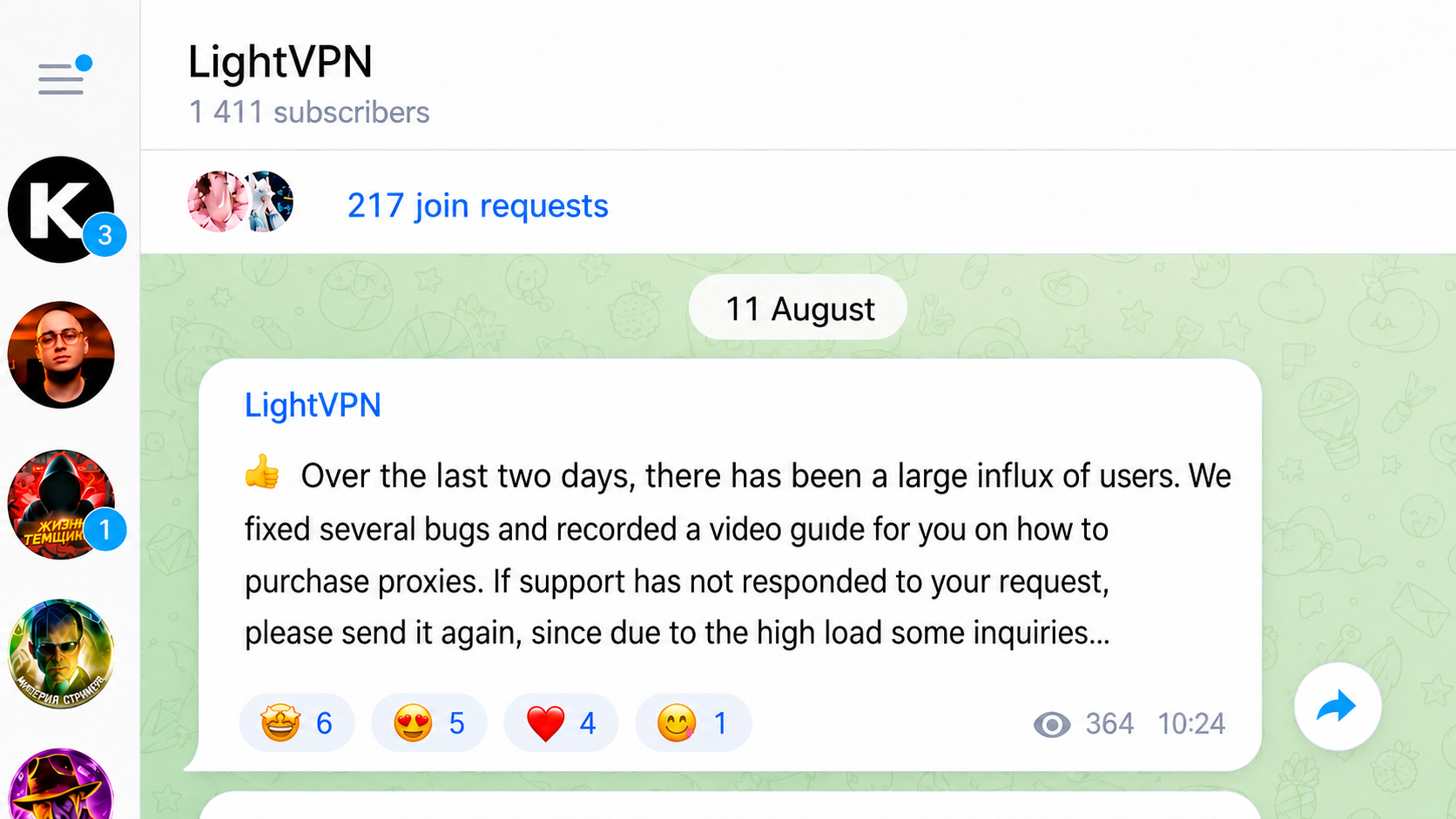
- For a manicure specialist, a client for a service costing 25 dollars cost approximately 25 cents. At the same time, such a service involves repeat visits.
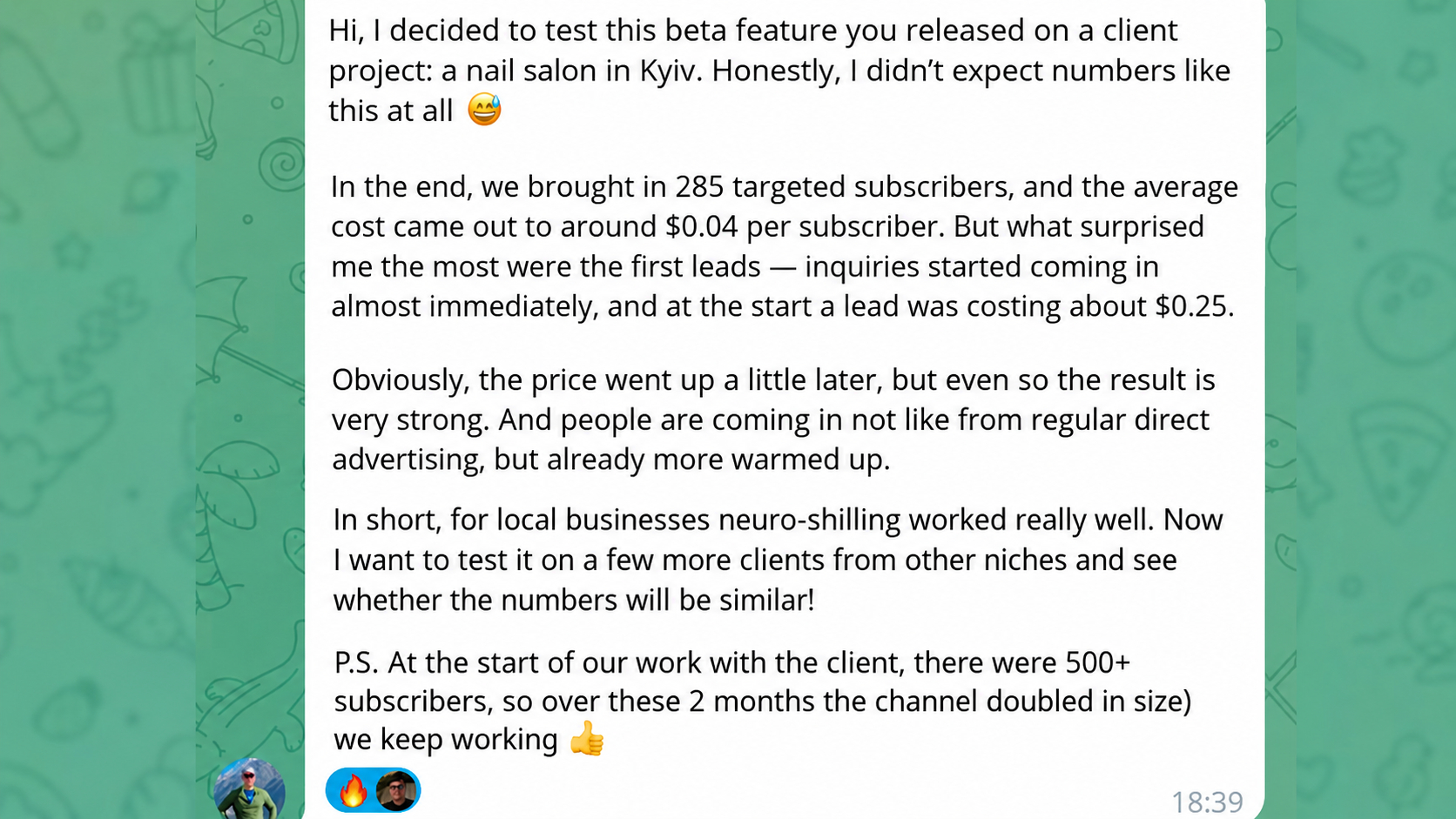
Neuroshilling in Telegram is applicable both in offline areas where audience geography matters and in online projects where users can be found by thematic interests.
How to Configure and Launch Telegram Neuroshilling in GramGPT.io
Configuring Neuroshilling in Telegram in GramGPT includes several sequential stages: preparing accounts and proxies, designing profiles, creating an AI scenario, configuring delays and limits, collecting a database of channels and chats, selecting the operating mode, and launching the campaign.
The working tool used is the Telegram Combine GramGPT.io. In one interface, you can manage accounts, build scenarios, select platforms, and control launched campaigns.
1. Preparing Accounts for the Campaign
The campaign is based on Telegram accounts on whose behalf the replies are published. For the first test, it is enough to prepare approximately five to ten profiles: this volume is sufficient to distribute roles and avoid tying the entire scenario to one account.
If the question arises, how to buy and choose a quality Telegram account for promotion, we previously covered this process in detail in a separate article.
Importing Accounts and Proxies
Go to the account manager and upload profiles in tdata or session+json format.
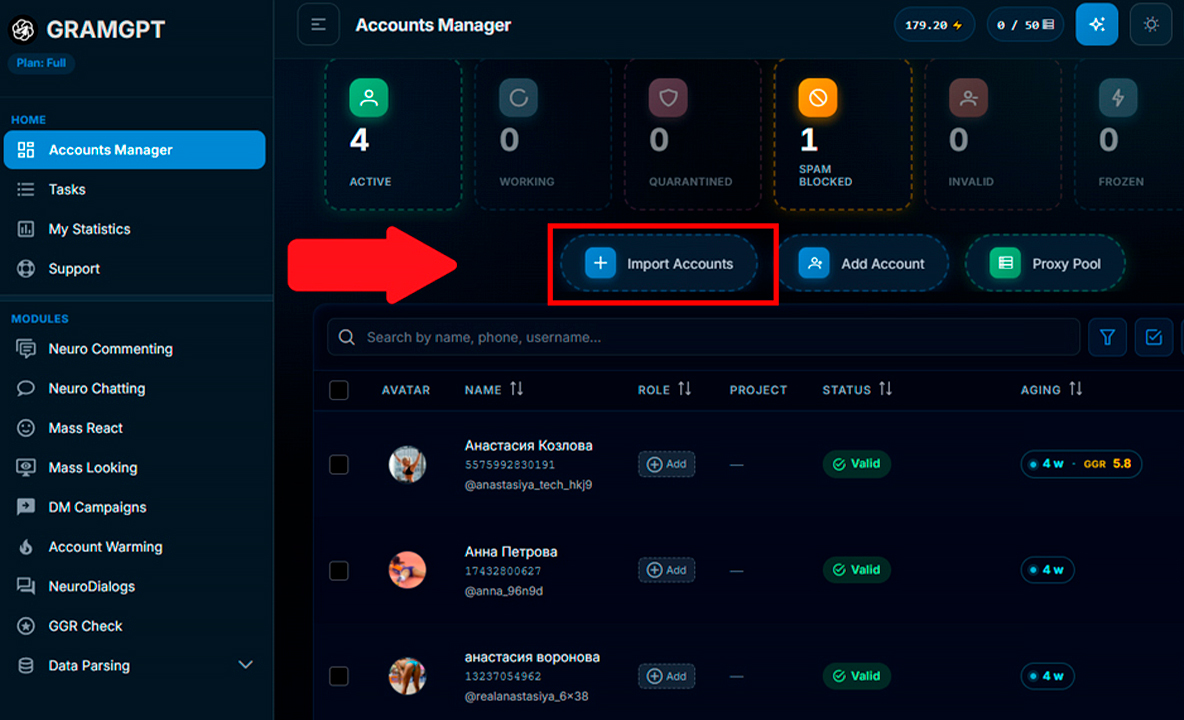
After import, each account is assigned a separate proxy that determines the IP address of its connection. It is advisable to choose an IP from the same geography where the profile was registered or usually used previously. This helps avoid an abrupt change of environment. After uploading the archive, specify the proxy and save the data in Telegram Combine.
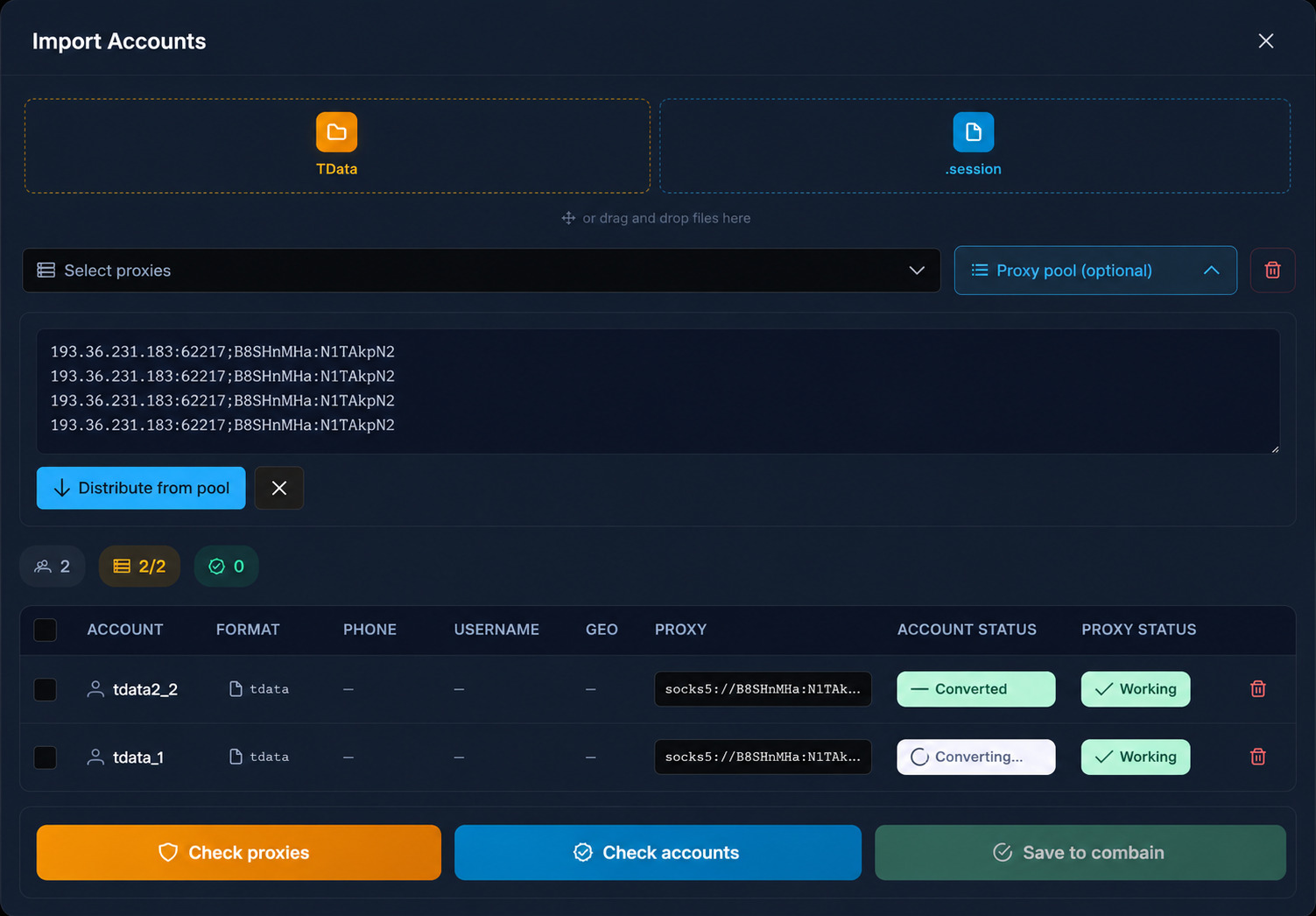
After changing the IP, it is better not to move immediately to active actions. It is recommended to give the accounts about 24 hours to rest in order to reduce the probability of freezing or additional restrictions during the first hours.
Automatic Profile Setup
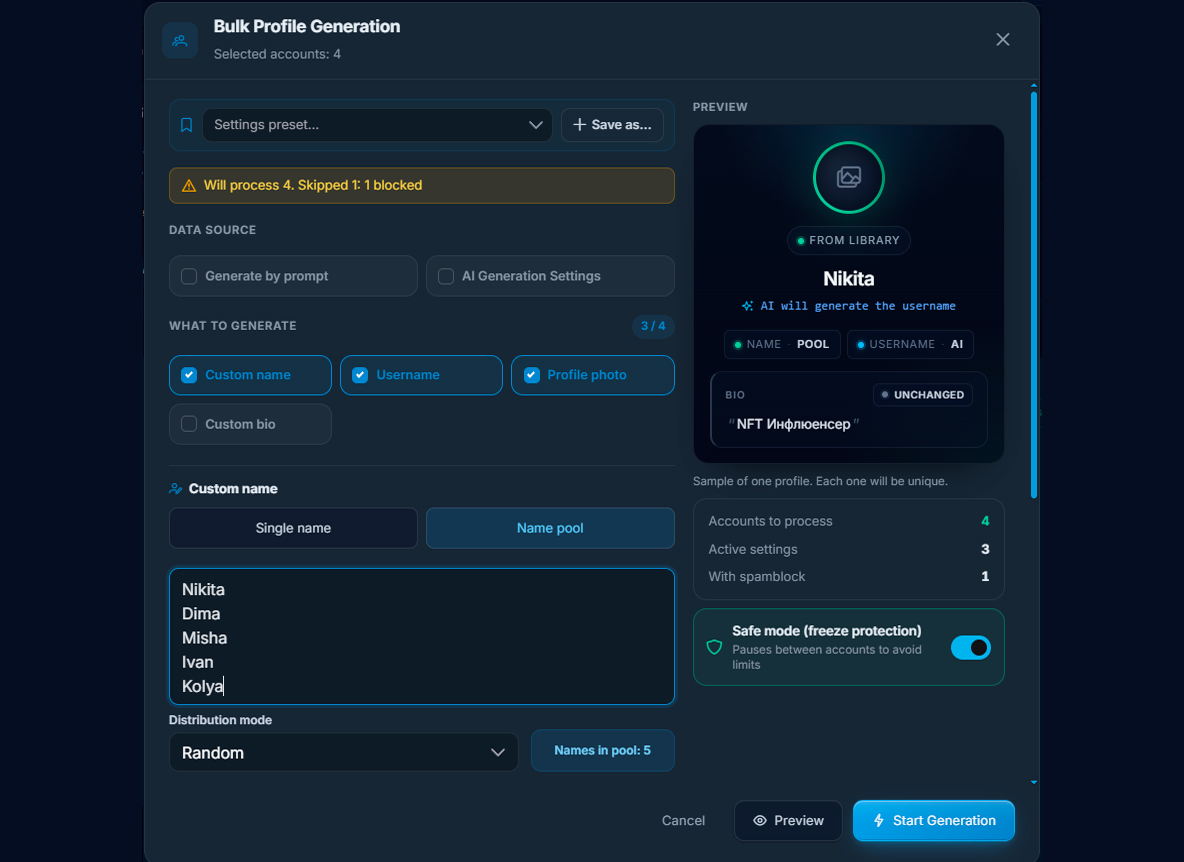
Before launching the campaign, profiles can be set up automatically. Select the required accounts, open the “Accounts” section, and go to “AI Profiles”. Here the system can create a name, username, and photo.
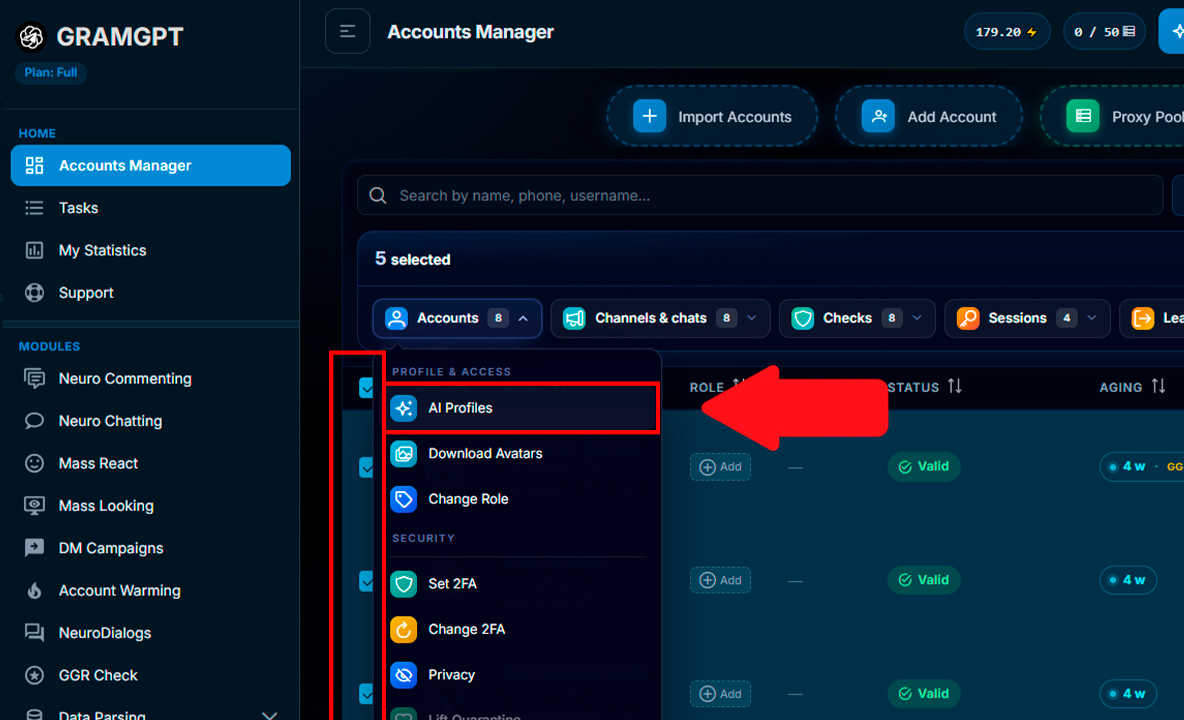
For this task, it is not necessary to fill in a bio, links, and a detailed description. You can specify gender for name generation, create a username, and use images from the library, although your own photos usually look more natural.
The module has a safe generation mode. It performs the task more slowly, so it is better to leave it enabled when preparing profiles. After completion, all configured accounts are displayed in the manager.
2. Configuring the Neuroshilling Module and AI Conversation Scenario
After preparing the profiles, open the “Neuroshilling” module, create a campaign, and select the accounts that will participate in the work. In the “Scenario Configuration” block, specify the topic of the conversation, for example the task of discussing a specific product, and define the number of participants. For example, for a VPN bot, you can set the topic of discussing the service and create a dialogue between three accounts.
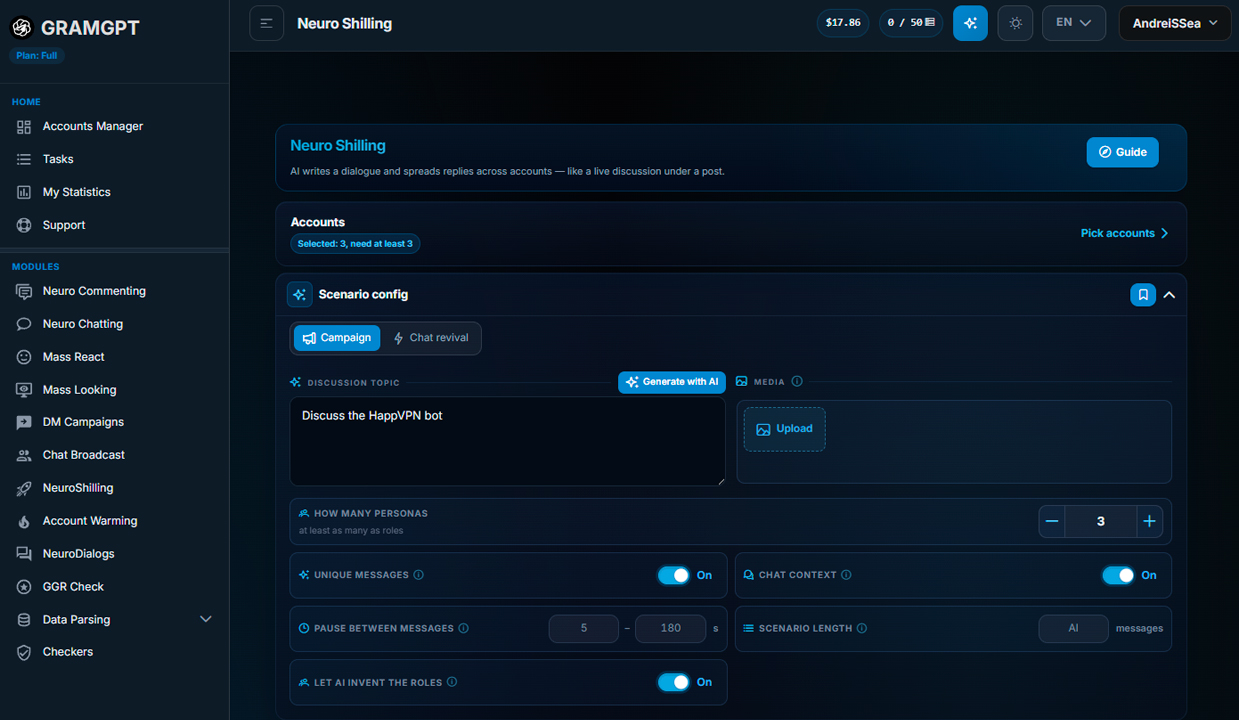
After the test configuration, click “Generate with AI” — artificial intelligence will automatically distribute roles between the accounts and create a conversation template.

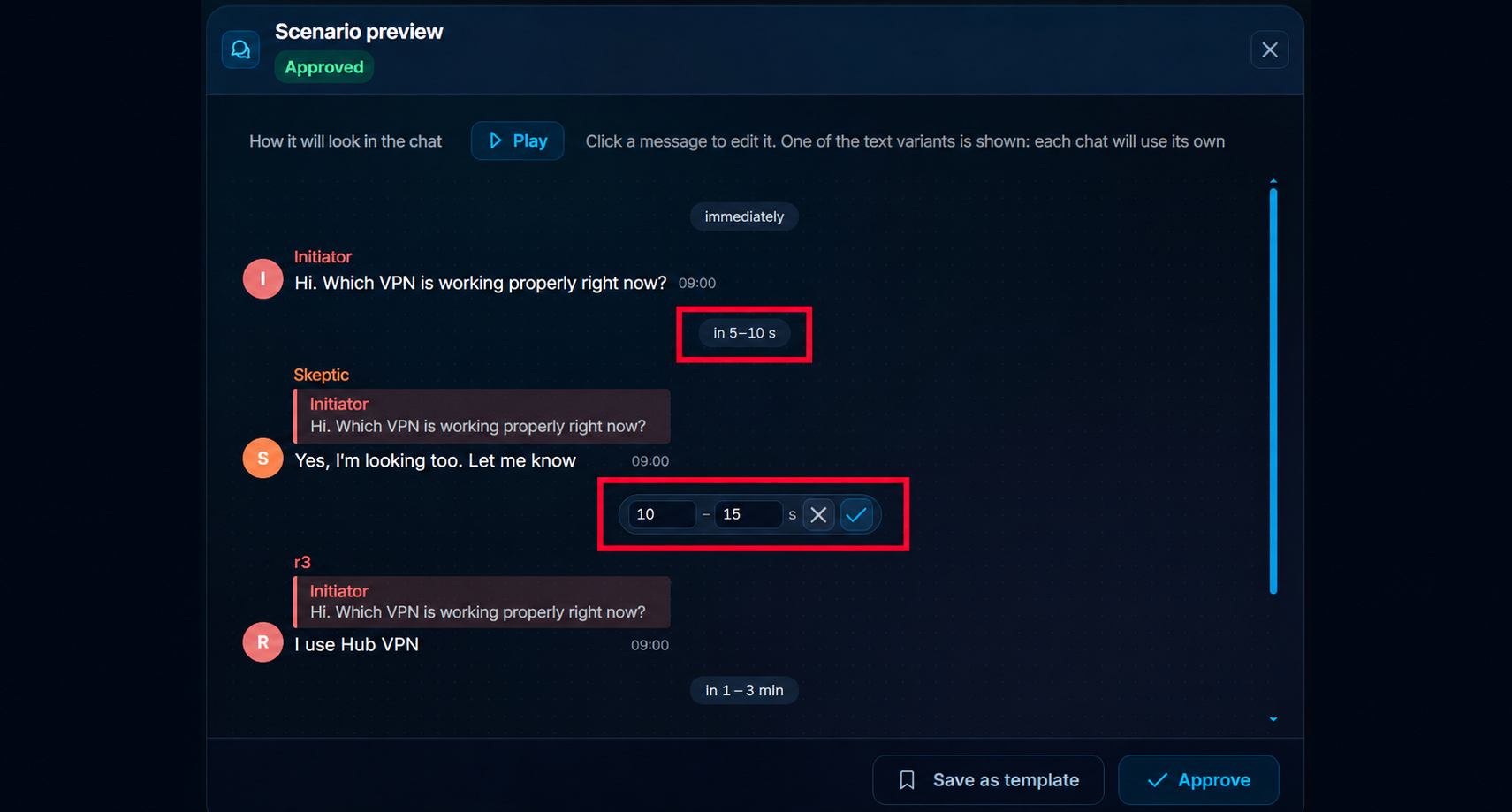
The finished scenario can be played through in advance to check the sequence of messages, replies between participants, and the overall flow of the dialogue.
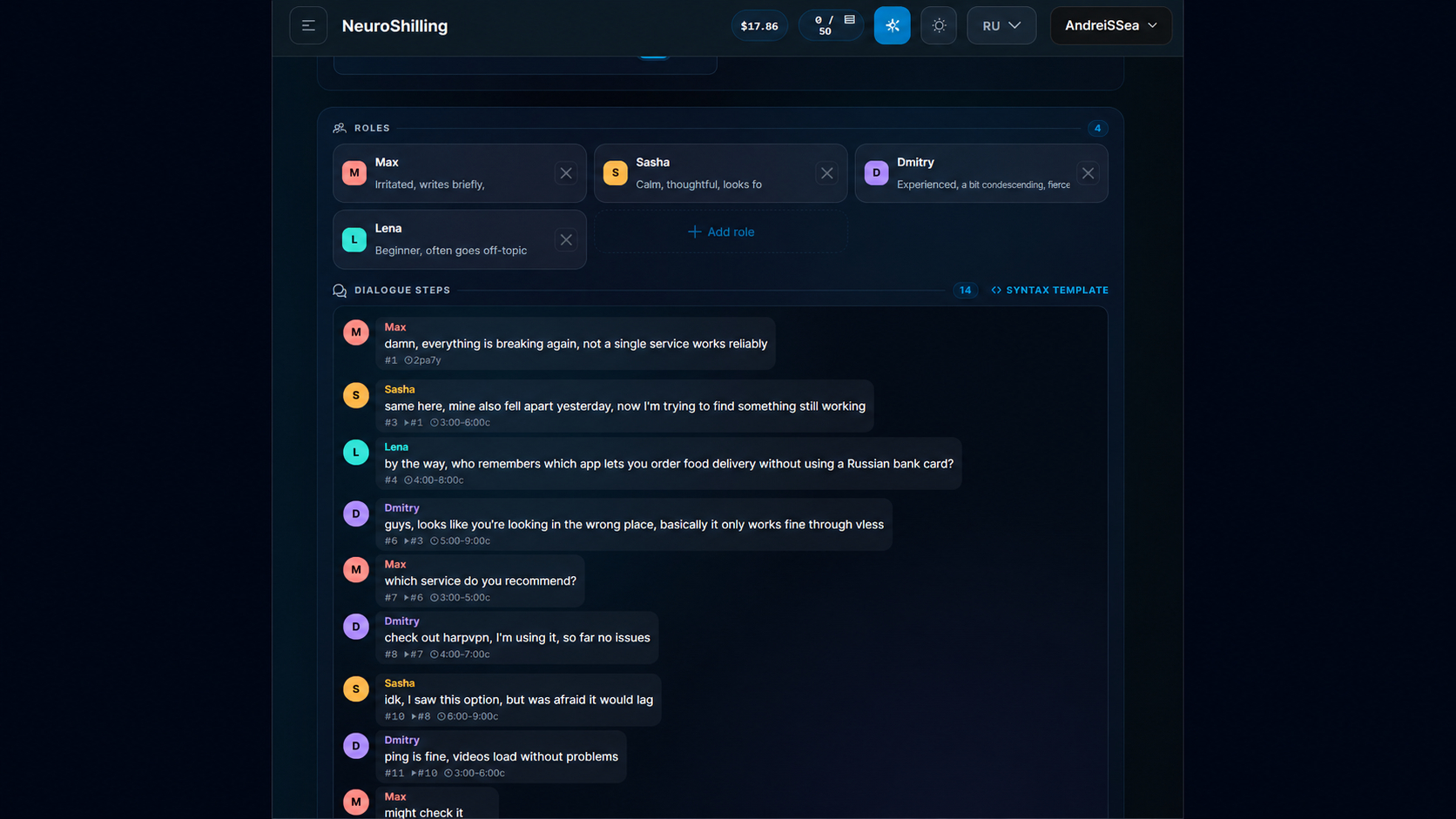
Randomization constructions are used in generation: individual words and formulations change, so the same meaning can be reproduced in different chats with different text.
If a more precise result and a custom scenario are needed, roles and replies can be assembled manually. Let us examine the example of a VPN service.
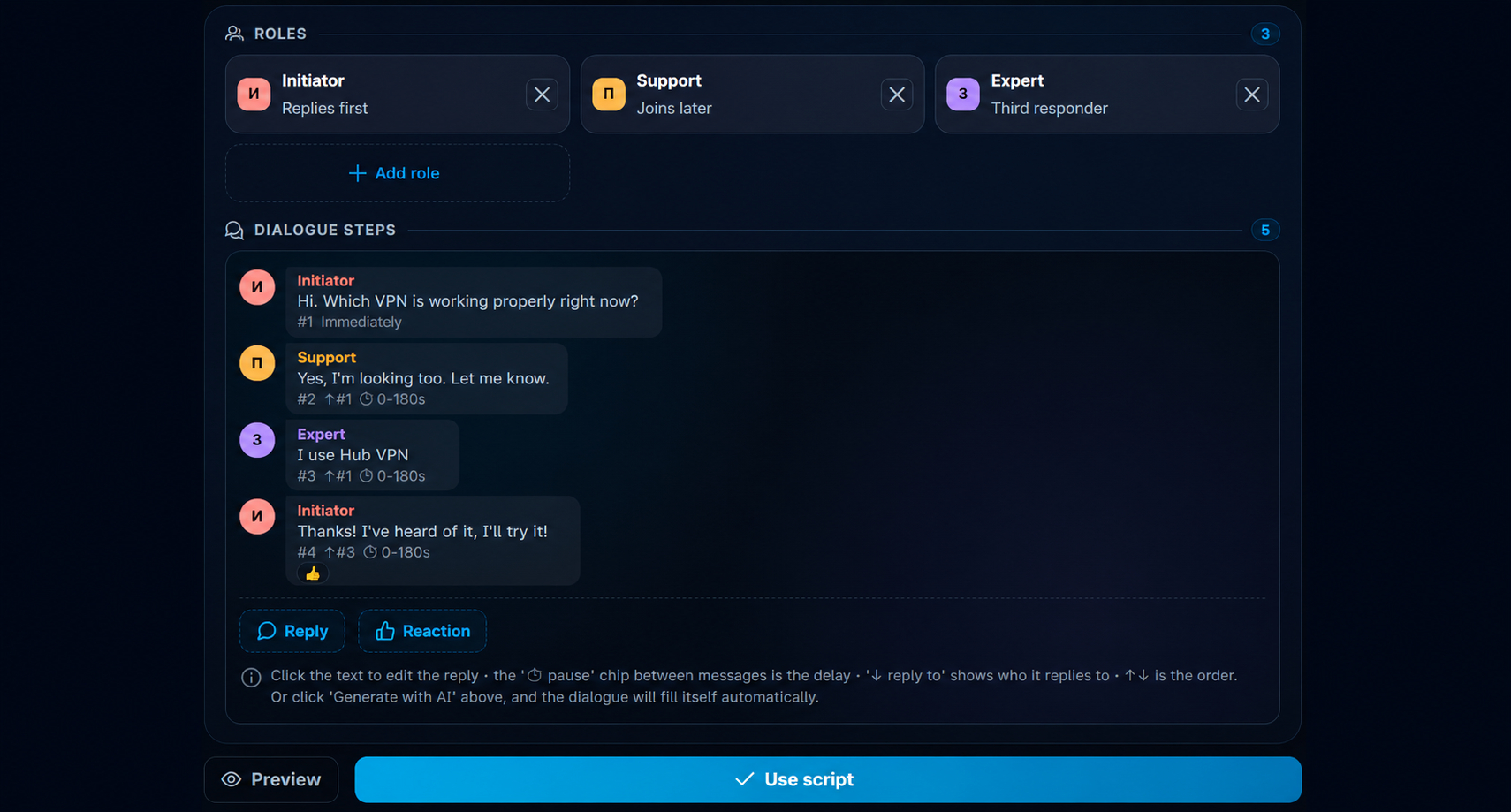
- Initiating. Opens the discussion with a question: “Hi. Which VPN works properly right now?”
- Responding. Supports the topic: “Yes, I’m looking too. Please advise.”
- Knowledgeable. Shares a recommendation: “I use Hub VPN.”
After that, click use scenario and proceed to the delays.
3. Configuring Delays Between Messages
After preparing the replies, set time intervals between responses. At the testing stage, a short pause can be used: for example, the second account replies after 5–10 seconds, and the third after 10–15 seconds. For a live campaign, it is better to select the values separately, taking into account the platform and launch intensity.
4. Channel and Group Parser in Telegram
Before launching Neuroshilling, you need a database of Telegram channels with open comments and thematic chats. You can upload an existing list or collect it through the Channel and Group Parser in Telegram in GramGPT.
The parser is needed to find platforms where the required audience is already concentrated.
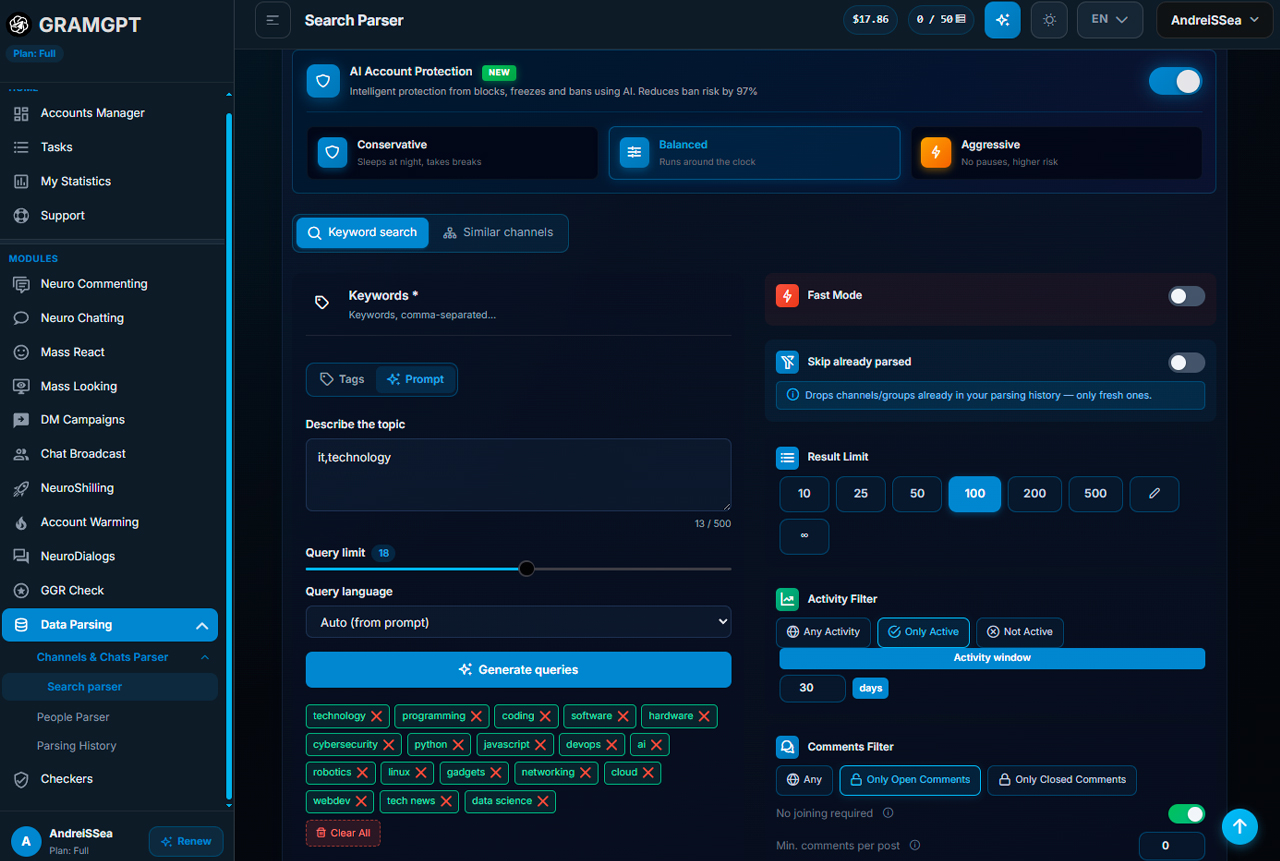
The workflow looks like this:
- Assign the accounts that will be used for parsing.
- Specify the prompt topic and generate search queries.
- Save suitable keywords.
- Keep active channels with open comments using filters.
- Set a minimum audience threshold, for example from 1,000 subscribers.
- Select the required countries and launch collection.
For a VPN, you can collect channels about IT and technology. For a local business, city channels and chats may be suitable. Public and private platforms can be included in the campaign if access to them already exists and the account is a member of them.
After parsing, upload the database of channels and chats to the Neuroshilling campaign.

5. Configuring Limits and Account Reserve
A separate pause is set for moving from one platform to another for the conversation. In our example, intervals from 60 to 180 seconds and higher are used.

Activity restrictions are also set in the advanced parameters. Our configuration uses up to 60 messages per hour and up to 200 messages per day per account. We separately enable a reserve. If one profile receives a block or restriction inside a specific chat, the system can replace it with another account from the prepared list.

6. Connecting an AI Autoresponder in Private Messages
Additionally, automatic replies in private messages can be connected through NeuroDialogues. If a user writes in private messages on their own, AI can continue the conversation, provide a relevant response, and natively mention the product when the context is appropriate.
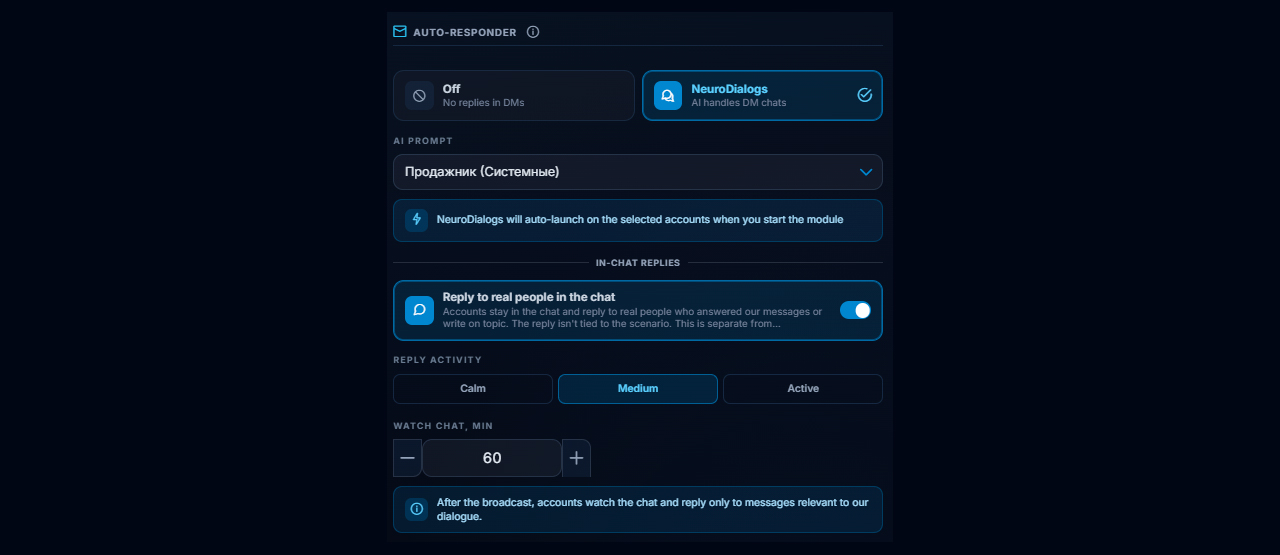
A separate prompt is configured for such communication, defining the style and logic of the responses. After configuring the main campaign, message monitoring can be left enabled: the system will track new replies from real people and continue the dialogue when necessary.
7. Launching Neuroshilling and Monitoring Logs
When the accounts, roles, scenario, platform database, and delays are prepared, the campaign can be launched. The logs show which messages were sent, which chats are being worked in, how long the pause lasts, whether errors occurred, and what stage the task is at.
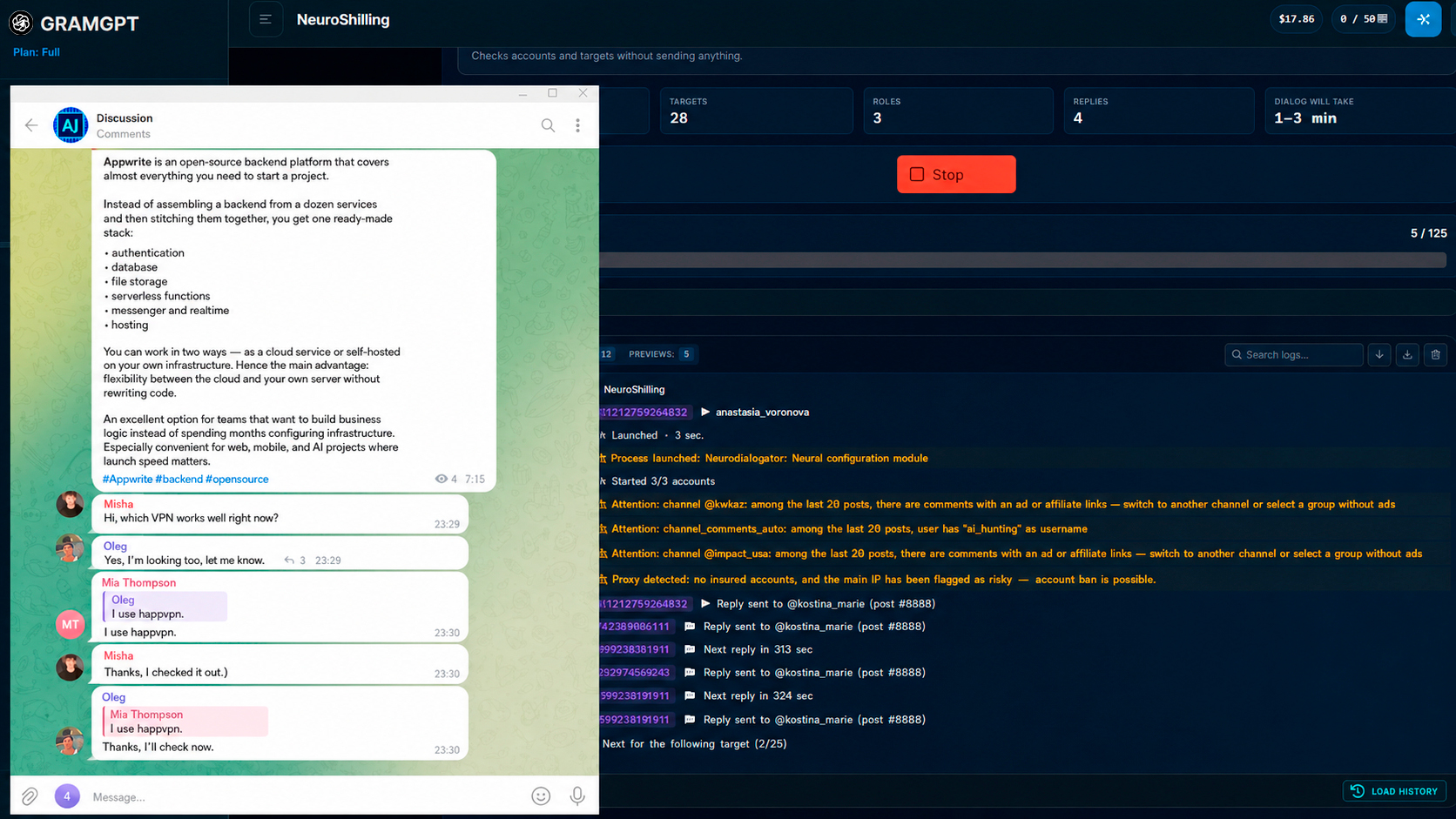
Within one platform, the chain proceeds sequentially: the first account starts the discussion, the second joins the conversation, and the third adds a recommendation. After the scenario is completed, the system moves to the next chat or to the comments of another channel.
After some time, the campaign is usually launched again for the same channels and chats. In this case, the previous conversation should not be reproduced: identical dialogues are easier for administrators and community members to notice.
For repeated launches, the unique message setting can be enabled. It reformulates the prepared replies, changing the style and individual expressions while preserving the original meaning of the scenario.

Pitfalls and Mistakes of Neuroshilling in Telegram
Account restrictions and freezes must be taken into account with any Telegram automation. One of the main mistakes is launching a campaign before the accounts, proxies, and platform database have been prepared.
During configuration, it is necessary to take into account the Telegram message limit, a possible spam block in Telegram, temporary restrictions such as Telegram Flood Wait, and the risk of a Telegram account ban. Therefore, automation in Telegram should include controlled activity, pauses between actions, a profile reserve, and a gradual launch.
The optimal preparation sequence:
- Select quality accounts.
- Assign suitable proxies.
- Prepare and warm up Telegram accounts.
- Collect relevant platforms through Telegram parsing.
- After checking the setup, launch Neuroshilling in Telegram.
This sequence makes it possible to remove the main weak points in advance: unsuitable accounts, problematic proxies, lack of preparation, and an unsuitable database. It is better to scale the campaign after a small test — first check the scenario and response, and then gradually increase the volume.
Conclusion: How to Use Neuroshilling in Telegram for Promotion
If all campaign elements are configured consistently, Telegram Neuroshilling helps obtain traffic from thematic chats and comments without necessarily starting with paid advertising. The mechanism can be used as one of the tools for UBT traffic: attention to the product is formed through scripted AI dialogues and a native recommendation within the discussion.
Before launch, it is especially important to determine:
- which communities contain the target audience;
- which AI conversation scenario will look natural;
- at what point in the conversation it is appropriate to mention the product or service.
Do not start immediately with a large volume. First, test a small setup, evaluate the quality of the platforms, the scenario, and the audience response, and only after that gradually increase the scale of promotion.
Wishing you success in promotion and a stable flow of targeted traffic from Telegram.