Skip to content
Automate
Traffic, funnels, bots
Start

How to Contact Telegram Support: All Ways to Reach Support

How to Contact Telegram Support: All Ways to Reach Support

Telegram will not let you into your account, messages are not being sent, and people you know are receiving requests from your account to transfer money. You want to contact an operator immediately, but search results show dozens of contacts and promises to “restore access within an hour.” The wrong address wastes time, while a scammer posing as support can make you lose your account.

In this article, we will examine how to contact Telegram support if you have trouble signing in, your account has been hacked, restrictions have appeared, or you need to report a publication. For each case, we will identify the appropriate contact, what information to include, and what to do while waiting.

How to Contact Telegram Support: App, Website, and Email

Choosing the right contact starts with two questions: do you still have access to the profile and which action triggers the error. It may be authorization, sending a message, or using another app function.

Quick Method 1. Messaging through the App Settings

If you are still signed in, you can contact support directly from Telegram.
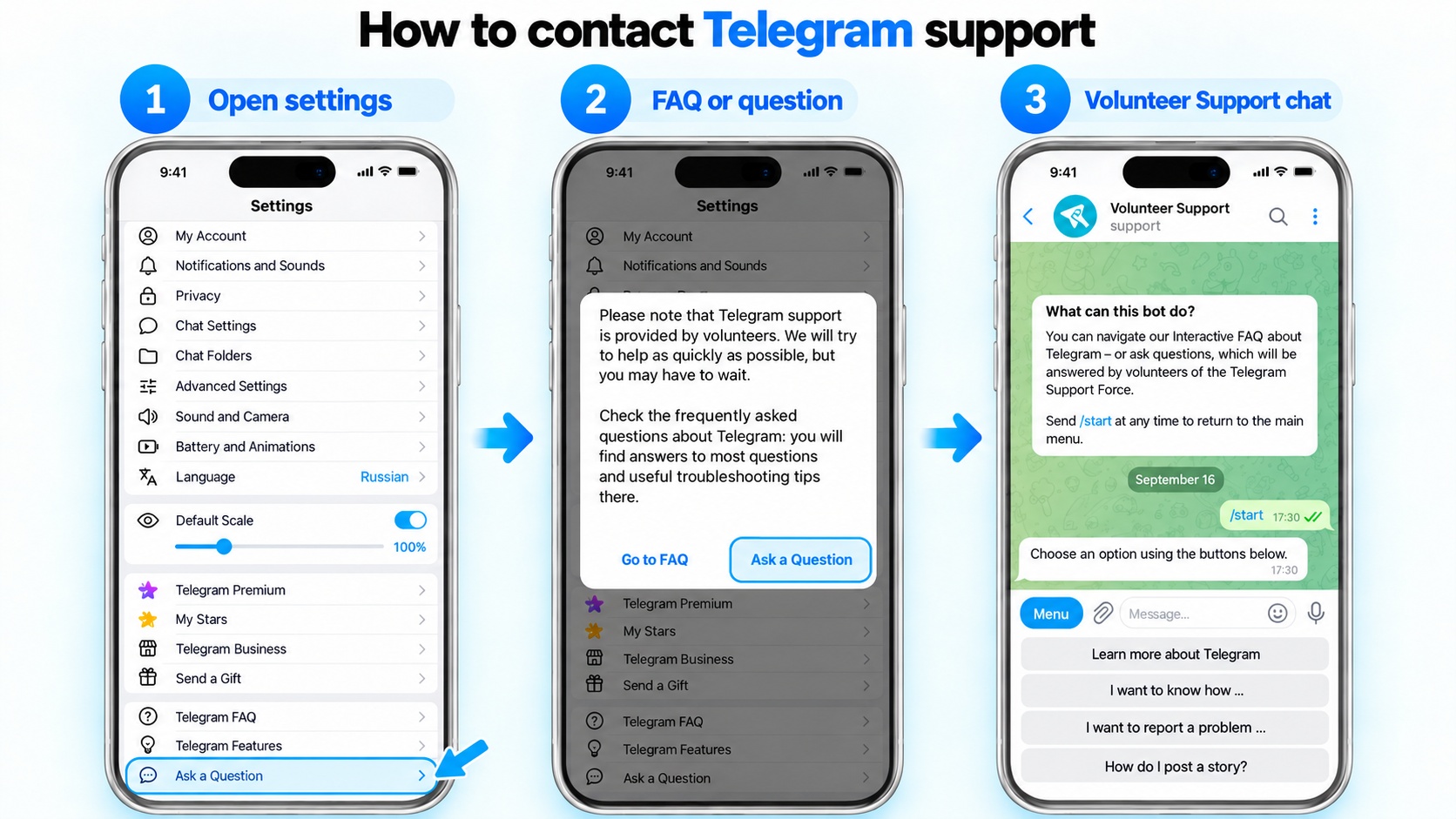
How to quickly contact Telegram support

The settings provide the following procedure:

  1. Go to “Settings” → “Ask a Question” or “Help”. The exact location of this menu item depends on the installed version.
  2. The app will first offer FAQ help. Check whether your case is covered there; if not, continue and send your question.
  3. Indicate at which step the error appears and what you do immediately before it. Attach a screenshot when it helps show what is happening.

Communication with users is handled by volunteer helpers. You should not expect a personal manager to connect immediately after pressing the button.

Method 2. Telegram Web Support: Contact without Authorization

If the settings are unavailable, Telegram web support remains an option. Authorization is not required to submit a request: simply open the Telegram Support page in a browser. Below is how to contact Telegram support through this form and fill in its fields.
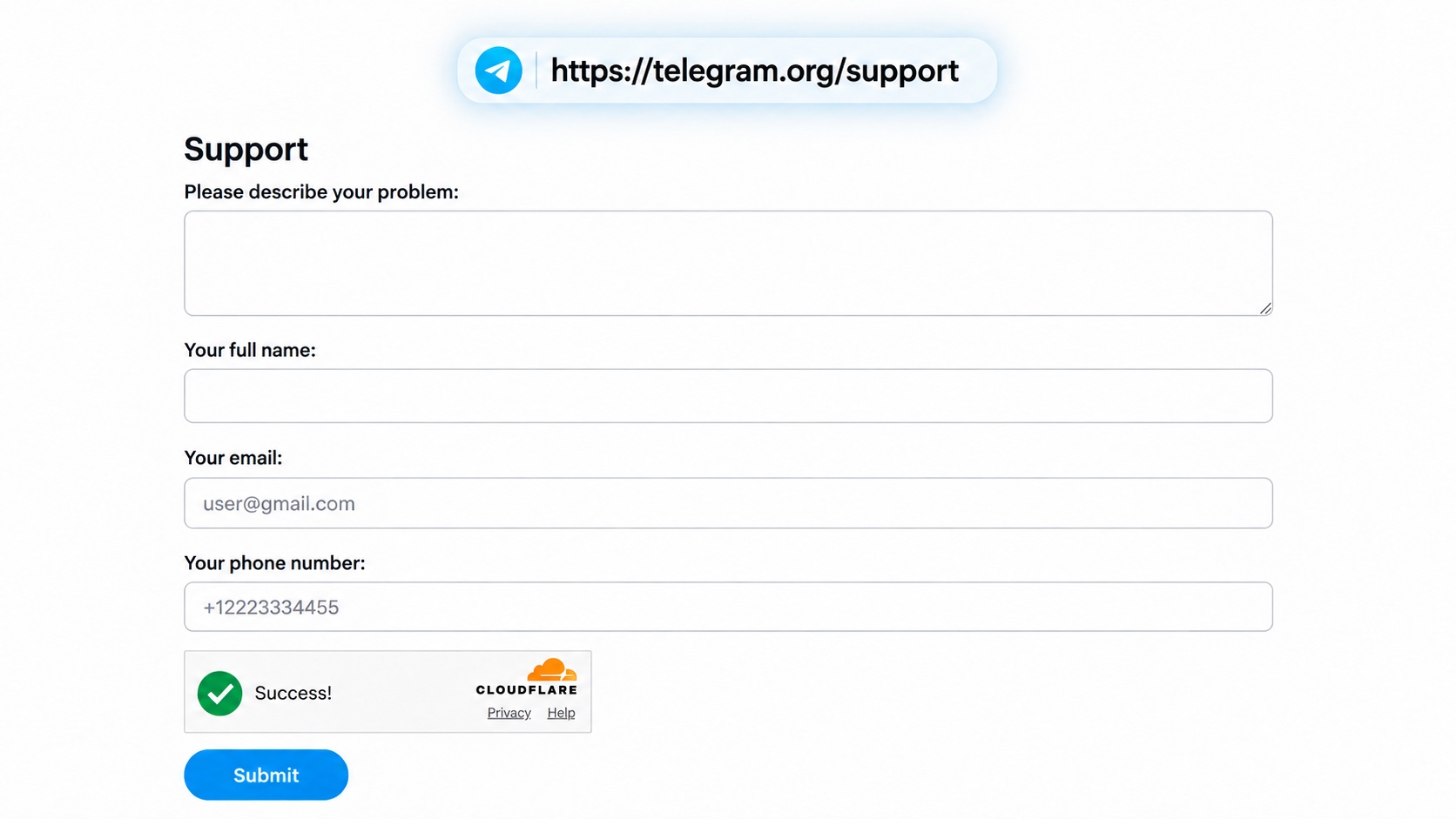
How to contact support through Telegram Support Web

  1. Start by describing what happened. There is a field labeled Please describe your problem.
  2. Next, fill in Your full legal name: enter your full first and last name without abbreviations.
  3. In the contact details, enter a working email address and phone number. The phone number must include the country code.
  4. Before submitting the form with the Submit button, review everything you entered once again.

Double-check the phone number and email especially carefully. A wrong digit makes account verification harder, and an error in the address can prevent you from receiving the response. Save the text you submitted and note the date it was sent.

Method 3. Telegram Support Email Addresses for Different Issues

Different mailboxes are assigned to different tasks, so the Telegram support email address should be chosen according to the nature of the request. There is no single address to which every type of question should be sent. The purpose of each contact is shown in the table:

Address What to Contact It About
[email protected] Reports concerning fraud, prohibited public content, and other violations. You can also report moderation issues involving public channels, bots, and stickers.
[email protected] Used for complaints about publications in Telegram search that infringe copyright.
[email protected] An address for reports about materials involving child sexual abuse and requests to remove such content.
[email protected] Information about discovered vulnerabilities and questions related to app, protocol, and encryption security are sent here.
[email protected] Suitable for problems receiving a code by SMS or call during registration and authorization.
[email protected] Used for login problems, access recovery, and in some cases account blocking.
[email protected] Can be used for login problems or a blocked phone number if Telegram itself shows this address in the error message.

Unable to sign in and not sure where to contact Telegram support? First, check which contact method the app itself offers, or use Telegram Support. Do not send the same request to every Telegram support address at once.

Where to Contact Telegram Support: Accounts and Bots

In addition to email and the general form, separate accounts and bots are used for certain tasks. You can determine how to contact Telegram support about a specific issue by checking their purpose in the table:

Official Account Purpose
@SpamBot Check here whether the profile has spam-related restrictions. If they can be appealed, the bot will show you how to do it.
@BotSupport A contact for people who develop Telegram bots and need help with the Bot API.
@PressBot Journalists and editorial representatives can send their inquiries here.
@NoToScam Used if someone has created a profile and is impersonating you: requests here concern identity impersonation.
@SearchReport For reporting a search query that can lead to illegal materials inside Telegram.
@EURegulation This assistant is intended for requests from users located in European Union countries.
@tgpb_support_bot If the issue concerns payment or subscription management, Telegram Premium support is available here.
@wallet_supportbot Telegram Wallet support operates here: you can ask about Wallet, transfers, other operations, and P2P. Never disclose the recovery phrase or private key; support does not need them for a conversation.
@TIDABot Accepts requests to remove an intimate photo or video that was published without a person’s consent. It is used in cases for which Telegram provides this procedure.

When checking a contact, compare every character of its username with the one listed in the source. A copied avatar and a similar display name do not by themselves make a profile official.

How to Call Telegram Support: Is There a Phone Number?

The answer to whether you can call Telegram support is no. There is no telephone line for ordinary user requests. Authorization problems, blocking, and profile malfunctions are described in a written request.

An advertisement offering a Telegram support phone number does not by itself confirm that it is genuine. Check the source: the messenger does not publish a number for speaking with an operator about these issues.

If the SIM card has been lost or the phone number itself is blocked, you should call the company that provides your mobile service. Restoring access to the number is their responsibility.

What to Write to Telegram Support So They Understand the Problem Immediately

Before contacting Telegram technical support, choose one issue and state what kind of help you expect. A Premium payment problem, a hacked account, and a channel complaint are better handled separately.

Include the following in the message:

  • What happened — which action you cannot perform.
  • When it started — the date and approximate time of the problem.
  • Which account — the phone number and, if necessary, username.
  • Device — the model and the system and app versions.
  • What you have already tried — checks you performed, restarting, switching networks.
  • What Telegram shows — the text on the screen or a screenshot of the error.

Here is how to write to Telegram support so you get a relevant answer: describe the observed problem without guessing its cause. “I select a photo and the app closes” is more precise than “I was banned from sending photos.”
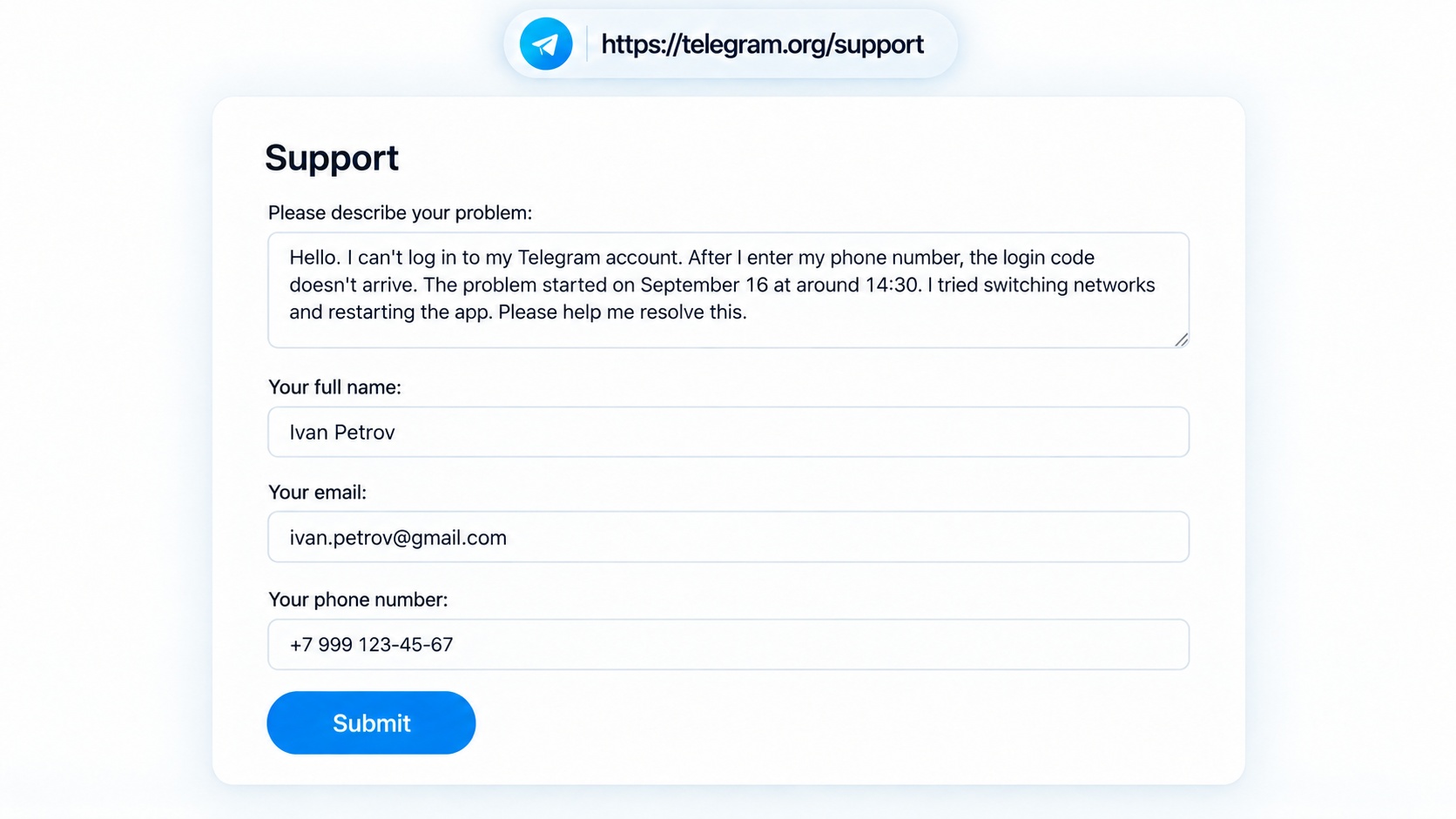
Example of a proper message to Telegram support

Example of a Request to Telegram Technical Support

Hello! Since September 15, I have been unable to sign in. I enter my phone number and see a notification that the code was sent, but I never receive the code.

My number: +7 900 000-00-00. Device: iPhone 15, iOS [version], Telegram [version].

Restarting and connecting to another network did not help. The internet works. Please help determine the cause. You can contact me by email: [email protected].

Replace the data with your own and remove the points that do not apply to your case.

What Data You Must Not Send to Support

Never send anyone:

  • login codes;
  • the two-step verification password;
  • the authorization QR code;
  • session files.

A request to confirm someone else’s authorization for “verification” is a reason to end the conversation. Enter the code and password only when you are signing in yourself or recovering access through the official interface.

In screenshots, hide unrelated conversations, payment details, and personal information that is not relevant to the request.

Telegram Technical Support: Where to Contact Them If Your Account Was Hacked

The first thing to do when a Telegram account is stolen is to find a device where you are still signed in. Do not sign out of it.
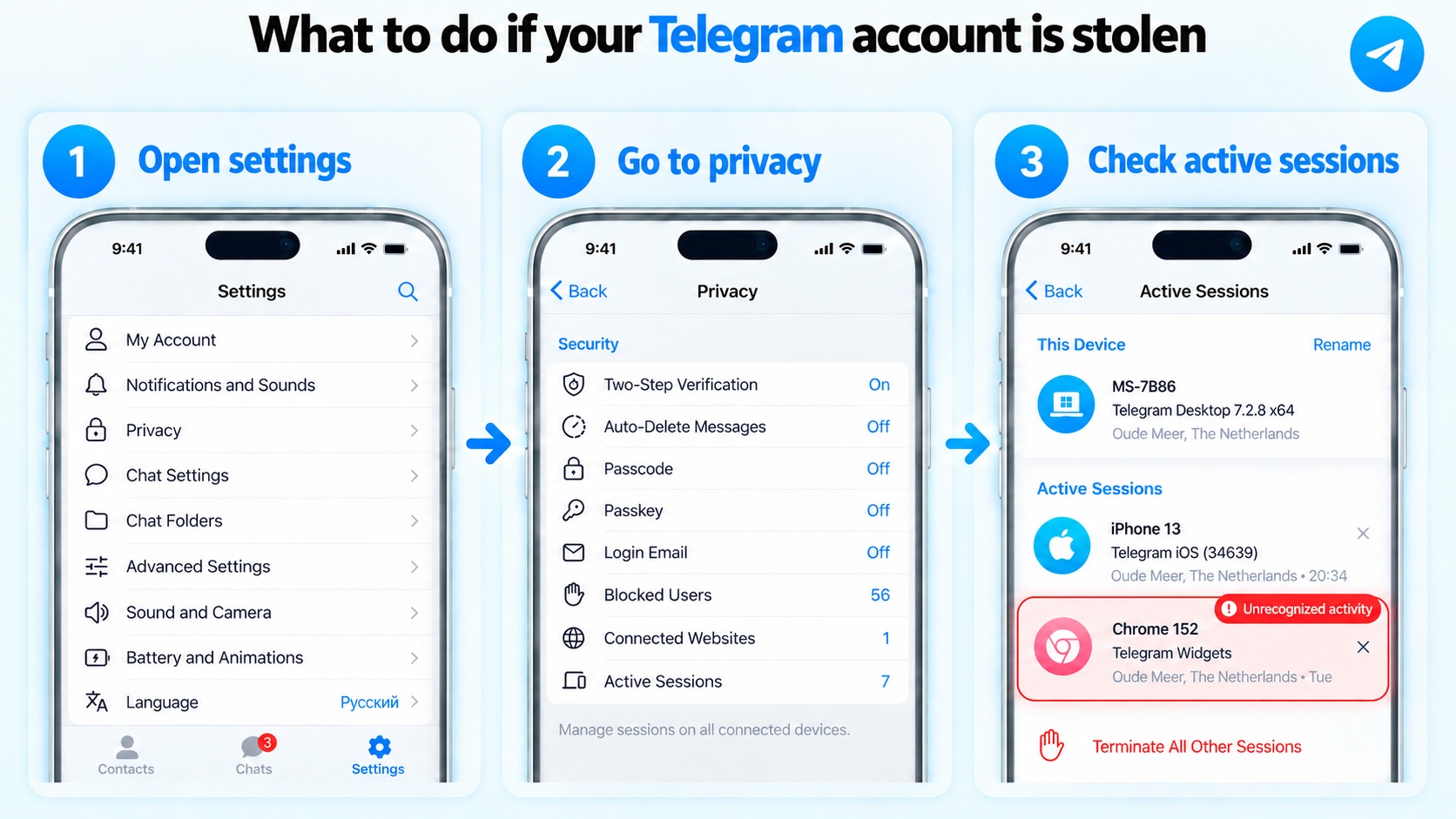
Check active sessions if your Telegram account is stolen

 Then:

  1. In “Devices” / “Active Sessions”, disconnect unfamiliar sessions.
  2. Set up two-step verification and make sure the recovery email belongs to you.
  3. Warn people you know if the attacker has already written to them from your account.

For a purchased account, separately check the previous owner’s access. If they still have a copy of the session you use, disconnecting other devices is not enough. The scheme below includes reauthorization and then termination of the previous working session.

How to Protect a Telegram Account from Hacking through GramGPT.io

In the GramGPT Telegram Combine, purchased accounts can be prepared for work using this scheme:

  1. Add accounts to the GramGPT account manager. Import them using tdata or session+json
  2. Terminate unnecessary account sessions — in bulk or one by one. Disconnect unneeded and unfamiliar devices.
  3. Important! Reauthorize the account. Obtain a new working session.
  4. Terminate old sessions again. From the new connection, close the previous sessions that other people may have used.
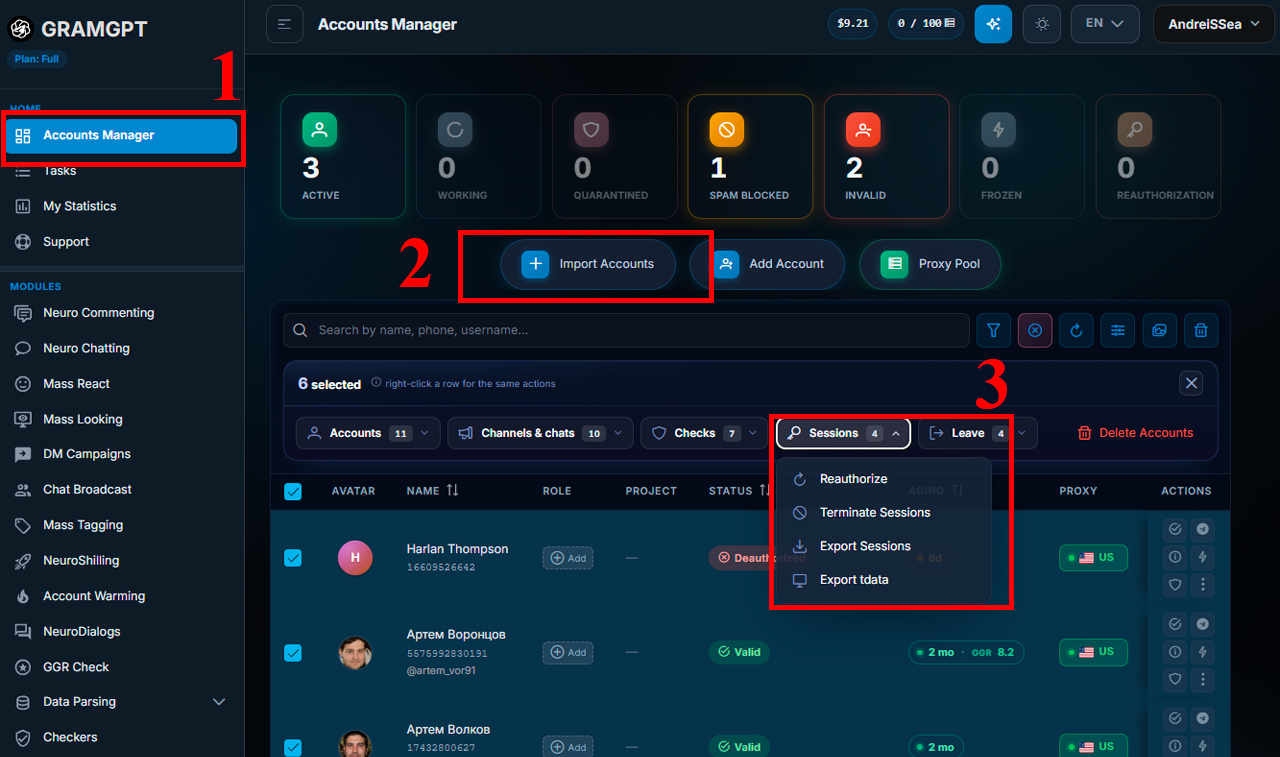
How to protect a Telegram account from hacking in GramGPT.io

After that, a new working session remains. 
For details on how to protect a Telegram account from hacking after purchase, configure a proxy, and complete reauthorization, read the article “How to Protect a Telegram Account After Purchase”.

How to Contact Telegram Support If You Are Not Signed In Anywhere

When access has already been lost on all devices, the available contact method is Telegram Support. Here is how to contact Telegram support in this case: fill out the form and describe the loss of access. The text below shows how to write to Telegram support if your account was hacked:

Hello. Please help me regain access to my Telegram profile. It is registered to +7 999 999-99-99; on September 15 I could still sign in. Now I enter the phone number, but I do not receive the code. I still use the SIM card, and there is no open session on any other device.

  • If the phone number is lost, start by getting a replacement SIM from your operator. Without control of the number and without an open session, it will not be possible to confirm ownership of the account.
  • If Telegram asks for an unknown two-step verification password, start the provided recovery procedure. Deleting the profile is a separate action that causes data loss; do not choose it if you want to keep the account.

To recover Telegram through support, indicate when access was lost, what happened afterward, and which login methods you have already checked. One detailed request is enough — copies of the same information will not help the review.

Where to Contact Telegram about Restrictions

Before deciding how to contact Telegram support about restrictions, read the notification: a spam block, Flood Wait, and login denial require different actions.

How to Remove a Spam Block in Telegram

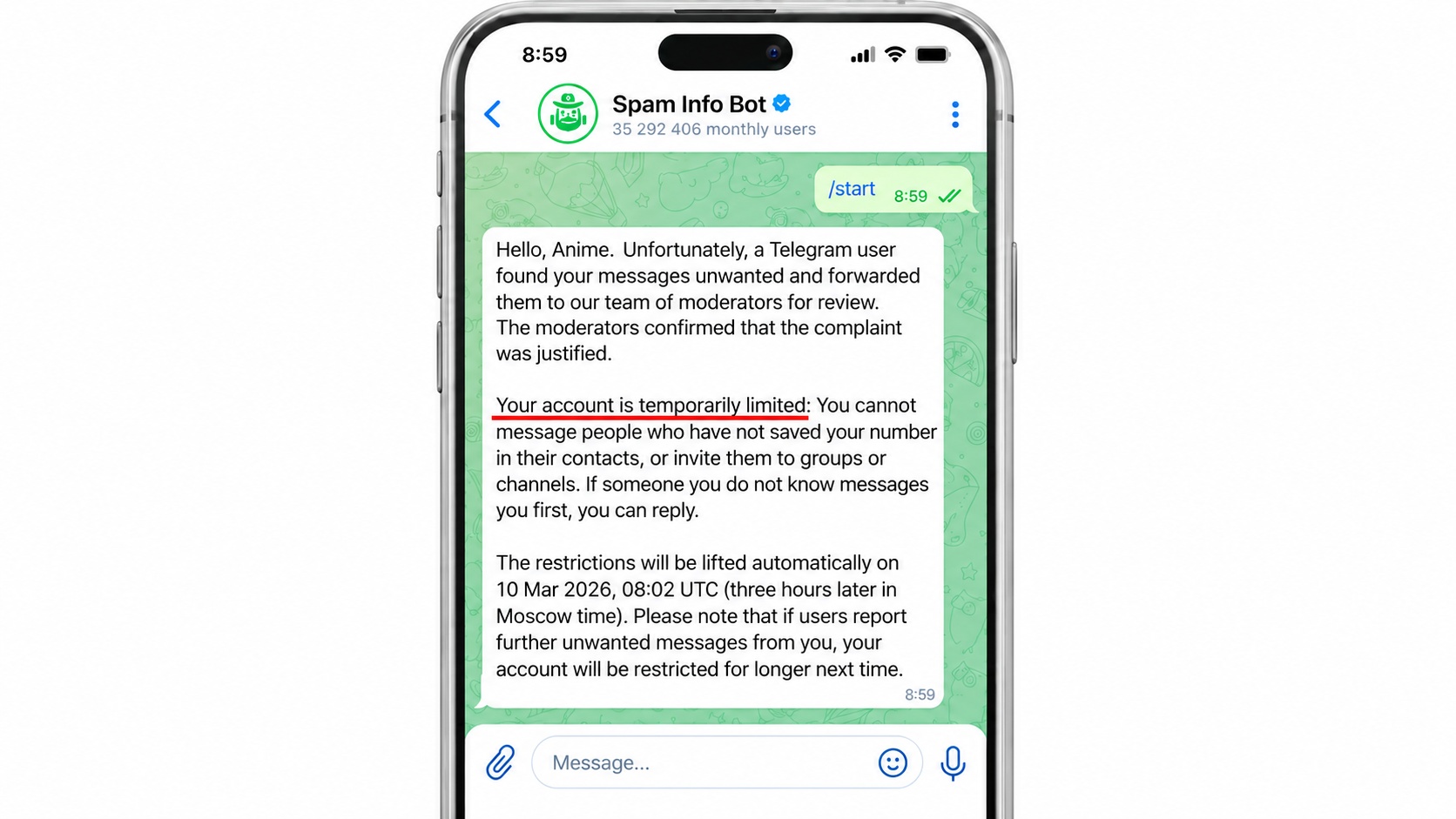
If you cannot message someone you do not know, check the profile through @SpamBot. The bot will show the restrictions and offer an appeal if one is available.

Spam block on a Telegram account

With a spam block, you can usually still reply to people who started the conversation with you and message people who have your number saved in their contacts. Appeal an incorrect restriction through the bot. Repeated violations may increase the restriction period.

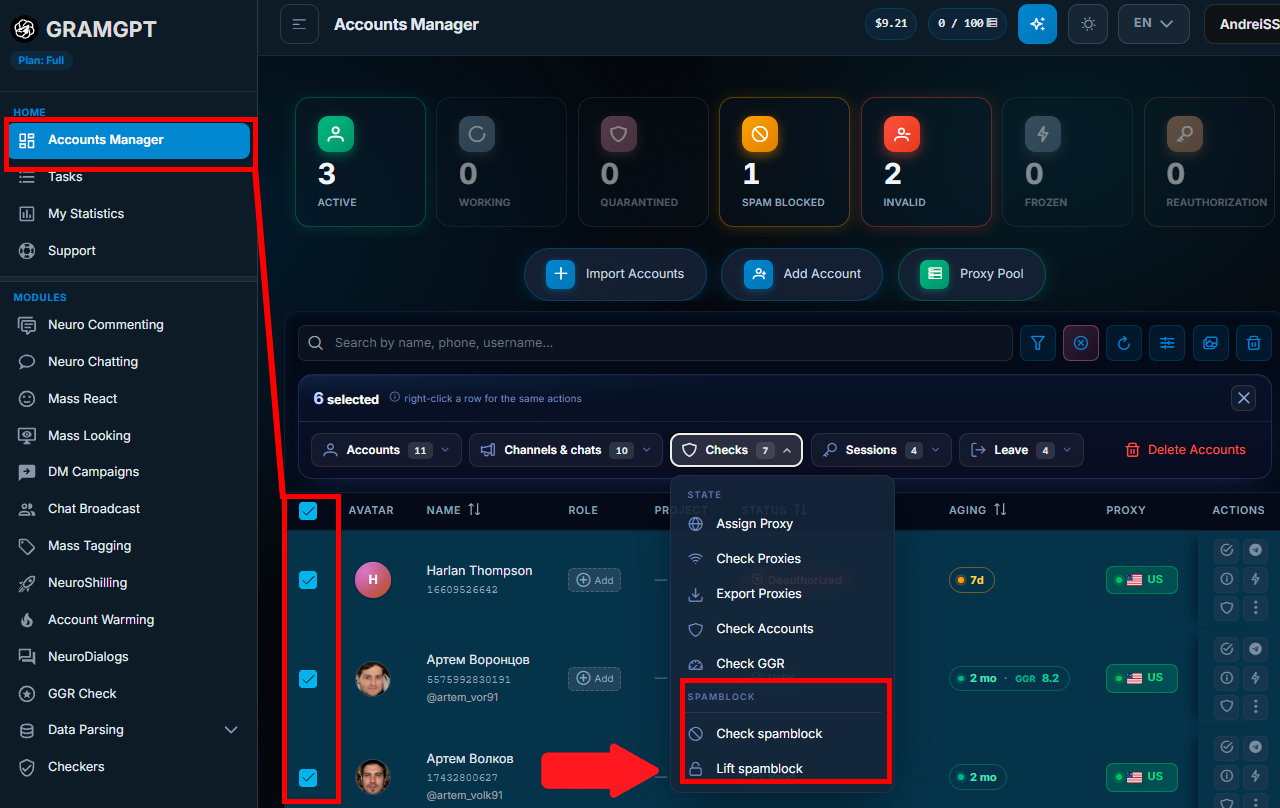
In the GramGPT.io account manager, requests to remove spam restrictions can be handled in bulk without checking each profile separately.

Bulk removal of Telegram spam blocks in GramGPT.io

The reasons for restrictions and the procedure for removing them are described in the article “Spam Block in Telegram: What It Is and How to Remove It”.

How to Remove Flood Wait in Telegram

Flood Wait means a temporary pause after actions are performed too frequently or repeatedly. It can occur during authorization, code requests, and other interactions with Telegram.

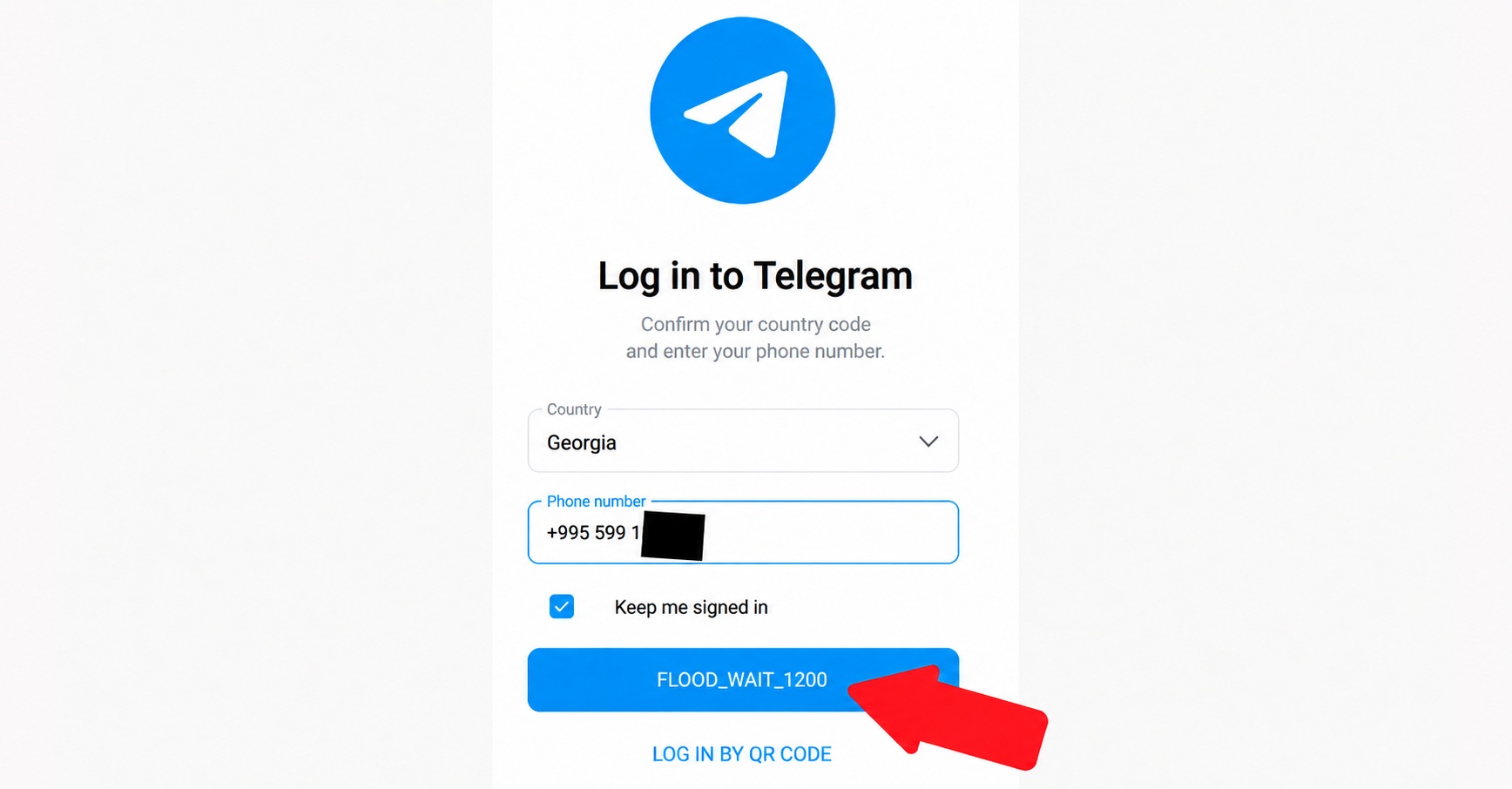
Wait until the specified period ends. In the error FLOOD_WAIT_1200, the number means 1,200 seconds, that is 20 minutes, before the next attempt. The value after FLOOD_WAIT_ is specified in seconds.

What Flood Wait looks like in Telegram

An explanation of the causes and what to do is provided in the article “What Flood Wait in Telegram Is and How to Fix It”.

A Spam Restriction Appeared Immediately after Registration

Having sent no messages does not rule out a spam block on a new profile. The restriction may be related to how the number was used previously; sometimes the cause is the characteristics of certain virtual numbers and VoIP. Pass this information to @SpamBot and try to remove the restriction there. Sometimes the restriction is temporary.

No Login Code or a Notification Says the Number Is Blocked

Start by checking the phone number you entered, including the country code. If the messenger is still open on another device, check messages there: the code may have been delivered in the app instead of by SMS. Do not repeat requests too frequently — this can trigger a Flood Wait pause.

  • The code does not arrive. To contact support, use the path “Didn’t get the code?” → “Help”. The app may generate an email addressed to [email protected]. In that email, leave the technical section unchanged and add the description of your case after it.
  • The number is blocked. Find the available contact option on the screen: next to the text “This phone number is banned”, there may be a “Help” button. If the notification contains the email [email protected], send a message there about the blocking.

How to Report a Telegram Account: Profile, Publication, Channel, or Group

Before reporting, first choose the object: a profile, publication, channel, or group. This determines how to contact Telegram support in your case. In the report itself, specify the violation, for example spam, fraud, or threats.

Reporting a Telegram User

You cannot directly submit a report against a Telegram user. However, if there are serious grounds, you can submit a Telegram account report for review.

For example, if someone created a fake profile, is impersonating you, and is trying to deceive other users, report it to @NoToScam. Send a link to the account and explain which of your details or photos they are using.

Telegram Channel and Individual Post: Filing a Report

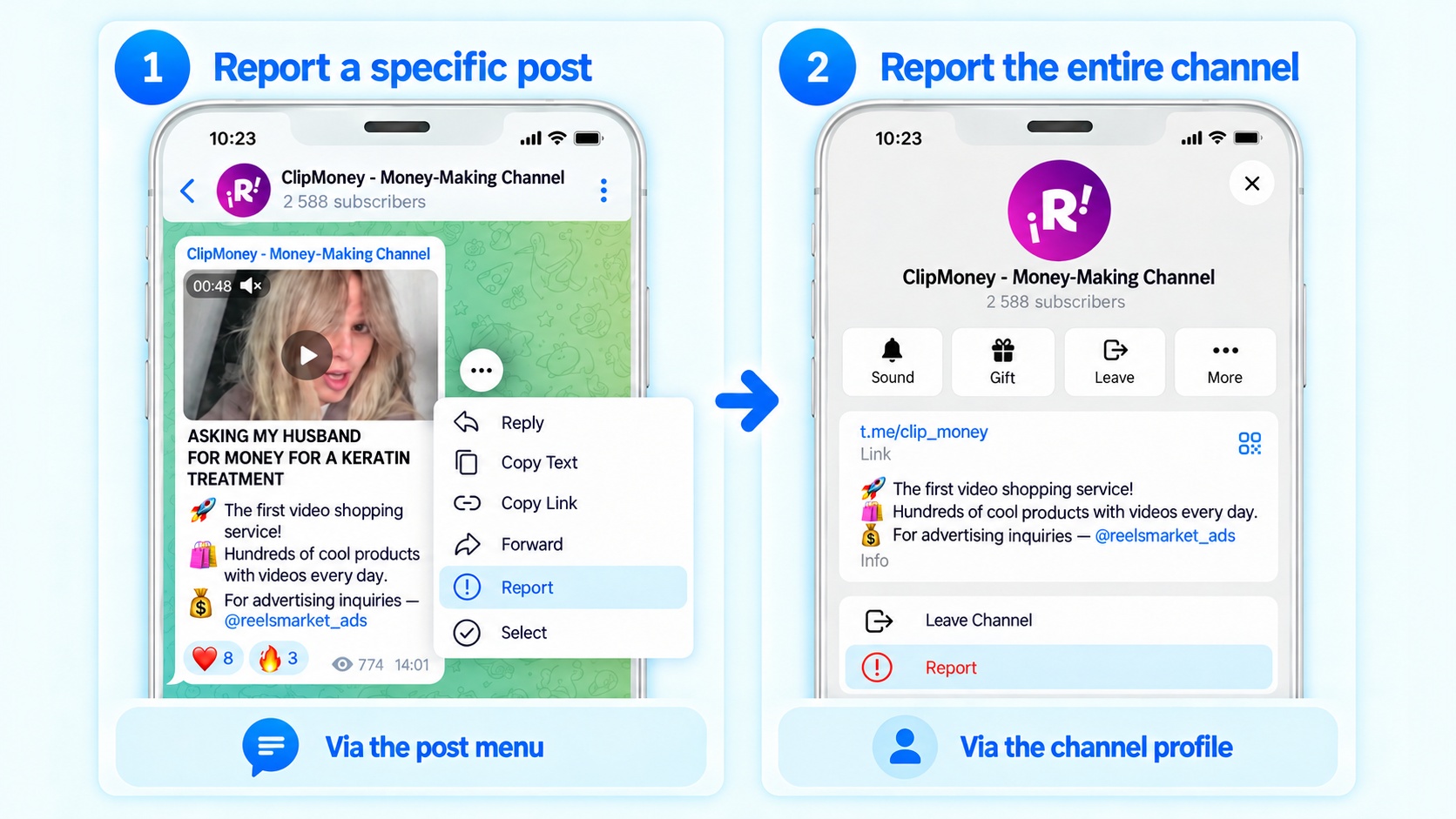
If the violation is in a single publication, you can report a Telegram post. Open the action menu for it: on Android through the message menu, on iPhone by long-pressing the publication, and on desktop by right-clicking it. In the list that appears, select “Report”.

How to report a Telegram channel and a post in it

If the complaint concerns the entire platform, open the channel profile. There, through the same action, you can report the entire Telegram channel.

Reporting a Telegram Group: Submission Options

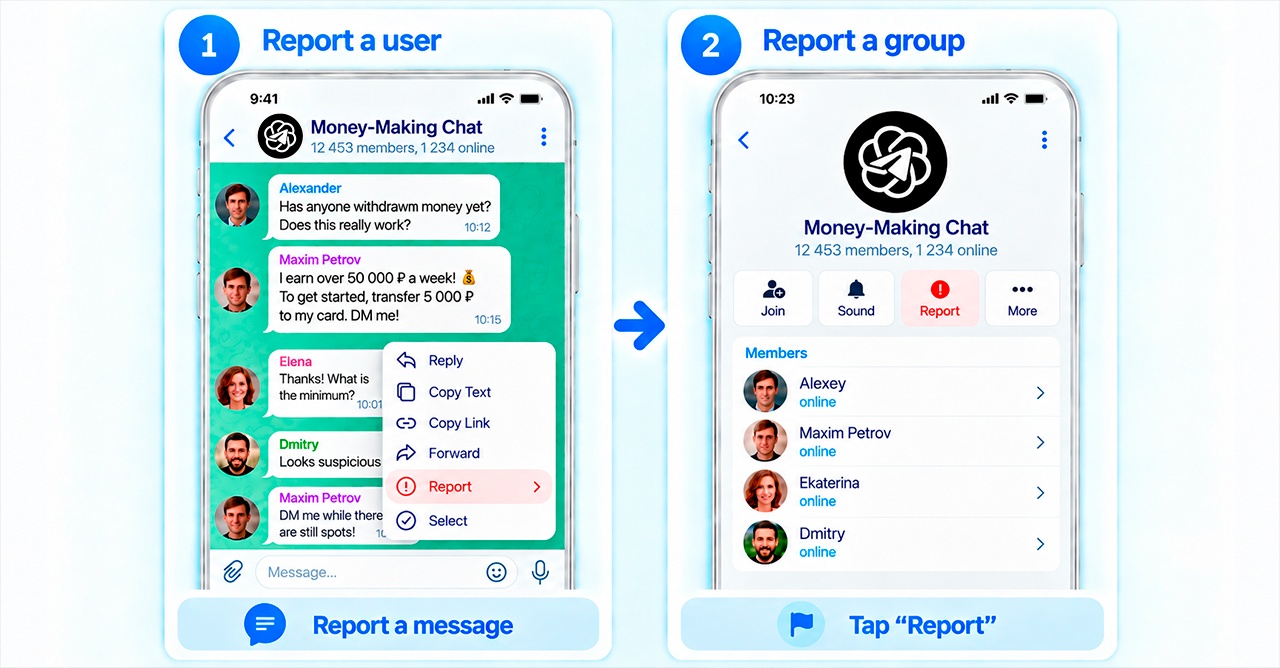
The basis for a report may be a message or the behavior of a specific member — identify that member. The ability to report the entire community at once is provided for supergroups. In other cases, when there is no general button, submit the report from the menu of the relevant message or member.

How to report a group and user in Telegram

How to Delete a Telegram Account: Is Support Help Required?

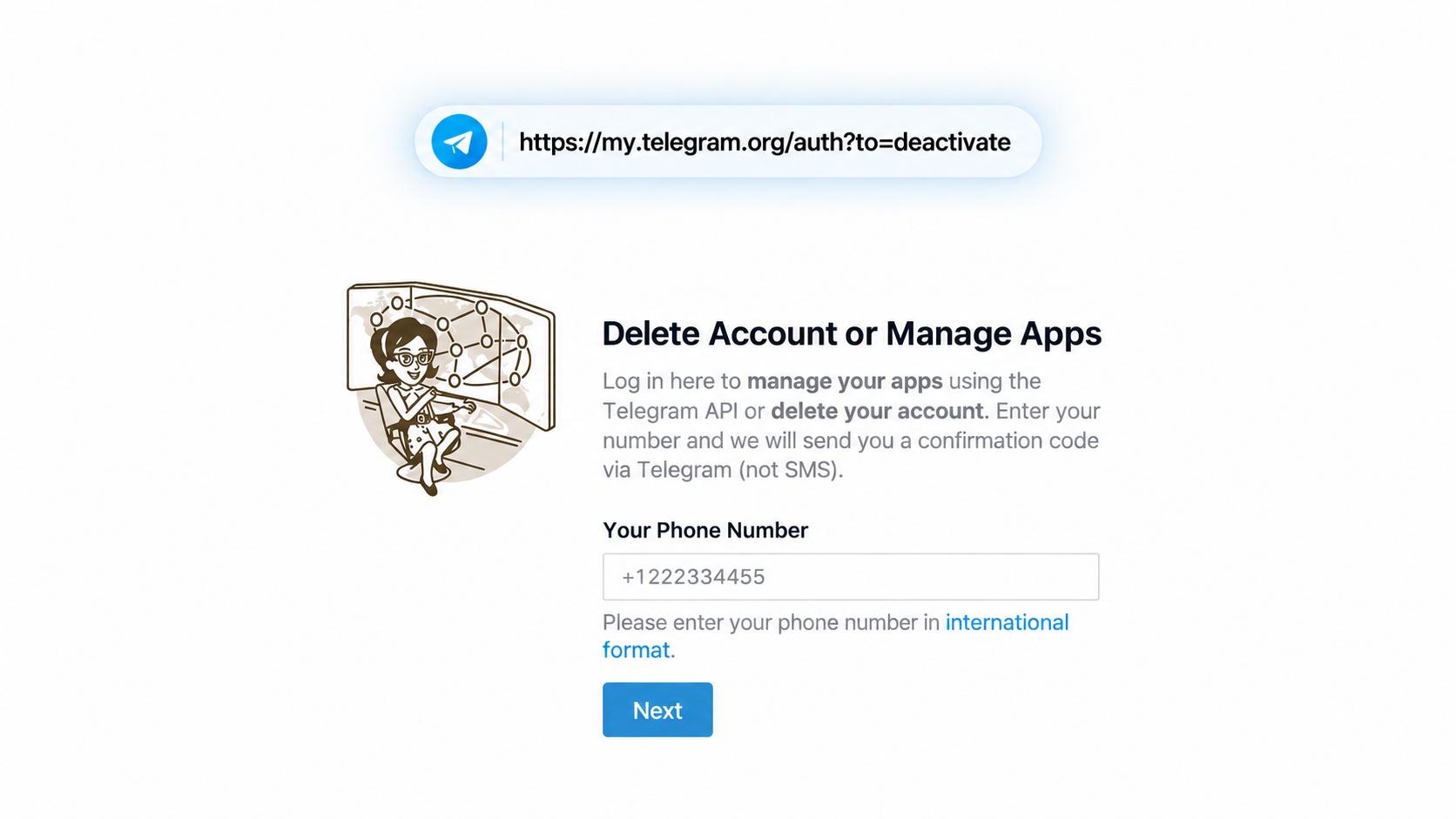
If the question is whether Telegram support can delete an account, contacting staff is usually not required. For self-deactivation, there is an official page at my.telegram.org/auth?to=deactivate.

How to delete a Telegram account without support

Deletion is irreversible: data cannot be restored after deactivation. If you want to regain access to the profile, first use the login recovery methods. Deleting the account is not suitable for this.

How Quickly Telegram Support Responds

There is no guaranteed response time for ordinary user support. It is impossible to determine in advance how long Telegram support will take to reply: the time depends on the issue and the selected contact method.

Telegram Support Is Not Responding: What to Do

If Telegram support is not responding, do not rush to assume the request has been lost. Some requests are reviewed by volunteers. Waiting may take hours or several days, sometimes longer.

After 3–5 days without a response, it is worth checking the following. This is a guideline for rechecking, not a promised processing time:

  1. Was the correct support channel selected? A login request should go to the appropriate destination, not to an inbox for complaints about publications.
  2. Does the email address you provided work? Check for typos and review your inbox and Spam folder.
  3. Is there new information? Add a screenshot of the error, its exact wording, or device details to the request.
  4. If you are writing by email, write the request in English. Explain the issue briefly. In a genuinely urgent follow-up email, you can include URGENT REQUEST, but neither this label nor the language guarantees faster handling.

A follow-up request is appropriate after a long wait or when new facts appear. Sending the same text every day does not add any guarantee that the issue will be resolved.

Main Mistakes When Contacting Telegram Technical Support

To understand how to contact Telegram support, check whether you are making any of these mistakes:

Mistake Better Approach
Choosing a support contact from Telegram search results Verify it against an official source: scammers use similar names and avatars.
Paying an unknown website to restore access Use the provided recovery procedure and do not give your data to intermediaries.
Looking for a hotline phone number Send a written request: there is no user phone number for calling an operator.
Demanding help using threats and accusations Describe what happened calmly and attach facts and the error text.
Trusting a stranger who contacted you first and demands payment Do not transfer money for a promise to “restore the account”: official technical support does not work this way.

Conclusion: How to Contact Telegram Support

Before contacting support, determine exactly what problem you are facing and choose the appropriate official contact method. Login issues, hacking, restrictions, and complaints are handled through different Telegram channels.

Before contacting Telegram support, find the correct contact and briefly describe the situation. If your account is hacked, secure access to it first; for restrictions, follow the message shown by the app itself. Never send anyone login codes, passwords, or session files.

FAQ

First, identify the type of issue. For general questions, use Telegram Support; for spam restrictions, use @SpamBot. Separate contacts are available for login issues, complaints, and security-related cases.