You grab a Telethon script from GitHub, hit run, and the very first prompt asks for api_id and api_hash. Meanwhile, the README just says "get them on my.telegram.org" and moves on. That is usually the moment people start wondering what a Telegram API ID actually is and why no user client starts without one.
The code is rarely the problem. Instead, the site refuses to load, the form throws a bare "ERROR", or the token from your bot turns out to be the wrong credential entirely. As a result, a five-minute task eats an evening.
Below we untangle the three kinds of Telegram credentials, walk through the signup page, decodes the common errors and shows how to avoid losing the account on day one. Finally, we look at how teams in 2026 run dozens of accounts without their own API keys or a single line of code.
Telegram API ID and api_hash in Plain Words
Telegram offers two separate interfaces for software. Under the Bot API, each bot gets a token from @BotFather and hits endpoints such as api.telegram.org/bot<token>/getUpdates. MTProto, by contrast, is the protocol Telegram's own apps speak, and any tool posing as an ordinary user speaks it too.
So the second case is where the key pair comes in. Think of api_id as your app's numeric badge and api_hash as the 32-symbol secret proving the badge is genuine. In other words, together they tell the server which developer's app is connecting. Alone, though, they unlock no chats: you still sign in with a phone and a one-time code, or with a saved session.
Three Keys, Three Jobs
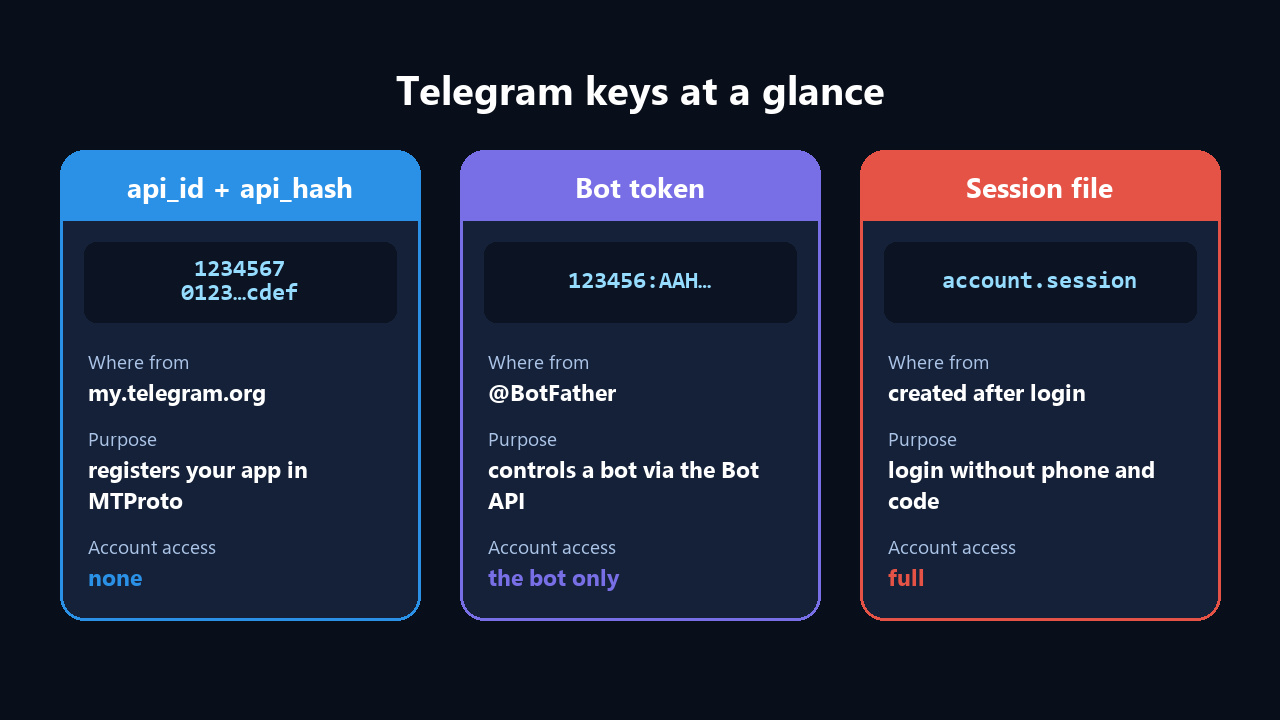
| Credential | Source | Job | Opens the profile? |
|---|---|---|---|
| api_id + api_hash | The developer page my.telegram.org | Identifies your program to MTProto | No |
| Bot token | Issued by @BotFather | Sends commands to one bot | Limited to that bot |
| Session file | Saved once you authorize | Skips the code next time | Yes, fully |
Thus the rule is simple: app keys are low-risk, whereas session files need password-level care. We cover bots and their tokens in our guide on what a Telegram bot is.
When You Actually Need These Keys
Therefore, the pair matters whenever software operates as a person instead of a bot. Typical cases:
- Telethon and Pyrogram scripts. For example, exporting chat members, forwarding posts, auto-replies.
- Scrapers and analytics. In addition, collecting messages, channel stats, mention monitoring.
- Third-party clients. That is, your own messenger app or a desktop wrapper.
- Growth software. In other words, tools that drive several accounts at once.
But if a bot with buttons and menus is the whole plan, MTProto is overkill: the token alone will do. Decide on the task first, then pick the keys.
Five Minutes to Your Own Telegram API ID
Nothing to pay, no expiry date. Also, the only requirement is a live account on a phone you can reach.
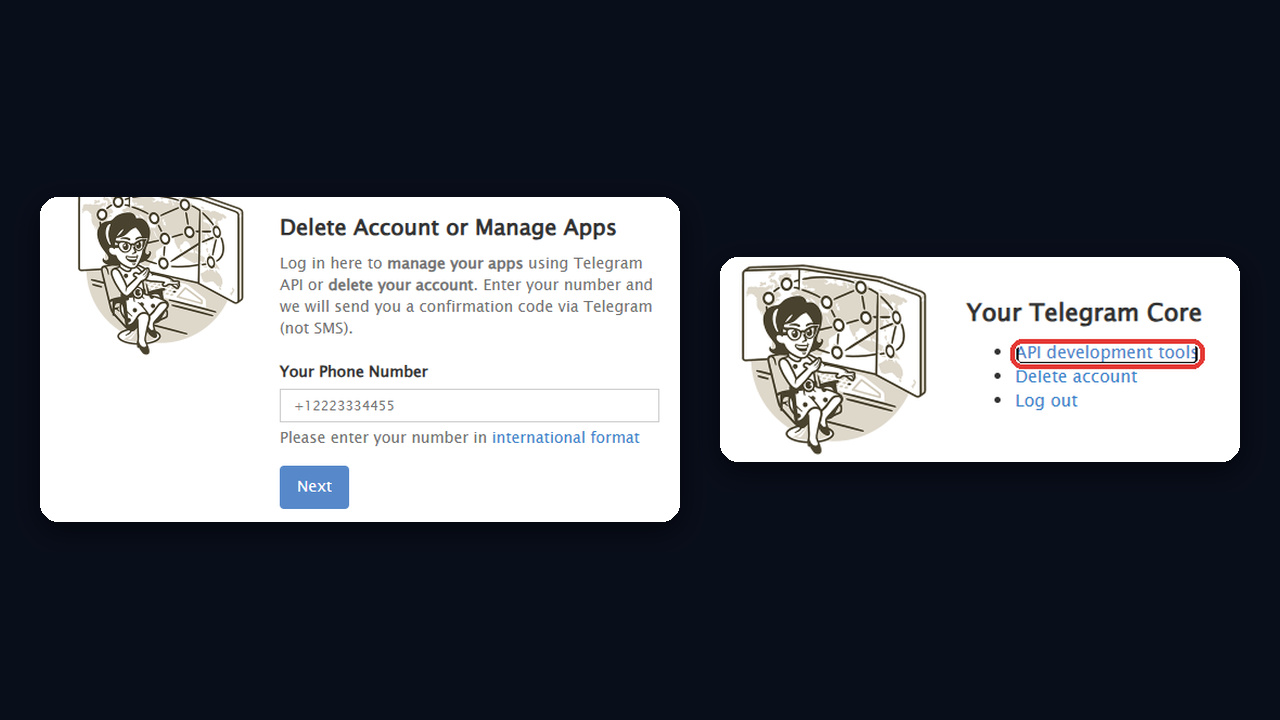
- Head to my.telegram.org on a laptop or PC.
- Next, enter the full phone, starting with + and the country prefix.
- Check the Telegram app for the code. An official service chat delivers it; your carrier sends nothing.
- Then pick API development tools from the menu. A short questionnaire about the app appears.
- Complete it and hit Create application.
What to Put in the Application Form
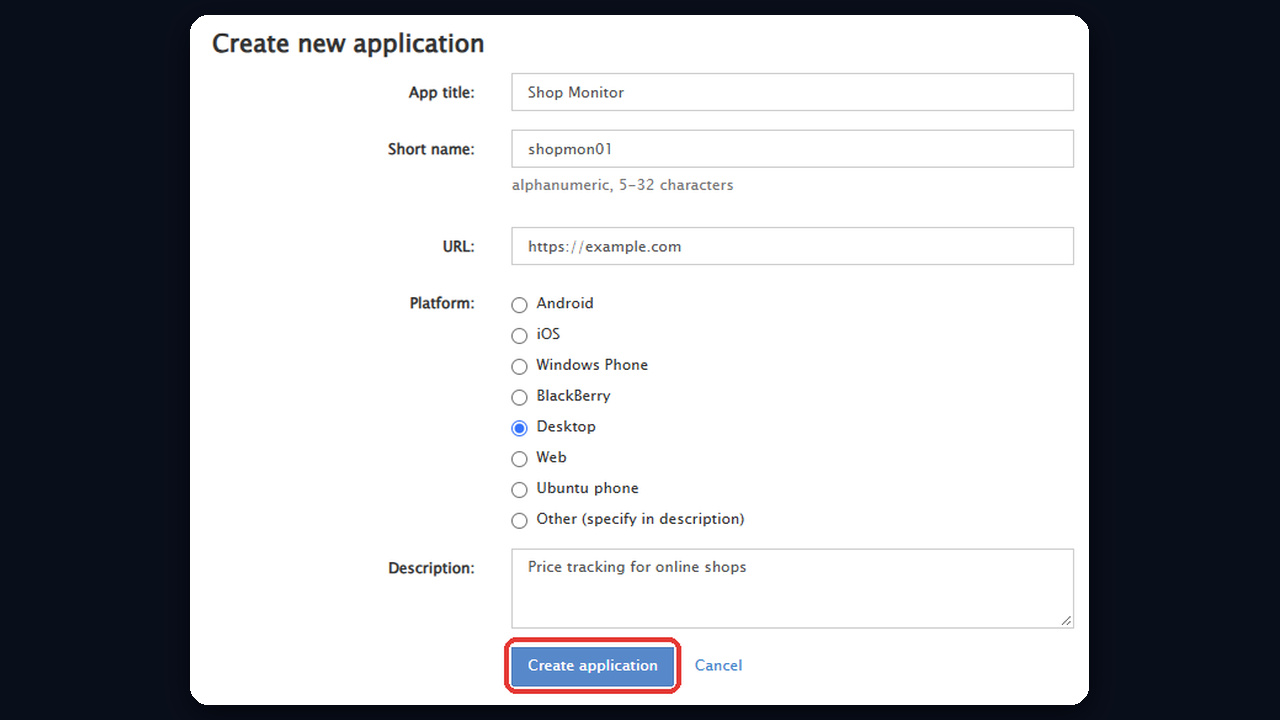
| Field | What to enter | Example |
|---|---|---|
| App title | Whatever you like | Shop Monitor |
| Short name | 5–32 characters, Latin letters and digits | shopmon01 |
| URL | Any site, or leave it blank | https://example.com |
| Platform | Where the program will run | Desktop |
| Description | One line on the purpose | Price tracking |
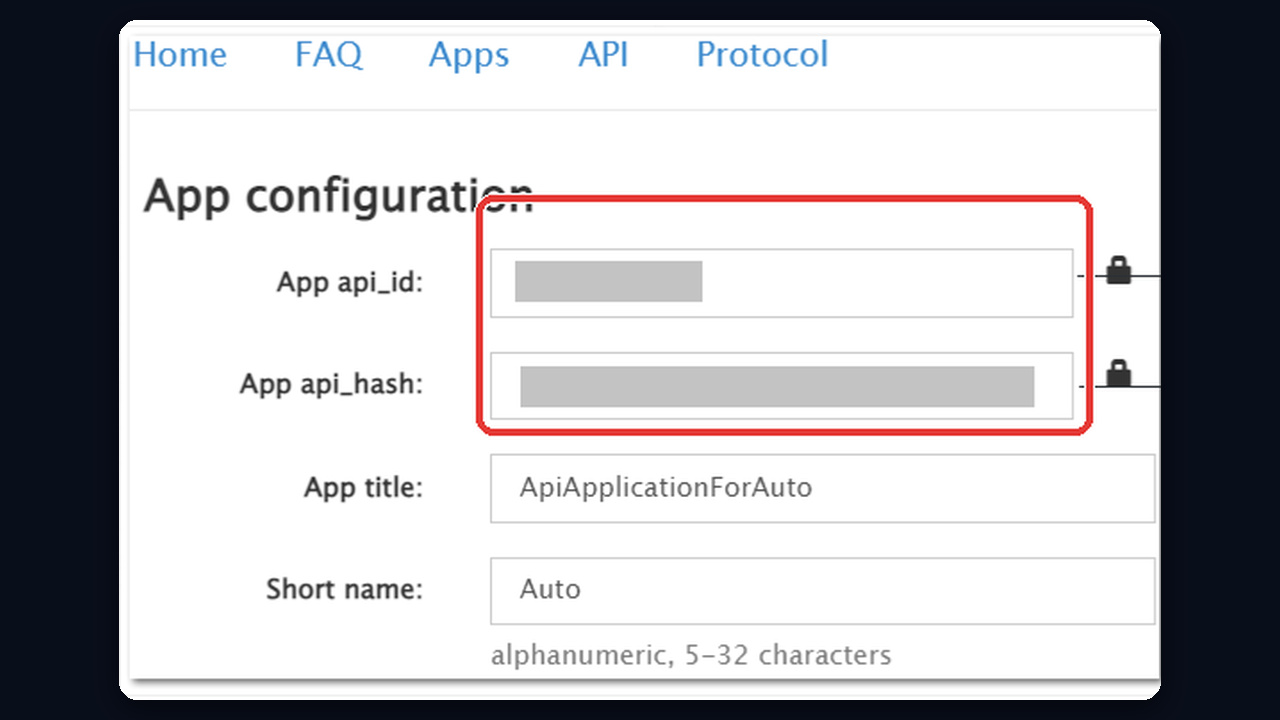
After that, you land on App configuration: App api_id and App api_hash sit at the top, server addresses below. Store both somewhere private. However, a phone supports just a single app, so revisit this page whenever you need the values again.
Why You Can't Get a Telegram API ID: Common Errors
Most often the form simply refuses to save without saying why, so work through this table from the top.
| What you see | Likely cause | Fix |
|---|---|---|
| "ERROR" or "[object Object]" after clicking | Your IP doesn't match the number's country, or a VPN/proxy is on | Turn off the VPN and connect from a regular network in the number's country |
| The site won't load | Restrictions on your provider's side | Switch networks, for instance to mobile data |
| Code never shows up | Another profile is open, or the country code is missing | Check the format and Telegram's service messages in the app |
| Fails on a just-created profile | Not enough history yet | Chat normally for several days, then retry |
| The error keeps coming back | Too many attempts in a row | Take a 24-hour break and choose a plain, short title |
Both refusals look like a plain browser alert reading "[object Object]" or "ERROR" right after you press Create application.
![ERROR and [object Object] alerts on my.telegram.org when creating a Telegram API ID](https://cdn.gramgpt.io/blog/media/my-telegram-org-error-object-object.jpg)
Also keep in mind that Telegram never explains a refusal. If nothing helps, the quickest route is creating the app from another account whose number matches your IP country.
Plugging the Telegram API ID into a Script
Next, libraries take the keys when you create a client. In Telethon, for example:
from telethon.sync import TelegramClient
with TelegramClient('work_profile', 7654321, 'a1b2c3d4e5f6a7b8c9d0a1b2c3d4e5f6') as tg:
    print(tg.get_me().username)
As a result, at launch number one the library requests the phone, waits for the one-time code, then writes work_profile.session. Then it signs in without a code. Pyrogram follows the same flow; only the class name differs.
Startup Errors
- API_ID_INVALID. A typo in the number or string; copy them again without spaces.
- API_ID_PUBLISHED_FLOOD. The script borrowed demo credentials from someone's repository; swap in personal ones.
- FLOOD_WAIT. Requests came too fast; the script has to sleep for the period the error names.
Safety Before Your First Run
App keys can't open someone's profile, but publishing them is still a bad idea. For example, someone could push spam through them, and the penalty would land on your application.
Besides, Telegram's developer terms warn that logins from third-party clients get extra scrutiny. Flood, spam or fake activity end in a lifetime ban. That's why you should:
- First, keep api_hash out of online tools and public repositories.
- Never test on your main account. Create a separate profile for experiments.
- Also, use a proxy from the number's country and pause between actions.
- Keep .session files apart. Whoever holds one holds the profile.
If an account still gets restricted, our guide to Telegram spam blocks explains what to do. For choosing a connection, see our breakdown of Telegram proxies.
Working Without Your Own API Keys: Ready Sessions in GramGPT.io
Your own keys matter when you write code yourself. However, if the goal is promotion, scraping or outreach across dozens of accounts, you can skip the keys, the scripts and the library updates. GramGPT.io works with ready sessions: each account is uploaded as a file, and the app parameters already sit inside it.
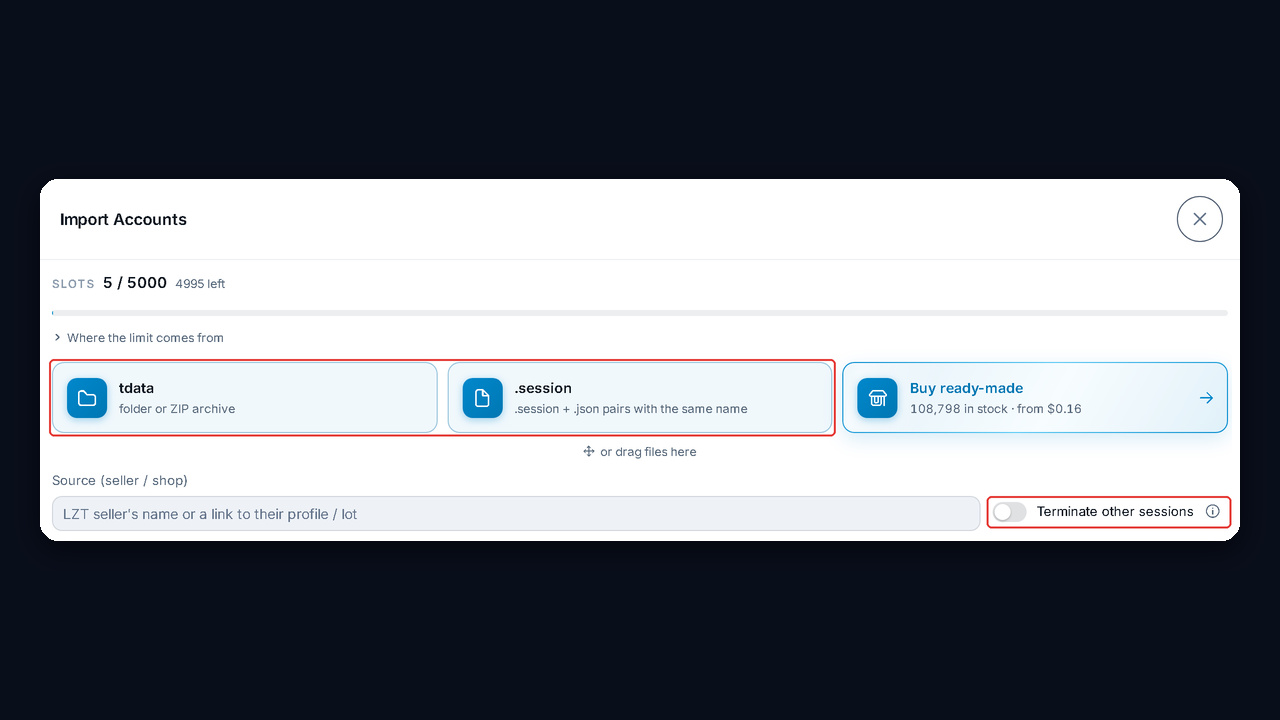
- Upload accounts. In the free account manager, click Import Accounts and pick tdata folders or session plus json pairs.
- Assign proxies. Distribute them from the pool, one address per one or two profiles.
- Turn on resetting other sessions. Foreign logins end, and the profile stays yours alone.
- Prepare the accounts. Fresh profiles should go through automatic warm-up first.
After that, every module, from scrapers to neurocommenting, runs on the uploaded sessions with no keys or code from you. No accounts yet? The dashboard marketplace has them, and our guide on buying a Telegram account shows how to choose.