Your channel is growing and posts get read, yet the Post Story button stays grey. Telegram says you need more boosts, and the questions start: what exactly is a Telegram boost, who can give one, and how many do you need?
However, a pinned "please boost us" post rarely gathers more than a couple of votes. The reason is simple: only Premium subscribers can vote, and they are a small slice of most audiences. Meanwhile, competitors already publish stories and customise their look.
This guide explains boosts and levels, how to support a channel and find its voting link, how many you need and why progress slips. Finally, we show how to collect boosts in 2026 without fake services and turn the unlocked features into growth.
What a Telegram Boost Is
A Telegram boost is a vote of support that a Premium subscriber gives to a channel or group. They add up, so once a threshold is reached the community moves to a new level. Each step, in turn, unlocks extras: stories, colours, emoji, wallpapers and more.
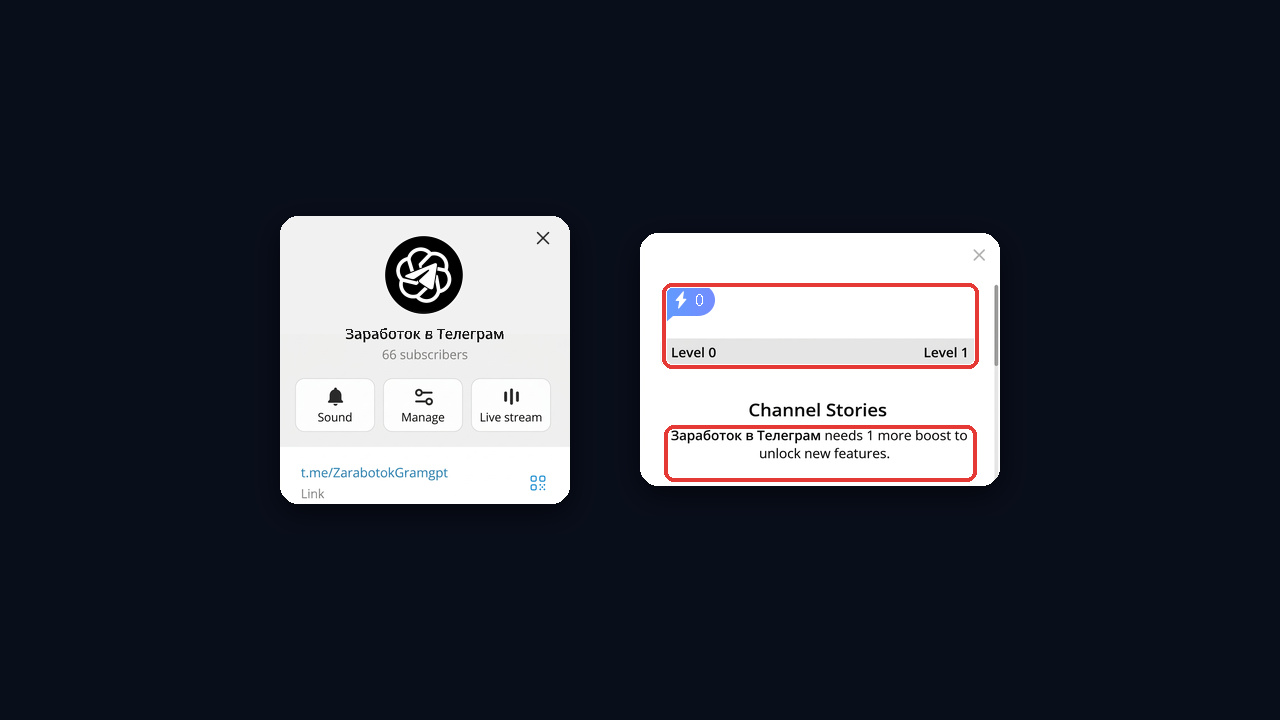
In other words, a boost is neither a subscription nor a view. Instead, it works as a separate loyalty metric, and anyone can see it: the count and current tier appear on the profile card.
How Many Boosts a User Gets
| Subscription source | Boosts |
|---|---|
| Paid for it yourself | 4 |
| Gifted it to a friend | 3 per gift |
| Received it from a person | 1 |
| Won it in a giveaway | 0 |
Boosts stack, so you can give them all to one community or spread them out. Also, each can move once a day, and it lasts as long as the subscription. For details on the plan itself, see our guide to Telegram Premium.
Telegram Channel Levels and Their Perks
The tier climbs as support grows. For example, level one unlocks stories: on the first tier you can post one story a day, on the second two, and so on. Other features, however, sit behind their own thresholds.
- From level 1: 7 name colours, link and quote styles, plus one story and one custom reaction for every tier.
- Level 3: auto-translation of posts.
- Levels 4–8: background emoji for links and the cover, over 1,000 emoji statuses.
- Levels 9–10: 8 preset wallpapers, and from level 10 your own uploads.
- Level 50: turning off official ads.
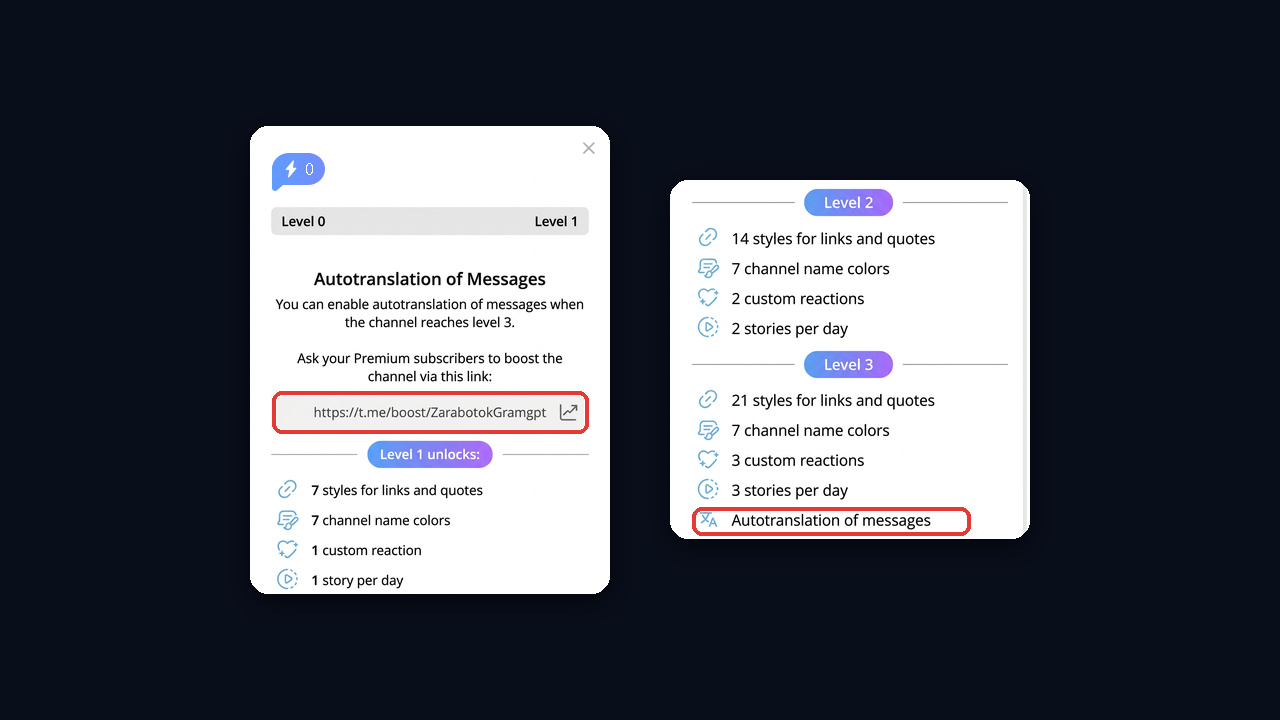
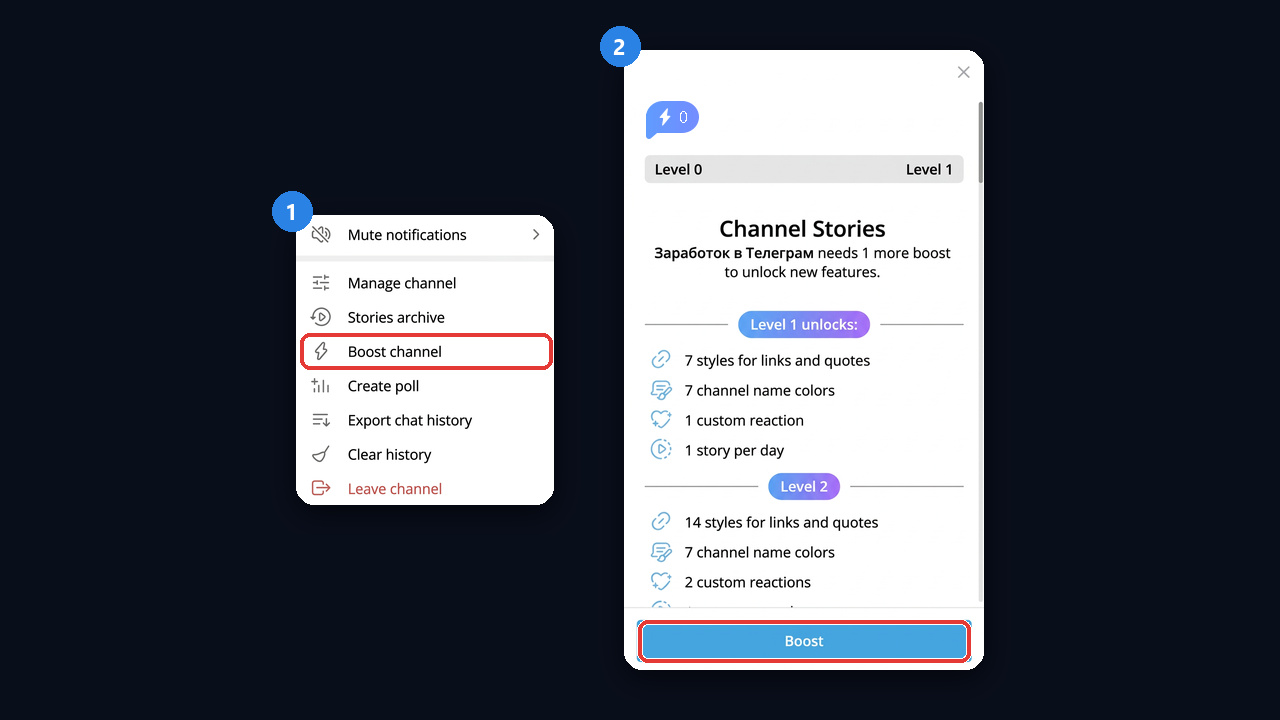
This is how the ladder looks in Telegram Desktop: the window opens when you tap any locked feature, such as auto-translation. Besides, thresholds appear right in the settings: under Appearance, background emoji carries a "Level 4" badge and channel wallpaper a "Level 10" one.
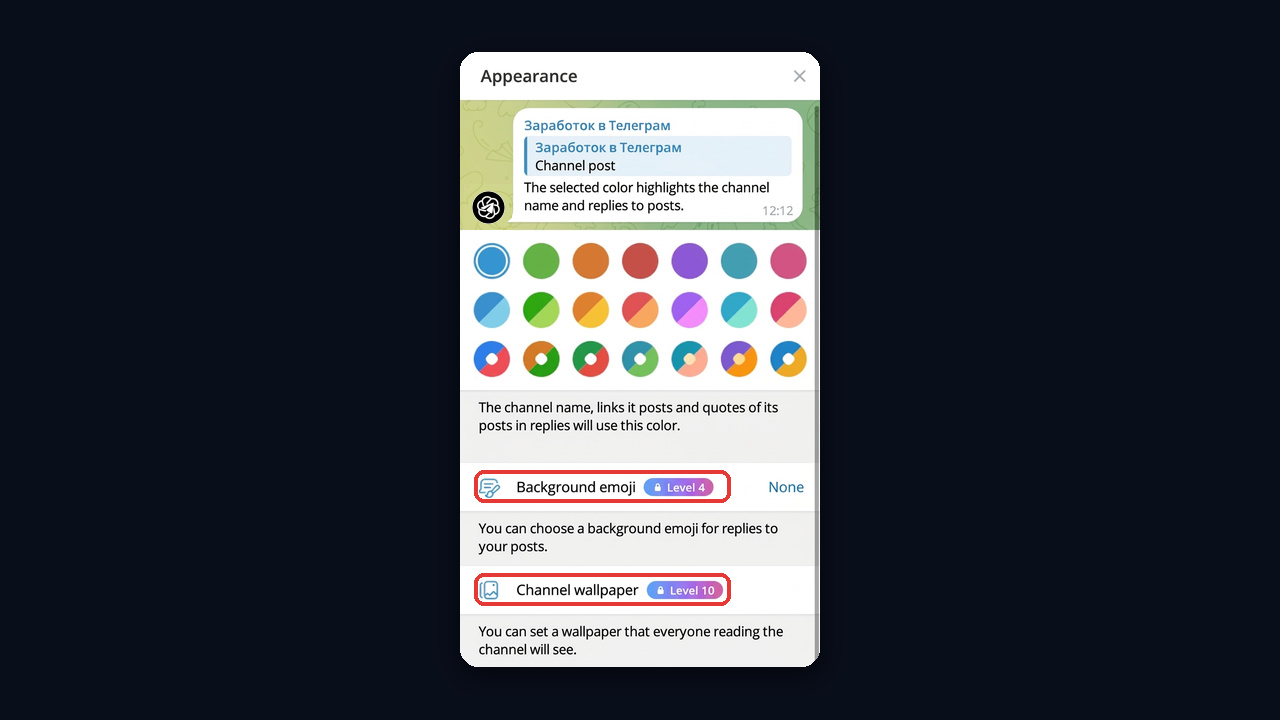
Requirements change from time to time, so check these badges before planning.
How Many Votes a Level Needs
First, the threshold depends on audience size: the more subscribers, the more votes required. For instance, our channel "Заработок в Телеграм" with 66 subscribers is one vote short of tier one, while tens of thousands of readers need dozens of boosts. Also, each next step costs more than the previous one.
So skip the formulas floating around online. Instead, open your channel's boost window: it shows the current tier, the total and what remains until the next step.
How to Boost a Telegram Channel
For a subscriber it takes a couple of taps:
- Open the channel menu. In Telegram Desktop it is the ⋮ icon in the top right corner; choose Boost channel there, or simply follow the voting link.
- Press Boost in the window. It also shows how many votes are missing for the next level.
- Check your free boosts. With none left, Telegram offers to move one from another community.
How to Boost a Channel From Your Phone
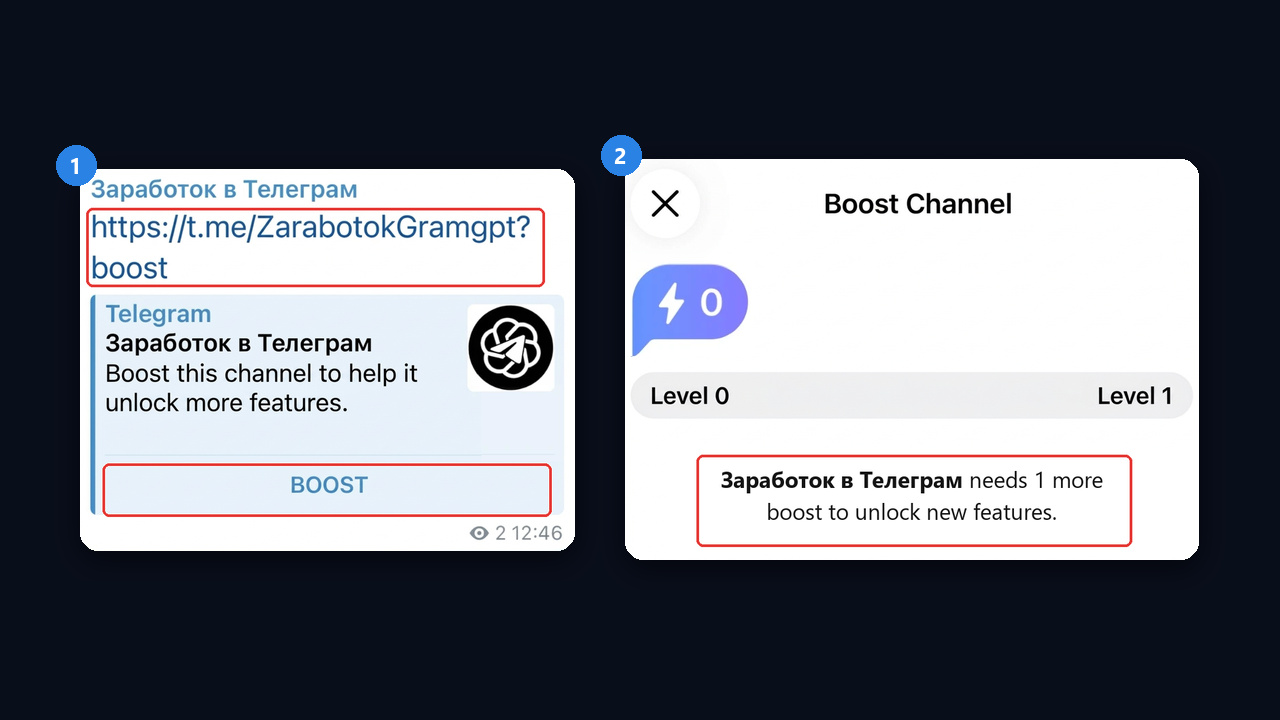
On mobile, the easiest way is to open the voting link. Telegram shows the Boost Channel window: the boost counter and level at the top, then how many votes are missing and what the next level unlocks. Then just press the button at the bottom.
Where to Find the Boost Link
An invite link is easy to build: add ?boost to the channel address, for example t.me/ZarabotokGramgpt?boost. In a chat it turns into a card with a Boost button, so it is handy to send to subscribers.
The second format is t.me/boost/channel_name. Admins find it in the window of any locked feature, as on the level ladder screenshot, and large channels also see it in boost statistics. Next, pin it in a post, add it to the description or send it to subscribers directly. Then the link opens a voting window with the tier and progress.
Boosts in Groups
Groups are boosted the same way as channels: Premium members give votes and the community climbs tiers. However, groups get their own perks and a couple of special mechanics.
- Member features. For example, a custom emoji pack and voice message transcription even without a subscription.
- Bypassing restrictions. Admins can let boosters ignore slow mode and other limits.
- Booster badge. Next to a member's name you can see how many votes they gave the group.
So in chats boosts also work as a privilege for active members, not just a way to unlock styling.
Why a Channel Loses a Level
| Cause | What happens | Fix |
|---|---|---|
| A subscriber let the plan lapse | Their support disappears | Remind newcomers about boosting |
| A vote moved elsewhere | It disappears instantly | Give a reason to stay: booster perks |
| The audience grew | The threshold went up | Ask for support in step with growth |
| A giveaway ended | Gifted Premium expired | Run giveaways on a schedule |
Getting a Telegram Boost Without Fake Services
Sites that sell boosts offer votes from other people's accounts. However, those votes vanish with the seller's subscription, and mass votes from look-alike profiles may be removed. Therefore, a live audience is the safer path.
- A direct ask. For example, a short post on what the next tier unlocks and why it matters to readers.
- A subscription giveaway. This way, the organiser earns boosts for every prize.
- Booster perks. For instance, extra stories, early access or a private chat.
- A bigger paying audience. Accordingly, the more Premium readers you have, the easier the votes come.
How to Run a Premium Giveaway
A giveaway is the fastest legitimate way to raise the level: the channel gets boosts for the whole duration of the prizes, and the winners get Premium. Admins open the channel's boost section and choose Create giveaway.
- Pick the prize and quantity. The number of subscriptions and their length: 3, 6 or 12 months.
- Set the participants. For example, only new subscribers or users from selected countries.
- Choose the end date and pay for the subscriptions. Telegram picks the winners and announces them in the channel.
Note that won Premium gives the winner no boosts of their own, and the channel's votes disappear when the subscriptions end. So run giveaways on a schedule.
Turning Telegram Boost Into Growth with GramGPT.io
Only live Premium subscribers can vote, so your level depends on your audience: the more relevant readers you have, the more of them will boost. That is where GramGPT.io helps, since its modules bring real people from your niche to the channel.
- Mass tagging. Work accounts post stories and mention people from topic chats. Each person gets a "mentioned you in a story" notification, opens it and visits the channel. Note that the stories come from the accounts, not the channel, so no level is required. See the mass tagging overview, and enable the Story Mentions module in your dashboard.
- Mass looking. Accounts view stories of people in your niche, so some of them check who it was and find the channel. Learn more in the mass looking overview.
- Account pool. Both modules run on work profiles, which are easy to pick in the dashboard marketplace. Treat them as tools for the modules, not as a source of votes: boosts from bought subscriptions expire with them.
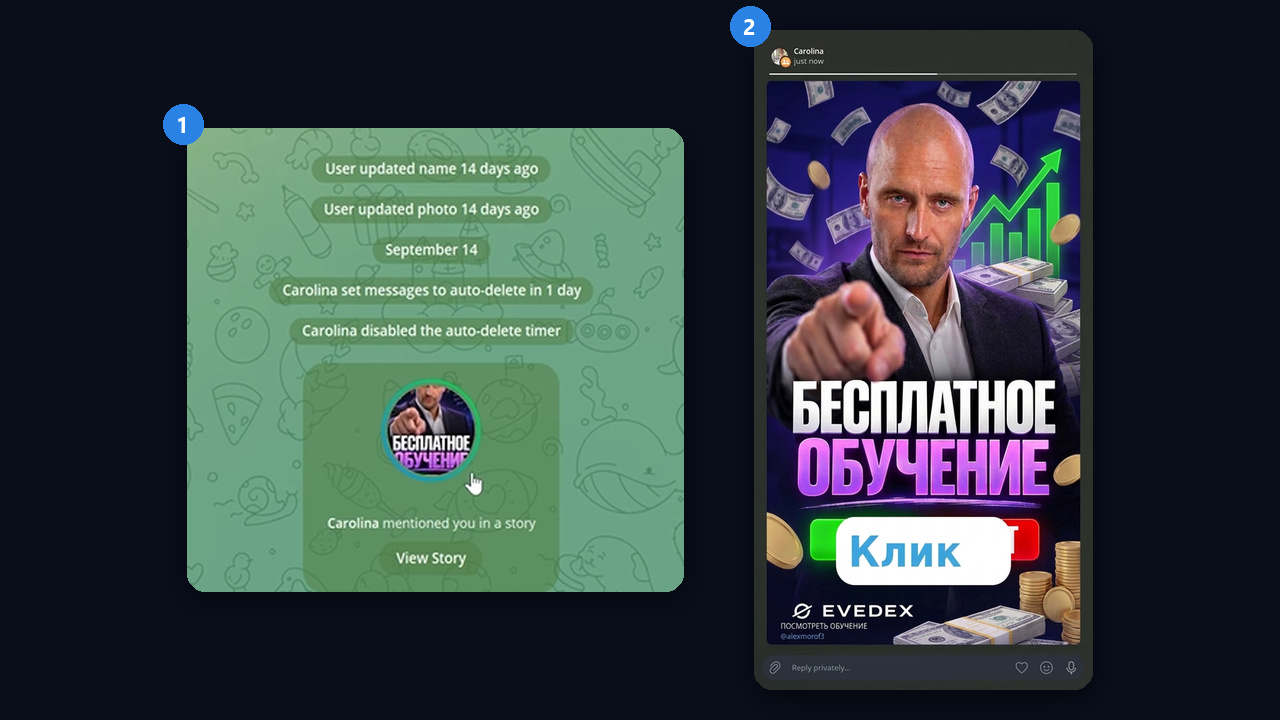
This is what a person sees: the mention notification on the left and the story itself on the right, with their tag and a clickable sticker linking to the channel.