Low-quality boosting of reactions and comments in Telegram often ends with unstable results: the activity looks unnatural, the owner has to constantly monitor orders, and when questionable services are used, there is still a risk of restrictions and other sanctions from Telegram.
Private channels especially need lively activity. Standard SMM panels work inconveniently with them or require gaining subscribers first. When there are views but nothing under the posts, the channel looks abandoned — especially in betting, casino, and other niches where the first impression strongly depends on what happens under publications. Reactions and discussions show that the content is being read and that there is activity inside.

Today you will learn how Neuroshilling works in the GramGPT Telegram Combine: how to configure reactions to old and new posts, how to launch comments through connected accounts, and which parameters to control so that the activity looks consistent and does not require manual work with every publication.
What Reaction and Comment Boosting in Telegram Is
Reaction boosting in Telegram is increasing the number of emojis under publications. This gives posts more visible activity and keeps them from looking empty.
Comment boosting in Telegram is creating activity in discussions manually or with the help of AI bots for communication in Telegram. Comments, replies, and dialogues appear under posts, making the channel look more lively and active.
What You Need to Know Before Launching Boosting through Neuroshilling
- Regular SMM panels often require manual work, additional subscribers, and recurring expenses.
- The number of emojis per post is limited by the number of connected Telegram accounts.
- Neuroshilling can work both with the latest publications and with new posts after the task is launched.
- In chat revival mode, connected accounts can leave thematic comments and reply to messages in discussions.
Why SMM Panels Are Not Suitable for Private Channels
The first thing that usually comes to mind when reaction boosting in Telegram or comment boosting in Telegram is needed is to order activity through regular SMM services. But for private channels, this option often turns out to be inconvenient.
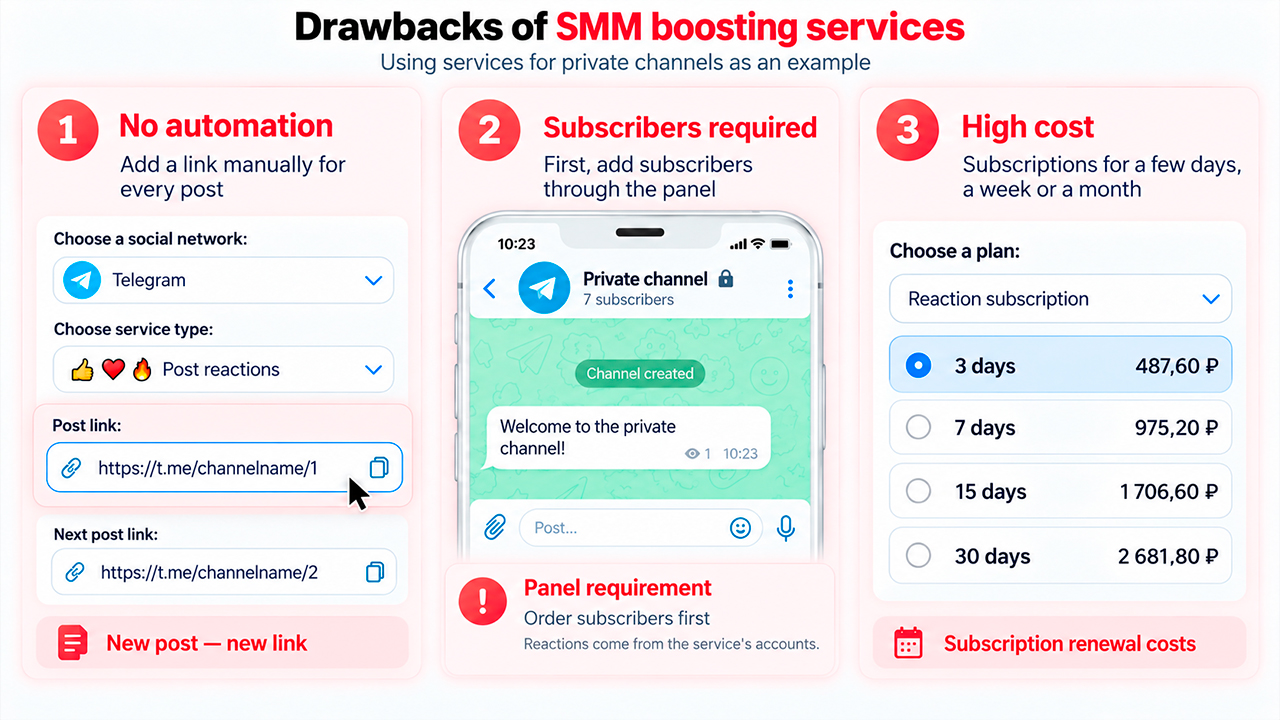
- No proper automation. Usually, you have to manually add a link to every post. It is not possible to configure a task once and automatically add activity under new publications.
- Additional subscribers are required. To add activity in a private channel, some panels first require boosting at least 500 subscribers. Those accounts are then used for this.
- High cost for continuous use. Three days of activity can cost about 25 dollars, while half a month can cost about 100 dollars. For many projects, such expenses simply do not pay off.
As a result, boosting services often turn into constant manual work: you need to monitor subscribers, post links, time periods, and expenses. If the task is to boost reactions in a Telegram channel without daily orders, it is easier to connect your own accounts, select the required emojis, and configure the scenario once.
At the same time, there is no need to first gain a certain number of subscribers through boosting live TG subscribers. In Neuroshilling, you can create lively activity using accounts that have already been added and use them for activity under publications.
How Reaction Boosting Works in a Private Telegram Channel through Neuroshilling
The Neuroshilling module in the GramGPT Telegram Combine is used for configuration. Inside it, there is a “Chat Revival” section with a separate “Reactions” tab.
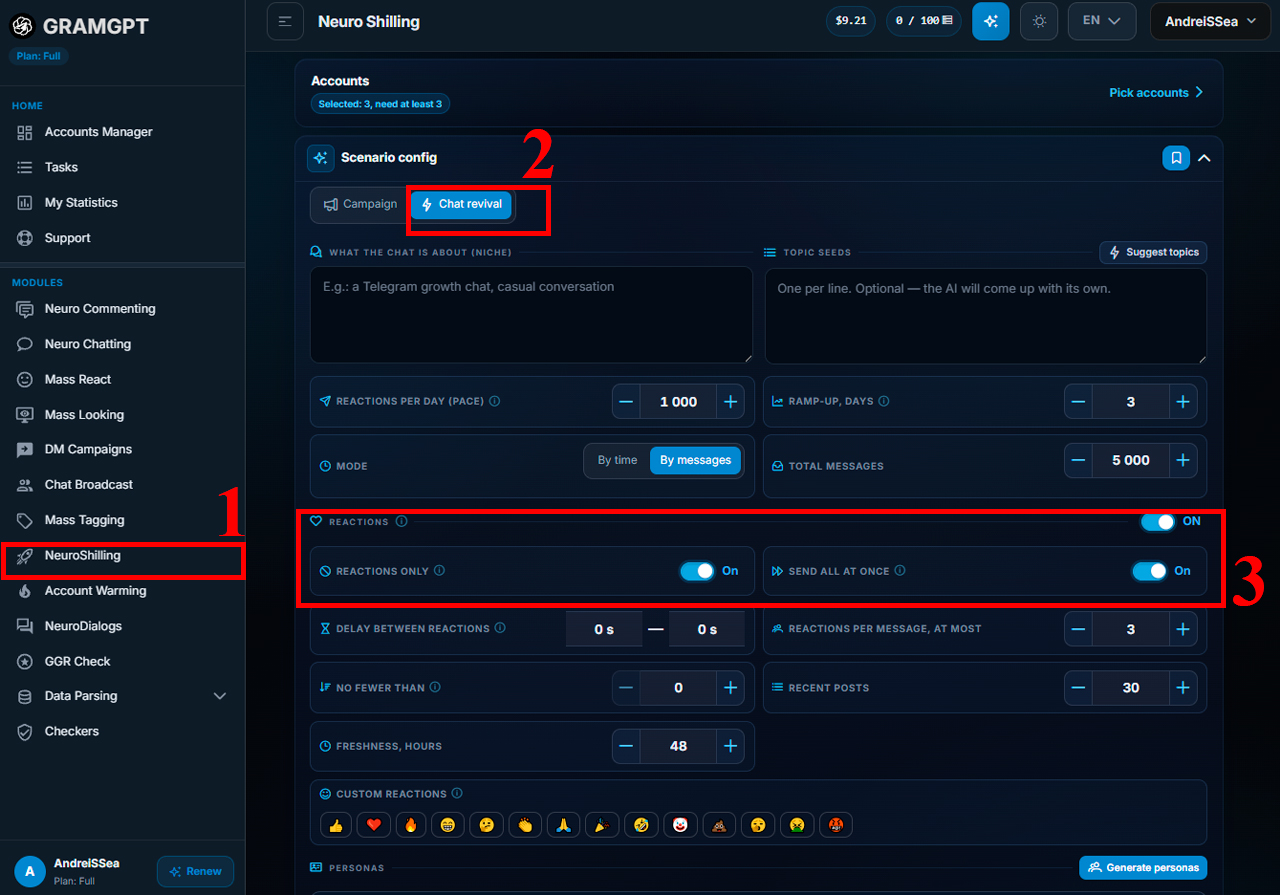
The logic is simple: first, add the Telegram accounts that will participate in the scenario. Then select the publications to process, specify the required emojis, and launch the task.
How do you boost reactions in Telegram without a separate order for every post? It is enough to add accounts once and configure the main scenario parameters.
1. Add Telegram Accounts
Emojis are sent from Telegram accounts added to GramGPT. Everything here is under the owner’s control: the number of connected accounts determines the maximum amount of activity that can be received on one publication.
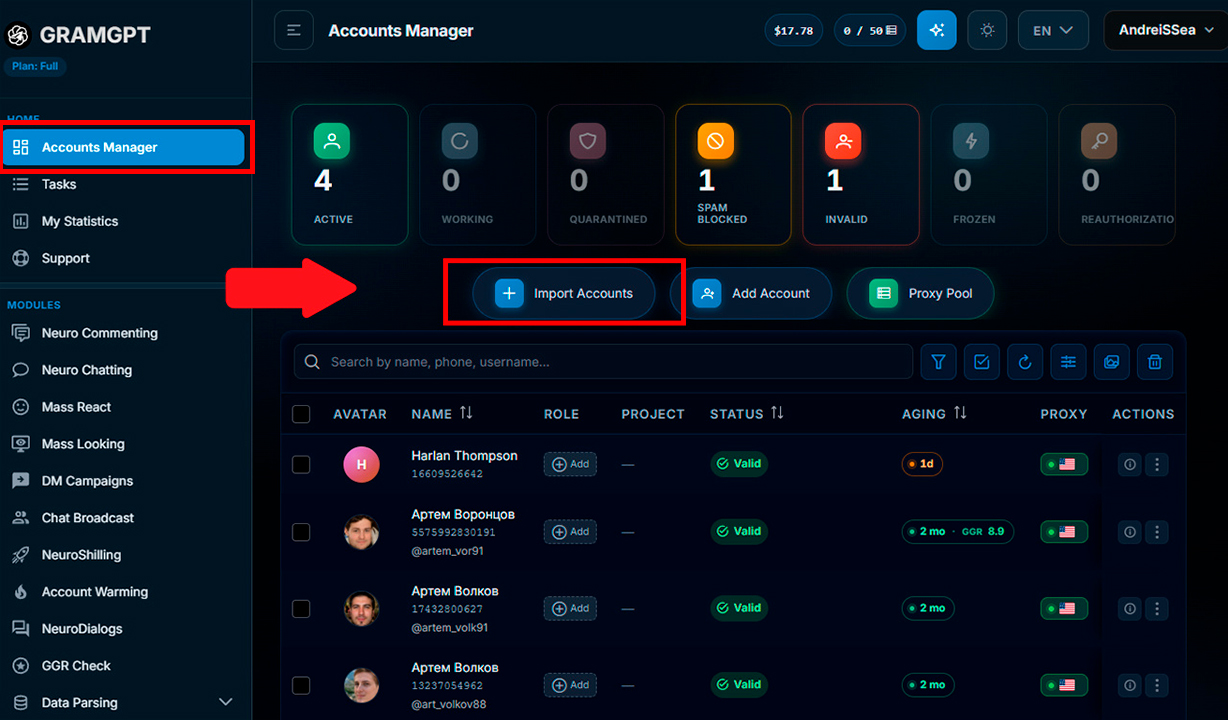
Before launch, the accounts themselves should be properly prepared. In previous reviews, we explained in detail how to choose a Telegram account for promotion and how to protect a Telegram account after purchase.
If seven accounts are added, the system will not send more than seven reactions to one post even if the settings specify a limit of ten. Therefore, the number of accounts directly determines the available amount of activity.
2. How to Configure Reaction Boosting in a Telegram Channel
In the reactions section, first enable the “Reactions Only” mode. It disables conversations in comments and leaves only the mechanics of sending emojis under publications.
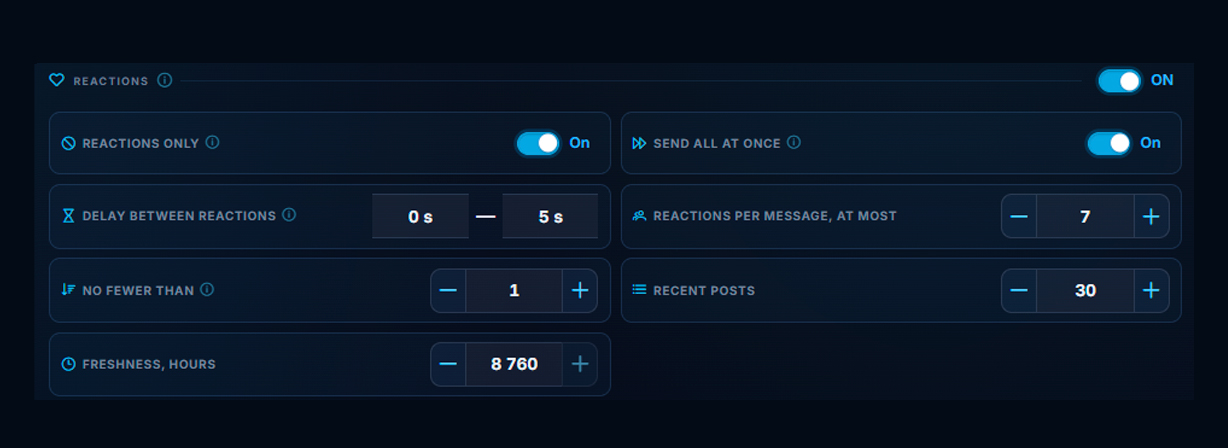
Next, configure the workflow itself:
- “Send all at once” — emojis appear shortly after publication.
- “Pause between reactions” — allows sending to be distributed over time. If the pause is enabled, it takes priority over the “Send all at once” function, and reactions are added at the specified interval.
- “Reactions per message, no more than” — limits the maximum number of emojis under one publication. For example, you can set a limit of up to 7 reactions per post.
- “No less than” — an additional threshold that, when necessary, helps limit the scenario more precisely.
- “Latest posts” — specify how many of the latest publications need to be processed, for example 30.
- “Freshness, hours” — set the period within which the system will search for these publications. For example, with a value of 8,760 hours, Neuroshilling will process up to 30 of the latest posts published during this period.
Publications that do not meet the specified conditions will remain unchanged. This way, reaction boosting in a private Telegram channel works only with the required posts and does not affect the entire archive.
For a quick function check, it is more convenient to enable immediate sending. If smoother and more natural reaction boosting in Telegram is required, it is better to set a pause between reactions and limit the number of emojis per message.
3. Select Reactions and Emojis
The next step is to select the emojis that will appear under publications. It is better to choose them according to the channel’s topic and style: likes may be appropriate in one project, while fire, a rocket, or other available emojis may fit another.

When looking at how to boost reactions in Telegram, one of the main steps is selecting the required emojis. Neuroshilling will distribute them among the connected accounts so that the activity under posts looks more varied and natural.
4. Add the Channel Link and Launch Neuroshilling
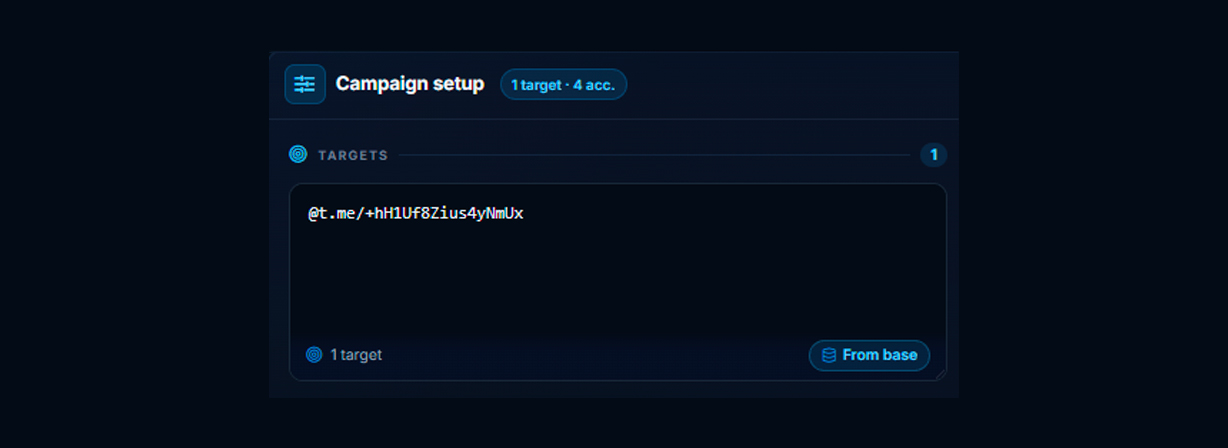
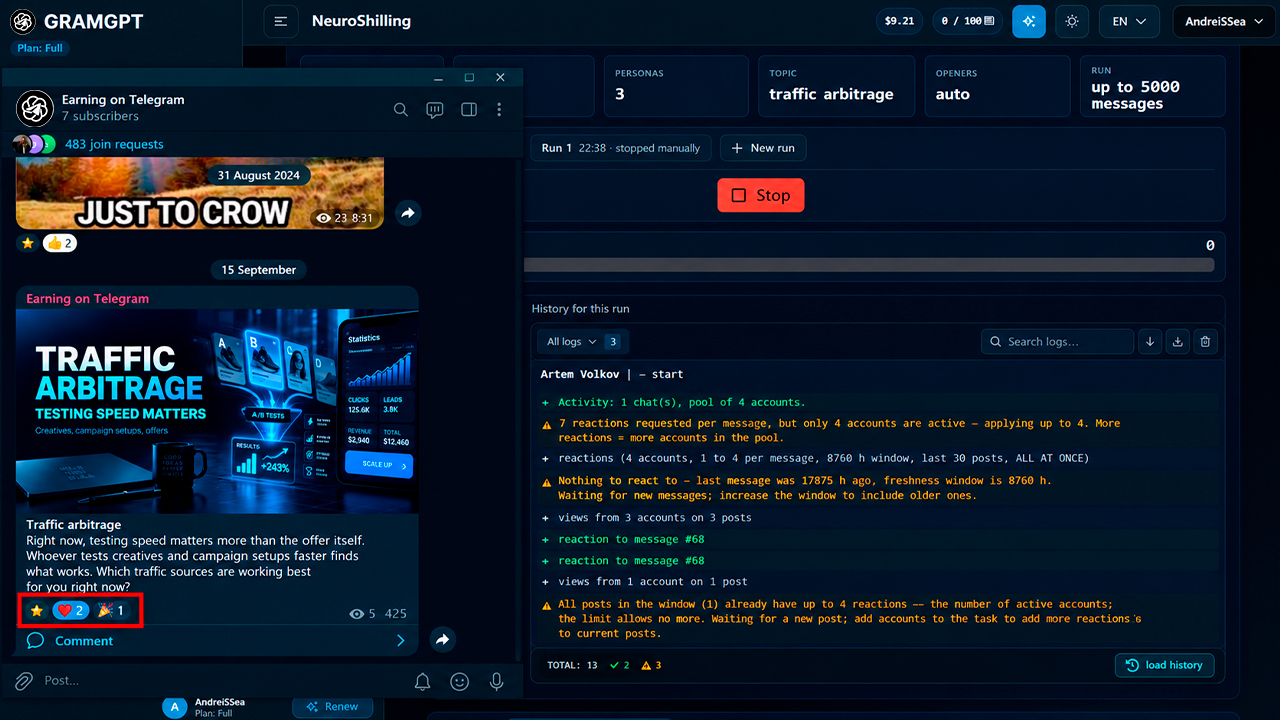
After all the settings, below in the “Campaign Settings” section, specify the link to the private channel and launch Neuroshilling. The selected emojis begin appearing on the required publications.
Sometimes Telegram does not display them immediately, so it is enough to refresh the channel or reopen it.
If necessary, you can create several tasks for different channels. For example, if activity needs to be maintained across ten projects at once, you will not have to manually configure a task for every new post.

How Automatic Reaction Boosting on Telegram Posts Works
The main advantage of Neuroshilling is that emojis can be placed not only on old publications but also automatically on new posts. After launch, the task waits for a new publication and works according to the specified settings.
If you want to understand how to boost reactions on Telegram posts without constantly copying links and placing repeat orders, everything is simpler here: configure the task once, and after a new post is published, the connected accounts react automatically.
How Comment Boosting in Telegram Works through Neuroshilling
The second part of the scenario is not only reaction boosting but also comment boosting in Telegram. For this, GramGPT uses the “Chat Revival” module: it allows you to add emojis and simultaneously create discussions under publications from connected Telegram accounts.
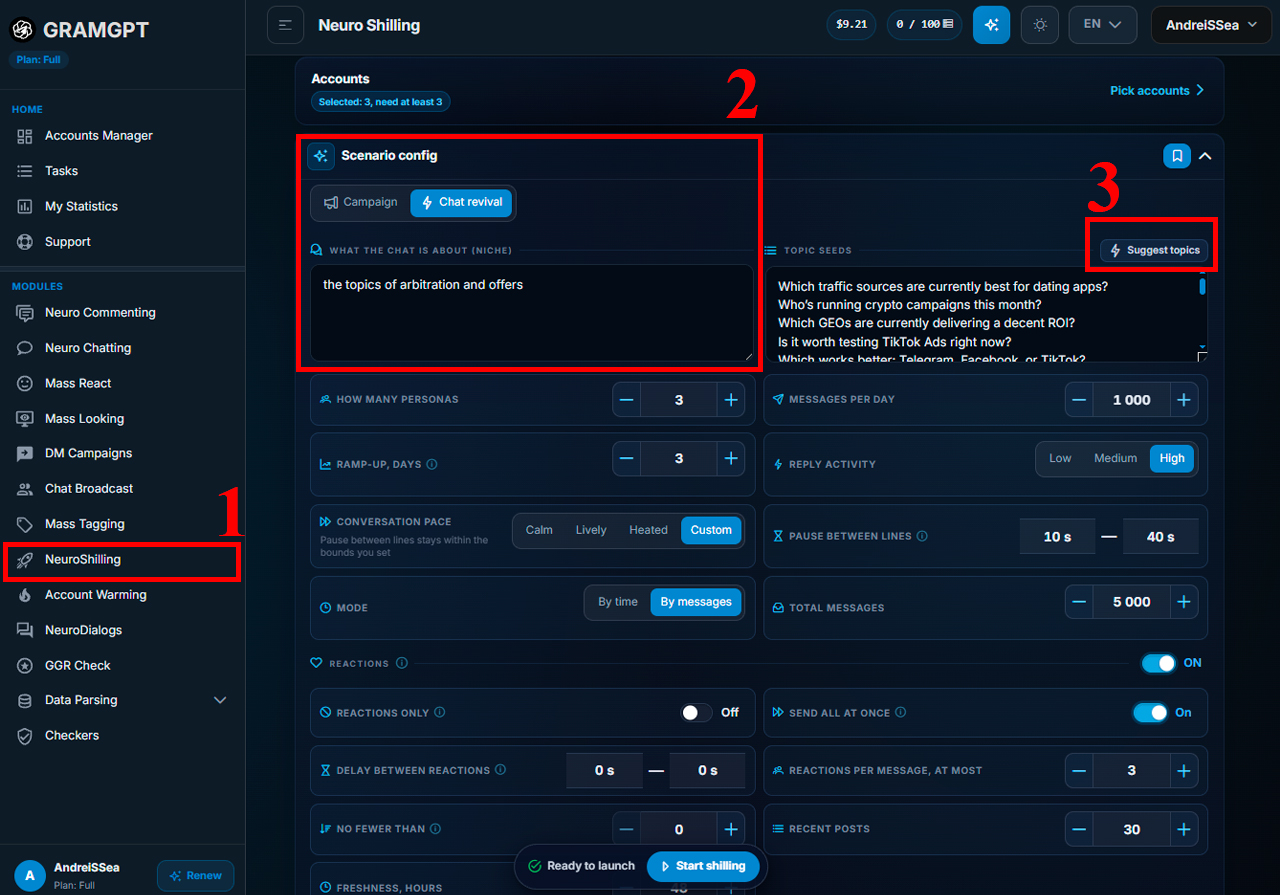
The workflow is simple:
- Set the communication topic. For example, if the channel is dedicated to traffic arbitrage, specify the topic of arbitrage and offers.
- AI suggests topic options that the connected accounts will discuss.
- In Campaign Settings below, specify the link to the channel chat or group and launch the task
- We explained in detail in the previous article how to revive a Telegram chat with Neuroshilling.
It is better to specify a topic that actually matches the channel. Then the comments are connected to the publications and the direction of the project rather than looking like random correspondence.
After launch, a conversation between accounts begins to form under new posts. They can not only reply to each other but also react to messages from real discussion participants.
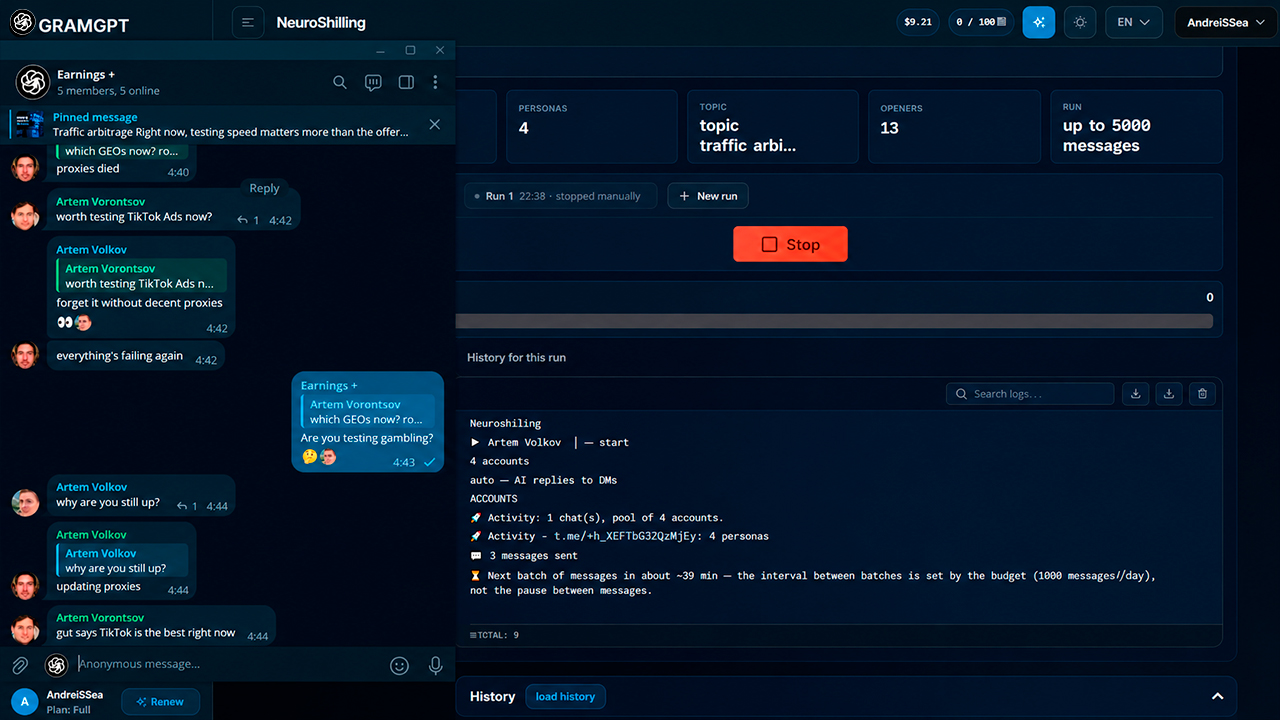
How Not to Buy Comments Separately for Every Post
Instead of manually buying comments separately for every publication, one scenario is created in Neuroshilling: connect the accounts, set the communication topic, and the system then uses these settings when working with new posts.
In essence, this is an automated TG chatbot for communication where several connected accounts conduct a thematic dialogue with one another. Unlike regular chatbots for communication in Telegram, comments here are published from the added Telegram accounts, while all settings and activity are controlled from one panel.
Why Initial Activity in Comments Is Needed
Young channels often face one problem: users are reluctant to stay where everything looks empty. There is no activity, dialogue, or sign that the publications are engaging anyone.
Boosting reactions and comments in Telegram solves this exact initial task: connected accounts create basic activity, support the discussion, and help make the channel look more lively at an early stage.
When the project grows and a sufficient real audience appears, artificial activity can be disabled. After that, subscribers themselves maintain activity and communication under publications.
What Needs to Be Controlled When Launching Neuroshilling
For the scenario to work according to the specified settings, it is enough to control several main parameters:
- the number of connected Telegram accounts;
- the reaction limit per post;
- the publications that need to be processed;
- sending speed;
- the topic of comments.
This approach makes it possible to manage activity in a private channel without constant manual work and separate orders through SMM panels.
If automatic boosting of reactions and comments in Telegram is needed for several channels at once, in GramGPT you can connect other accounts and launch separate tasks for each community. Activity will appear on the required publications within the specified settings.
Conclusion
For private channels, Neuroshilling solves two main tasks at once: it automates reaction boosting in Telegram and comment boosting in Telegram. All settings, connected accounts, and the process itself can be controlled independently in one GramGPT panel.
Unlike regular SMM panels, there is no need to adapt to third-party rules and restrictions, manually order activity for every new post, or first boost a large number of subscribers. It is enough to configure the scenario once and then manage activity under the required publications.
At the same time, Neuroshilling can not only create activity inside your own channel but also attract traffic from Telegram communities. In a separate article, we explained in detail how to configure Neuroshilling and use it to attract an audience.