Someone new taps your profile and finds an empty line, or a random "nyc" you typed years ago. That first impression is gone, even though people read your Telegram bio before they read your first message. So the few words under your name matter more than they seem.
Most users paste the first quote that comes to mind or copy a line from a list. But 70 characters run out fast, long thoughts get cut off, and a generic phrase says nothing about who you are.
Below we cover where the field lives and how much fits, a simple formula for writing one, 50+ examples for profiles and channels, and a way to fill descriptions on dozens of accounts at once in 2026.
Where to Edit Your Telegram Bio and the Character Limit
First, this is the short line under your name. Anyone who opens your profile sees it, whether they found you in a private chat, a group member list or a comment thread.
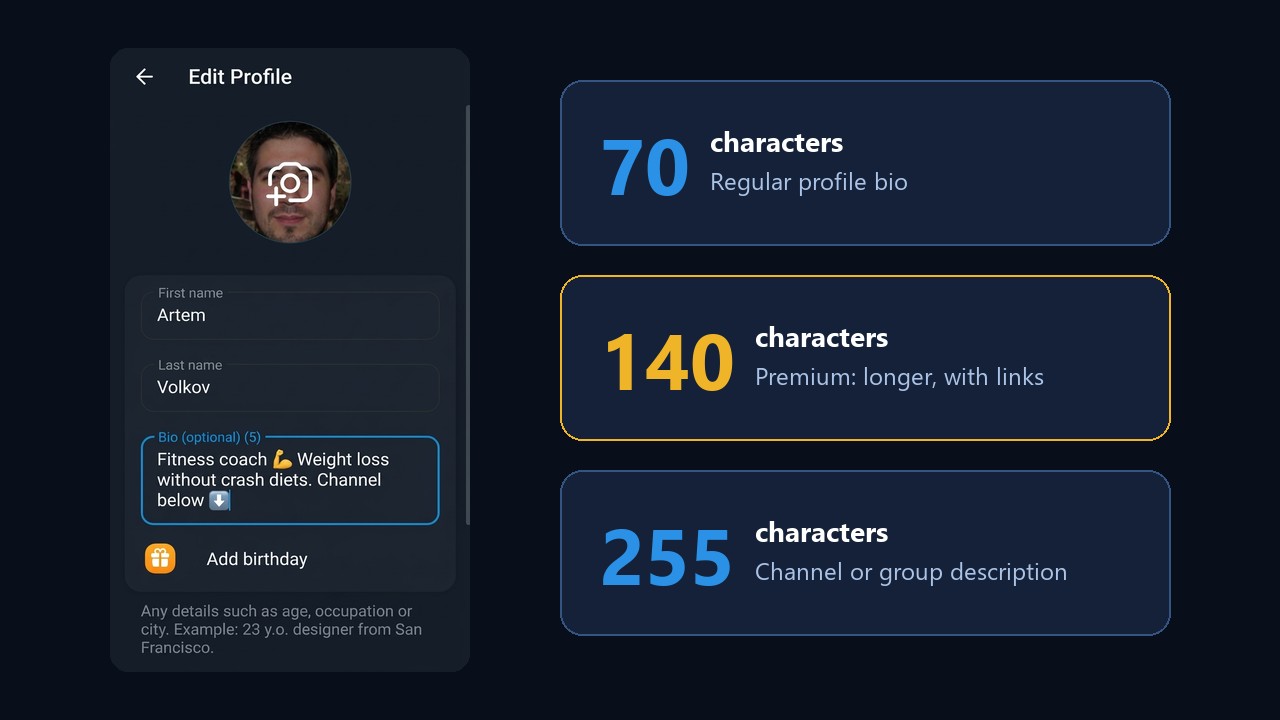
- iPhone: Settings → Edit → Bio.
- Android: menu ☰ → Settings → tap the Bio line.
- Desktop: Settings → Edit Profile → Bio.
Regular accounts get 70 characters, while Premium raises the limit to 140 and makes links clickable. A channel or group description, however, holds 255 characters. The counter in the field shows what's left, so you'll notice right away if you go over.
You can also limit who sees it. Under Privacy and Security → Bio, choose everybody, your contacts or nobody. For everything else the subscription unlocks, see our guide to Telegram Premium.
How to Write a Telegram Bio: A Three-Part Formula
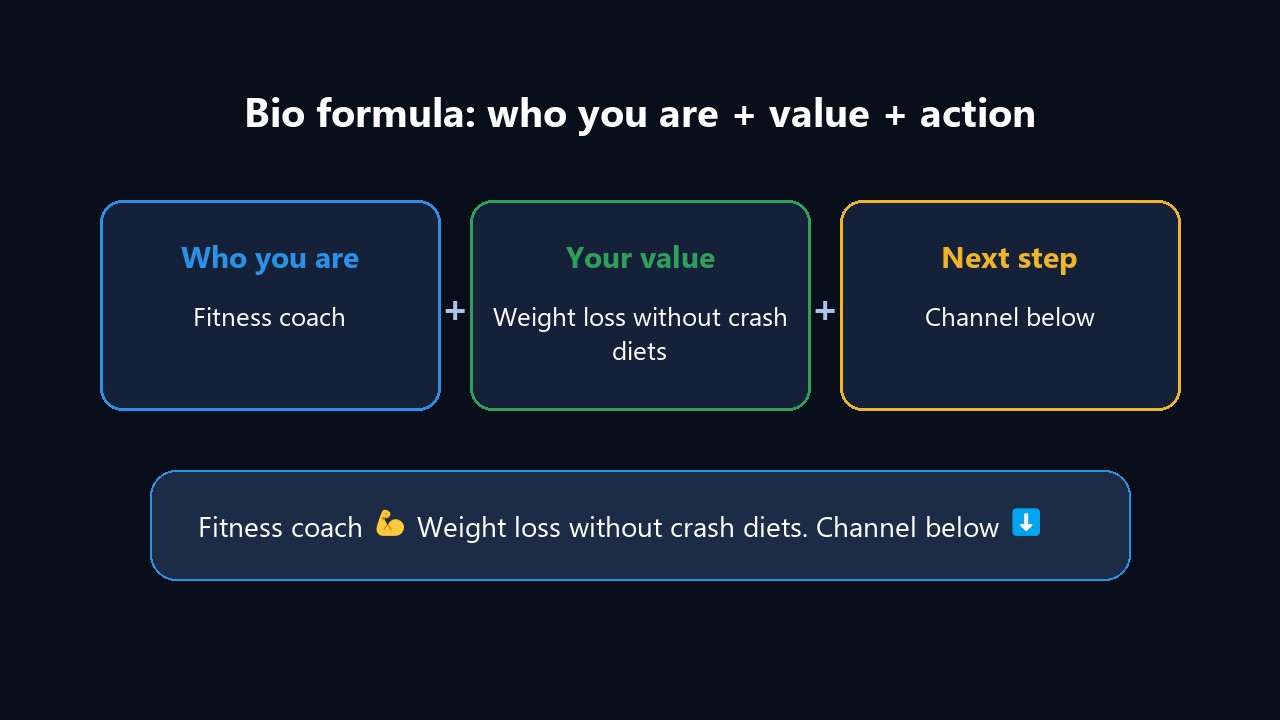
A strong one answers three questions: who you are, why you're worth following and what to do next. That's why it fits on one line and still does its job.
A few rules also help you save characters:
- One idea. Two jobs and three hobbies won't fit into 70 characters.
- One or two emoji. An icon can replace a word, but a cluster of them looks spammy.
- A mention instead of a URL. Your channel's @username is clickable even without Premium, while a website address isn't.
- No phone number. Your username is enough for contact, and numbers posted there get scraped by spammers.
Telegram Bio Ideas: 50+ Examples
Here are examples grouped by mood and purpose. Use them as they are or tweak them, since every line stays under 70 characters.
Short and Aesthetic
— Quiet mind, loud dreams
— Sunsets, playlists and late-night talks
— Building something worth the wait
— Slow mornings, fast replies
— Made of stardust and strong coffee
— Still figuring it out, happily
— Here for the plot
Funny Lines
— Left you on read because I'm crafting the perfect meme
— My cardio is running late
— Professional overthinker, amateur everything else
— Replies in 3–5 business days
— I put the "pro" in procrastination
— Powered by snacks and sarcasm
— If I'm offline, I'm napping. Respect it
For Girls
— Soft heart, sharp mind ✨
— Peonies, books and long walks
— Smiling more than posing
— Ocean lover with a city address
— A playlist for every mood
— Kind, but don't test me
For Guys
— Gym, road trips and good music
— Actions over promises
— Calm outside, driven inside
— Hands on the wheel, eyes on the goal
— Less drama, more results
— Building a life I'll be proud of
Love and Mood
— Taken, but always there for friends 💛
— You're my favorite notification
— Missing someone who isn't always near
— Sometimes silence says enough
— It'll happen, just not today
Famous Quotes
Short sayings from classic thinkers suit those who'd rather not write about themselves directly:
— "While I breathe, I hope" (Cicero)
— "Know thyself" (Delphi inscription)
— "Through hardships to the stars" (Seneca)
— "Everything flows" (Heraclitus)
— "The journey is the reward"
Travel and Hobbies
- 🌍 34 countries and counting
- Mountains on weekends, code on weekdays ⛰
- I read more than I sleep 📚
- My coffee beats my jokes ☕
- Running marathons and from problems 🏃
- Shooting sunsets and cats
Emoji-Style Bios
- 📍 NYC | 🎧 music | 🎮 games
- ✨ Making things pretty ✨ DMs open
- 🎨 Illustrator • commissions open ✅
- 🧘 Yoga, 🥑 clean eating, 🌿 calm
- 🚗 Cars | 🔧 repairs | 📞 business only
- 🍰 Custom cakes, Austin 👇 channel
Telegram Bio for Work and Experts
If the profile works for your business, that line becomes a tiny business card. For example:
- Fitness coach 💪 Weight loss without crash diets. Channel below ⬇️
- Interior designer | Austin | Portfolio: @design_portfolio
- Family lawyer. Free first consult, just DM me
- SMM for cafes and salons. Case studies at @smm_cases
- English tutor: IELTS 7+ without cramming
- Handmade soy candles 🕯 Catalog pinned in the channel
It also pays to attach your channel: the profile editor has a Personal Channel option, and it appears right under the text.
Profiles That Promote: 3 Telegram Bio Setups
A Telegram bio works together with the avatar, the name and a pinned channel. When someone lands on the profile after a comment, a reaction or a mention, that combination decides whether they go further. So here are three formats that work.
Example 1. An Expert With a Personal Brand
Promotion can be done through a well-known crypto blogger’s persona: a profile with a real photo, a simple name, and a pinned channel called “Free Training Today.”
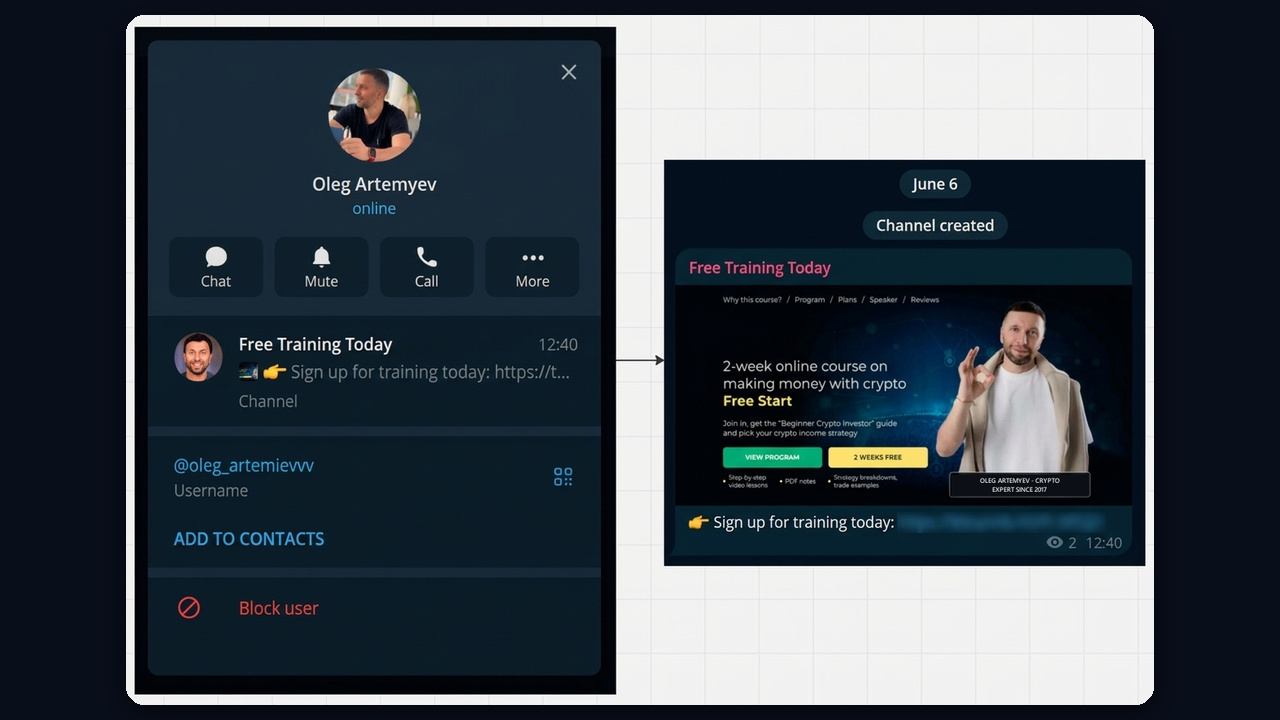
You can set up your own profile the same way, whether you coach, teach or consult. Next, name the pinned channel after a benefit, such as "Free lesson today", and let the first post lead to sign-up or a bot. For a worked example of growing such a channel, see our guide on how to promote a crypto Telegram channel.
Example 2. A News Channel: An Event in the Pinned Slot
Besides, city and news channels grow well on big events. An ordinary attractive girl's profile with the bio "Barnaul 💙 concerts and events" pins a channel called "Barnaul Events". For example, the preview line carries the headline: Egor Kreed's concert on November 11.
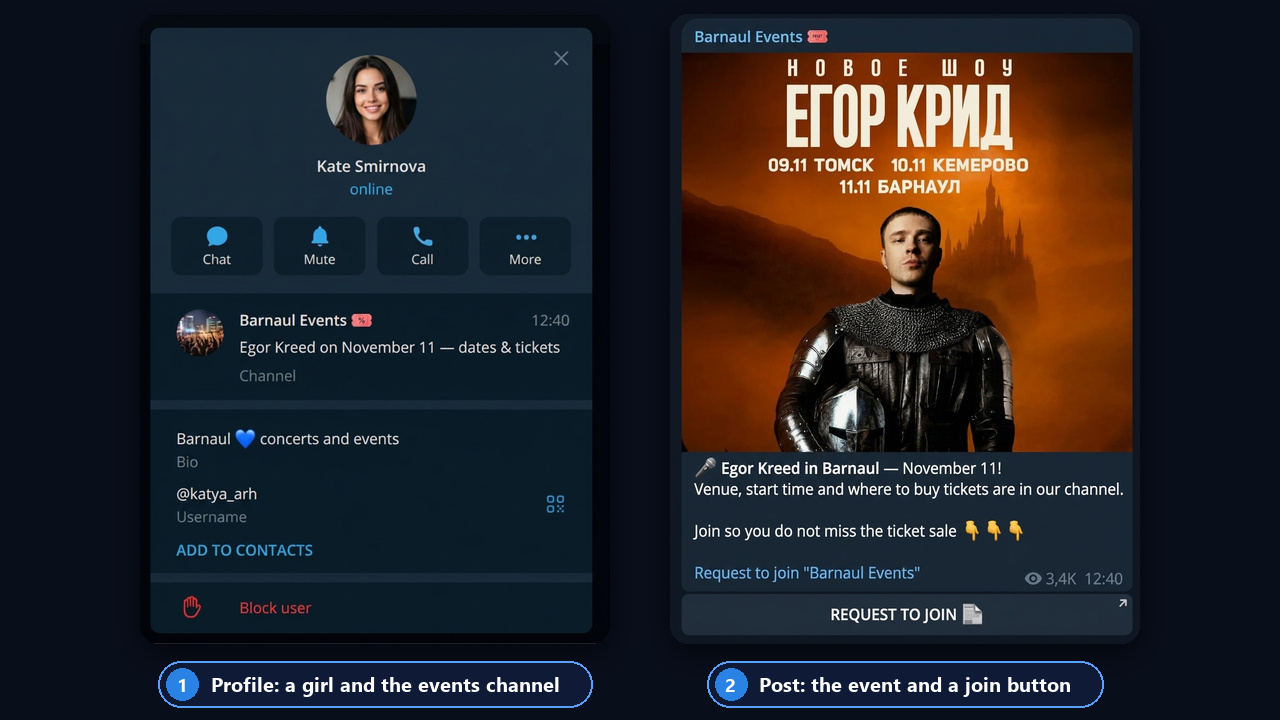
Then, inside, the channel shows the real event poster, and the text explains what comes next: venue, start time and where to buy tickets. The Request to Join button leads into the channel, so people subscribe. The full playbook is in our guide on how to grow a Telegram news channel.
Example 3. A Profile for 18+ Traffic
In the 18+ niche, a profile sells curiosity rather than words. The Telegram bio shrinks to a single word such as a city, while the avatar and a pinned personal channel with a provocative name do the work. So people see the profile after a comment or a reaction and nearly always open the channel.
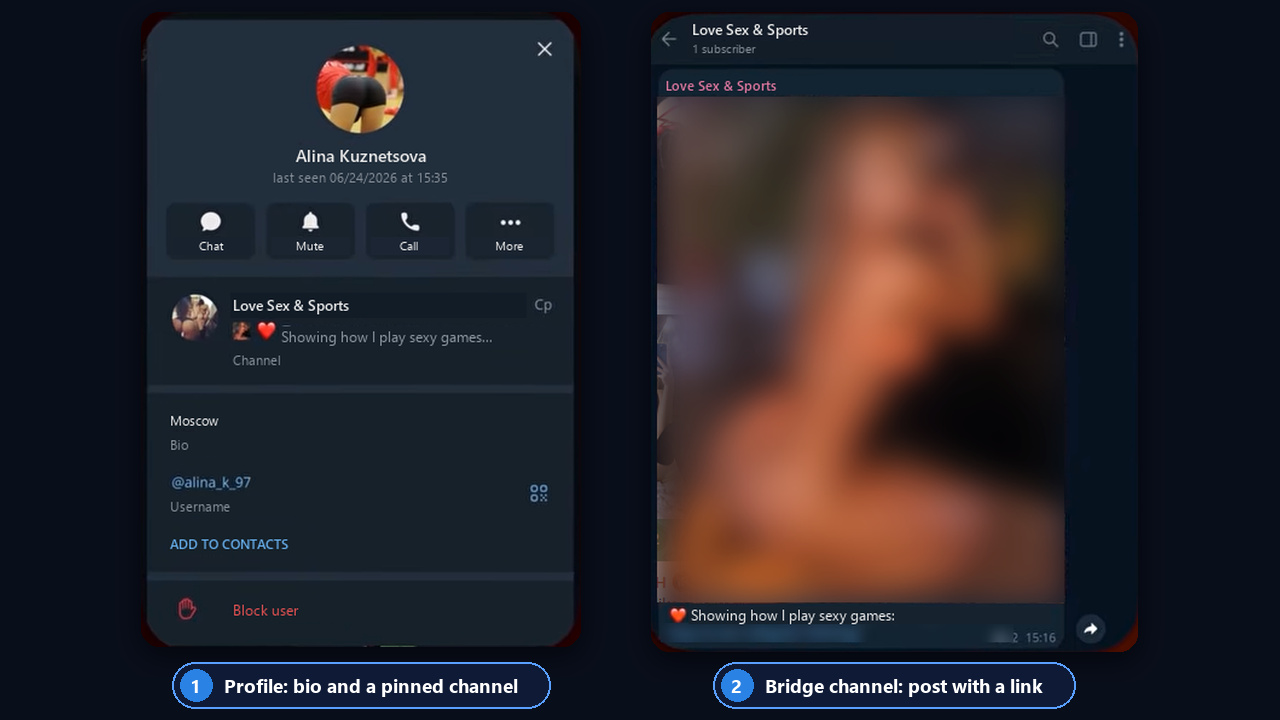
In turn, that channel is a bridge: one post with a blurred preview and a link to the main channel or bot. We cover the full strategy in our guide on how to promote an 18+ Telegram channel.
Telegram Channel Description: What to Write
A channel description answers one question: why should anyone subscribe? Unlike a personal profile, you get 255 characters here, so three or four short lines work well.
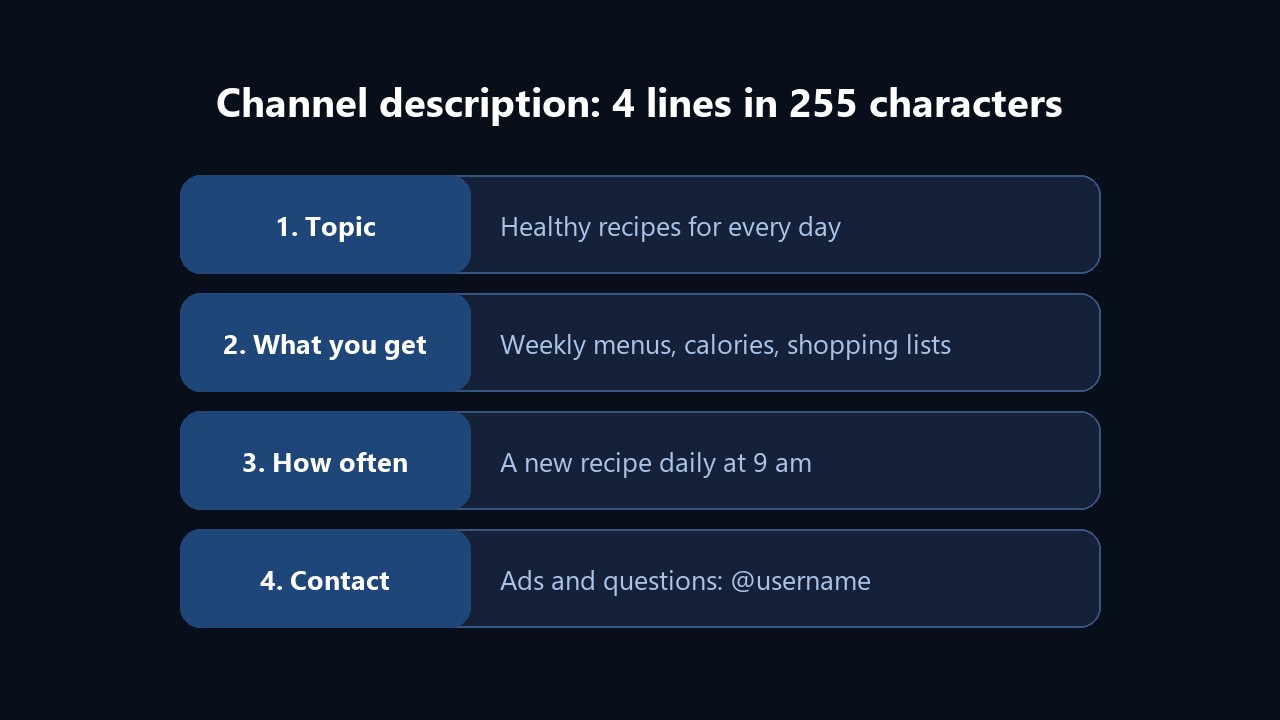
Here are examples for different niches, for instance:
- Recipes: "Healthy recipes for every day. Weekly menus and shopping lists. A new dish at 9 am. Ads: @username".
- Local news: "The main Austin news in 5 minutes: traffic, events, outages. Send us a tip: @username".
- Expert blog: "Marketer with 8 years in the field. I break down ads and funnels using real cases. Consults by DM".
- Shop: "Handmade soy candles. Shipping across the US. Catalog pinned, orders via @username".
- Humor: "Office memes you'd never send to your boss. Daily, no days off".
Pay special attention to the first line, because search results and channel previews show only that. No channel yet? Start with our guide on how to create a Telegram channel.
Descriptions for Dozens of Accounts: AI Profiles in GramGPT
Writing one description by hand is easy. But if you run dozens of work accounts for outreach, commenting or sales, identical profiles hurt you: blank or copied descriptions look like a bot farm and draw restrictions faster. That's why the GramGPT account manager includes bulk profile generation.
Generate by Prompt
Tick the accounts, open Accounts → AI Profiles and choose "Generate by prompt". Then describe the persona in plain words, such as "fitness coaches from Austin, 25-35, friendly tone". The AI comes up with a first name, last name, username and Telegram bio, then picks a photo, and every profile turns out unique.
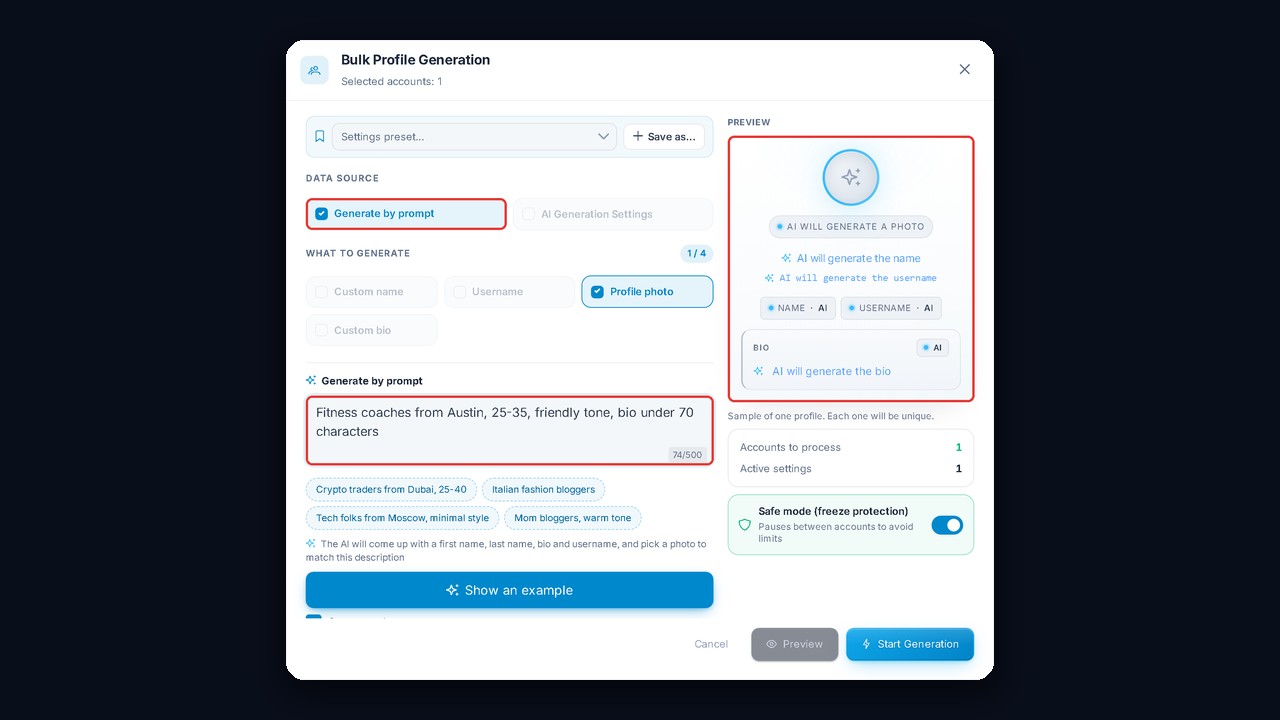
For tighter control, pick "AI Generation Settings" instead: gender, country and language, age range, profession and interests. Meanwhile, the preview on the right shows how a profile will look.
Custom Bio and a Pool of Variants
Ready-made texts can go out in bulk too. Under "Custom bio" you'll find two modes: "Single bio" sets the same text everywhere, while "Custom pool" spreads variants across accounts. So add one bio per line, for instance from the lists above.
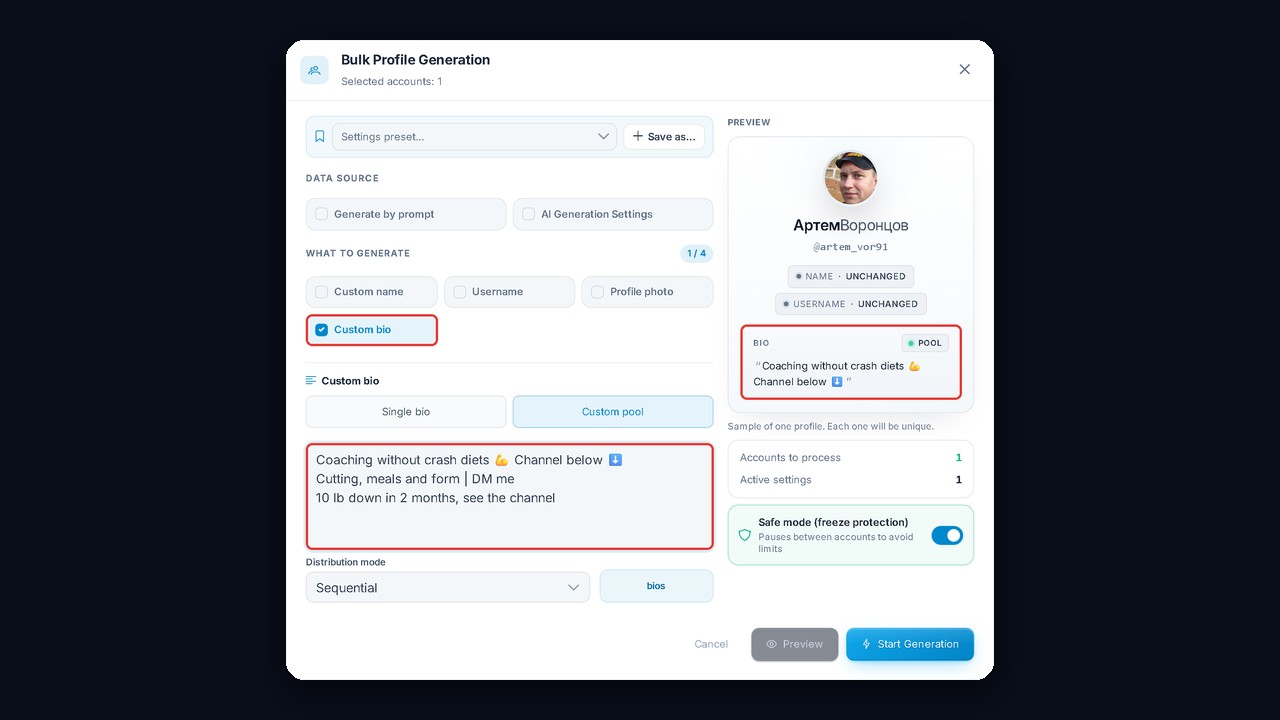
The module even reminds you of the limit: up to 140 characters on Premium only, and regular accounts keep the first 70. Safe mode adds pauses between accounts, so the profile changes don't trigger a freeze.