
Someone finds you in search, opens the profile and decides in about three seconds whether to join. All they see is a small round picture, a few words in the name and two lines of text. If your Telegram channel description, name and avatar don't explain what the channel is and why it matters, they leave.
Yet most of them are set up in a hurry. For example, the name takes a minute, the avatar is whatever was on the phone, and and the text is written "for friends". As a result, ads and shoutouts bring visitors, but few of them subscribe, and the budget leaks away.
This guide walks through the whole setup in 2026: how to pick a name, what to write in the description, what makes a good avatar, what to pin and how to keep the channel going. Finally, we show how to give dozens of channels the same polished look at once.
What a Telegram Channel Description and Design Include
In short, it is everything a visitor sees before the first post: the profile card, the pinned message and the welcome text. Moreover, each part answers one question, namely "who is this", "what is it about", "why should I join" and "where do I start".
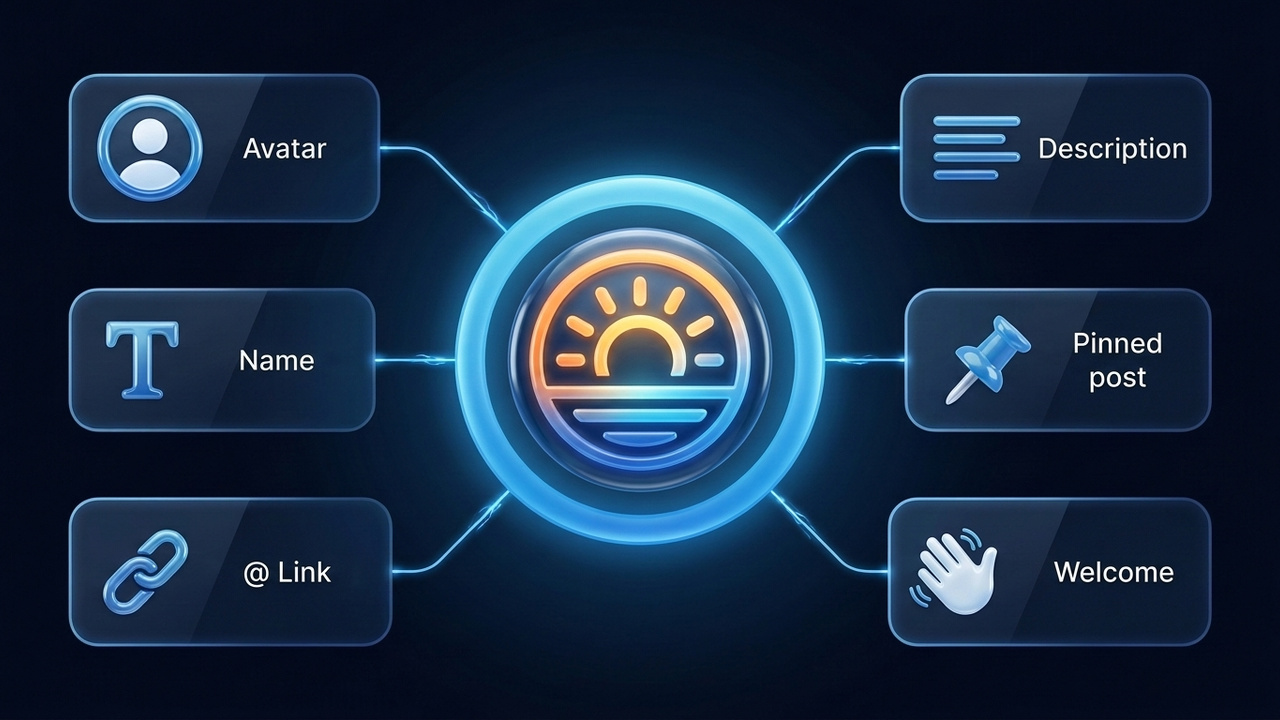
| Element | Where people see it | Limits | Job |
|---|---|---|---|
| Name | Search, chat list, forwards | Up to 128 characters | Say what the channel covers |
| @username link | Profile, ads, business cards | 5–32 characters: Latin letters, digits, "_" | Easy to remember and type |
| Avatar | Next to the name everywhere | Square, displayed as a circle | Stand out in the feed |
| Description | Channel profile | Up to 255 characters | Explain the value |
| Pinned post | Above the feed | One message on top | Navigation and offer |
| Welcome message | Only for new subscribers | Several messages | Greet and guide |
Telegram adjusts limits from time to time, so double-check them in your app. Creating it takes a minute; our step-by-step guide on how to create a Telegram channel covers that part, while here we focus on making it look right.
Telegram Channel Name Ideas That Get Found
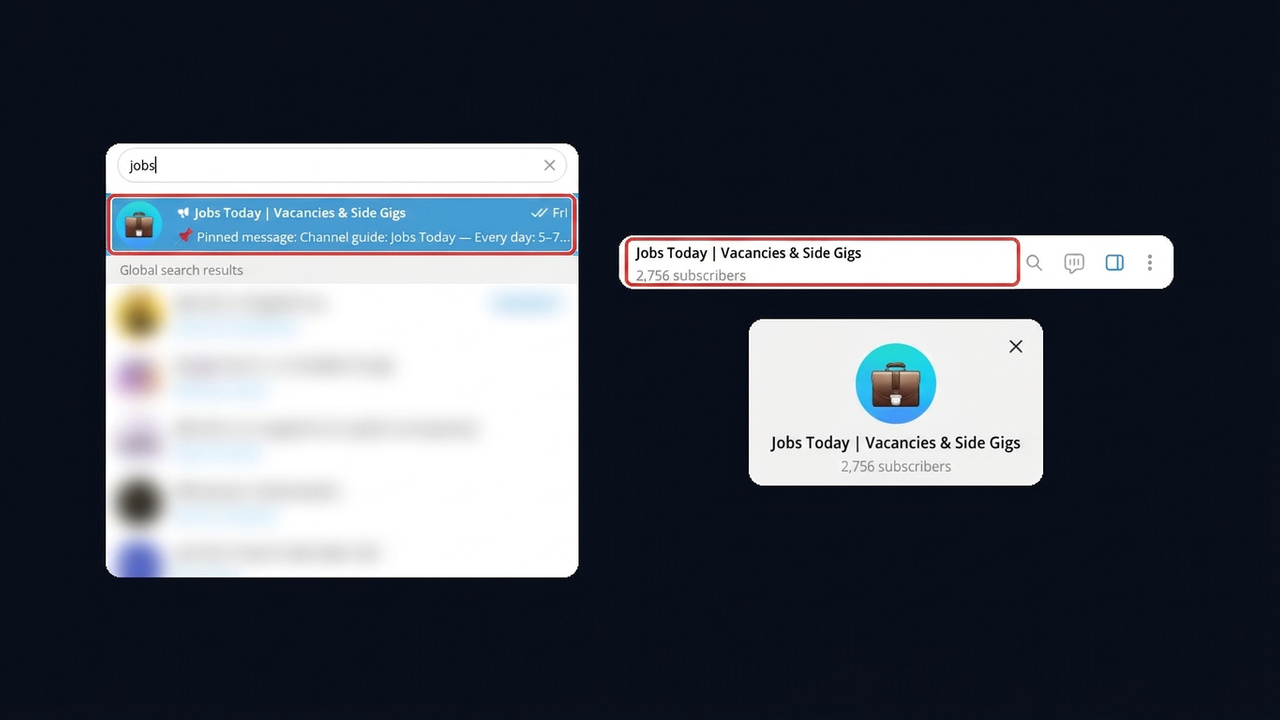
First of all, a name does two jobs. People read it in the profile, and global search also matches results by the words in their names. That means a topic word in the name is free traffic: "Morning Yoga Studio | 10-Minute Practices" shows up for both "yoga" and "practices".
Here is how it looks on a job channel. The word "jobs" sits right in the name, so a search for it brings the channel up, and the header shows the subscriber count next to the title.
Three Naming Formulas
- First, brand + topic: "Bean Lab | Roasting & Recipes". Works for companies and shops.
- Name + expertise: "Anna Bell | Taxes for Freelancers". Ideal for a personal brand.
- Finally, straight value: "Entry-Level Tech Jobs". Best for digests and news.
Besides, a vertical bar or a dash separates the brand from the topic, so the name scans faster. Also, keep the key words in the first 25–30 characters, because the chat list cuts off the tail.
Name Ideas by Channel Type
Below, for example, are starters you can adapt. Still, search each idea in Telegram first: a big channel with the same name confuses people.
| Channel type | Name examples |
|---|---|
| Business and services | "Renovations Without Stress | Austin", "Flowers Next Door", "Wood & Light Workshop" |
| Expert | "Ask Lawyer Pete", "Marketing Without Fluff", "Code Over Coffee" |
| Personal blog | "Notes From Lisbon", "Life in Color", "My Sugar-Free Year" |
| Aesthetic | "Soft Notes", "Golden Hour", "Small Wins" |
Username and Channel Link
A public page gets an address like t.me/username. Therefore, it should be short, easy to say out loud and free of look-alike letters such as "l" and "I". It also helps when the link mirrors the name: "Flowers Next Door" and @flowersnextdoor stick together in memory.
By contrast, a private one works through an invite link and never appears in search. That suits paid content and closed clubs, whereas growth needs public access. If the handle you want is taken, our Telegram username guide shows tricks for building a free and memorable one.
Choosing a Channel Avatar
The avatar appears in the feed, in search and in notifications, always inside a tiny circle. For that reason, it needs one large object on a contrasting background. Small text, slogans and busy collages turn into a blur at 40 pixels.

- Size. First, upload a square of at least 512×512 pixels; Telegram crops it into a circle.
- Logo or symbol. Next, companies usually use a logo without words, while experts pick a close-up portrait.
- Color. In addition, choose one brand color and reuse it on post covers, so readers recognize you in the feed.
- Video avatar. Also, a short clip is allowed, but a static mark is usually safer for a business.
For example, a lotus on a soft gradient suits a yoga studio, while a night skyline fits a city news channel. Therefore, the rule of thumb is simple: the avatar must make sense without a caption.
How to Write a Telegram Channel Description
The description is 255 characters that answer "why should I subscribe". Visitors skim a Telegram channel description in a couple of seconds, so the first line has to state the benefit. Here a handy formula is who you are → what readers get → how often → how to reach you.
Example. "Yoga for beginners: class schedule, video lessons and 10-minute practices 🧘 New practice every Monday. Booking info is pinned, questions go to @morning_admin."
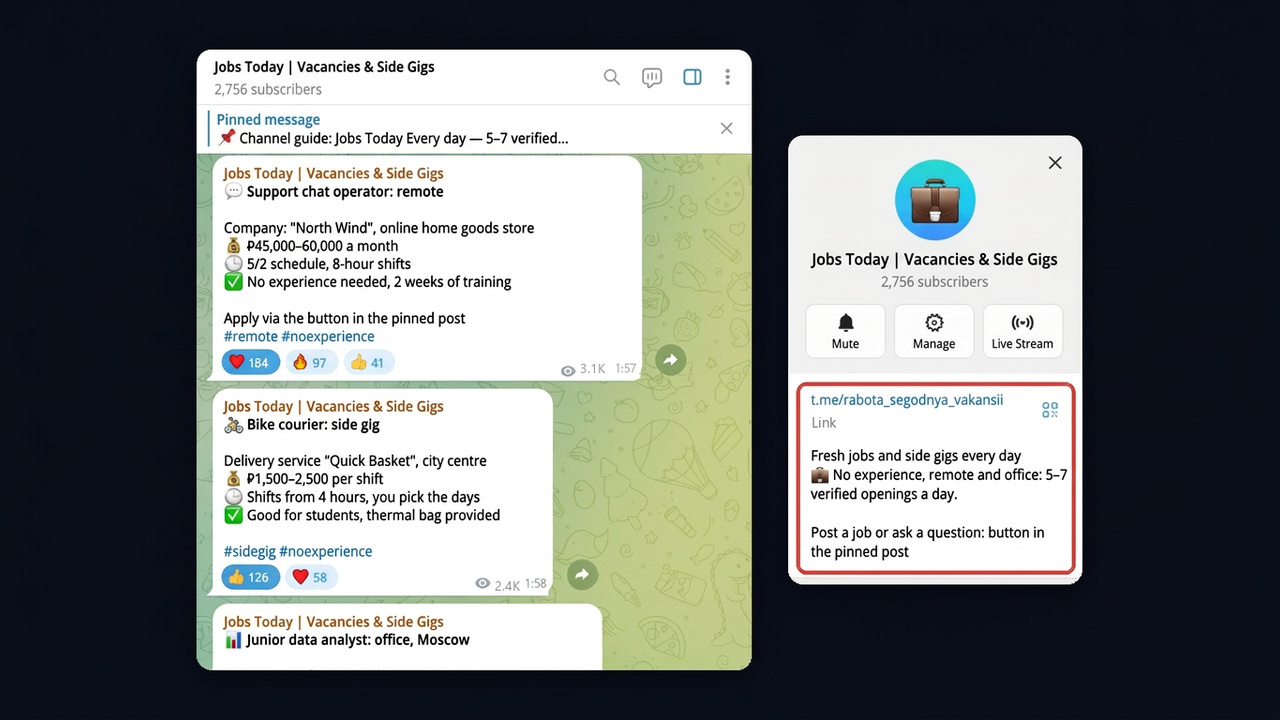
For instance, here is a Telegram channel description from a job channel called Jobs Today: value in the first line, a "5–7 openings a day" rhythm and a hint where to find the contact.
Telegram Channel Description Examples
| Channel | Description |
|---|---|
| Coffee shop | "Fresh roast, breakfast until noon and weekly deals ☕ Menu and address are pinned" |
| Tax expert | "Freelance taxes explained in plain English. New post every Tuesday. Consultations: @bell_tax" |
| Job digest | "Entry-level tech jobs: five fresh openings a day. Post a vacancy: @jobs_admin" |
| Personal blog | "I moved to Lisbon and write honestly about prices, daily life and remote work" |
Also, skip "welcome" and "it will be interesting here", since those words carry nothing. Meanwhile, links in the description are clickable, so add a contact or your bot. For more wording ideas, see our post on Telegram bio ideas, which includes a section on channel descriptions.
Pinned Post and Welcome Message
The pinned post is your shop window inside. Newcomers see it above the feed and then decide whether to keep scrolling. Navigation works best here: who you are, main sections with links to your best posts and one action such as "book a class" or "get the guide".
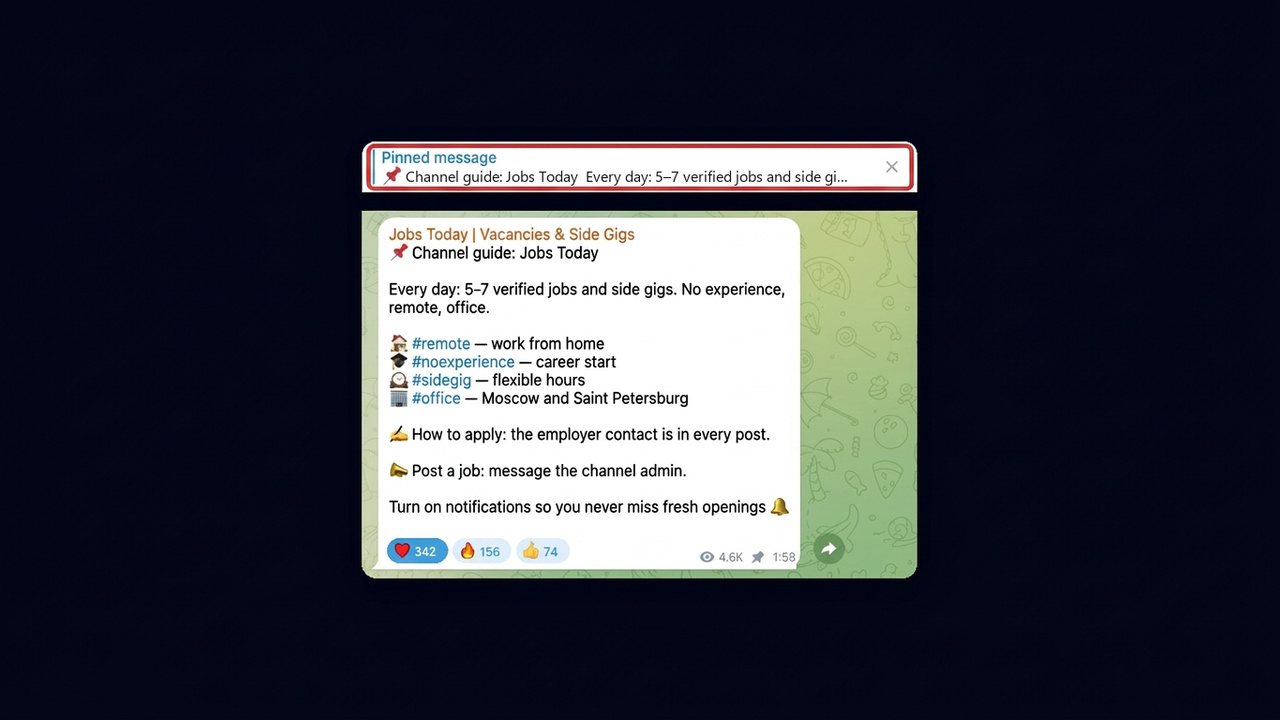
In the same job channel, the pin is built from hashtag sections such as #remote, #noexperience, #sidegig and #office, followed by how to apply and how to post a job.
In addition, since August 2026 communities also have a welcome message that only new subscribers see. You set it in the profile under Edit → Welcome. Hence the pinned post can hold the offer, while rules, navigation and a sign-up gift move to the welcome.
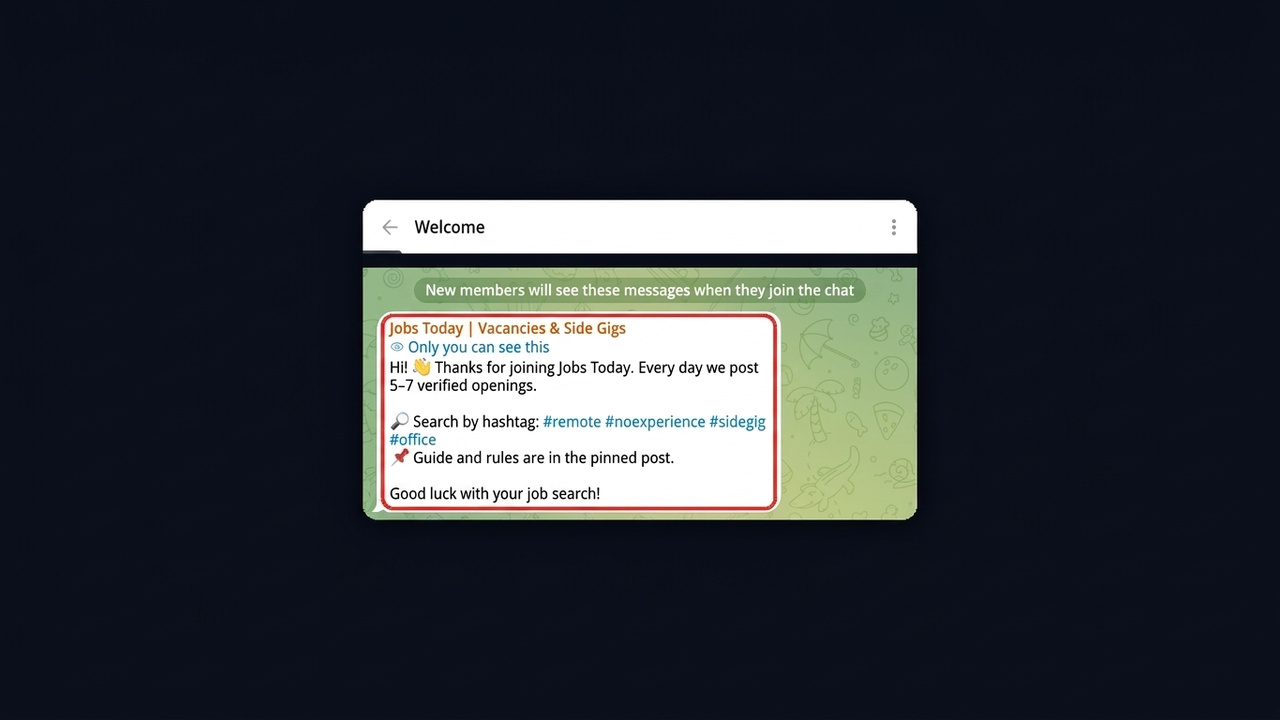
Important: don't swap the pinned post every week. Someone returning after a month should still find what they joined for.
Channel Appearance Through Boosts
Some styling options unlock with boosts, which are votes from Premium subscribers. In other words, the higher the level, the more you can change: name and link color, profile background, emoji status, custom wallpapers and reactions. Telegram shows the required level for each option right in the appearance settings.
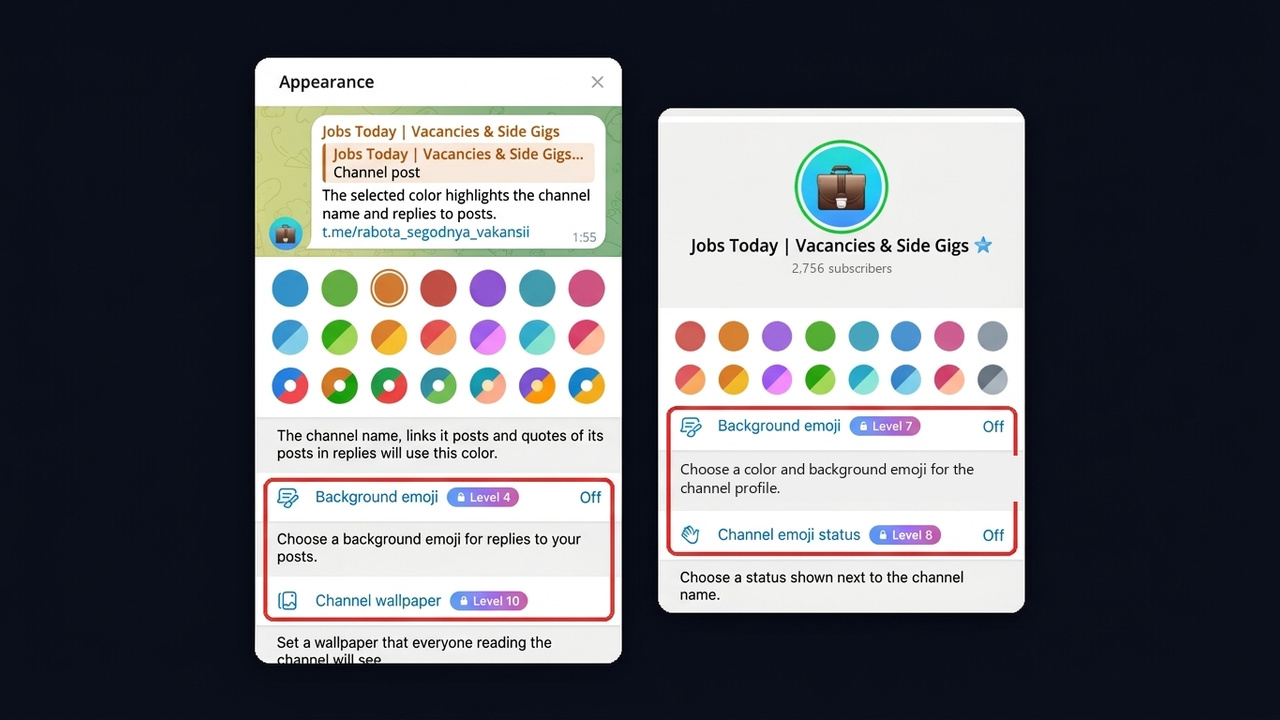
The screenshot shows that the name color is free, while background emoji for replies opens at level 4, the profile background at 7, emoji status at 8 and wallpaper at 10.
For a small channel this is a bonus rather than a must. However, a brand color on the profile and links helps you stand out among similar channels, so once you have an audience, ask active readers to boost.
How to Run a Telegram Channel After the Setup
Design attracts, but content keeps people. So right after polishing the profile, plan what you post and how often. Otherwise a beautiful storefront with three posts a month looks abandoned.
- Sections. Pick three or four recurring formats: tips, breakdowns, case studies, Q&A.
- Rhythm. For instance, three posts a week every week beat ten posts in week one followed by silence.
- Post layout. Then use a bold headline, two- or three-line paragraphs and one image in your brand color.
- Feedback. Finally, enable comments and reactions to see what resonates.
Once everything looks good and has content, start bringing people in. Our guide on how to grow a Telegram channel lists the methods, and NeuroCommenting works well for the first subscribers.
Pre-Launch Checklist
Before the first ad, run through this list. Every skipped item makes paid traffic convert worse.
- Name with a topic word, key part in the first 25–30 characters.
- Short @username with no digits or confusing letters.
- Avatar that reads well in a tiny circle.
- Telegram channel description with value, posting rhythm and a contact.
- Pinned post with navigation and one action.
- Welcome message for new subscribers.
- At least five to seven posts in the same style.
Bulk Name and Telegram Channel Description Setup in GramGPT.io
Now, if you manage a network rather than a single page, styling each one by hand takes ages. A typical case is traffic arbitrage: for a nutra weight-loss offer, every work account gets its own bridge channel pinned to the profile, which sends readers on to a landing page. The account manager in GramGPT.io has a bulk action for it called Create and pin channel.
- Select accounts and open Channels & chats → Create and pin channel.
- Set the name and description: one value for all or the Variant pool mode with one option per line, such as Slim by Summer and 30-Day Slim Diary, so each channel gets its own. Spintax like {a|b} works inside variants too.
- Upload an avatar pool: every channel receives a different picture.
- Add a first post with media and buttons and tick Pin channel to profile.
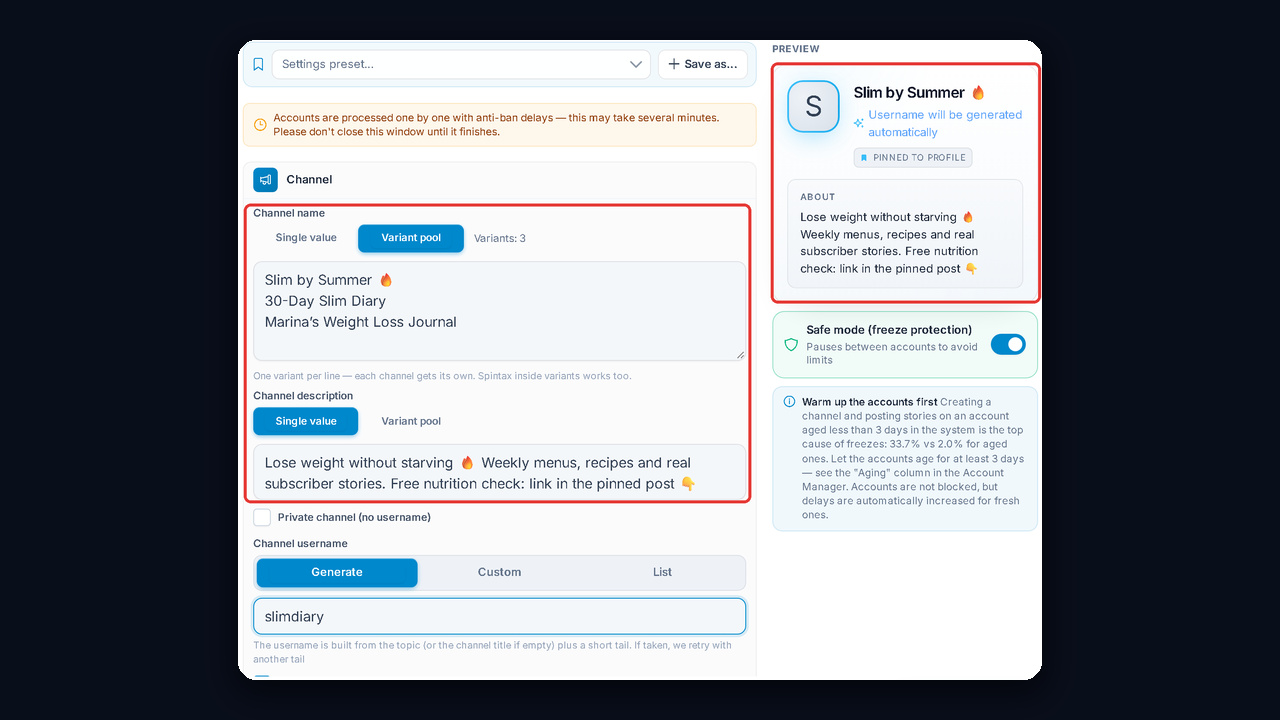
The preview on the right of the form shows how the card will look, so a typo in the description is visible before launch. At the same time, accounts are processed one by one with pauses, and safe mode lowers the freeze risk. Fresh accounts should be warmed up first: according to the module, creating one on an account aged under three days leads to 33.7% freezes versus 2.0% for aged ones.
For example, here is the result on one account: the module created Slim by Summer 🔥 with an avatar, a description and a first post, then pinned it to the profile. The Channel block shows right under the name.
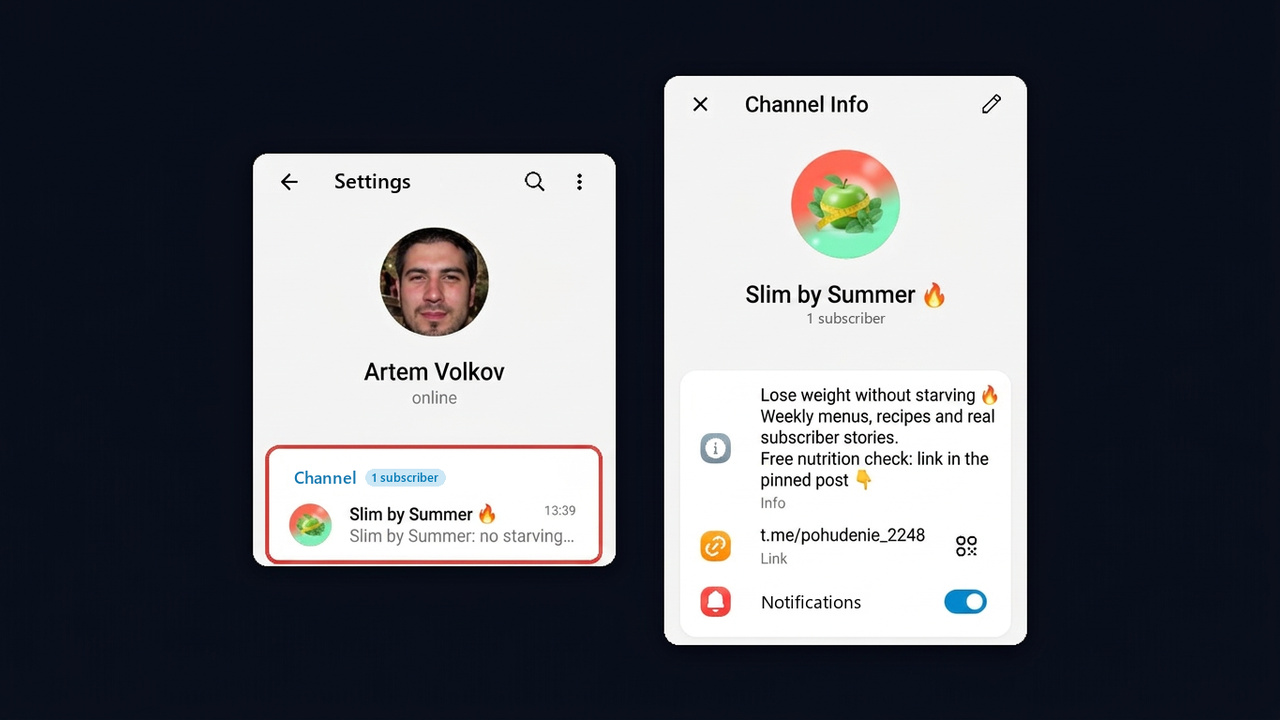
The module builds the username from your topic plus a short tail, hence the digits in @pohudenie_2248. For a clean link without digits, set it on the Custom tab.