A colleague pings you: "Since when do you borrow money over chat?" You never asked, yet their screen shows a plea from you plus a link. On your phone that thread looks clean, because the intruder erased the message from your side only. Many people learn this way that their Telegram hacked status is real.
Most victims open a support ticket and sit tight. But that is a bad idea: within roughly a day the thief gains the power to boot you from every device, while volunteers may take a week. Your own quick moves matter far more.
This guide walks through warning signs, popular 2026 tricks, a first-day rescue plan, regaining control after every session is gone, saving a channel and hardening one profile or a whole fleet.
Signs Your Telegram Was Hacked
Thieves prefer silence. Typically they add a parallel login and leave yours untouched, so nothing looks off at first glance. Watch for indirect clues instead.
- Odd texts reach friends: loan requests, votes, "gifts" you never sent.
- A login code shows up, or a new-device alert, while you were idle.
- Name, avatar or bio shifted, maybe with a foreign link added.
- Unfamiliar chats, channels or bots appeared.
- The device list includes a phone model, city or country that isn't yours.
- Lately you typed digits from SMS into some page opened from a chat.
Spot even one? Then review logins immediately.
Reviewing Telegram Active Sessions
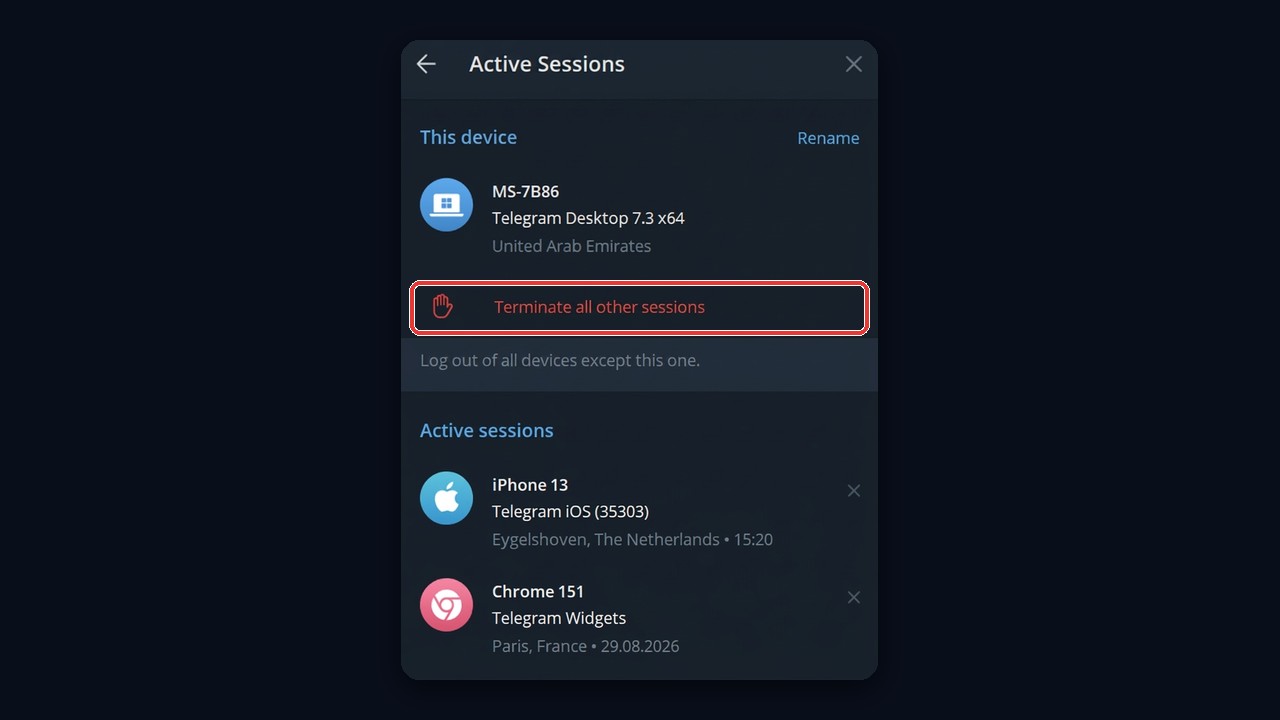
Open Settings and tap Devices. Every row lists hardware, app version, IP, location and last activity, with yours pinned on top. On Telegram Desktop the same list lives under Settings → Privacy and Security → Active Sessions. So anything below that you can't place means an outsider.
Five Ways Thieves Take Over Profiles
Can Telegram be hacked through some exploit? Rarely. Instead, the owner nearly always hands over the keys unknowingly, since a thief needs that one-time number and sometimes the cloud password.
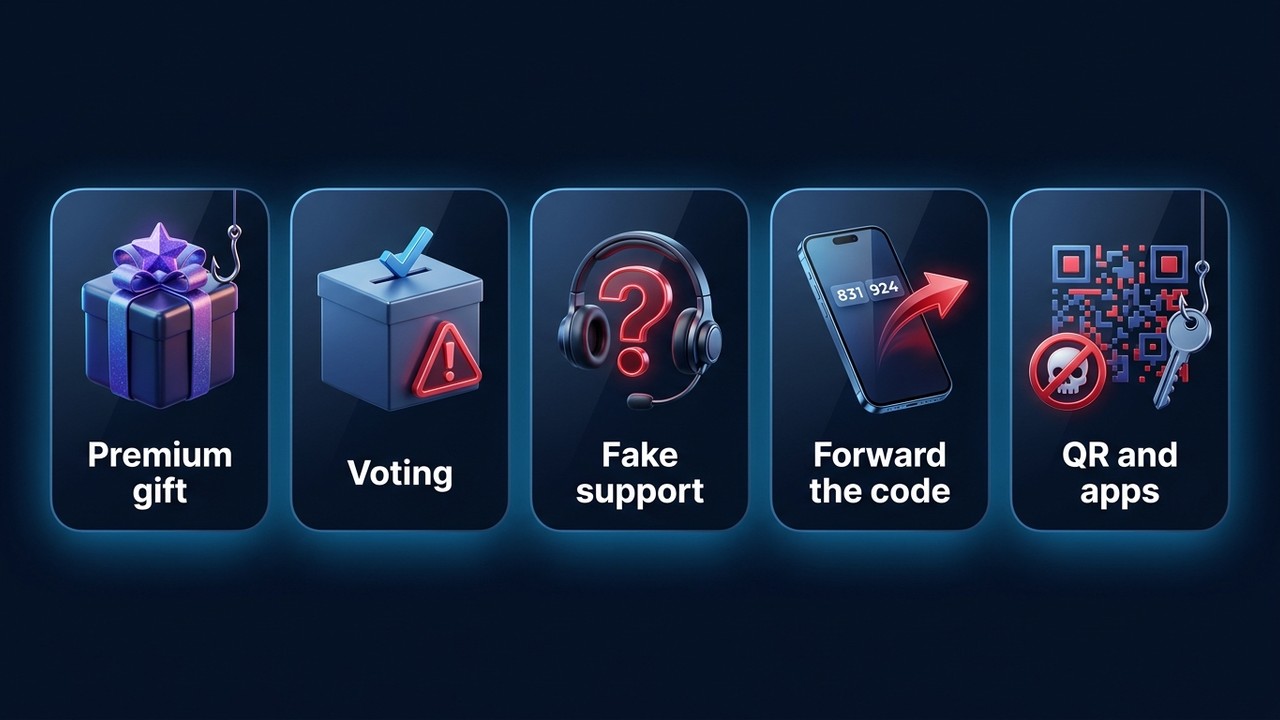
- Free Premium. Something resembling t.me/premium opens a cloned sign-in page.
- "Vote for my niece". Voting supposedly requires signing in on an outside site.
- Bogus moderators. A profile with a checkmark emoji in its name threatens a ban unless you "confirm".
- Mistaken SMS. A buddy claims their digits landed on your phone by accident.
- QR scans and modded clients. Scanning a stranger's QR or using an unofficial app grants a login.
One rule covers all five: the genuine app never wants those digits forwarded or pasted anywhere else. Also, further tricks are listed in our piece on Telegram scams.
Telegram Hacked: Your First-Day Rescue Plan
Here's the good news. A freshly added login can't kick older ones out during its first 24 hours, and that delay is your head start. So while you remain inside, you outrank the intruder.
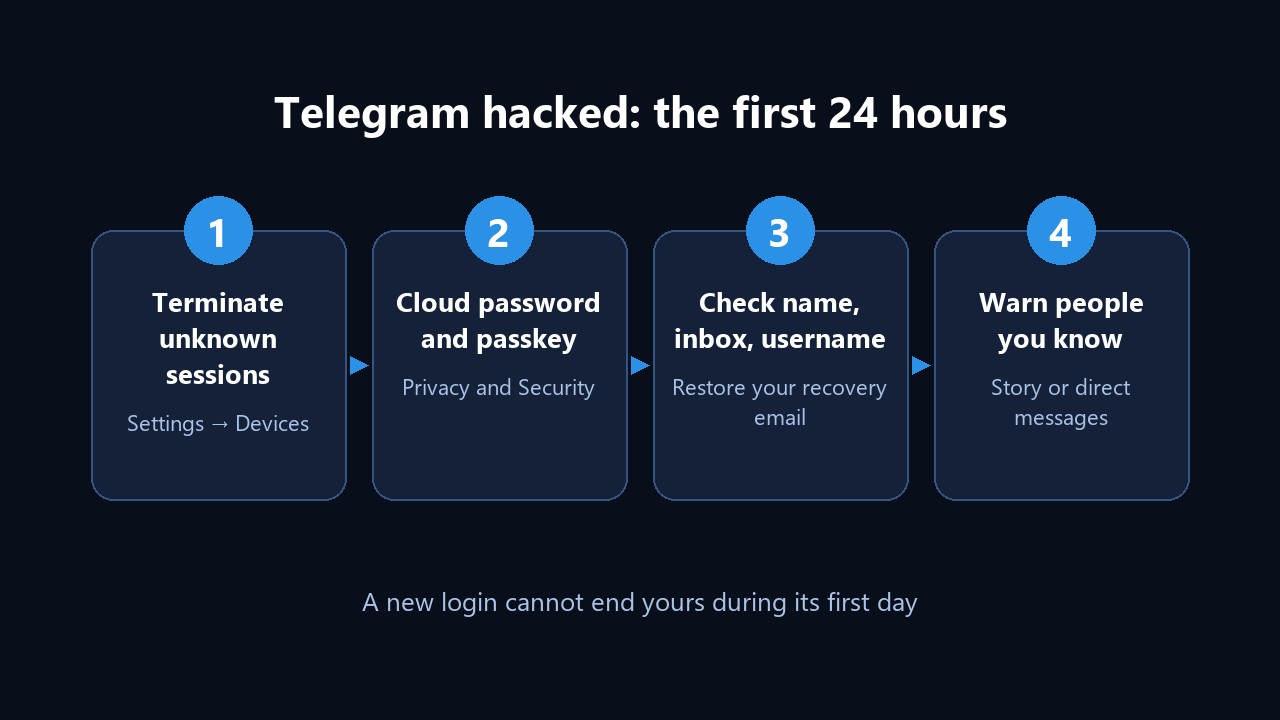
1. Kick Out Strangers
Settings → Devices → Terminate All Other Sessions. Own a tablet or laptop on that list? Then end only the unknown rows one by one. Afterwards set idle logins to expire, say, after seven days.
2. Add a Cloud Password and a Passkey
Settings → Privacy and Security → Two-Step Verification. Choose a phrase used nowhere else and attach a backup inbox. As a result, a new device now needs more than SMS digits. Under Passkeys, meanwhile, you can enable fingerprint or Face ID sign-in.
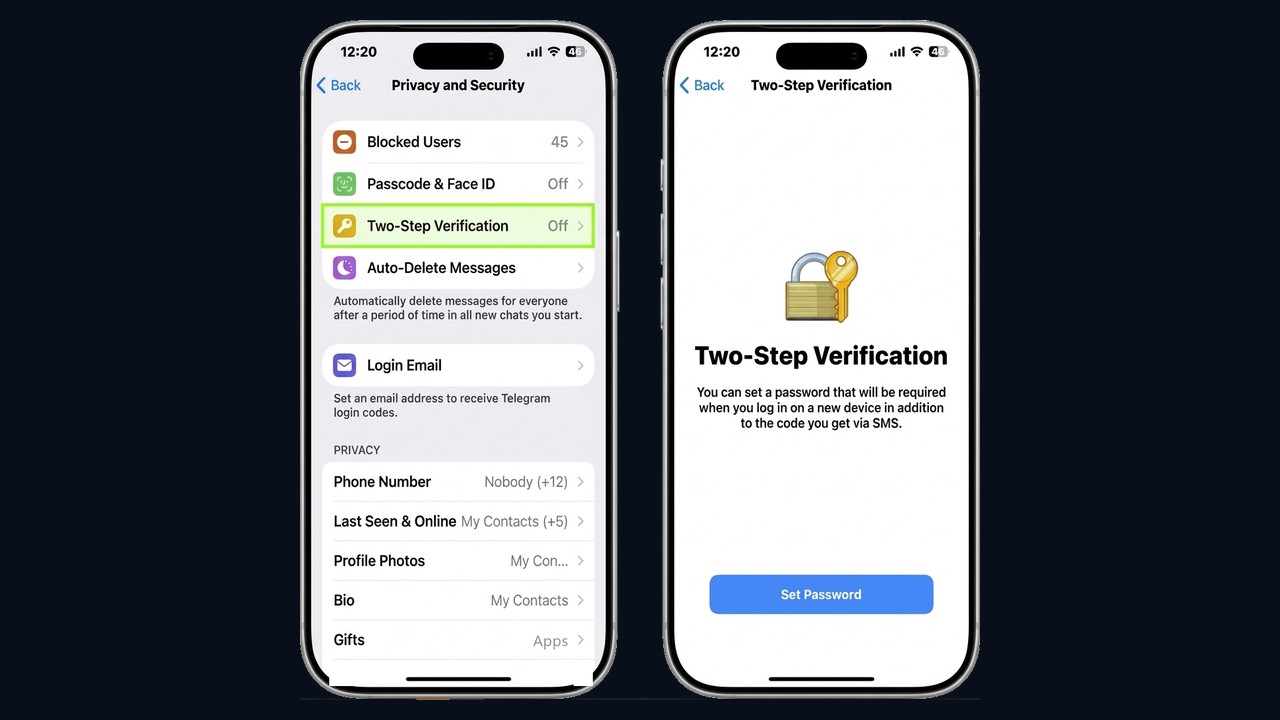
3. Undo the Intruder's Edits
First, compare name, photo, bio, username and backup inbox with what they should be. Swapped inbox? Then put yours back inside two-step settings. Also open Login Email: if the intruder attached their own address, sign-in codes go to them instead of arriving by SMS. Enter your mailbox and confirm it with the code.
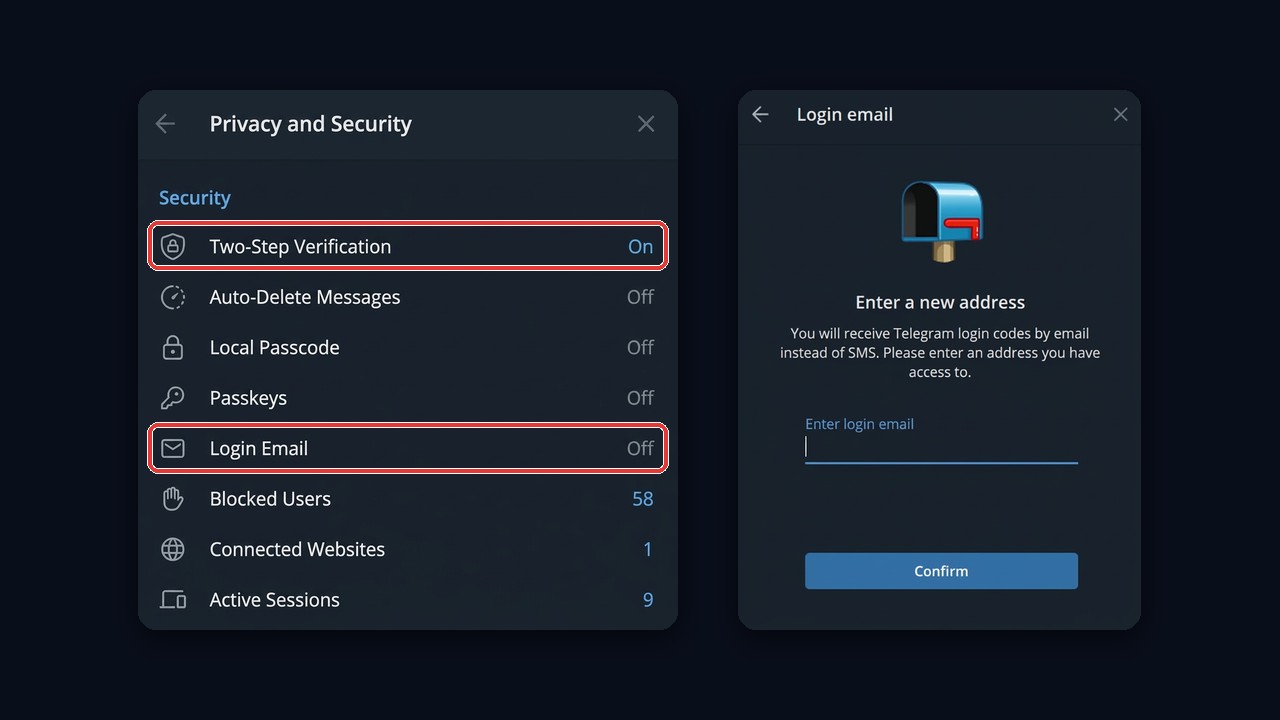
Next, skim Saved Messages and recent chats, because thieves sometimes plant re-entry links there.
4. Tell People You Know
A short story or a few direct messages saying "my profile was stolen, ignore money requests" shields friends the thief already approached.
Shut Out Completely? Getting Back In
If your Telegram was hacked over a day ago and every login of yours got terminated, the phone number remains your route.
- Start the app and type your phone.
- Wait for digits: they come via another device of yours, SMS or a call.
- Without a second factor, entry is instant. Right away, close foreign devices and switch protection on.
Note that each open login receives an alert about your attempt, so the thief sees it as well. Speed beats caution here.
Hacker Locked Your Telegram With Their Own Password
This is the toughest spot: your Telegram was hacked and sealed with someone else's passphrase, and the backup inbox is theirs too. So options depend on what you still hold.
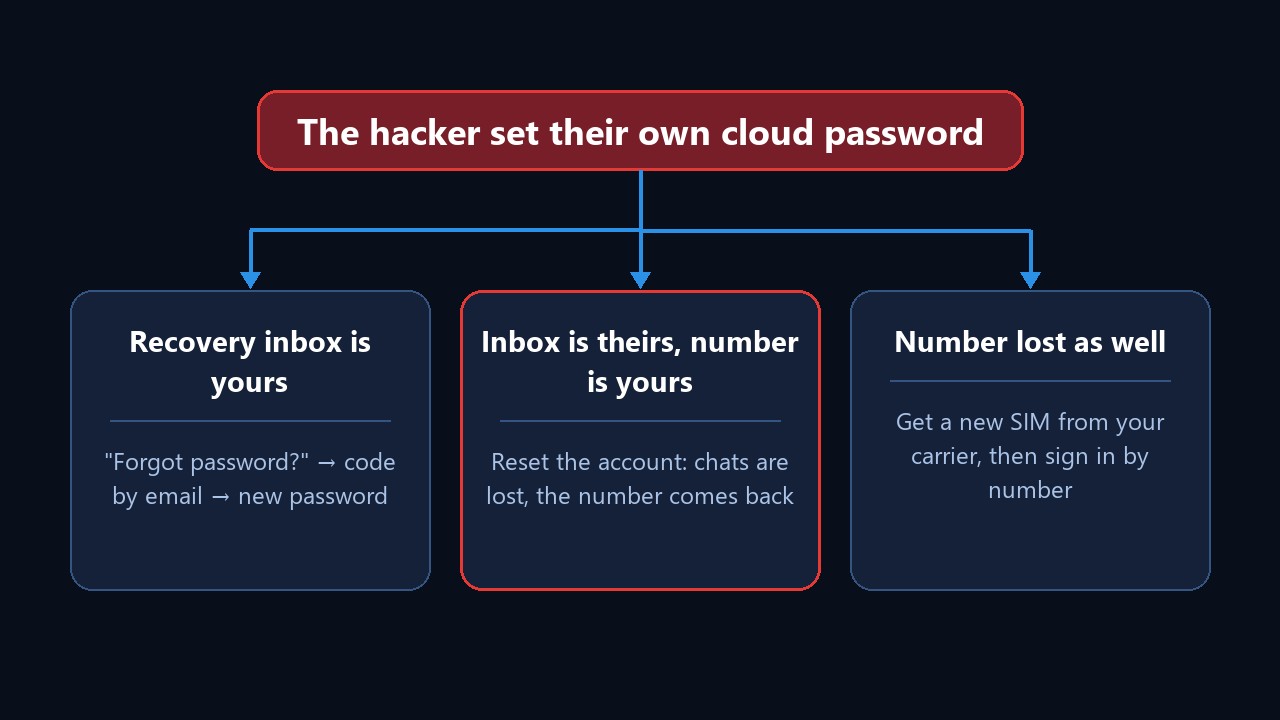
- Backup inbox still yours. Choose "Forgot password?", grab the emailed digits and set a fresh phrase.
- Inbox lost, phone kept. Only a reset remains: below the password field pick recovery, then the no-email route, then reset. History disappears, but the number returns to you. Active profiles may face a waiting period first.
- Phone lost as well. Get a replacement SIM from your carrier, then repeat the steps above.
Reaching Telegram Support
Use Settings → Ask a Question, or the form at telegram.org/support. Then mention your number, when trouble began and what you've tried. Volunteers handle these, so answers can lag. Impersonators using your name? Report them to the official @NoToScam bot. Besides, every option is gathered in our article on contacting Telegram support.
Lost Chats After a Breach
Threads wiped for both sides are gone for good: no trash bin exists. Anything erased "for me only", however, survives with the other party, who can forward it back. From now on, export your data monthly via Telegram Desktop.
When a Friend Gets Hacked
Someone close suddenly begging for cash? Phone them before replying. Meanwhile, skip their links and keep your digits private. Then open their profile, tap Report and choose a reason, which helps moderators freeze the stolen login sooner.
Hacked Telegram Channel or Group
Sometimes a channel is the actual prize. For example, if the stolen login owned it, the thief can strip admins, rename everything and run ads.
- Win back the owner login first; channel rights follow.
- Remove unfamiliar admins and audit permissions.
- Inform subscribers via a spare channel or a pinned note.
- Escalate to support when the owner is unrecoverable, attaching proof.
Going forward, keep a second full-rights admin on a separate login and never publish from the owner.
Keeping Telegram From Being Hacked Again
| Setting | Where | Blocks |
|---|---|---|
| Cloud password | Privacy and Security → Two-Step Verification | Sign-ins with one stolen SMS |
| Passkey | Privacy and Security → Passkeys | SMS interception |
| Backup inbox with its own 2FA | Two-step settings | Resets through a weak mailbox |
| Auto-expiring logins | Devices | Forgotten devices |
| Hidden phone number | Privacy and Security → Phone Number | Lookups by number |
Still, habits beat toggles: never forward digits, never paste them into websites.
The Full Scheme to Protect a Telegram Account From Hacking and Theft
The table covers everyday threats. One scenario, however, surfaces too late: someone else keeps access through a shared session. It happens with purchased profiles, and also after signing in to a third-party client or on another person's computer.
Step-by-step protection scheme. How sellers and hijackers regain access through a shared session, and the exact order to cut it off: fresh proxy, a rest period, ending sessions, re-authorization, a second purge after 24 hours, two-step verification and a backup session. Our guide on how to protect a Telegram account from hacking and theft walks through every step with screenshots.
Order matters here: set a password before breaking the shared session, and the other side keeps a loophole. So run the scheme on every new or suspicious profile, and for dozens of accounts use the bulk actions described next.
Locking Down a Fleet of Work Profiles With GramGPT.io
Twenty profiles turn manual checks into an afternoon of clicking, and gaps creep in. The GramGPT account manager handles it in bulk:
- Tick the profiles, or all of them.
- Sessions → Terminate Sessions clears foreign devices everywhere at once.
- Accounts → Set 2FA / Change 2FA applies a cloud password to each, while Login Email attaches your inbox.
- Privacy hides numbers and limits who may message or add them.
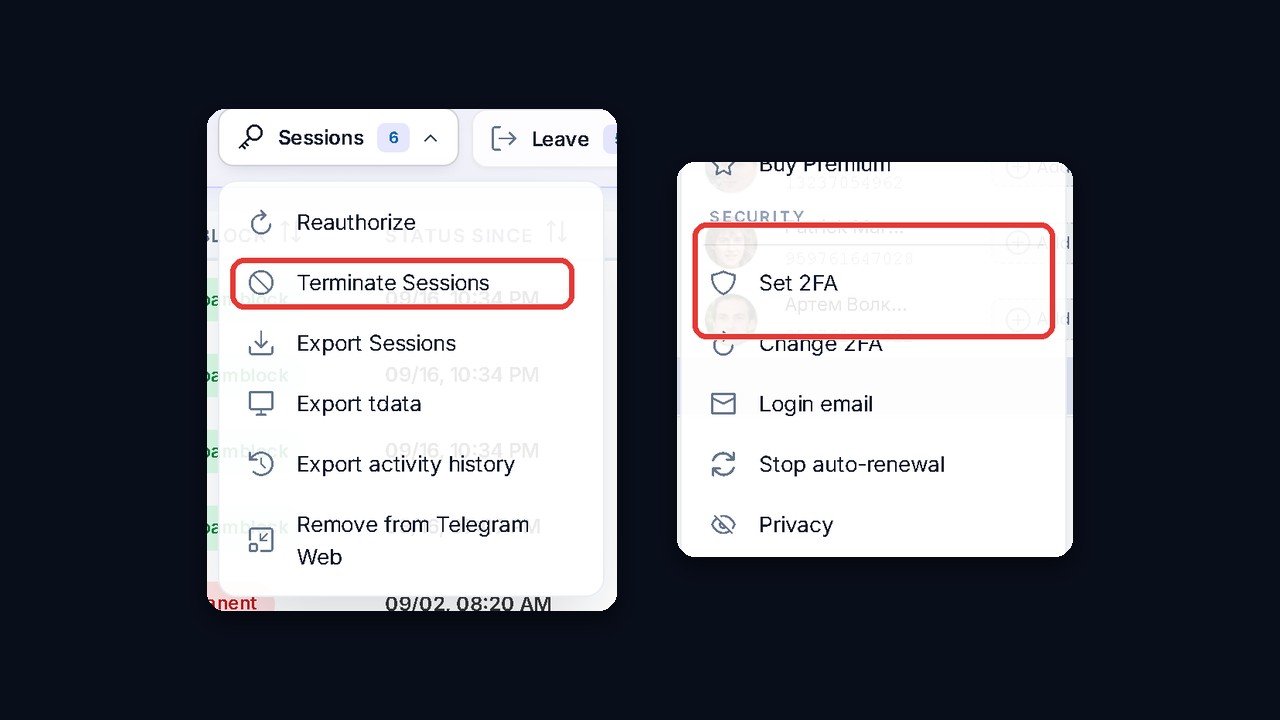
An action-history export also shows what happened to each profile and when. The manager costs nothing, so trying it is easy.