You text a friend, glance at the chat header and find a fuzzy note instead of a clock reading. Were they around five minutes ago or two days back? Dodging you? Anyone meeting the Telegram last seen recently note for the first time asks these questions. Then one day the note turns into “a long time ago”, so panic follows: a block?
But the vagueness is deliberate. The app prints it whenever your contact keeps activity private, or you keep yours private. So a status alone says little about interest, mood or bans.
Below we decode each status and its gap. Next comes the switch on phones and computers, habits that betray your presence, and finally bulk setup for dozens of work profiles inside GramGPT.io account manager.
What Telegram last seen recently means
By default, the line under a name carries a precise stamp like “last seen at 2:32 PM” or the word “online”. As soon as someone limits who gets that stamp, the messenger trades it for a broad bracket. In other words, Telegram last seen recently covers any visit from seconds to three days back. Outsiders get nothing sharper.
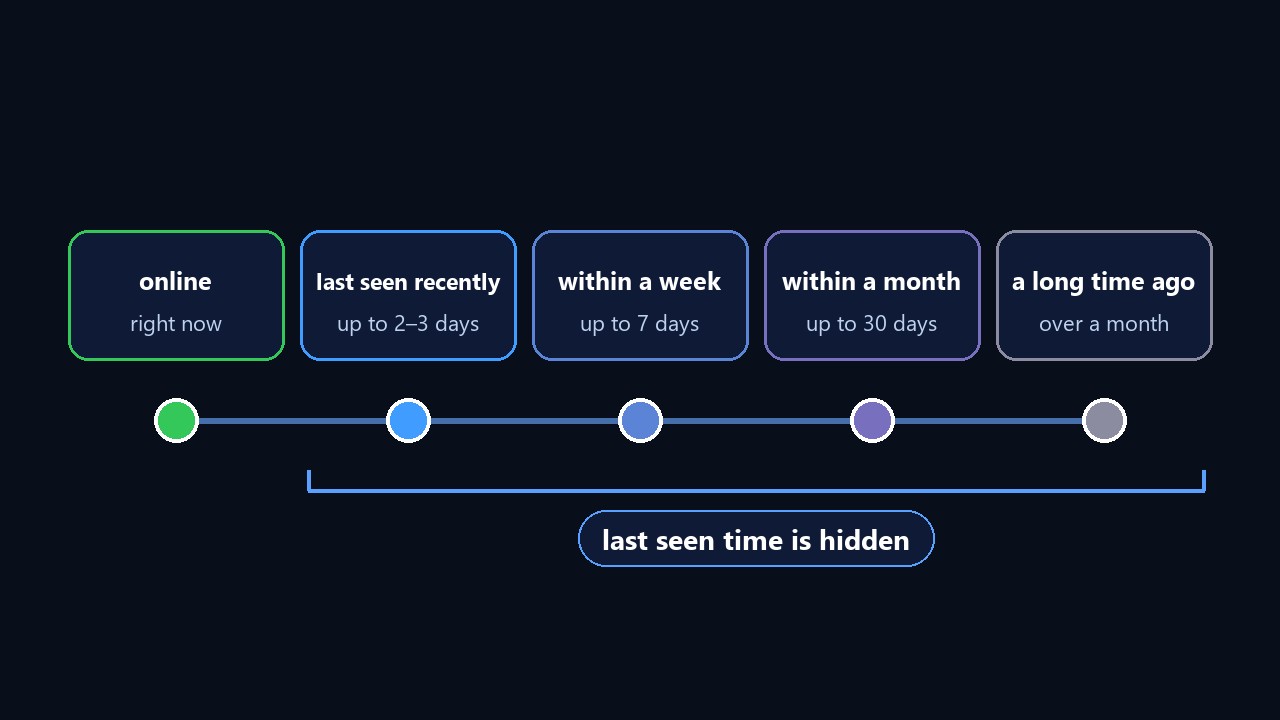
Four such brackets exist, each replacing the previous as silence stretches:
| Label | Gap since the app was opened | Why it appears |
|---|---|---|
| online | active at this very moment | activity open to you |
| recently | seconds to 72 hours | hidden by the owner |
| within a week | three to seven days | hidden by the owner |
| within a month | 8 to 30 days | hidden by the owner |
| a long time ago | more than thirty days | hidden, or the owner blocked you |
The lesson is short. Telegram last seen recently rarely targets you personally. Instead, the owner probably flipped a switch months ago and forgot. Many sales reps, freelancers and help-desk agents do so because clients otherwise count every login.
How long is Telegram last seen recently?
Anything between seconds and 72 hours. For example, your friend might have closed the chat a minute ago or scrolled messages two evenings back. The messenger never narrows that bracket, so guessing further is pointless.
What “last seen a long time ago” means
Three situations produce this note. First, the person abandoned the app for over thirty days. Second, they keep activity private and have stayed away for weeks. Third, they put you on their block list: anyone blocked gets that note permanently, even while the owner chats daily.
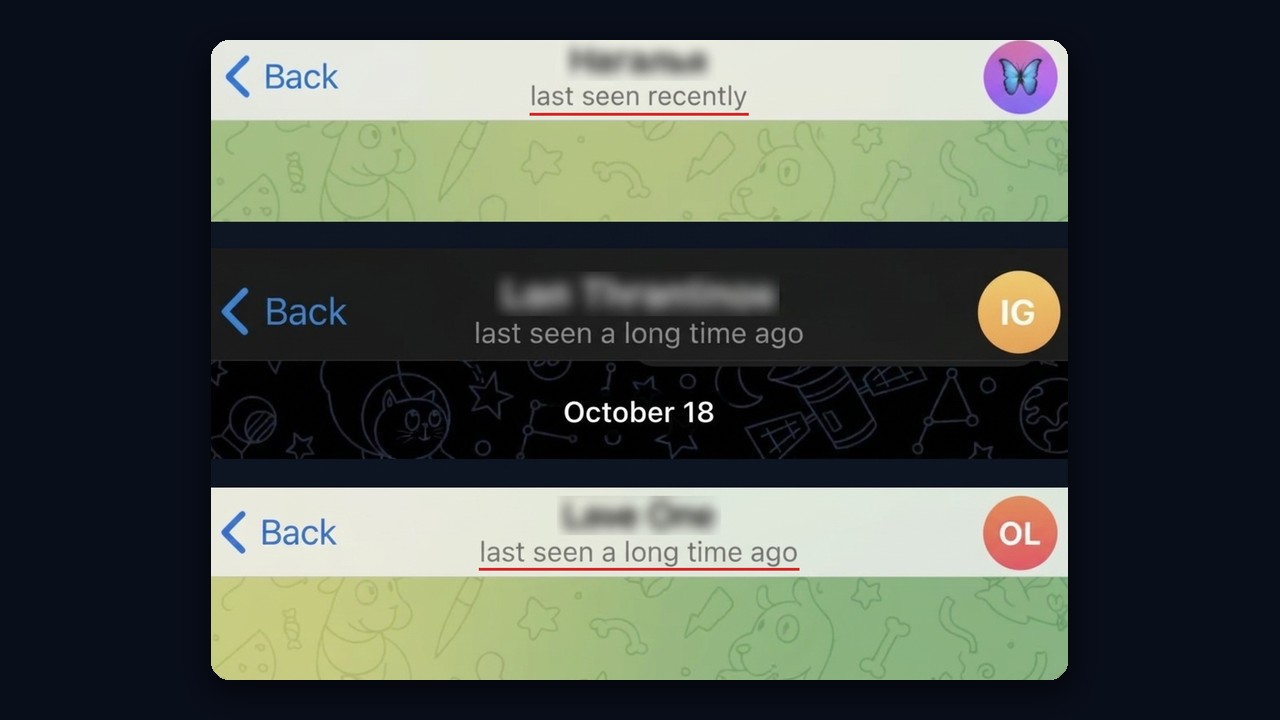
Here is how these statuses look in the header of real chats on iPhone: "recently" and "a long time ago".
Therefore, side signals separate a block from a break. For instance, vanished avatars, messages frozen on one grey tick for days and calls that never ring point to a block. On the other hand, visible avatars and read messages mean rare visits.
Why you get Telegram last seen recently instead of a clock reading
Besides, another cause hides in plain sight. The rule works both ways: conceal your own activity, and every other stamp disappears for you too. As a result, your whole contact list turns into brackets, including people who share theirs openly.
The exception is Telegram Premium. Subscribers stay hidden yet still read precise stamps from anyone who shares them. However, a contact who chose Nobody remains Telegram last seen recently for you even with Premium, because paying never overrides another person’s choice.
Finally, glitches sometimes swallow stamps. So install updates, verify device date and zone, then relaunch; after syncing, the line returns.
How to hide last seen in Telegram
First, the switch looks identical everywhere, only the route differs. The choice syncs through the cloud, so a single edit on any device covers the rest.
Going dark makes most sense for:
- sales and help-desk staff tired of clients demanding instant answers;
- freelancers and consultants who split office hours from evenings;
- channel admins whose readers like to monitor the author;
- owners of work profiles that must not reveal synchronized logins.
How to set Telegram last seen recently on Android and iPhone
- Go to Settings, then the privacy section.
- Tap Last Seen & Online.
- Pick Nobody for full darkness, or restrict visibility to saved numbers.
- Optionally, build exception lists for those who should always or never get the stamp.
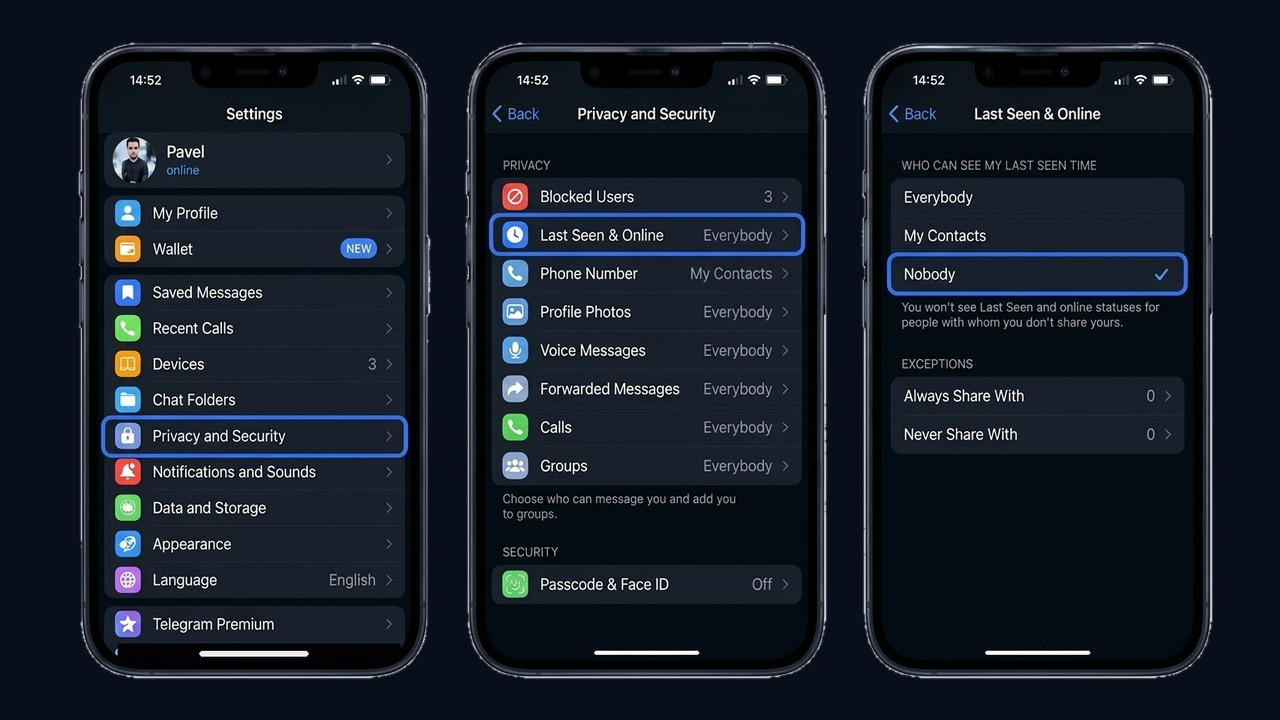
Right under Nobody, the iPhone app warns about reciprocity: you will stop seeing other people's last seen time and online status too.
The right level depends on your goal:
| Option | What others get | Trade-off |
|---|---|---|
| Everybody | precise stamp plus the online badge | handy for support and sales, though strangers can track your routine |
| My Contacts | saved contacts get minutes, strangers get a bracket | a sensible middle ground for most users |
| Nobody | brackets for everyone | maximum secrecy, but without Premium you lose other people’s stamps |
Desktop app and browser version
For desktop users, the route runs through the hamburger menu into Settings, Privacy and Security, then Last Seen & Online. You get the same three options, and the exception lists are called Always share with and Never share with.
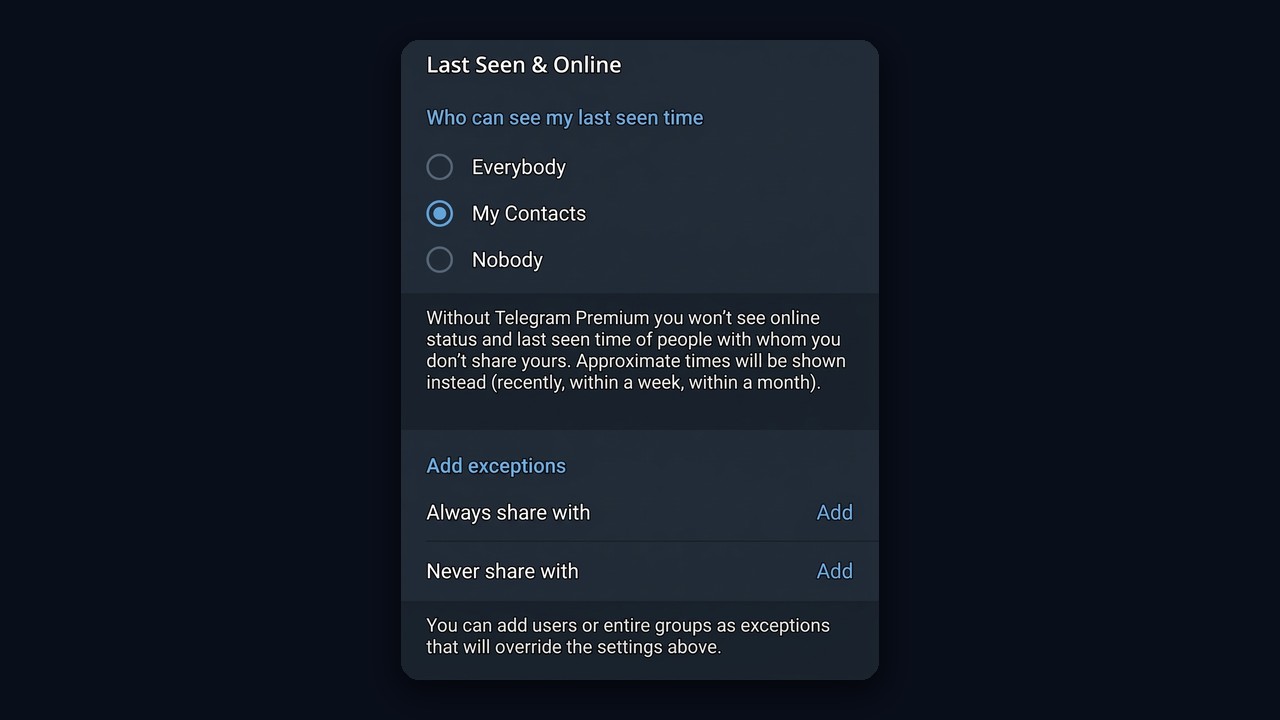
The browser client phrases the question in full, asking who may view your last visit.
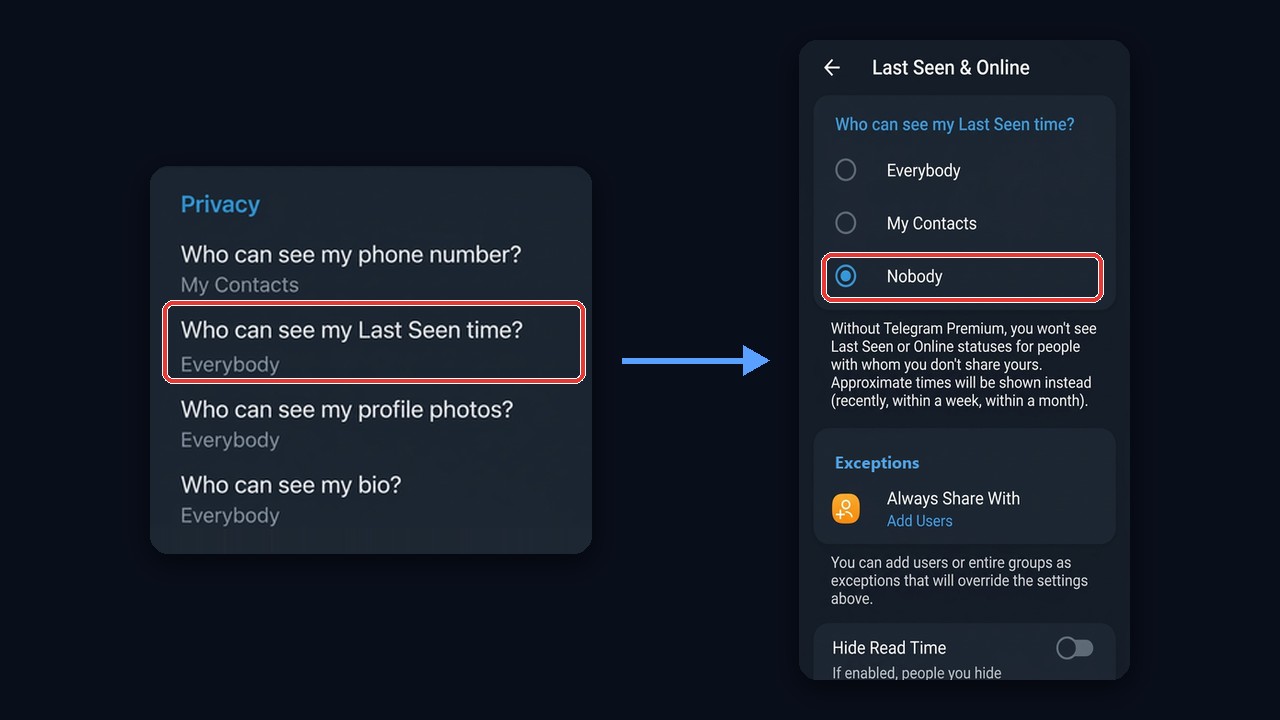
Next, a Hide Read Time toggle sits underneath. It masks when you opened private messages from everyone kept away from your activity. In return, their read moments vanish for you as well unless you pay for Premium. Note that group chats ignore this toggle.
How to hide it from certain people only
This way, exception lists do the heavy lifting. For example, keep My Contacts but block a former colleague from the stamp. Or flip it: go fully dark and open minutes to a few close friends. Also, lists accept single users as well as whole groups, so some people get a bracket while others get exact minutes.
What still gives you away
A private status masks only the clock and the online badge. However, several traces remain visible:
- “typing…” pops up in a private chat no matter what you picked;
- double ticks confirm a message was opened, even with read time masked;
- fresh reactions and replies prove recent presence;
- story views list you among viewers unless Premium stealth mode is on;
- group posts carry a precise send stamp for every member.
So choosing Nobody alone won’t make you look offline. Also skip opening that chat or reacting to posts until ready to answer.
Can you find out when someone was online if they hid it?
No. Whenever you get Telegram last seen recently, servers withhold the real moment, so no tool can retrieve it. Bots and websites promising to expose anyone’s activity are guessing at best. At worst, they request your number plus a login code and then hijack the profile. Never type a login code into third-party services.
The only honest route: ask the person to add you to their exception list. Alternatively, buy Premium when the problem is the two-way rule rather than someone else’s restriction.
How to hide activity on dozens of work accounts
A personal profile needs a minute. A fleet of work profiles for comments, outreach or promotion is another matter: log into each, dig out the menu, adjust seven options, log out, repeat. Meanwhile, open stamps work against you. Competitors and chat moderators spot ten profiles waking up within the same minute and expose the network.
The GramGPT.io account manager handles this in bulk. Then tick the needed profiles, open the Accounts dropdown and choose Privacy under Security. A window appears where seven options apply to every selected profile at once.
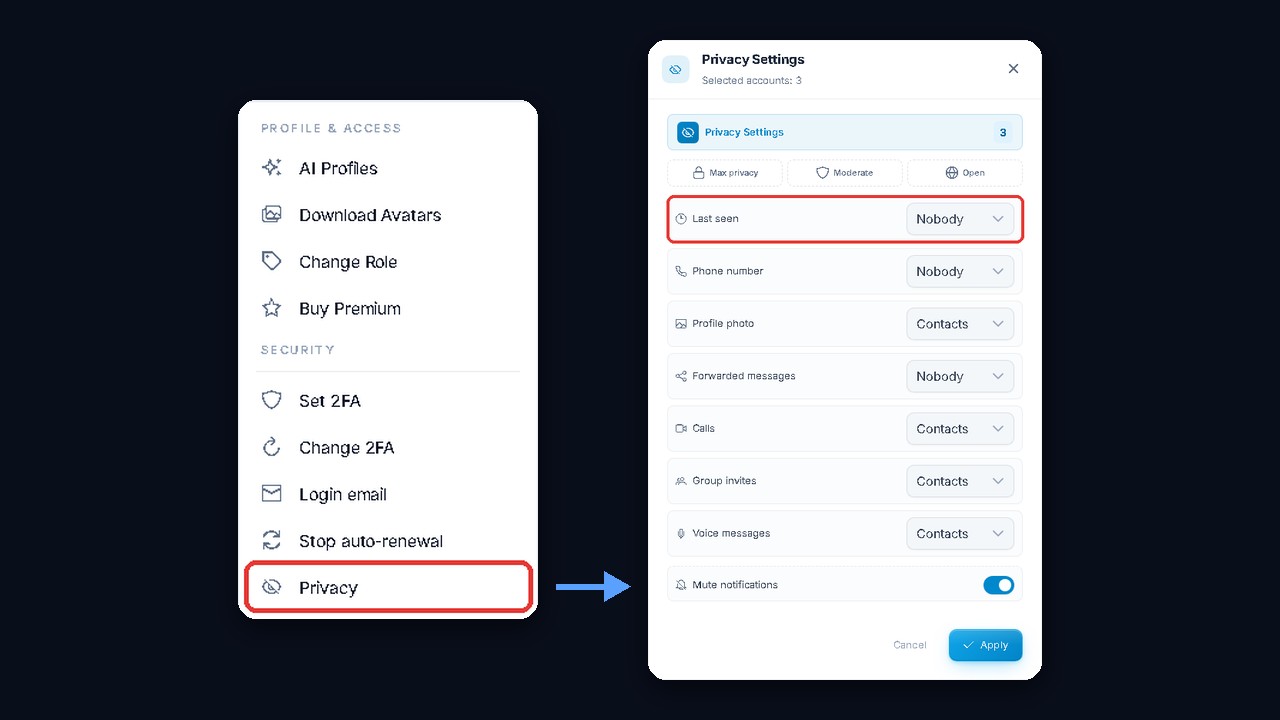
Ready-made presets
Instead of tuning options one by one, pick a preset:
| Preset | What it does | Best for |
|---|---|---|
| Max privacy | activity, phone number and forwards closed to everyone; photo, calls, group invites and voice notes limited to contacts; notifications muted | work profiles for comments, outreach and scraping |
| Moderate | activity open to contacts, phone and forwards closed, photo public | profiles that chat with customers and should look natural |
| Open | most data public, phone shown to contacts | showcase profiles of a brand or expert |
Every option stays editable after a preset; then hit Apply. The screenshot above uses Max privacy. As a result, each profile shows only a bracket to its contacts, keeps its number private and can’t be dragged into random spam groups, since only saved contacts may add it.