A follower forwards you a "special offer" from your own feed. Same logo, same title, same pinned post, but you never wrote it. For readers, the only quick way to tell the original from the copy is Telegram verification: the small blue check beside the title.
Most owners first look for a "verify" button in settings, and there is none. Some then pay an agency that promises a badge in three days and get nothing back. Meanwhile, impostors have learned to draw a lookalike mark on their own. In reality, only the platform itself grants the real one, so the rules are public and the review is free.
Below we explain what the blue check means, how to tell a genuine badge from an emoji status or a symbol typed into a name, who qualifies in 2026, and how to apply through @VerifyBot.
What the Telegram Verification Badge Means and Where It Appears
The Telegram blue checkmark confirms that a feed, bot or public group belongs to the brand, outlet or public figure it claims to represent. The team behind the app reviews every request, so no outside service can add or remove it.
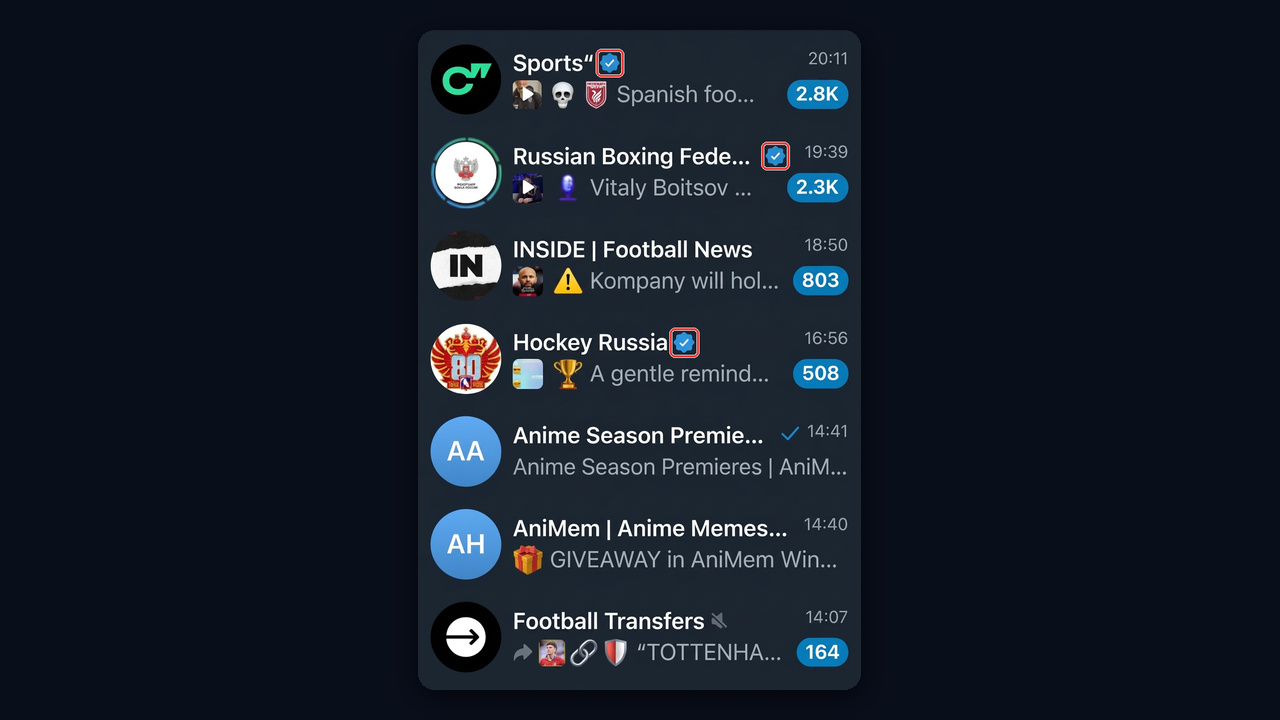
Visually, the badge sits right after the heading. It also shows up in the chat list, in search results and on the profile page. In the list below, Hockey Russia and the Russian Boxing Federation carry it, while the football transfer feeds do not.
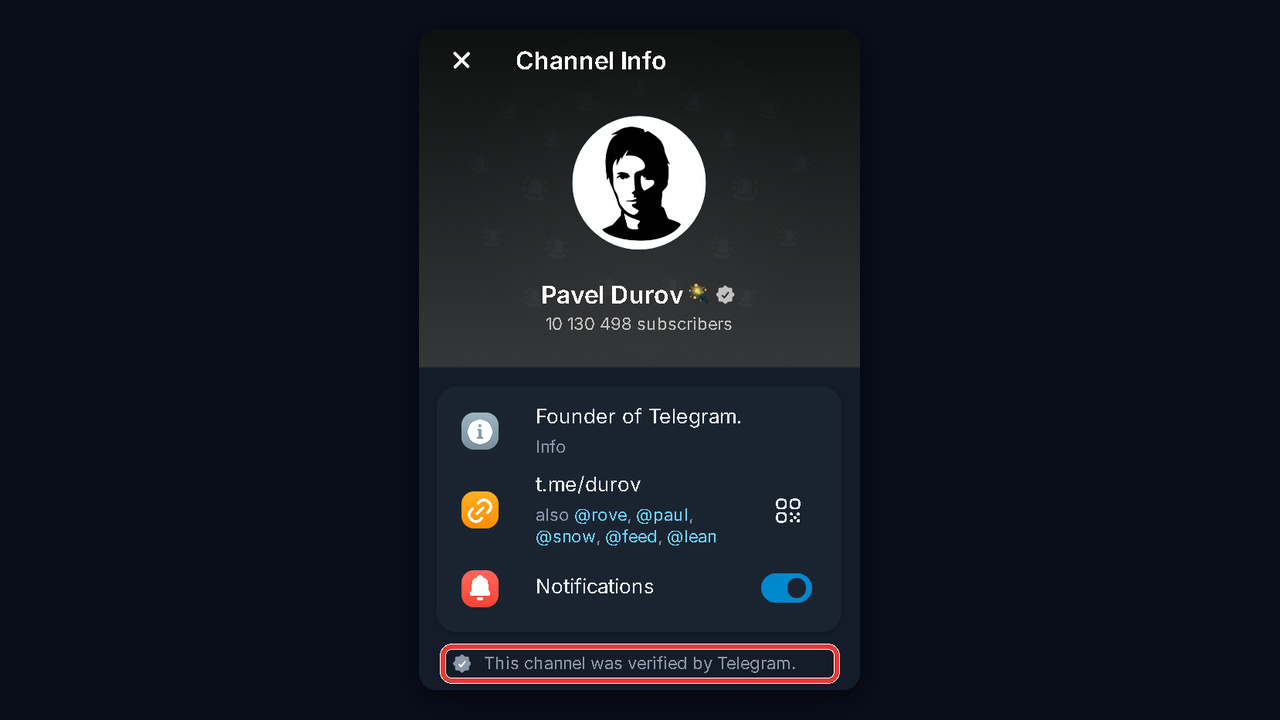
Open an approved channel's page and another detail shows up: a line under the links confirming its status. Because of this, a copycat cannot fake it with a clever title or a stolen avatar.
What the Check Gives You, and What It Does Not
Keep expectations realistic. The official guidelines state that verification unlocks no extra features: reach does not jump, ads do not get cheaper, and URL limits stay the same.
Moreover, approval is not an endorsement of your content. It simply proves who is behind the account. So its real value is trust: subscribers know they are talking to you, not to a scammer wearing your logo.
Real Badge vs Emoji Status vs Third-Party Icons
However, several symbols can now appear around a chat name, and that confusion is exactly what impostors exploit. For example, Pavel Durov's channel shows a magic wand emoji status first, and only then the official tick.
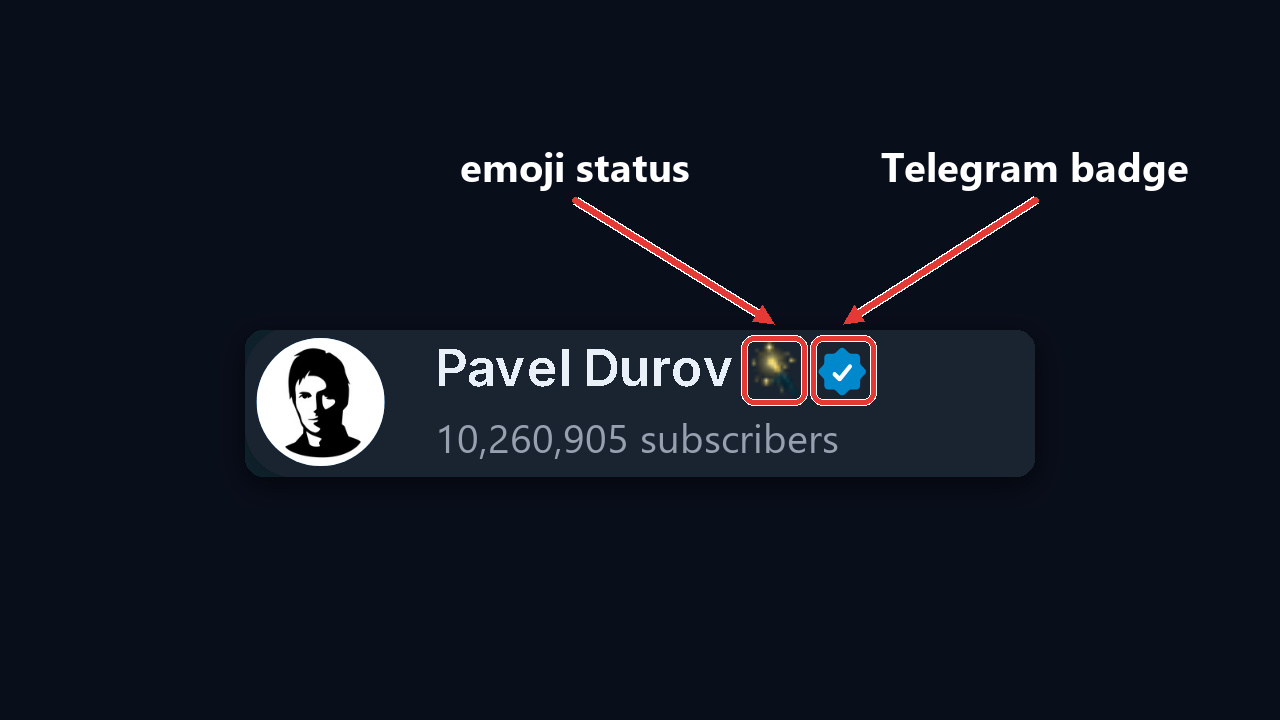
Here is how to read every mark people mistake for the genuine article, plus the message ticks that often get mixed up with it.
| Mark | Position | Who sets it | How to tell |
|---|---|---|---|
| Official blue check | after the title | the messenger only | the info page says the messenger approved it |
| Premium emoji status | after the name | the owner, any emoji | tap it and a window names the emoji pack |
| Third-party icon | before the title | an approved verifier service | the profile names who confirmed it |
| "✔️" typed into the name | inside the text | anyone | same height as the letters, copies along with the rest |
| Check drawn on the avatar | on the picture itself | whoever made the photo | open the photo full size: the tick is part of the image |
| One or two ticks on a message | next to the time | the app | one means sent, two mean read |
However, that last row has nothing to do with identity. Green or blue ticks by the timestamp only report what happened to your message, and their colour depends on the chat theme.
How to Spot a Fake Telegram Verification Badge
A genuine badge goes only to channels, bots and open communities. Fakes, however, turn up anywhere, most often on personal accounts of so-called managers and admins. So look at where the icon comes from, not its shape. Impostors favour crypto groups, giveaway chats and marketplace deals, where a fake tick buys instant credibility.
A Check-Shaped Emoji Status
The most convincing trick is a Telegram verified emoji set as a status. Premium subscribers pick it from public packs, but some of those sets copy the genuine mark pixel for pixel. That is why a so-called Telegram verified logo beside a person's name proves nothing on its own. Sparkles, gradient fills or slightly odd proportions are typical giveaways.
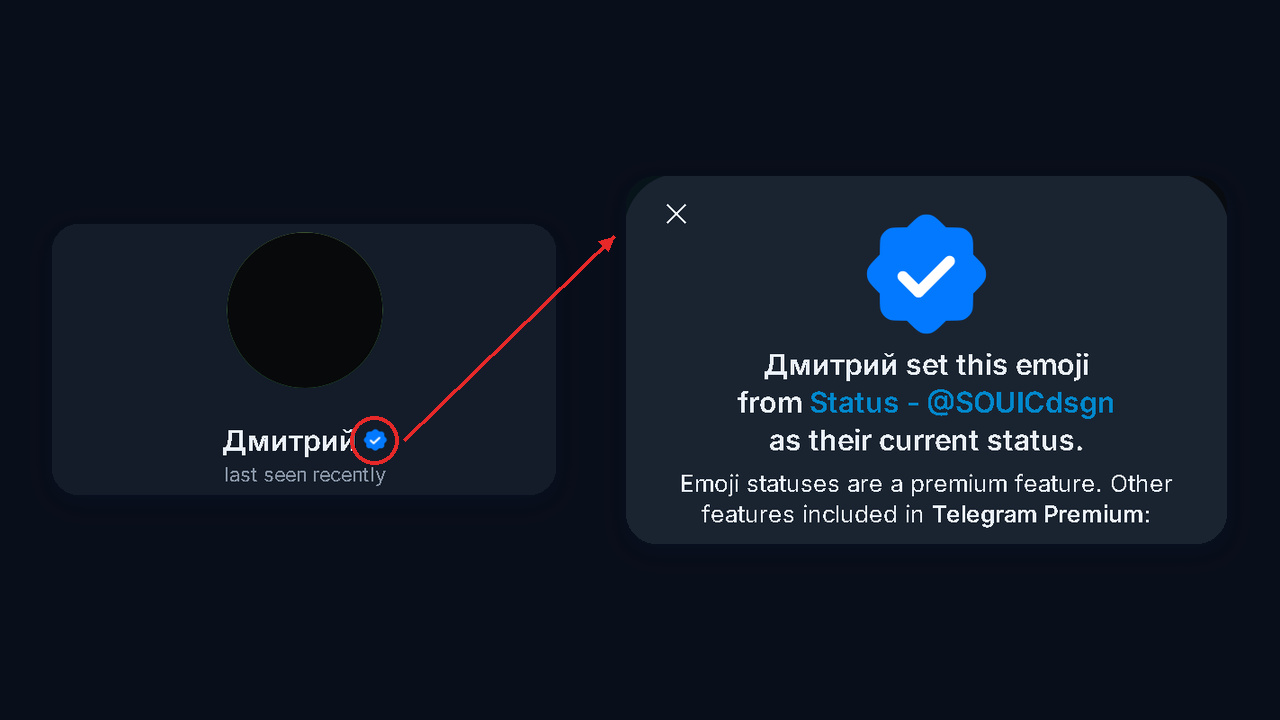
The test takes a second: tap the icon. If it is a status, a window pops up saying the person set this emoji from a named pack for their profile, and the app offers you Premium underneath. A real badge opens no such window, and the profile carries the verification line instead.
A Check in the Name or on the Avatar
A cruder version types "✔️" or "☑️" straight into the display title. Besides, it sits at the same height as the letters and often has a slightly different shade. It also copies along with the rest, like any other text.
Others, for example, paint the mark onto their avatar. Still, the messenger never puts its seal on a photo. Open the image full size: if the symbol is still there, it was drawn by hand.
A 30-Second Profile Check
Clones often copy the whole look. This account, for instance, is labelled "Pavel Durov" and uses his photo, yet the line beneath says "bot", nothing confirms it, and the handle is @PavelDurov_Robot.
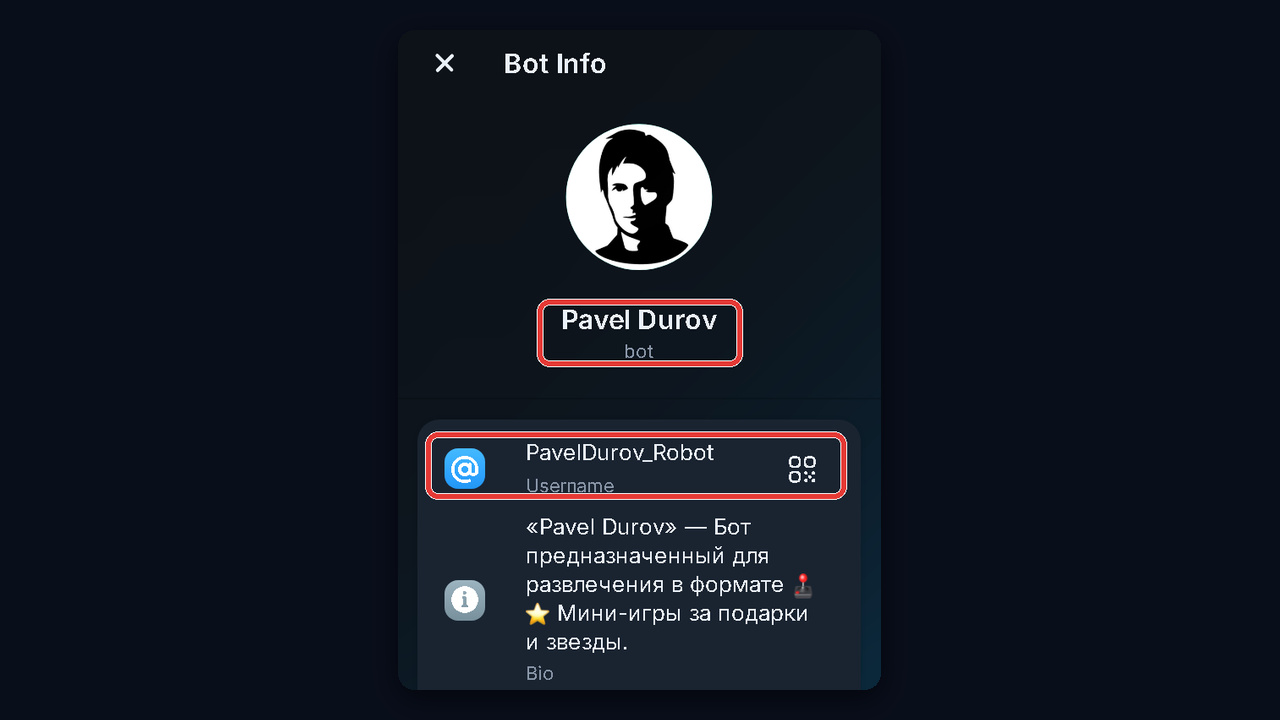
- Verification line. Open the info page. A real channel or bot states under its links that it has been confirmed.
- Account type. A blue tick next to a personal profile is fake: private accounts are not verified, and even Durov carries a paper-plane badge instead.
- Handle. Then compare it with the handle on the company's own website. Clones add "_official", "support" or a stray letter.
- Age and audience. Scroll to the very first posts. Copies are usually new and small.
- System labels. SCAM or FAKE next to a name means people have already reported it. Our guide to the scam label explains what they mean.
Note: a real admin never asks for payment in private messages or sends "account check" links. We break down this kind of Telegram verification scam in our article on Telegram scams.
Keep Followers Away From Clones
Until you earn it, three habits do most of the work. First, keep one source of truth: link the channel from your site and socials, and pin a post saying "Our only channel is @username". Second, search for your brand once a week and report copies from their menu. Third, remind readers that you never sell "access" in DMs.
Any famous person shows the scale. Search for "Pavel Durov" and you get a pair of genuine feeds, @durov and @durov_russia, surrounded by look-alikes with the same heading and picture but no confirmation.
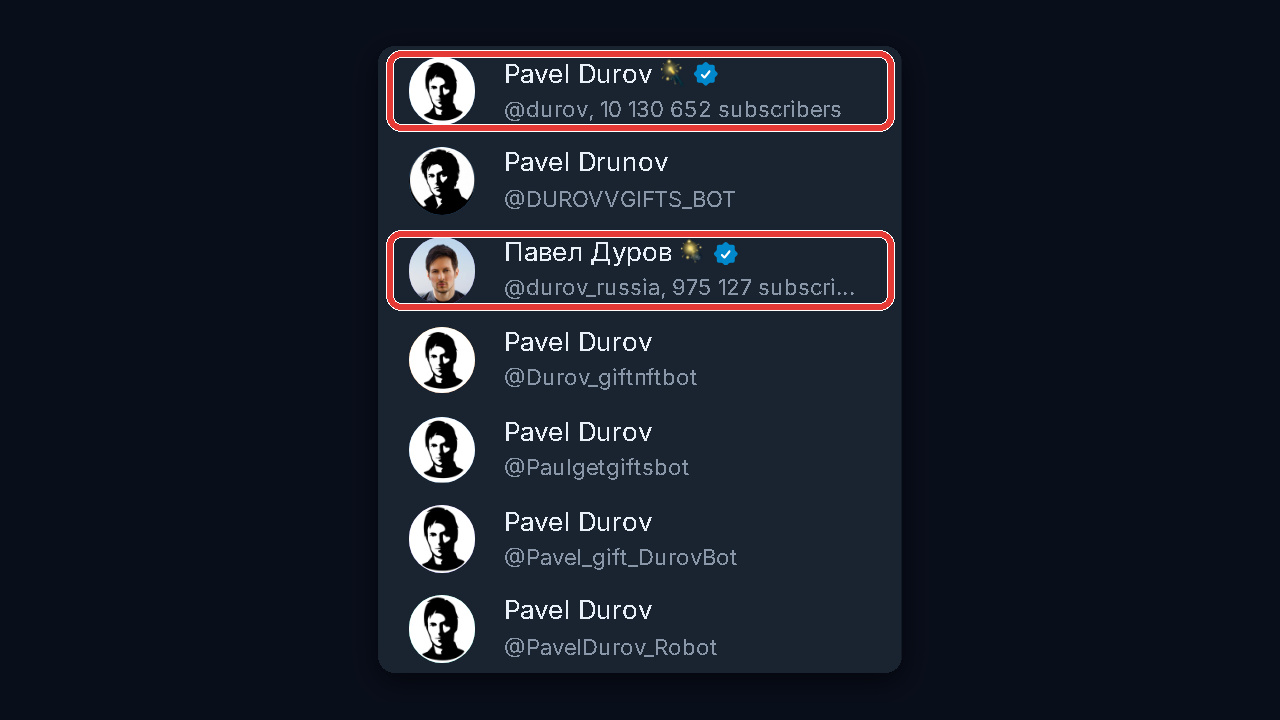
With many brands or titles to watch, a spreadsheet beats manual searching. For example, the GramGPT channel parser lists every feed that uses a given word, with subscriber counts, so fresh copies stand out.
Who Can Get the Blue Check
The messenger grants it to large, active, official channels, bots and public groups. The bar is the same for media, businesses and public figures alike. In other words, private channels and closed groups are not eligible.
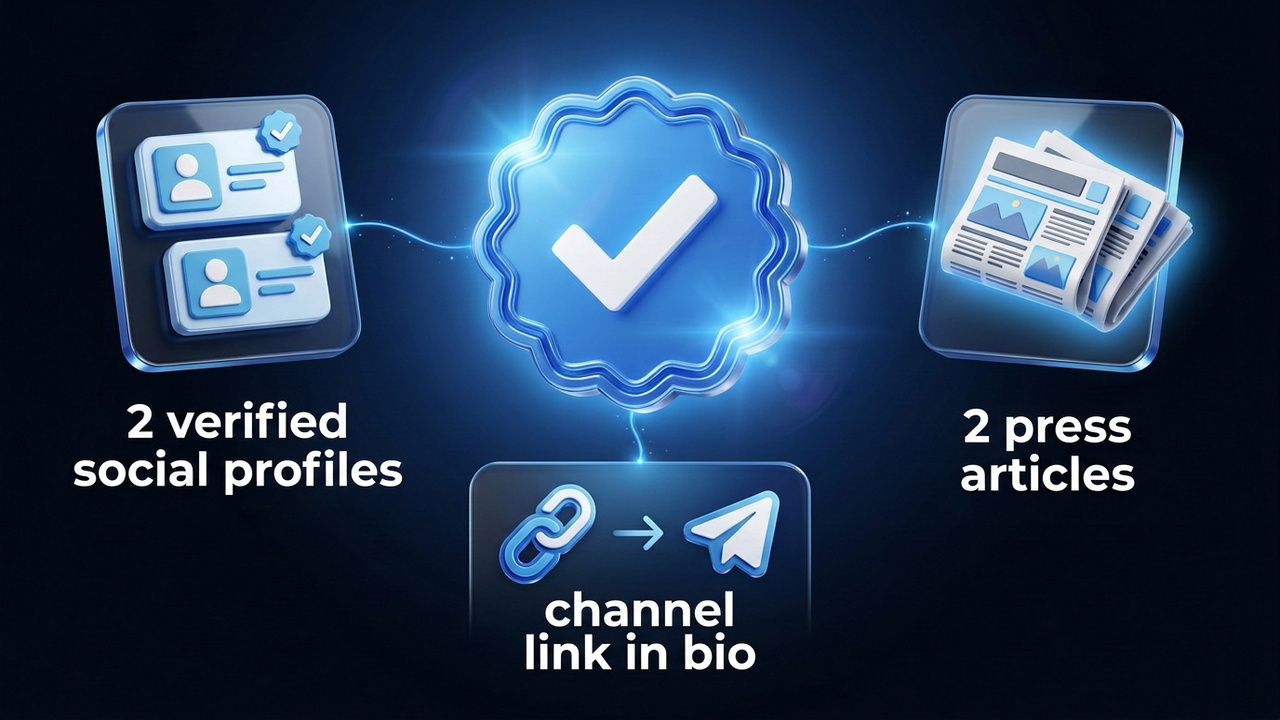
Telegram Verification Requirements
- Two verified social profiles. You need official badges on at least two of these platforms: TikTok, Instagram, Facebook, YouTube, X (Twitter), VK, Snapchat.
- A link in each bio. Those profiles must point to the exact chat, bot or group you want confirmed.
- Two press mentions. Articles must name you or your organisation. They do not need to link to your chat, but a well-known publisher and an English-language piece help.
- Owner rights. Only the creator or a full-rights admin can submit the request.
Missing one social profile? For instance, an undisputed Wikipedia page that links to you can replace it. In addition, organisations may count a mention on their official website. The same substitutes work when you are short of press coverage.
Tip: lock in your final handle before you apply. An approved chat cannot change either of them.
Can a Personal Account Be Verified?
Not officially. The review covers channels, bots and public groups, while user accounts stay unbadged. The exception is Pavel Durov's personal profile: in August 2025 it got a special paper-plane badge saying the account is confirmed by Telegram representatives. Apparently, that mark is reserved for staff. Private users usually end up with a third-party icon instead, which we cover below.
How to Get Verified on Telegram via @VerifyBot
Every Telegram verification request goes through the official @VerifyBot. There is no web form, and support agents cannot speed things up either. Therefore, the flow below works for a channel and for a bot.
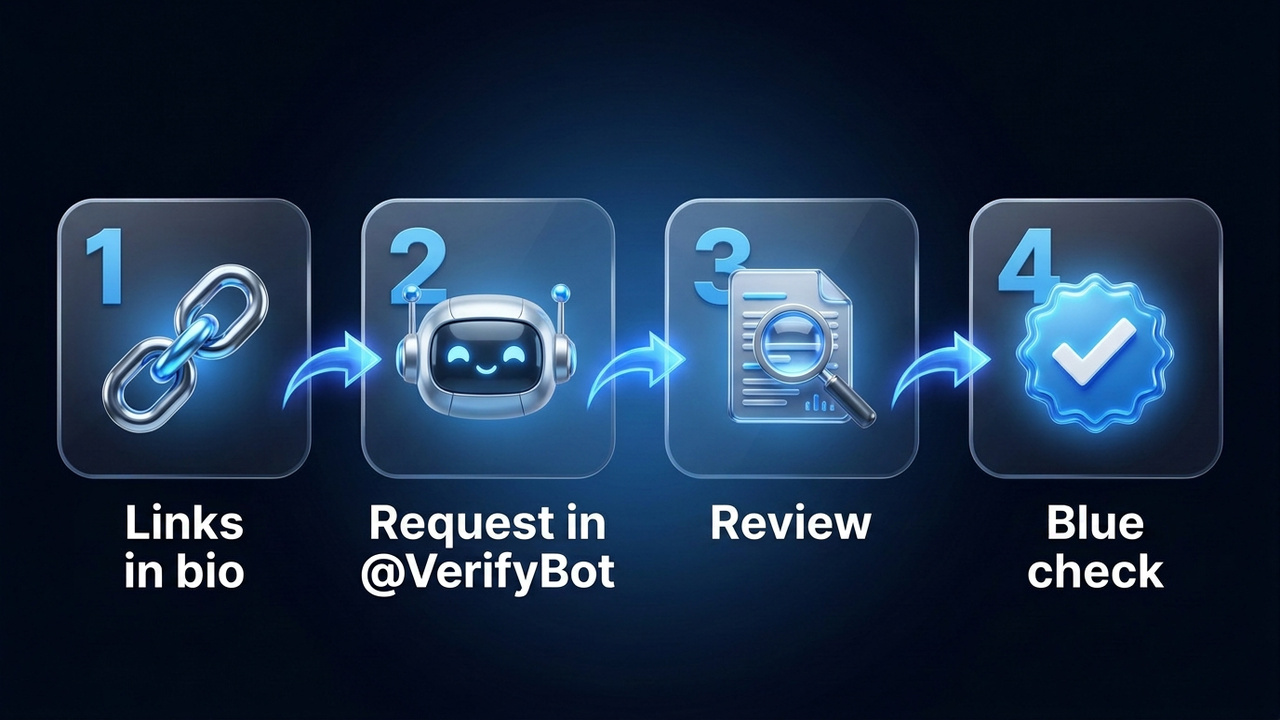
Step 1. Prepare Your Links
First, put the address into the bios of two badged social accounts. Then gather two articles about you or your company. Also double-check your naming, because they freeze once approved.
Step 2. Start the Bot and Send Your Link
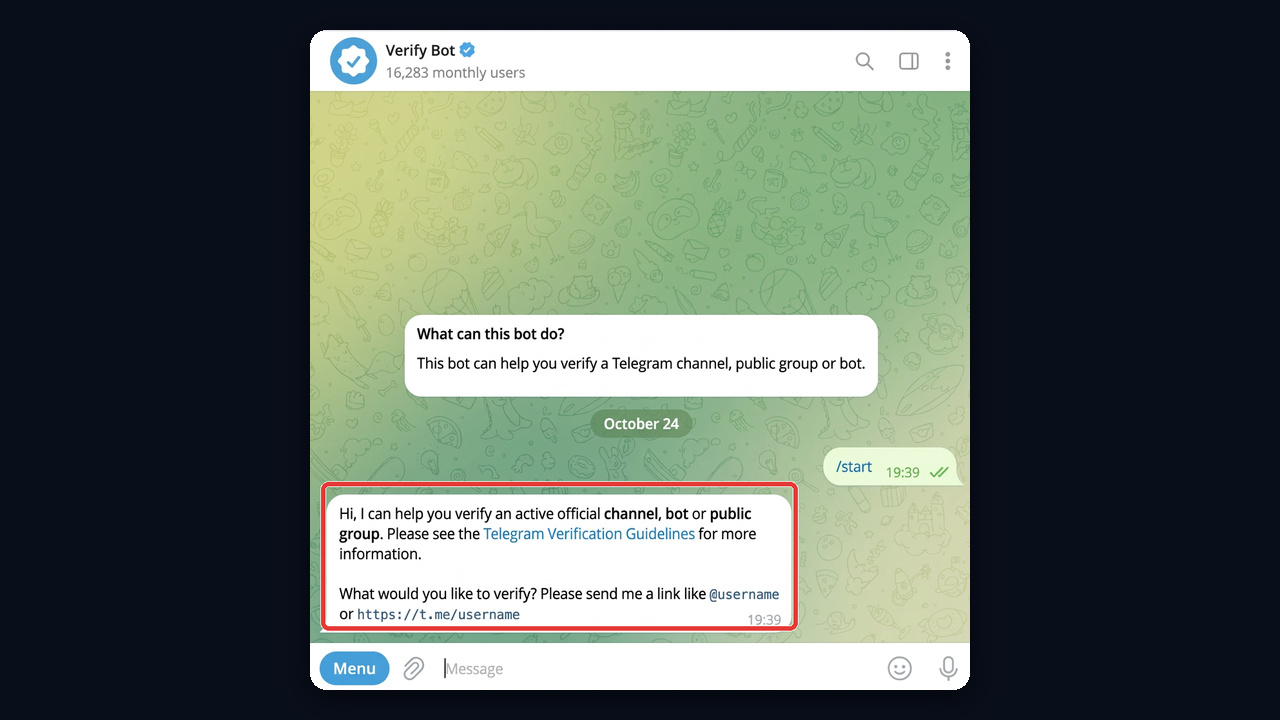
Open @VerifyBot and tap Start. It explains that it reviews channels, bots and public groups, then asks for a link in the form @username or t.me/username.
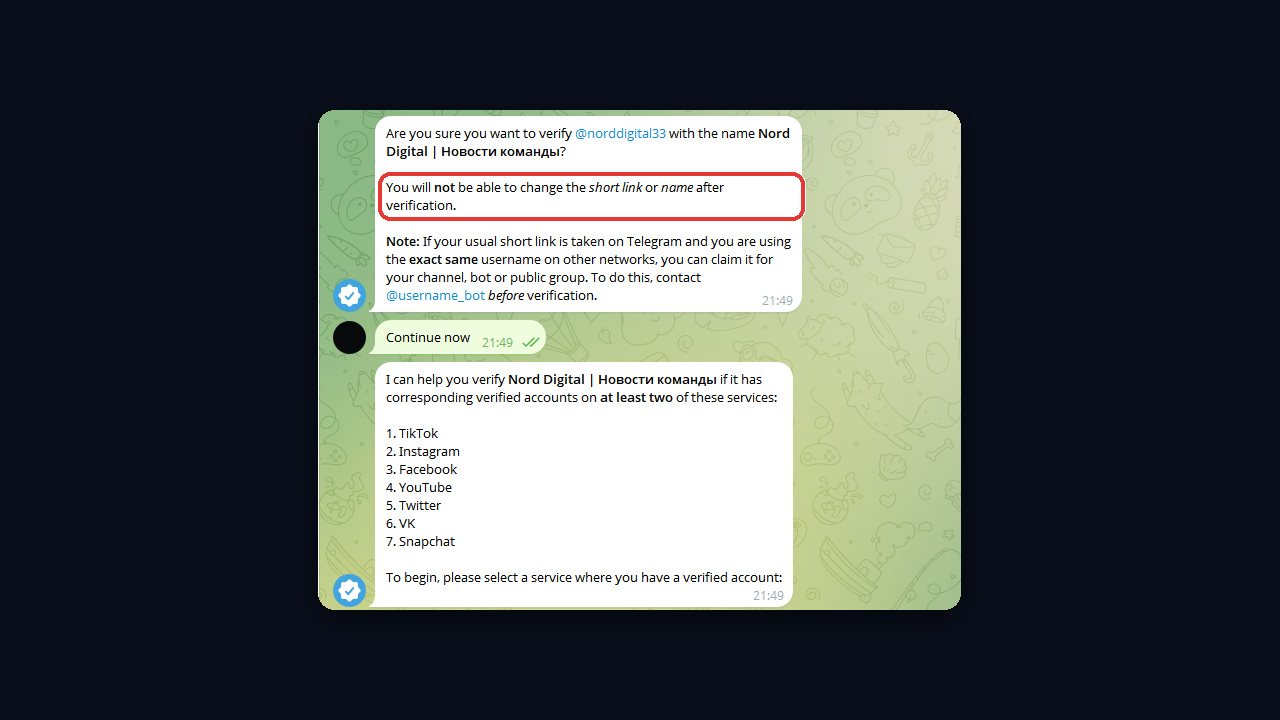
Once you send it, the bot asks whether you really want to confirm the channel under this title and warns that neither the short address nor the name can change afterwards. Tap "Continue now" to see the seven supported platforms: TikTok, Instagram, Facebook, YouTube, Twitter, VK and Snapchat.
Step 3. Confirm Your Social Accounts
Pick a service where you already hold an official mark. The reply contains your t.me/username address: paste it into that profile's description (About on YouTube, Bio on Instagram), then send the URL of the account itself. The service's home page will not do, and the request simply repeats.
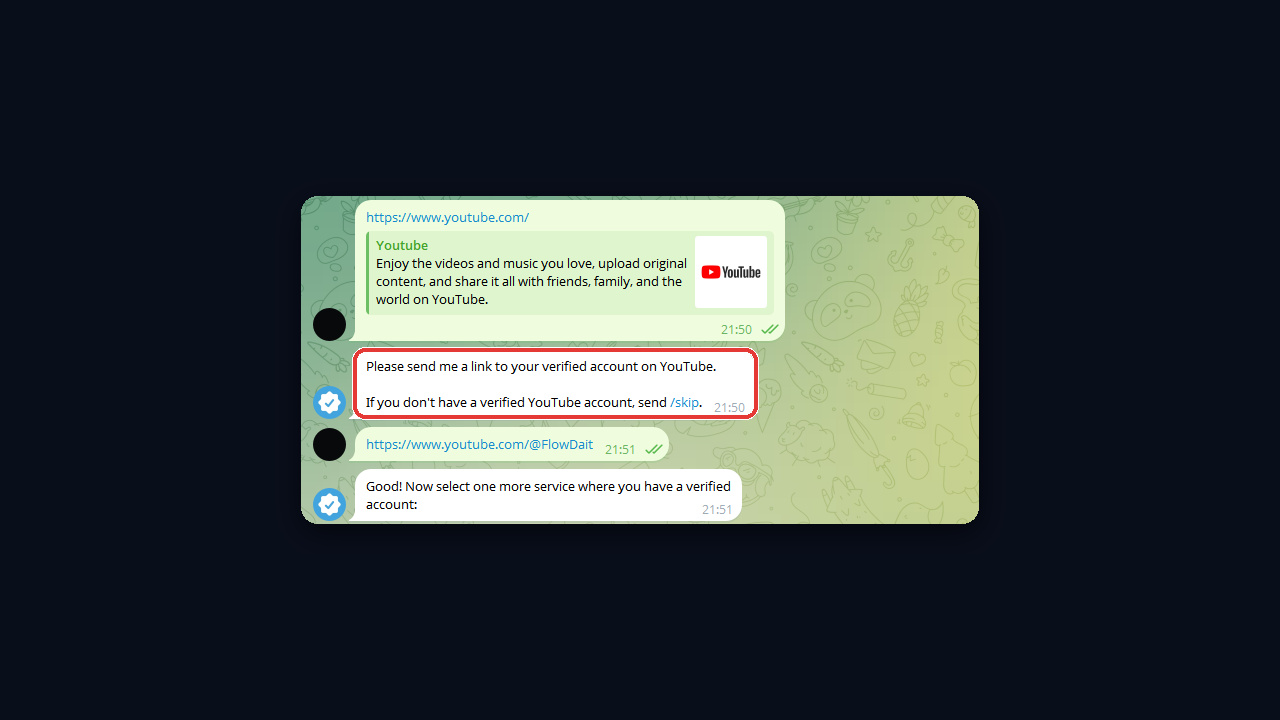
Add the second platform the same way. When you have nothing else to offer, tap "No more accounts".
Step 4. Send Press Coverage
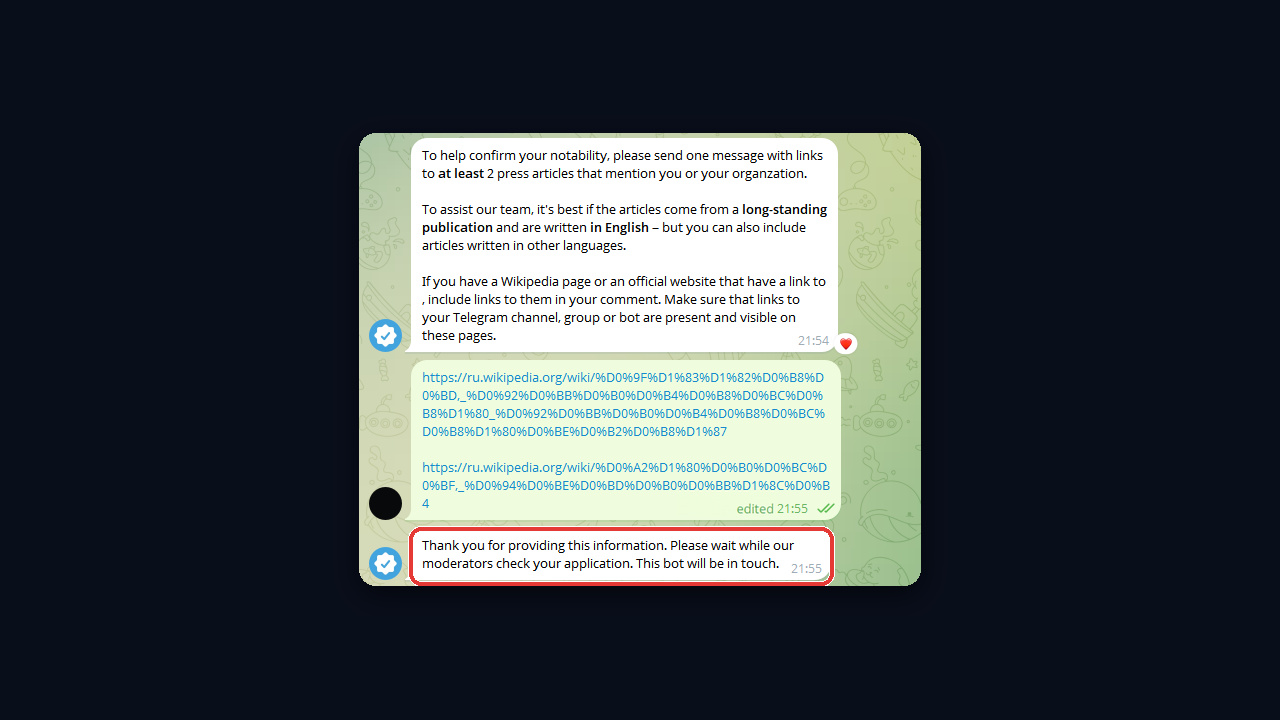
Next comes a request for links to at least two articles that mention you or your company, all in one message. Long-standing outlets and English-language pieces work best, although other languages are accepted. Add Wikipedia or your official site to the same message if they show your channel address. After that, you get a note that moderators have your application.
Step 5. Wait for the Decision
There is no published deadline for the review. Owners usually report an answer within days or a few weeks. When approved, the mark simply appears; you do not need to do anything else.
What to Do After a Rejection
Rejections tend to have three typical causes: the social profiles are not verified themselves, the bio has no t.me link, or the articles never mention the project. Fix the weak spot, then apply again. Meanwhile, keep posting, because only lively chats get confirmed; our guide on how to grow a Telegram channel has ideas.
Changing the Name After Approval
After approval, a chat cannot rename itself or change its t.me link. If you need a rebrand, send /unverify to the bot, make your edits and go through the review again. That is why it pays to settle on a solid Telegram username early.
Major Badges and Other Third-Party Icons
Since 2025 the platform has supported third-party verification. A bot that is already verified can apply to become a verifier and then mark users and chats with its own icon. Each verifier has a unique symbol, and it appears before the title.
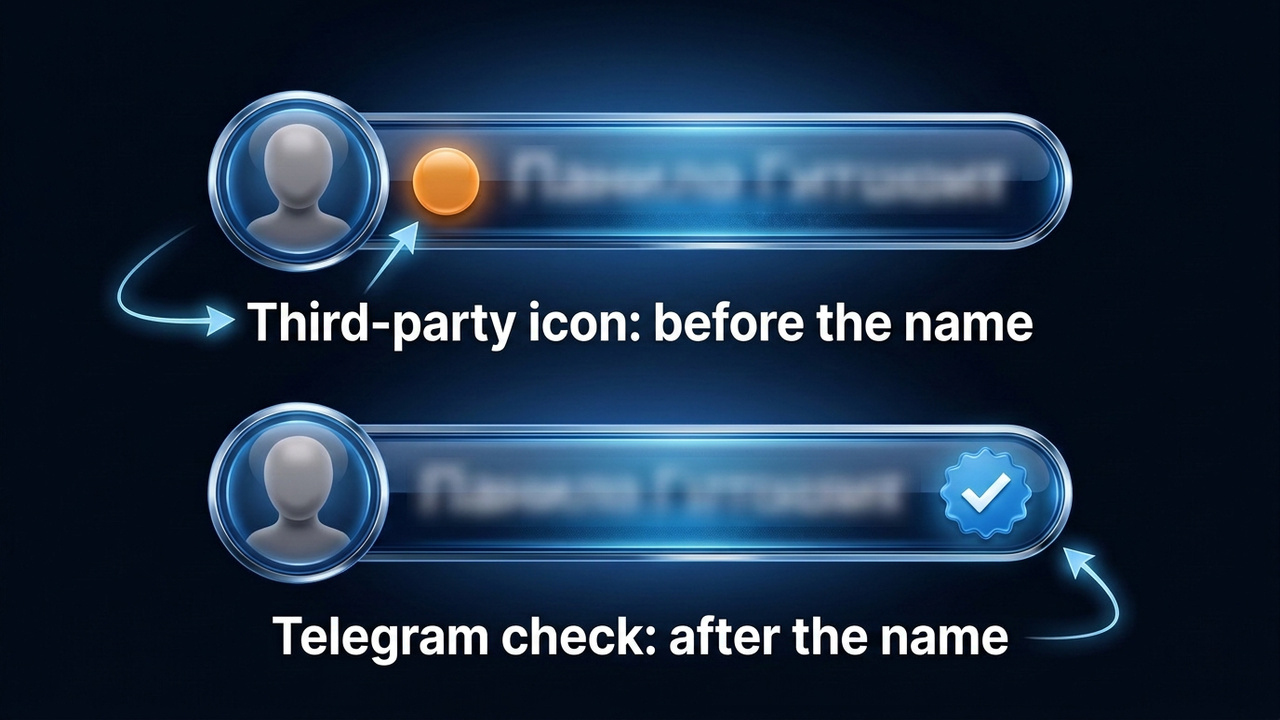
The popular question about the Major badge belongs here: that icon comes from the Major project under its own rules. Banks, exchanges and media use the same mechanism to confirm employees and partners.
Still, the difference from the real thing matters. Only the app itself places the blue mark after a title, while verifier icons have other shapes. Such an icon also tells you which service confirmed the account.
Can You Buy Telegram Verification? How the Scam Works
A typical paid-badge offer starts with an ad for "verification in 72 hours" in search or in chats. But this status is never sold, and the app does not work through resellers. So a seller will either vanish with your prepayment or paste a "✔️" into your title.
- A fake helper. A @VerifyBot clone with a similar handle asks you to "pay for the review" or log in. As a result, you lose access.
- An emoji passed off as proof. The "expert" sets a check-shaped Premium emoji status and calls it verification.
- Buying an already verified channel. You cannot rename it, and the status can be removed. Read how to vet such deals in our guide on how to buy a Telegram channel.
The honest route is simple: the application costs nothing, and the money is better spent on recognition, which is what the review actually weighs.
Common Telegram Verification Mistakes
| Mistake | Better approach |
|---|---|
| Applying with ordinary, unverified social profiles | Earn the official badge on at least two platforms first |
| Forgetting the address in the bio | Add a direct t.me link to the exact chat you submit |
| Sending articles that never name the project | Pick coverage that mentions the company directly |
| Renaming right after approval | Fix the name and handle before you apply |
| Paying a middleman for a "guarantee" | Submit the request yourself, it is free |
Besides, a tidy profile helps both reviewers and readers: a clear description, a recognisable avatar and working links. Our checklist on channel description and design walks through it.
Telegram Verification: The Bottom Line
In 2026 Telegram verification is a trust signal, not a growth hack. The app grants it for free through @VerifyBot once you have two verified social profiles and some press coverage. Emoji statuses, symbols in names and third-party icons may look similar, yet one tap and the profile line expose them.
If you are not there yet, shield your audience from clones and keep building recognition. Routine parts such as finding copies of your channel can be automated with GramGPT.io.