You answer a listing or drop a message in a busy group, and an hour later a stranger rings you and then texts on WhatsApp. Open visibility is usually the culprit. That's why sooner or later anyone who talks beyond close friends wants to hide the phone number on Telegram.
Most users flip a single switch and move on. Yet some acquaintances keep seeing it, and typing it into search still brings up your profile until you change a second option. Besides, your username, a t.me link with your digits, bots and forwarded messages can point to the account as well.
This guide shows how to hide phone number in Telegram on iPhone, Android, desktop and the web version in 2026, what others notice afterwards, how to test the result and what to use instead when chatting.
Why Hide Your Phone Number on Telegram
Your SIM ties the account to a real person. Once it is public, it ends up with strangers you never gave it to:
- Spam and cold calls. Numbers from open profiles get scraped into databases and sold for call campaigns.
- Fraud. Knowing it makes it easy to call "from support" and talk you out of a login code.
- Doxxing. It leads to your other social accounts, delivery addresses and relatives.
- Work boundaries. Clients and chat members start calling at any hour instead of writing.
Therefore, anyone who posts in public groups, sells through listings or runs a channel benefits from closing it.
Who Actually Sees Your Phone Number on Telegram
Out of the box, the messenger reveals it only to your address book. Many users, though, switched that to Everybody long ago, so any member of a shared group can read it. The second option, meanwhile, decides whether someone who types your digits into search lands on your profile.
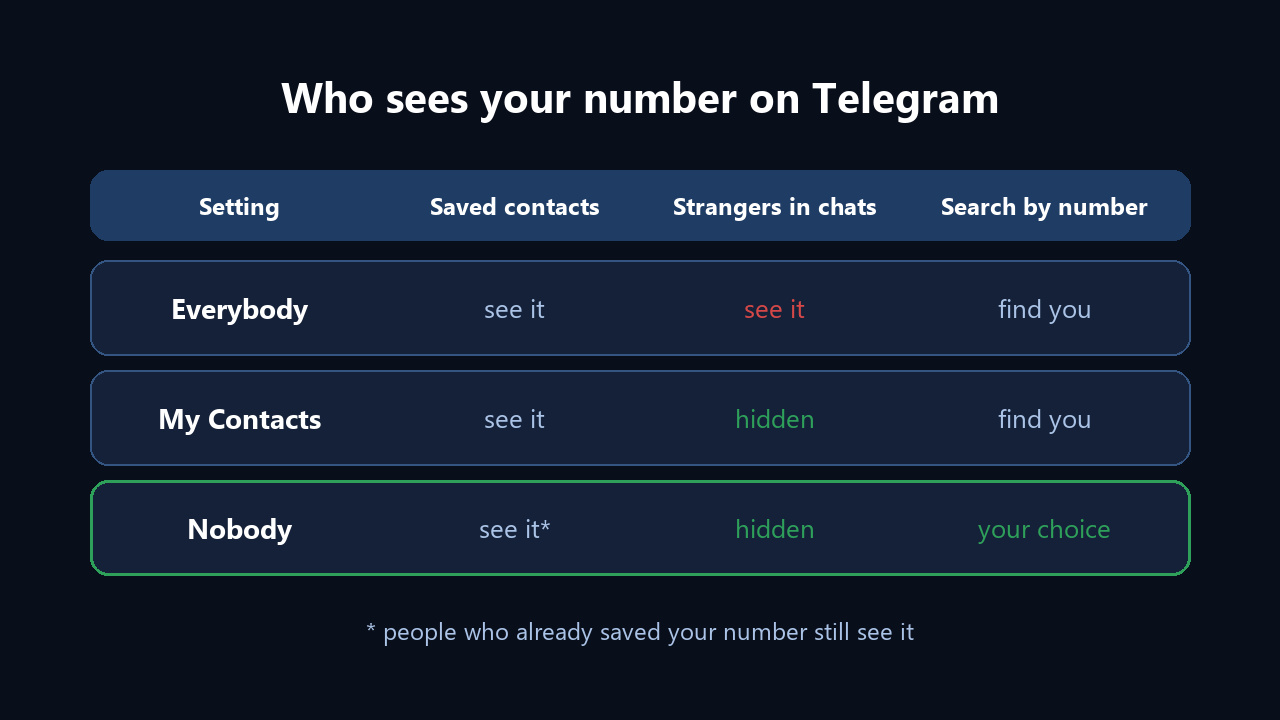
Acquaintances do not always lose them, however. For example, My Contacts opens it to everyone who stored you in their phonebook. Nobody, by contrast, keeps it visible only to people who saved it and whom you added yourself.
| Option | Strangers in groups | Acquaintances | Search by it |
|---|---|---|---|
| Everybody | See it | See it | Anyone finds you |
| My Contacts | Don't see it | Your address book and anyone who saved it | Anyone finds you |
| Nobody | Don't see it | People who saved it, if you added them | Everybody or your list, your choice |
Contact Sync: Why Acquaintances Still See It
In fact, that exception comes from syncing. When someone lets the app read their phonebook, it matches each entry against accounts, and a match links you to their entry.
You can't edit another person's phonebook, yet you can stop syncing your own: Privacy, then Data Settings on mobile (Advanced on desktop), then Sync Contacts. The same screen lets you delete previously uploaded entries from Telegram's servers.
How to Hide Phone Number in Telegram on iPhone and Android
First, your choice is stored on the server, so changing it once is enough; your other devices pick it up automatically.
On iPhone
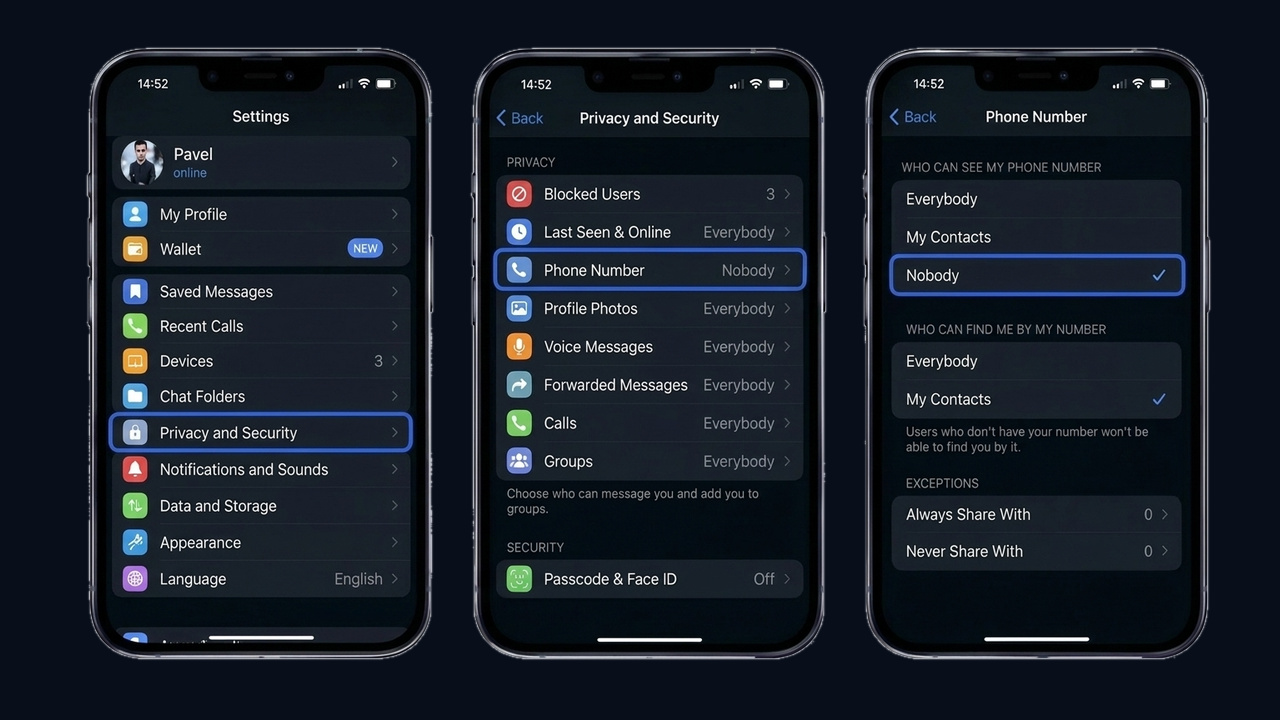
- Head into Settings, then Privacy and Security.
- Open the Phone Number row.
- Next, tick Nobody in the upper block.
- In the "Who can find me by my number" block that appears, pick My Contacts.
On Android
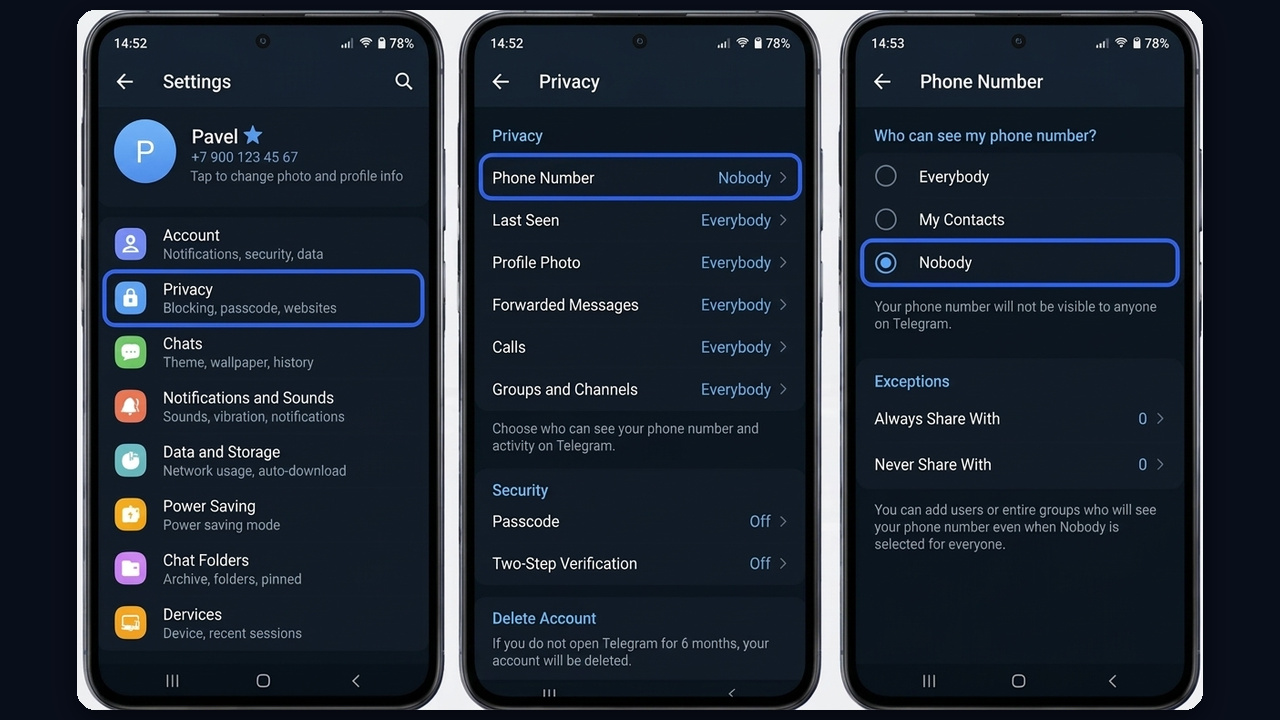
Similarly, Android follows an identical route through the privacy menu down to Nobody, then limits search. A grey note then explains who will still see it, with the exceptions block right below.
Hiding It From One Specific Person
For example, say a couple of colleagues or a courier need to reach you. In that case, put them on the allow list and keep Nobody for the rest. Also, the deny list hides it from chosen people even when visibility is wide open; it appears when Everybody or My Contacts is selected.
Keeping It Private on Desktop and the Web
On a computer, the same privacy menu leads to a dedicated window with two questions: who may view it and who may search by it. An exceptions button sits underneath, and the list value counts them, like Nobody (+1).
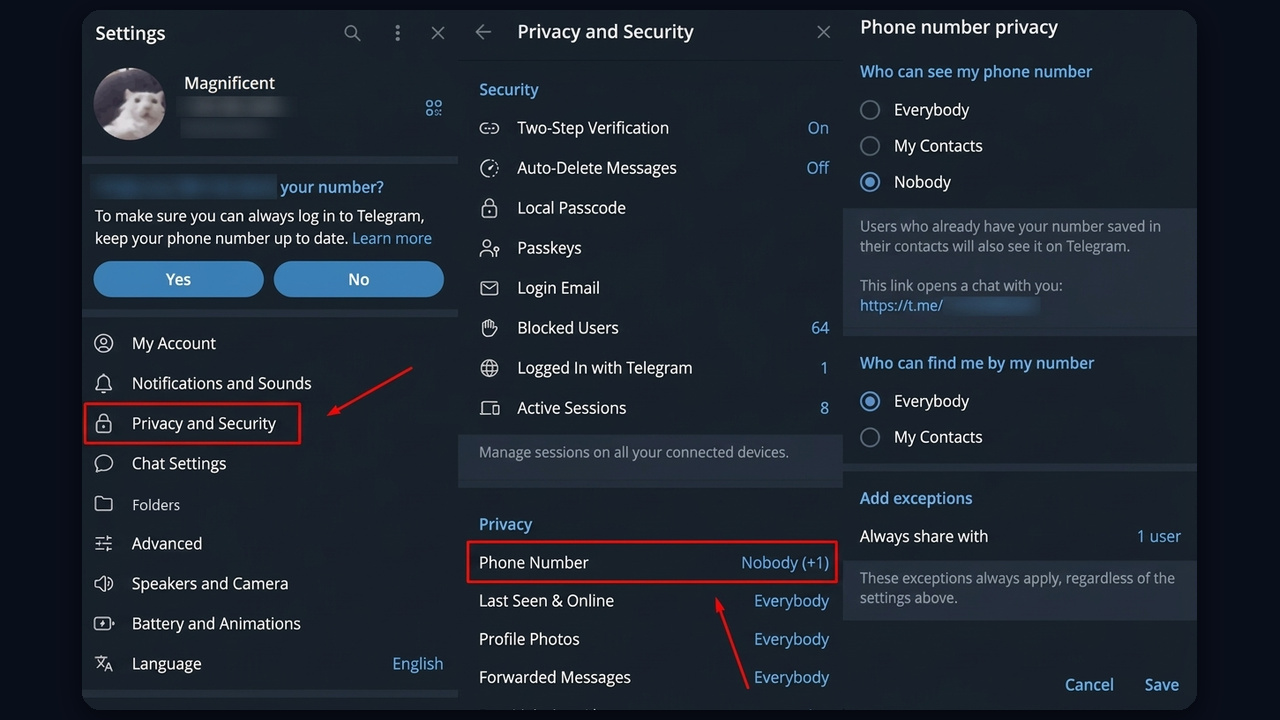
Watch the grey hint there too: it reveals a personal t.me/+digits address leading straight to your DMs, so keep that address out of public posts. What's more, the desktop choice syncs to mobile instantly.
Hiding the Phone Number in Telegram Web
Next, the web version. In web.telegram.org the route is shorter: the left menu, Settings, Privacy, then "Who can see my phone number?". After you choose Nobody, a "Who can find me by my number?" block appears. Tick My Contacts there and go back, and the setting is saved.
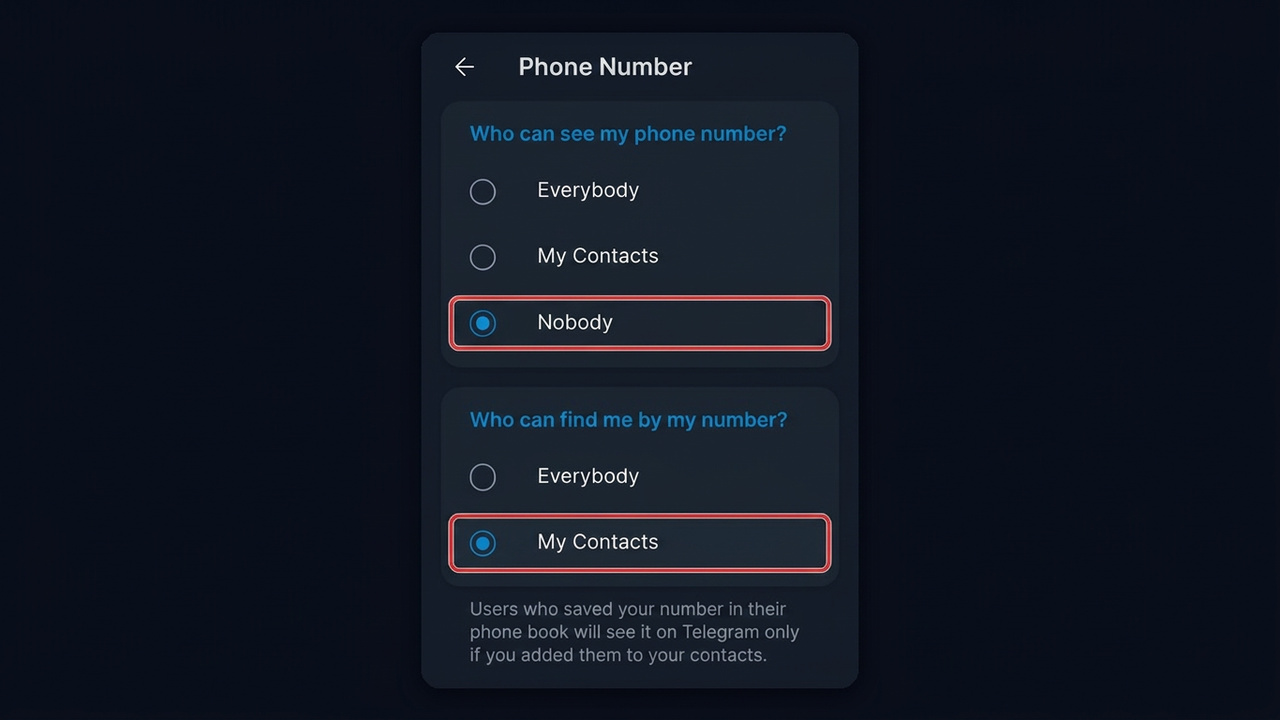
Also note the hint under the blocks: the app states plainly that anyone who saved it will view it only if you added them too.
How to Hide It From Everyone
However, a single switch is not enough for full protection. Run through this short list instead:
- Set Phone Number to Nobody.
- Limit search to your address book.
- Clear the "Always share with" list unless you need it.
- Remove it from your bio, channel description and pinned posts.
- Don't publish the t.me/+digits link or share your contact card in groups.
As a result, it stays only with users you added who also saved it in their phonebook.
What Others See Once the Telegram Phone Number Is Hidden
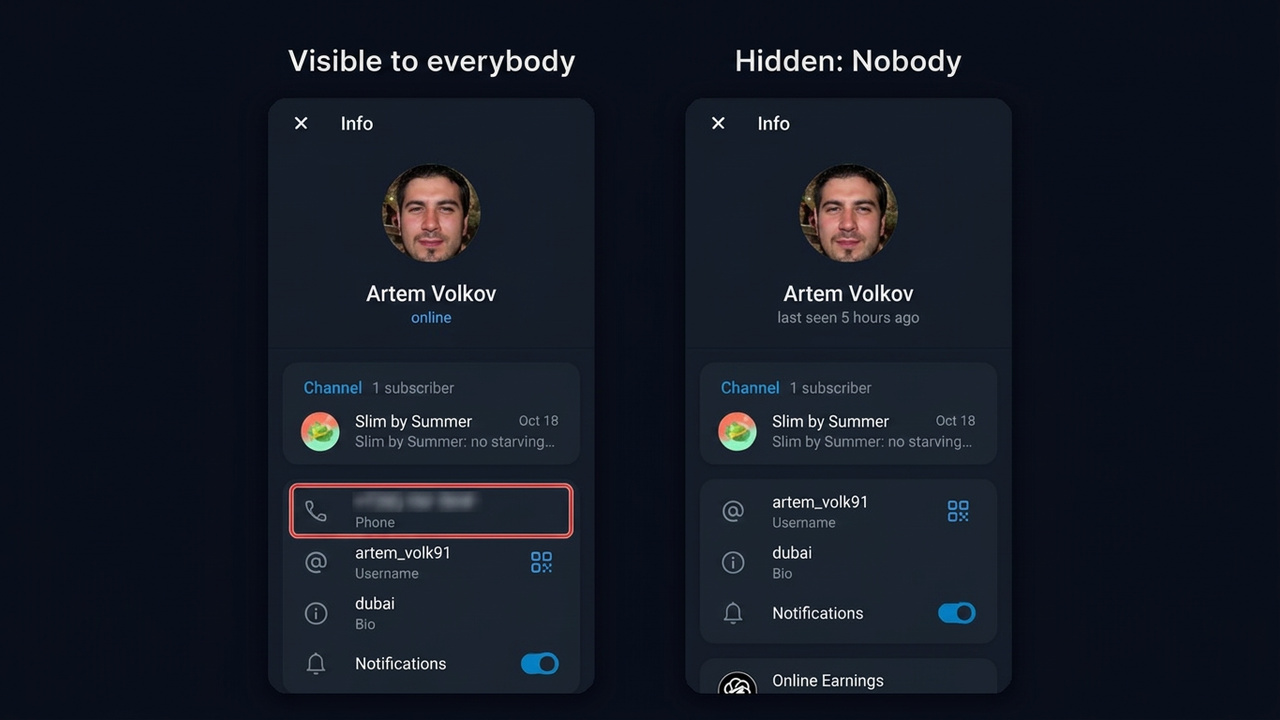
Once hidden, that line disappears for strangers. Your name, username, photo and bio remain, so anyone can still message you, and group chats keep working as usual.
With search limited, strangers can't find you that way. In other words, a leak no longer leads to your account. Still, anyone who found you earlier keeps the chat.
For example, an outside account sees this profile before and after Nobody: one line vanishes.
How to Check That It Worked
The easiest test is to ask a friend who isn't in your contacts to open your page: that line should be gone. Alternatively, use a second account instead. Find yourself by username, then try searching by number. If the profile doesn't show up and no digits appear, everything is set correctly.
Chatting Without Revealing It
Hiding it doesn't block conversations. Instead, others look up your @handle and start talking. Picking a good one is covered in our guide on choosing a Telegram username.
- Username. You can swap it if it ends up in spam lists; your SIM, not so easily.
- A t.me/handle link. Handy for listings, signatures and business cards.
- Anonymous +888 digits. Bought with TON through Fragment and unconnected to any real SIM.
- A separate profile. Great for side gigs; see our guide on multiple Telegram accounts.
Signing up without any SIM is impossible, though: the service needs a real one or an anonymous +888 line to create an account.
Other Ways It Can Leak
Hiding it is only half the job. After all, other options expose you too:
| What's open | The risk | Tip |
|---|---|---|
| "Share my phone number" in bots | The bot owner gets it | Skip it in unknown bots |
| Sending your contact in a group | Every member sees it | Share your handle instead |
| Last seen | Others know when you're online | Contacts only |
| Name on forwarded messages | Leads straight to you | Pick Nobody |
| Group invites | Spam chats and ad groups | Contacts only |
Bots and Mini Apps
Be careful with bots in particular. Many ask you to tap "Share my phone number" on the first launch, and it then goes to the bot owner despite your hidden settings. So never tap it in unknown bots, giveaways or "checkers", and revoke past access by deleting and blocking the bot.
Closing your online status is explained in our guide to the "last seen recently" status. Also switch on two-step verification: it keeps intruders out even after a leaked code. If someone already got in, follow our steps for a hacked Telegram account.
Can Someone Find It Once Hidden?
In short, there is no official way. Only users you added who saved it can view it, and search finds you solely while it stays open.
Meanwhile, bots and forums advertise "lookup" services for account owners. They run on leaked databases, using them breaks data protection law, and many are simply scams. So rely on your own settings rather than hoping nobody goes looking.
Managing the Phone Number on Telegram Across Work Accounts
Clearly, one account takes a minute. With dozens of accounts for outreach, commenting or sales, though, exposed lines become a liability: scrapers harvest them, strangers call and report them, and identical settings expose your network.
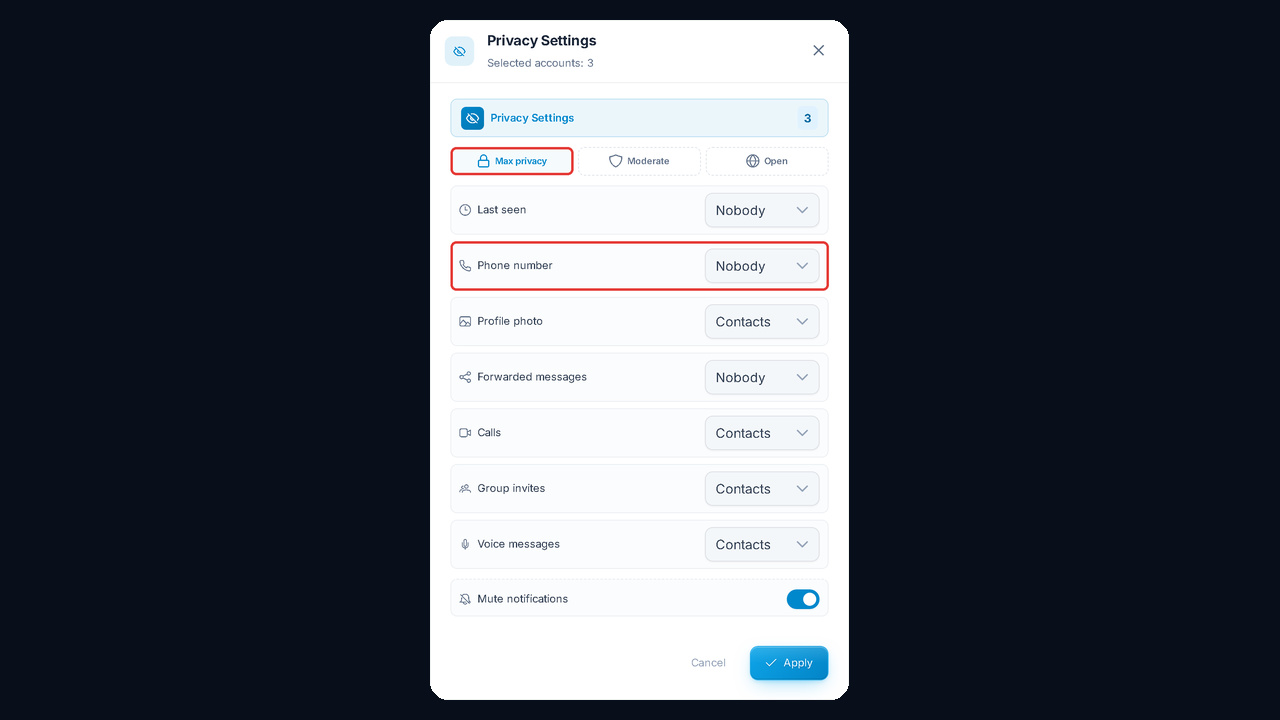
The GramGPT account manager handles it in one pass. Tick the profiles, open the Accounts menu and choose Privacy under Security. One window then controls visibility, last seen, photo, forwards, calls, groups and voice messages, and the Max privacy preset closes the main three in a click.