Warming up Telegram accounts for DMs works differently from warming them up for comments or group chats. Here the sender writes to a person directly, so every text goes through the strictest anti-spam check. That is why the classic "read channels, leave reactions" routine barely affects the outcome.
The same applies to other modules where you contact a user personally: inviting, mass tagging and auto replies in private chats. In this article we look at what really matters in 2026: region and data center, the quality of the lot, the right warm-up actions and a schedule for raising limits.
How warming up your Telegram accounts for private messages differs from regular warm-up
First, regular warm-up prepares a number for channels and groups. There it should look like a live reader: scroll the feed, join communities, react to posts. This routine is covered in our guide to account warming without freezes.
In private messages, however, something else is judged. The platform looks at who the sender writes to, whether people reply and whether recipients complain. In other words, conversation history matters, not the number of posts read.
| Factor |
Channels and group chats |
Direct contact with users |
| Modules |
Neurocommenting, neurochatting, group mailing |
DM mailing, inviting, mass tagging, Neuro Dialogs |
| What anti-spam checks |
Message frequency in a group and admin reports |
Messages to strangers, replies and recipient reports |
| Useful warm-up actions |
Reading, reactions, joins |
Dialogs, forwarding, simulated typing |
| What matters most |
Behavior |
Region, source and limit ramp-up |
Region and DC: where you start to warm up Telegram accounts for private chats
The messenger runs five server sites (DCs). DC1 and DC3 are in Miami, DC2 and DC4 in Amsterdam, and DC5 in Singapore. Each number is tied to one of them at registration, and the phone's country code plays the main role.
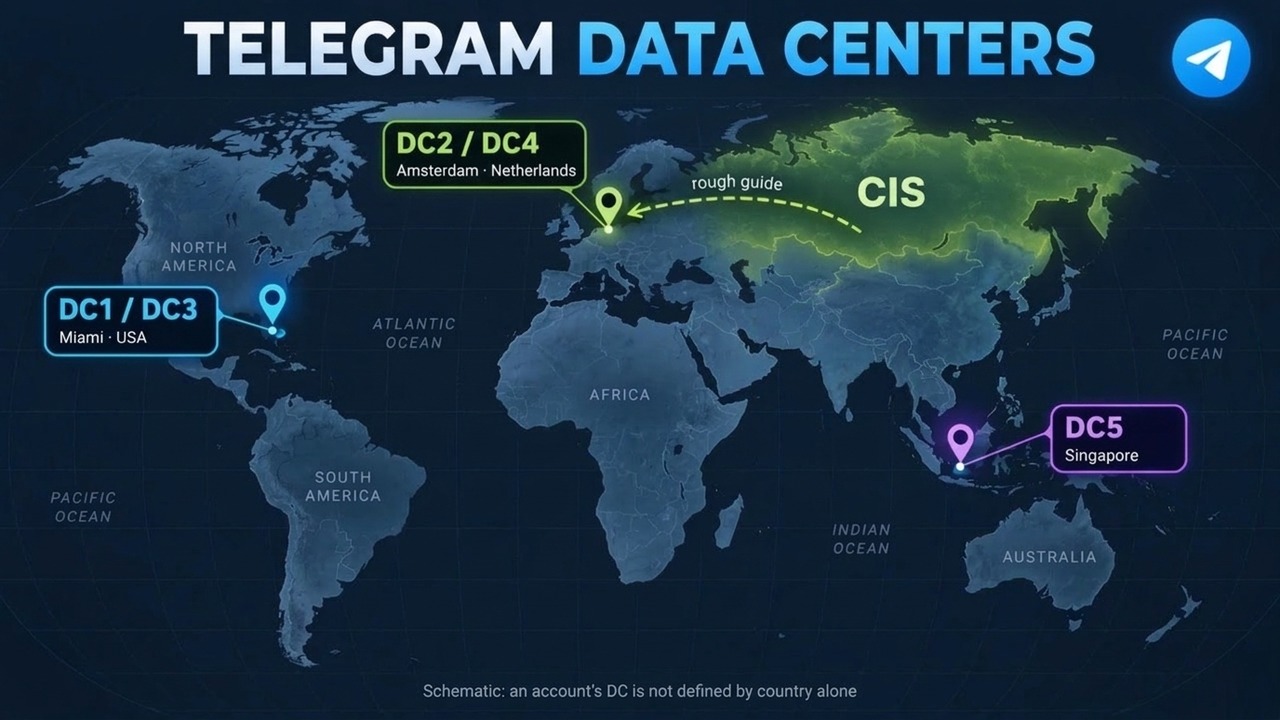
For DM campaigns, therefore, this is critical. If you write to a CIS audience from, say, an Asian number that sits in DC5, outreach to new contacts gets an extra check. As a result, delivery drops and a ban arrives sooner.
So the rule is simple: your region should match the audience's region. For the CIS, take numbers served by DC2 or DC4; for the US, DC1 or DC3. The map is schematic because the DC is not defined by country alone, so confirm it with the seller when buying.
Important: no warm-up fixes the wrong region. Choose the geo first, and only then set up the actions.
How to find the DC
The easiest way is to ask the seller: decent shops list the DC in the listing. Besides, a Telethon-format .session file stores it in the dc_id field. If they come from one batch, checking a couple of files is enough.
As a rough guide, logins from Europe, the CIS and the Middle East usually land in Amsterdam, those from North and South America in Miami, and those from Asia and Oceania in Singapore. Exceptions happen, so a check is a must.
Which actions to enable when warming up Telegram DM accounts
Thus, for private messaging we keep only what relates to conversations. These actions build the dialog history that anti-spam looks at.
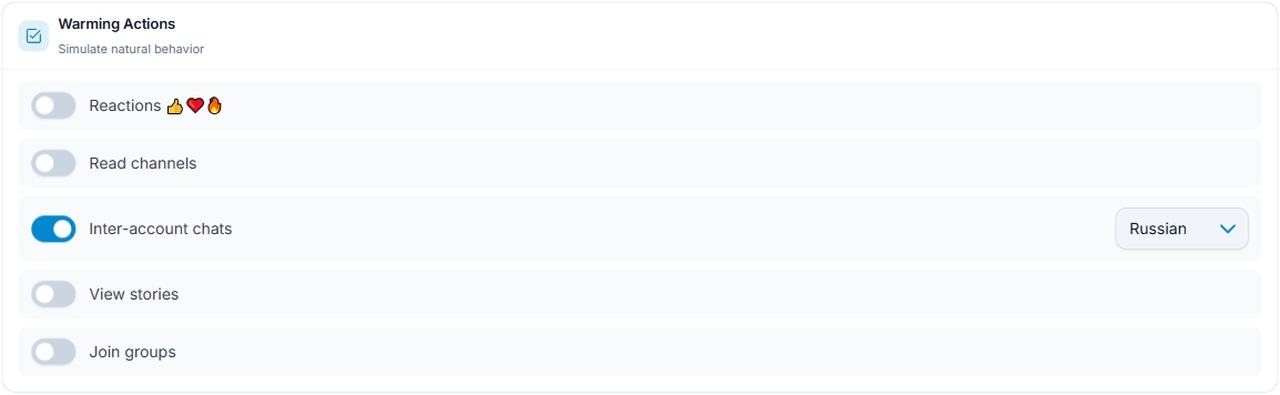
In the "Warming Actions" block of the Account Warming module, turn on "Inter-account chats" and pick the language your audience speaks. At the same time, switch off reactions, channel reading, story views and group joins.
Next, open "Fine-grained action toggles". Here we keep:
- Reading: dialog list view, mark as read and message search;
- Social: message forwarding;
- Presence: "Keep the account online";
- Profile & settings: the typing option.
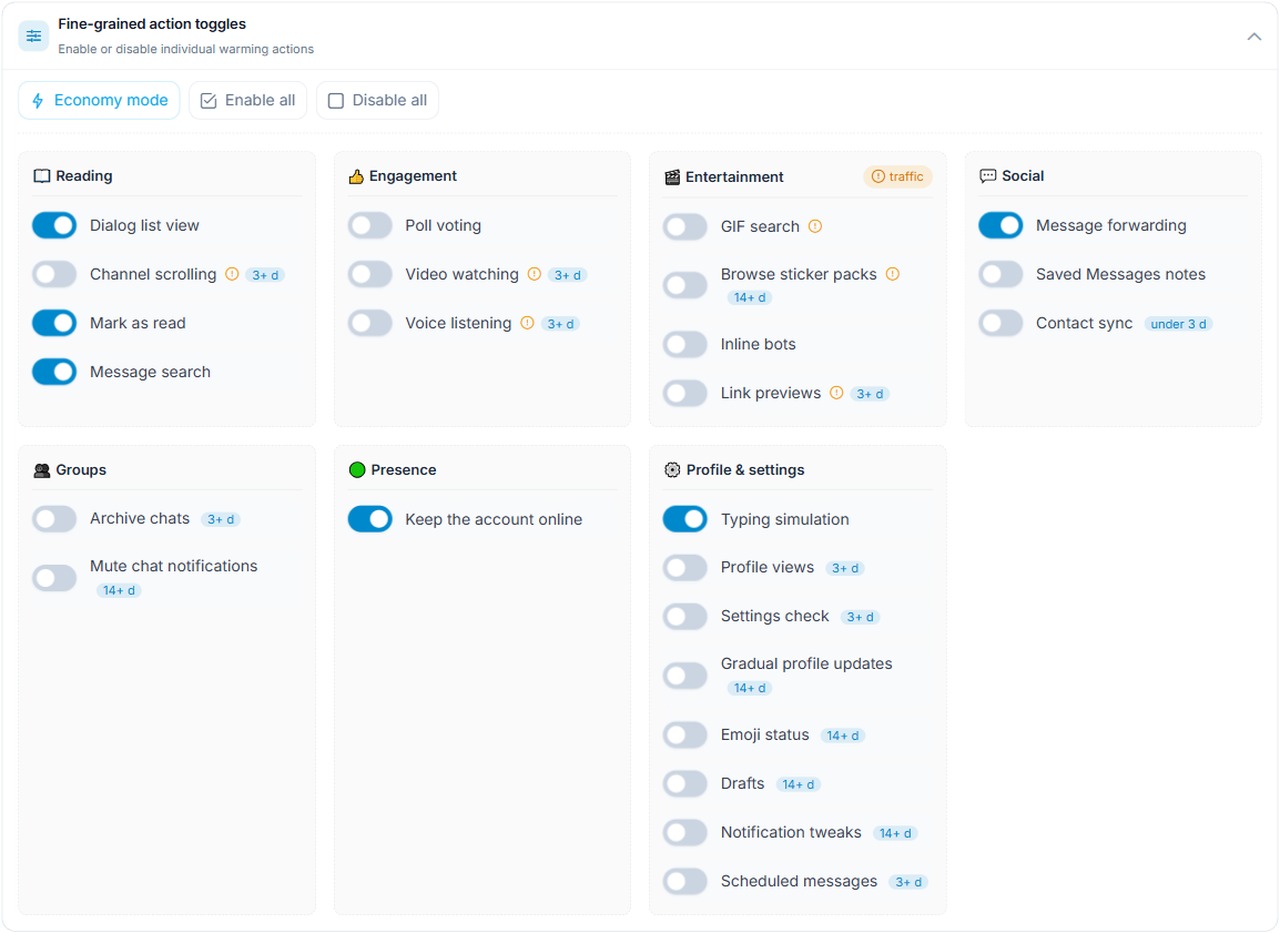
Leave the rest off. Note the "3+ d" and "14+ d" tags: the system unlocks those actions at that age. Separately, "Economy mode" helps if you work through mobile proxies billed by traffic.
The batch matters more than the warm-up
Warming up your Telegram accounts improves results by roughly 10–20%. However, the batch itself has a much bigger effect on survival. That is a group bought from one seller with the same registration date, geo and creation method.
Members of a single lot also behave alike. So if the batch is good, almost every piece calmly handles the same volume. If it is bad, errors and spam blocks hit all of them at once, no matter how long you warm them.
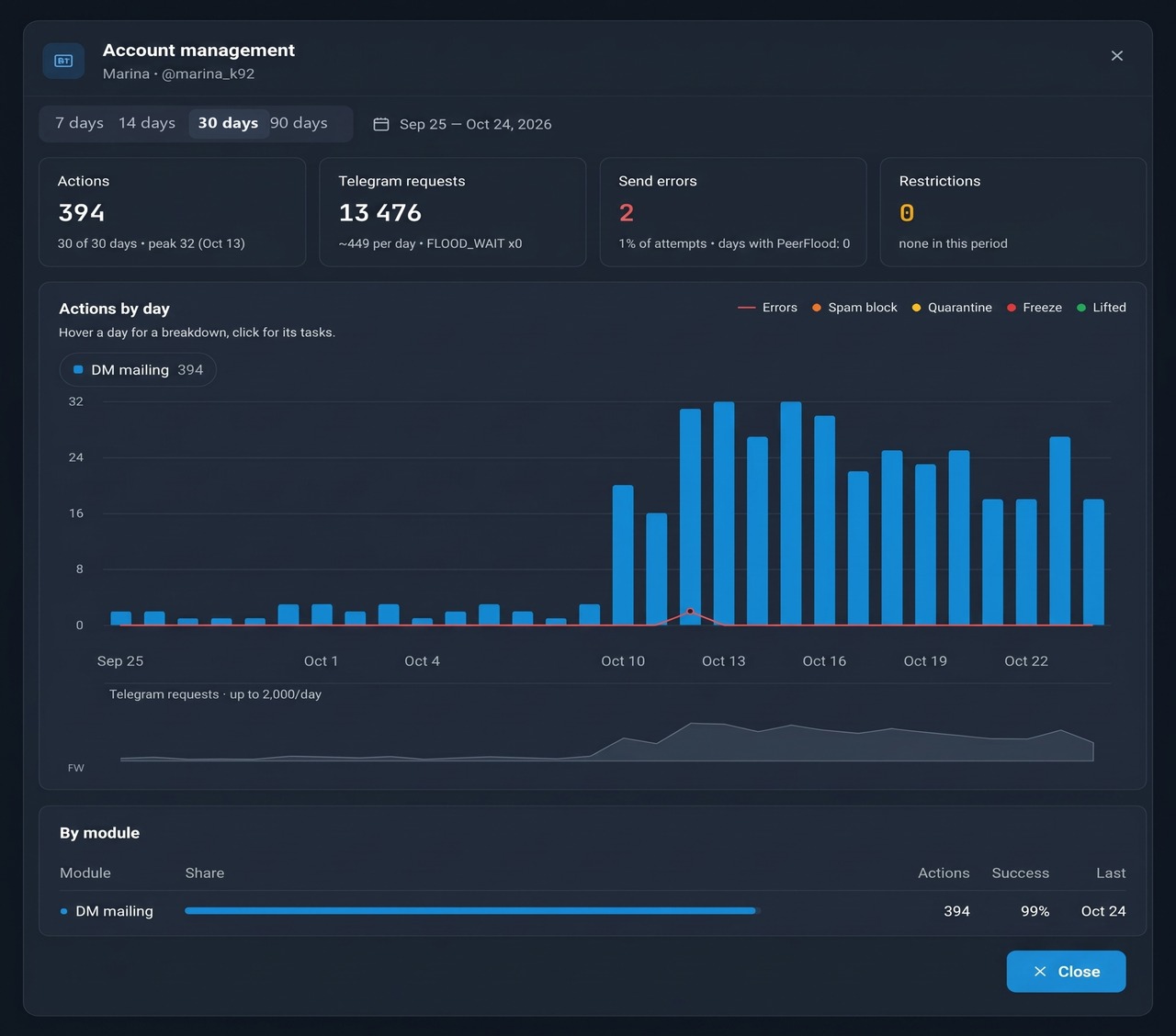
For example, below are monthly stats from a good lot running DM mailing. It sent 20–30 texts daily with 1% errors, zero FLOOD_WAIT, zero PeerFlood and no restrictions.
Here, for comparison, is a sample from a poor batch. It was pushed to 40–48 DMs right away. Errors climbed to 8% of attempts, PeerFlood lasted 10 days, and a spam block came on October 8.
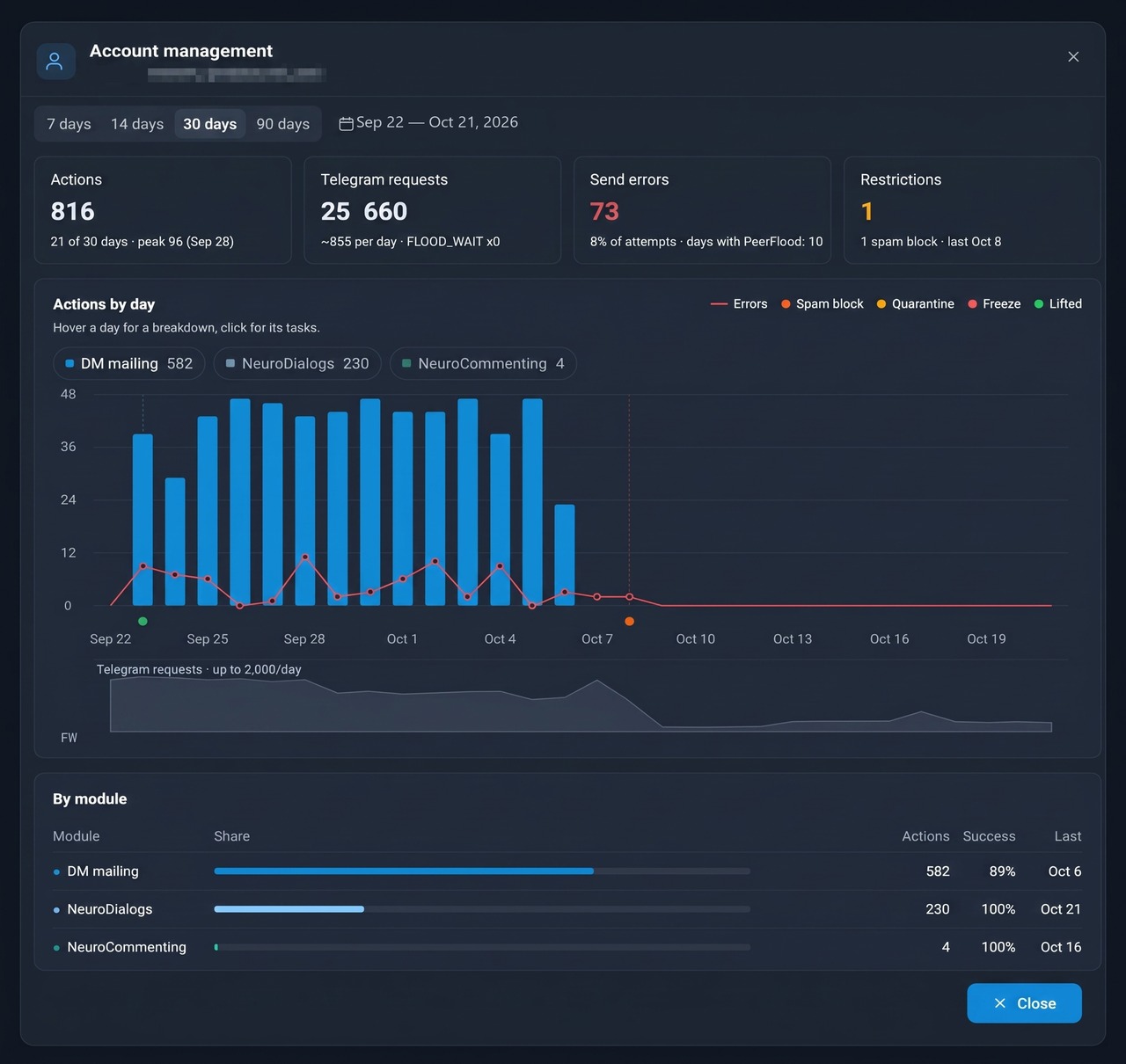
The takeaway: test every new lot before the main work.
- Buy a small amount, such as 5–10 pieces, and run them on minimal limits.
- Watch the error share, days with PeerFlood and restrictions in the card.
- If the metrics stay clean after a week, order more of the same batch from that seller.
Then buy more in the marketplace inside the GramGPT panel, because purchases land straight in the account manager. We covered what to check in the guide how to buy accounts for automation. You can also rate each login with the GGR check.
How to raise sending limits
There is no published daily cap. It depends on age, history and source. That is why GramGPT sets limits separately for each action and each number, and in practice people use two schemes.
Scheme 1. Good lot: straight to work
First, if the batch is tested and stable, they start at 20–30 private messages right away. Warm-up runs alongside the work: chats between your own logins dilute the mailing and keep the record healthy.
Scheme 2. Gradual ramp-up
For a new or untested lot, limits go up in steps:
| Period |
DMs per number daily |
| Days 1 to 10 |
1 |
| Next 5 days |
2 |
| Another 5 days |
3 |
| After day 20 |
10, then 20 and 30 |
Next, here is a case that went through exactly this ramp-up. Over a month it had zero errors, 100% successful actions and not a single restriction.
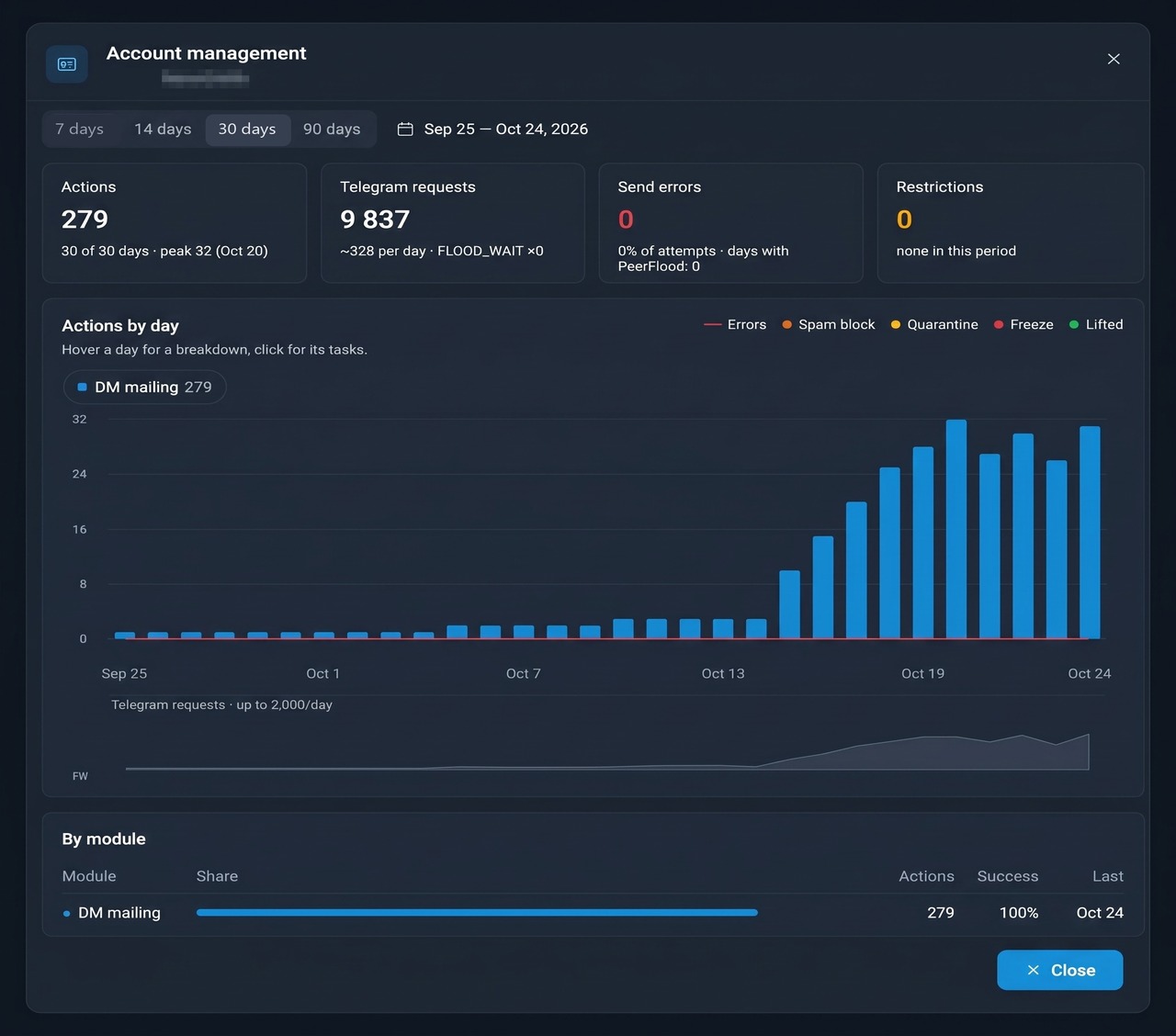
The second scheme is slower, but it fits any source. For instance, people choose it when numbers are expensive or the seller is new. A month goes into the ramp-up, but then it lasts for a long time without losses.
How to read the stats
The "Account management" card shows four key metrics:
- Actions: how many messages went out in the period and on how many days;
- Telegram requests: total load and the number of FLOOD_WAITs;
- Send errors: the share of failed attempts and days with PeerFlood;
- Restrictions: spam blocks, quarantine and freezes.
Meanwhile, a healthy sender keeps errors at 1–2% and avoids PeerFlood. If errors exceed 5%, the limit is above what the batch can take. In that case, keep warming up those Telegram accounts longer and cut the volume.
PeerFlood vs FLOOD_WAIT
These two errors are often confused, but they mean different things. FLOOD_WAIT is a short pause for sending requests too fast: the error itself says how many seconds to wait, and afterwards work continues. PeerFlood is more serious: a ban on writing to strangers that can last for days. In other words, the first is about speed, the second about trust. What prevents it is exactly what this guide covers: a geo that matches your audience and a gradual ramp-up.
How to scale once you warm up Telegram accounts
You cannot bypass the cap on a single login. Instead, grow volume by adding senders rather than squeezing more out of each. For instance, thirty numbers at twenty DMs reach 600 people daily and stay stable, while ten at sixty quickly end up blocked.
If errors grow at any step or FLOOD_WAIT appears, go back to the previous step. If a block hits, pause it; how to lift it is described in our spam block guide.
Separately, the sending itself is easiest to run in the DM mailing module, where you set limits and delays and see per-number stats.
How long it takes to warm up Telegram accounts for outreach
In short, a good lot needs 2–3 days of internal chatting, after which mailing can begin. For a new batch, the timing matches the gradual scheme: about three weeks before reaching 10 a day.
But warm-up does not end with the first DM. While it works, those internal conversations keep running in the background and dilute the mailing. As a result, ordinary conversations stay a large share of the history, and anti-spam reacts less to new contacts.
A sample timeline
Imagine you bought twenty US logins for a SaaS outreach campaign. Monday: import them, check the DC, leave them idle overnight. Tuesday through Thursday: only internal English chatter, with simulated typing switched on. Friday: five pieces go live at one DM each, while the rest keep chatting.
After ten quiet days, double the pace, then triple it. By week four, the whole group handles a few dozen conversations apiece without complaints. Meanwhile, you review the error column every morning and freeze anyone who drifts above two percent.
What else affects delivery
Even a perfectly warmed sender will quickly collect reports if the mailing itself looks like spam. So keep a few rules in mind:
- No link in the opener. Share it after the person replies.
- Varied texts. An identical text to hundreds of people is a strong filter signal.
- Pauses between private messages. Random delays look more natural than a fixed interval.
- Fast replies. If someone answers, keep talking: a live dialog raises trust.
AI handles the last point well: Neuro Dialogs pick up incoming replies and carry the conversation on their own. In other words, every reply turns into a full dialog instead of an abandoned chat.
Besides DMs, the same principles apply wherever a profile interacts with a person directly. Only the emphasis changes.
- Inviting. Adding someone to a group counts as contact with a stranger, so geo and source matter just as much as in private messages. Read more in the article what inviting is.
- Mass tagging. Story mentions reach the user as a notification, so limits are also raised in steps. The module's features are on the story mentions page.
- Neuro Dialogs. Here the bot side replies to people who wrote first, so the risk is lower. Even so, the region should match the audience, so check the DC as well. We explained the AI reply setup in the article on the AI auto responder.
Common mistakes
| Mistake |
Better approach |
| Messaging a CIS audience from another region |
Match geo and DC to the audience |
| Warming for DMs with channel reading and reactions |
Enable dialogs, forwarding and the typing option |
| Buying a large volume of a new lot at once |
Test 5–10 pieces for a week |
| Giving untested profiles 40+ messages from day one |
Raise limits in steps |
| Ignoring a rise in errors |
Roll back a step at the first signs |
Conclusion: warming up Telegram accounts for private messages
In the end, warming up outreach Telegram accounts is not about reading channels. First, match the region and DC to your audience, then test the batch on a small volume. Next, enable only conversation-related actions and raise limits with either scheme. In 2026 this approach gives a steady 20–30 DMs daily without bans, and part of the process can be automated with GramGPT.io.