It usually starts with a DM from a stranger: "Delete that post or you're gone by tomorrow." An hour later, something you never joined sits at the top of your chat list, and random strangers keep pinging you. Welcome to a Telegram mass report attack, seen from the victim's side.
Most people then either panic or offer to pay. Neither works. The threat is often a bluff, and when the attack is real, the only thing that stops it is a handful of settings you should have switched on before anything happened. Support replies slowly and never promises to restore a lost account.
This guide explains how coordinated flagging actually works in 2026, who can realistically be banned, why most paid "takedown services" scam their own customers, and how to protect a personal profile, a public project and a fleet of work numbers.
What This Attack Really Is
It is a coordinated attempt to get someone else's profile, broadcast or group blocked through the messenger's own complaint system. However, nobody hacks anything. Instead, the attacker creates the look of a violation and then floods it with complaints, hoping moderation will side with the crowd.
Usually, people order these attacks for revenge, for blackmail or to remove a competitor. Channels, however, are a special case. Here the real target is often the owner, because once the creator is banned, every group, bot and broadcast tied to that login is at risk too.
There is also another side to this. Plenty of users who "got mass reported" were never attacked at all. They cold-pitched strangers, recipients tapped the spam button, and the sender limited themselves. So we will cover both scenarios.
How Reporting Works Behind a Telegram Mass Report
Every message, profile and community has a Report option. The user then picks a reason, such as spam, violence, adult content, copyright or personal data, and the complaint lands in a moderation queue. Some decisions are automated, while others are reviewed by people.
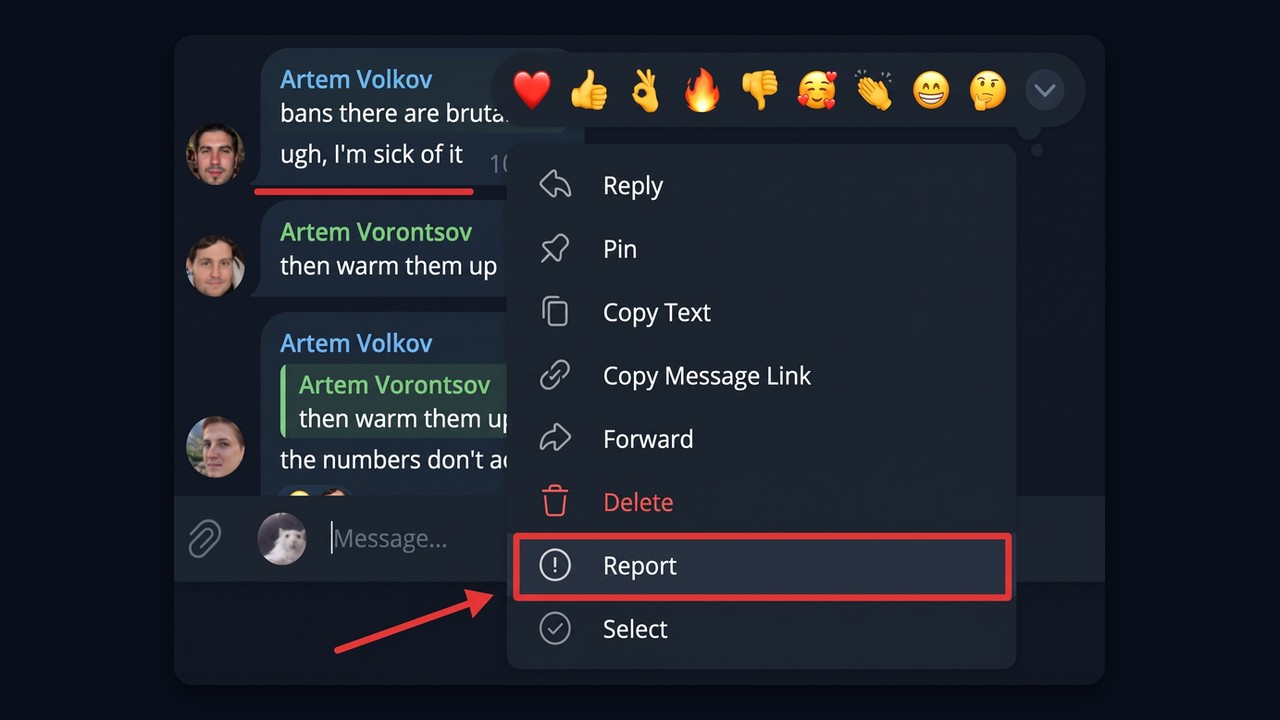
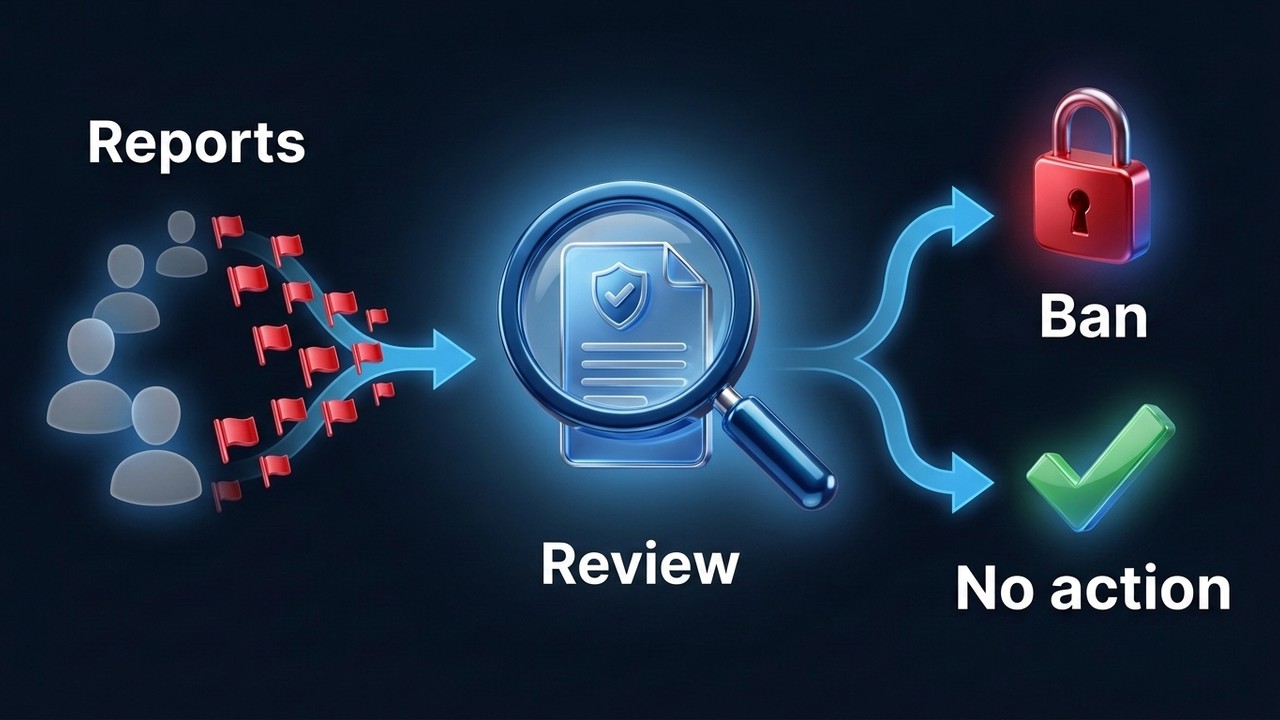
Remember one thing: a single complaint is a signal, not a vote. Moderators look at the content itself, at how trustworthy the people filing them look and whether a rule was actually broken. So a hundred complaints against a harmless post usually achieve less than three flags on content that clearly breaks the terms of service.
| Target of the complaints | Typical outcome |
|---|---|
| Cold DMs from a stranger | Spam limit: you can only message mutual contacts |
| A post or channel with clearly banned content | Blocked, sometimes together with its owner |
| Copyright infringement | Post removed or channel restricted after review |
| Posts inside a community chat | Limits for the author, a shadowban for the whole chat if abuse piles up |
| Someone with a clean record | Old profiles usually hold, fresh ones may still get limited |
Is There a Magic Number of Complaints?
The company publishes no threshold, but our hands-on experience looks like this. A brand-new account can be limited after 4 to 6 complaints. A Telegram Premium account holds out longer, roughly up to 10. Still, treat these as rough figures: the outcome depends on how often complaints arrive, who sends them, account age, past violations and whether the messages give moderators a real reason. That is why "can you get banned from Telegram by reports" has no single answer.
What makes a profile resilient to a Telegram mass report? Telegram keeps these signals private, so the points below come from practice:
- Frequency and source. For example, a dozen flags per minute from similar fresh profiles looks different from rare complaints by real contacts.
- Past violations. If the profile already had a spam limit, the next wave works faster.
- Age. A profile that has existed for years gets more benefit of the doubt. Look up the registration date with our free account age checker.
- Real activity. Chats, contacts, a filled-in bio and subscriptions also make the owner look like a real person.
- Premium or a Fragment username. Paid subscribers are rarely spammers, so they draw less suspicion.
- Phone number country. Numbers from countries with cheap registration are linked to spam more often.
Common Telegram Mass Report Schemes
First, understanding the attacker's logic helps you spot an attack early. What follows describes warning signs, not instructions.
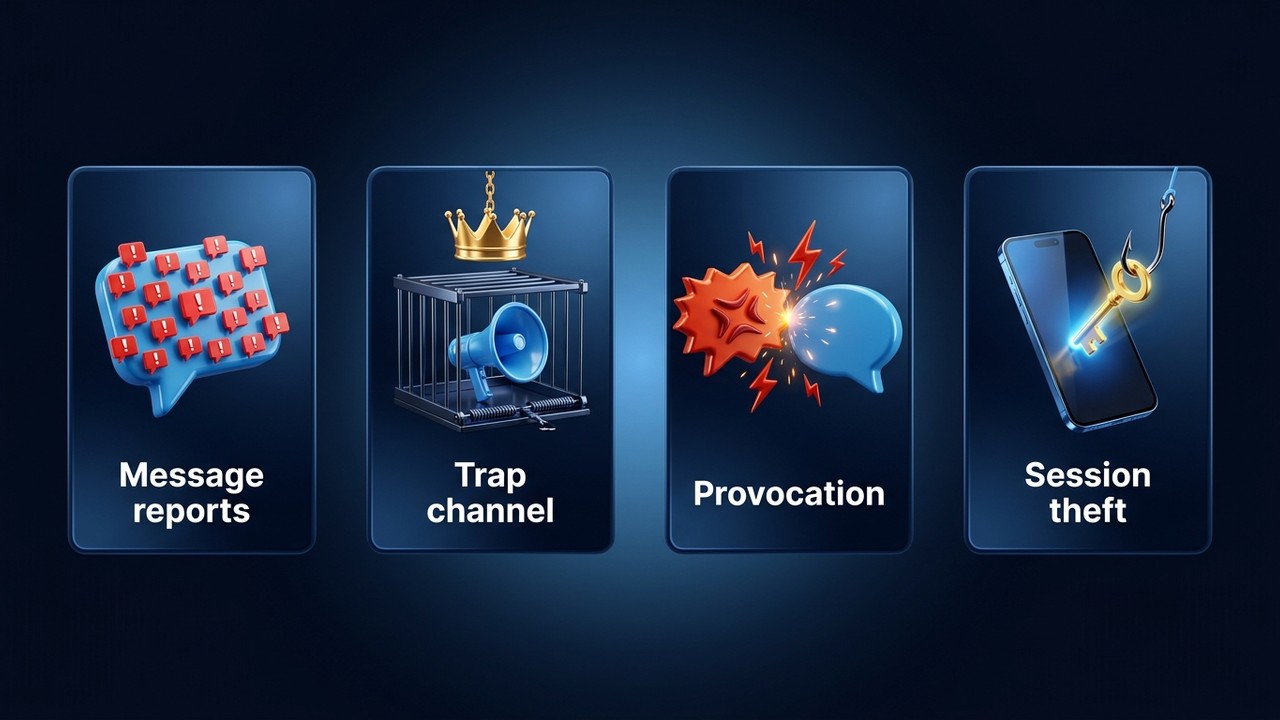
Complaints about real messages. This is also the most common route. The attacker digs up a rude reply, an ad or a questionable image and then organizes complaints from many sockpuppets. If there really is a violation, then a ban is possible.
The trap channel. First, someone creates a broadcast full of banned content, adds the victim and hands over ownership. Then the flags start, and to moderation it looks as if the owner is the one breaking the rules. But this only works if strangers are allowed to add you to channels and groups.
Provocation in a chat. Typically, you get baited into an angry reply, and then that reply gets flagged. A single insult rarely leads to a ban, but it chips away at your standing.
"Session takedowns". This one is not about complaints at all. It is account theft: the victim is asked to "verify" in a bot or enter a login code on a website, and the attacker then kicks the owner out of every session. The defense here is a cloud password and never sharing codes.
Takedown Bots, Tools and GitHub Scripts
Search for a "telegram mass report bot" or a "mass report tool github" and you will find dozens. However, almost none of them do what they claim. A typical bot asks you to log in with your phone number "so it can file flags from your profile" and quietly takes over your session. Many scripts carry a stealer or simply fake a progress bar.
Paid Telegram mass report services are even simpler. First, no seller can guarantee a result, because moderation makes the decision. Second, there is no way to check their work, so the "report" is usually a screenshot with numbers. The pattern is almost always the same: prepayment, a promise of "within a day", then silence. Worse, some sellers learn who the target is and start blackmailing the customer, or sell that information to the target. We covered similar tricks in our article on Telegram scams.
Can Someone Get You Banned Just by Your Username?
A phone number or @username is just an address. Instead, for complaints to land, the attacker needs material: a message, a post, a public page. That is why "I'll take you down by username in an hour" is almost always a scare tactic. If you have not broken any rules and strangers cannot add you to groups, it usually goes nowhere.
How to Protect Your Telegram Account From Mass Reports
Most of the protection takes five minutes in settings. After that, the trap channel and session theft stop being realistic threats.
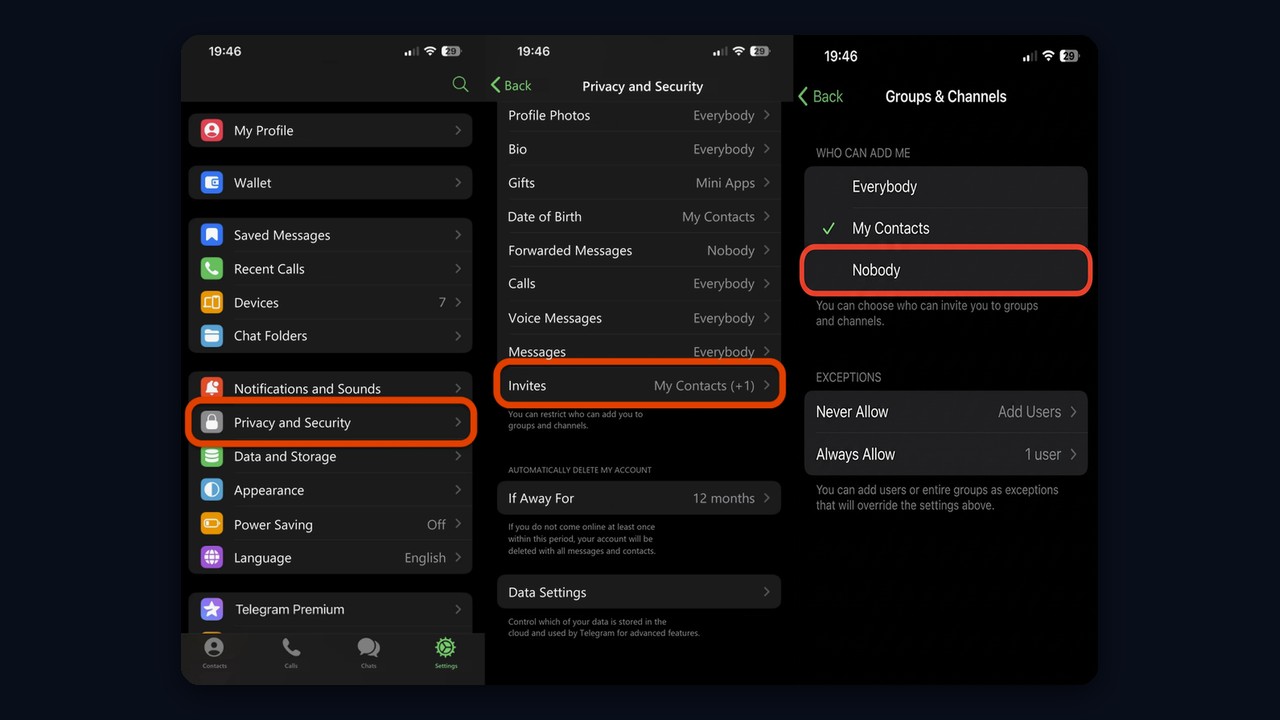
- Block group and channel invites from strangers. Go to Settings → Privacy and Security → Invites (Groups & Channels on Android) and set it to Nobody or My Contacts. This is the single most important step.
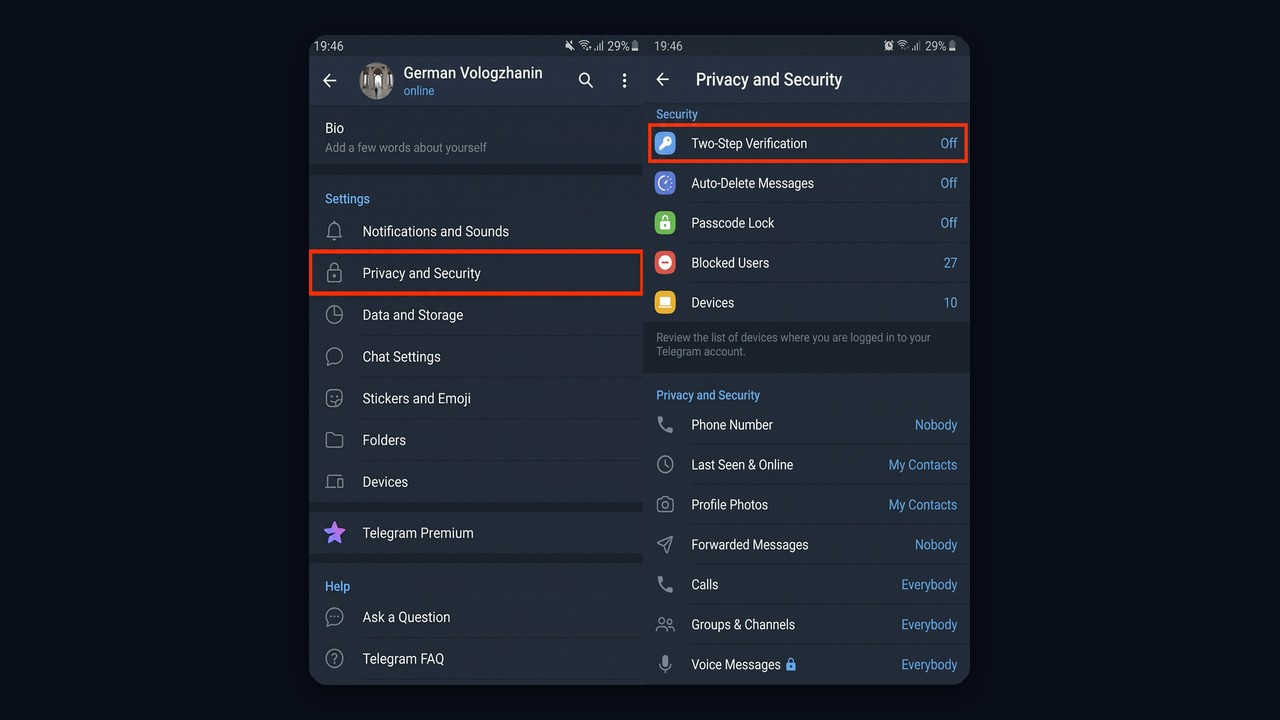
- Turn on a cloud password. Privacy and Security → Two-Step Verification. Without it, one intercepted SMS code is enough to lose everything.
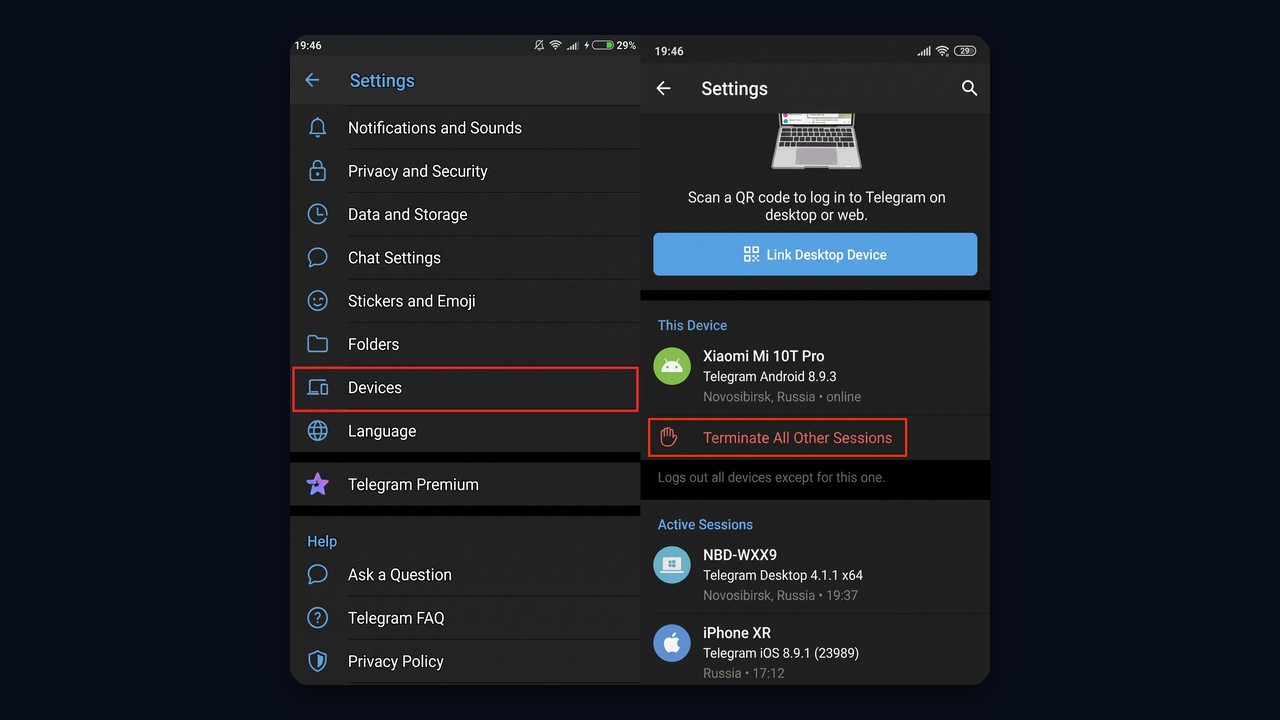
- Review active sessions. Settings → Devices. Terminate anything unfamiliar and enable automatic logout for inactive sessions.
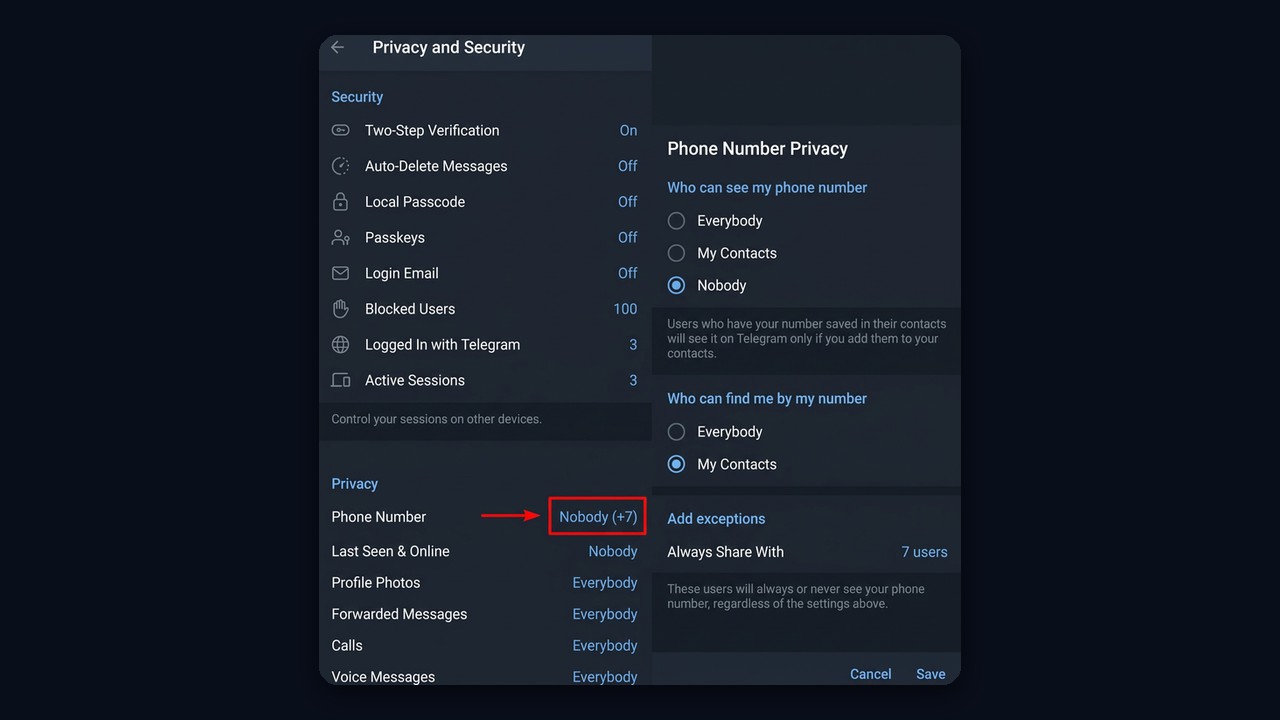
- Hide your phone number. Under Phone Number choose Nobody; lookup by number stays limited to people you know.
- Limit who can message you first. The Messages setting narrows who can start a chat (some options require Premium).
Start with invites. On iPhone the item is called Invites, on Android it is Groups & Channels.
Two-step verification sits in that same menu, under Security. Once enabled, one SMS code no longer lets anyone in.
Next, Devices lists every active session, and "Terminate All Other Sessions" kicks out unknown logins at once.
Finally, to hide your number, pick Nobody and leave lookup on My Contacts. Exceptions let chosen people still see it.
It also pays to tidy up your inbox. With hundreds of subscriptions, a new trap blends right in, because nobody checks them all. Folders and the habit of leaving unread feeds make an unfamiliar one stand out within minutes. If you discover that you own something you have never seen, delete it instead of leaving: leaving does not remove your creator rights.
If you bought the profile or someone else used it before, start by ending their sessions and changing the password. Our guide on protecting an account after purchase walks through it step by step.
Protecting a Telegram Channel From Mass Report Attacks
In other words, channels carry more risk because one login controls the whole project. So the protection works on two levels: the owner login and the project itself.
- A dedicated owner account. Keep it out of groups and comment sections, and post through admins instead.
- A second admin with full rights. This way, if something happens to the main login, you still keep control.
- Moderation in the linked group. For example, join requests, a moderation bot and clear rules. Waves of complaints about members' posts can push a community into a shadowban.
- Careful content. Other people's photos, videos and texts invite copyright claims, and moderation takes those seriously.
- A backup channel. Set it up in advance and keep it almost empty. If the main one goes down, subscribers will find you through the link in your profile.
After an attack takes your project down, don't copy the old name, avatar and description onto the replacement. A lookalike is easier to find and attack again.
What to Do When an Attack Has Already Started
The warning signs of a Telegram mass report are usually visible: threats in DMs, a wave of texts from unknown senders, an unfamiliar broadcast in your list, login alerts from a strange device.
- Never pay and never argue. Screenshot the threats, then block the senders.
- Check your chat list. Then leave unknown groups and delete anything you suddenly own.
- End foreign sessions and make sure the cloud password is on.
- Clean up your content. Remove anything you posted that could be used against you.
- Warn your audience through the spare broadcast if a project is under attack.
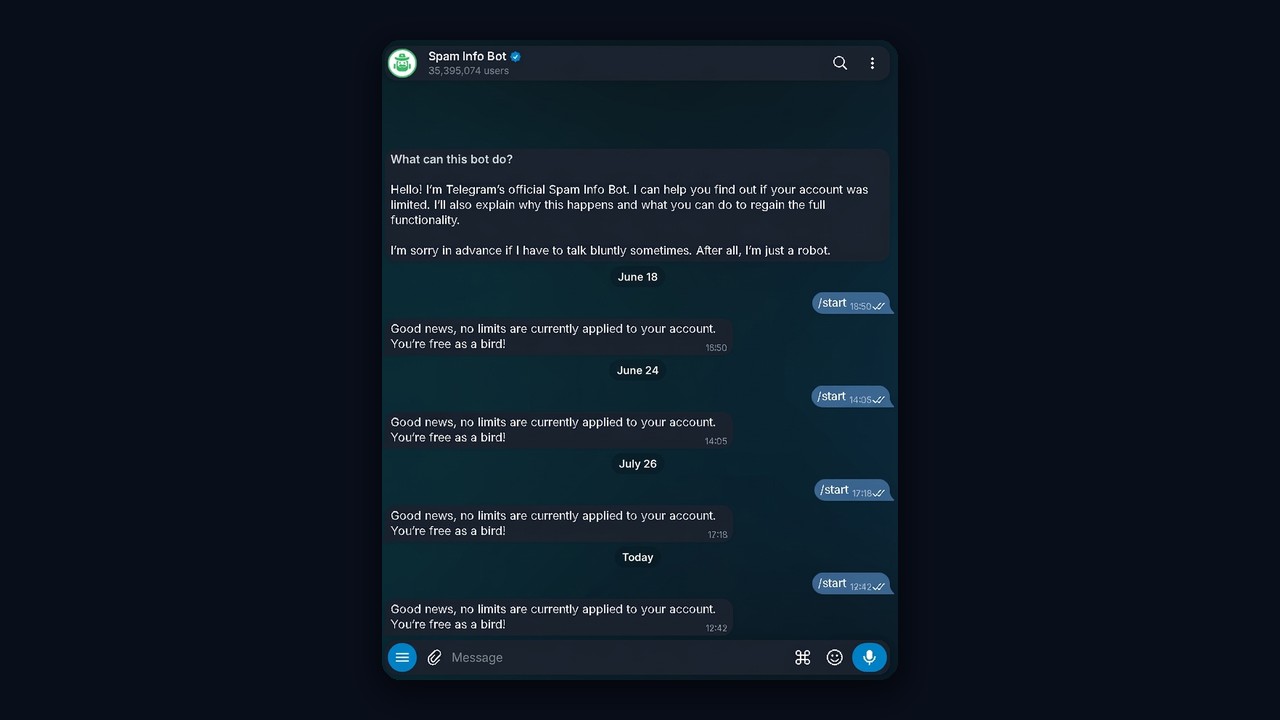
If you can no longer message strangers, open @SpamBot. It also shows your current status and when the limit ends. The difference between temporary and permanent limits is covered in our article on the Telegram spam block.
If you are fully banned, your remaining option is support. Explain calmly, attach proof of the attack, but avoid sending the same email twenty times. Every contact route is listed in our guide on how to contact Telegram support.
Why Work Accounts Get Flagged More Than Anyone
If you run dozens of accounts for outreach, commenting or community chats, the threat rarely comes from competitors. Instead, it comes from recipients. Someone gets a text from a stranger, hits the spam button, and those flags add up until the number is limited. In effect, you have triggered a slow Telegram mass report against yourself.
Moderation also watches behavior, not only complaints. Identical intervals, joining dozens of chats in a row and instant replies with no typing all signal automation. As a result, such a user goes down much faster than one that behaves like a person. Volume norms are collected in our post about Telegram message limits.
Lowering the Risk With GramGPT.io AI Protection
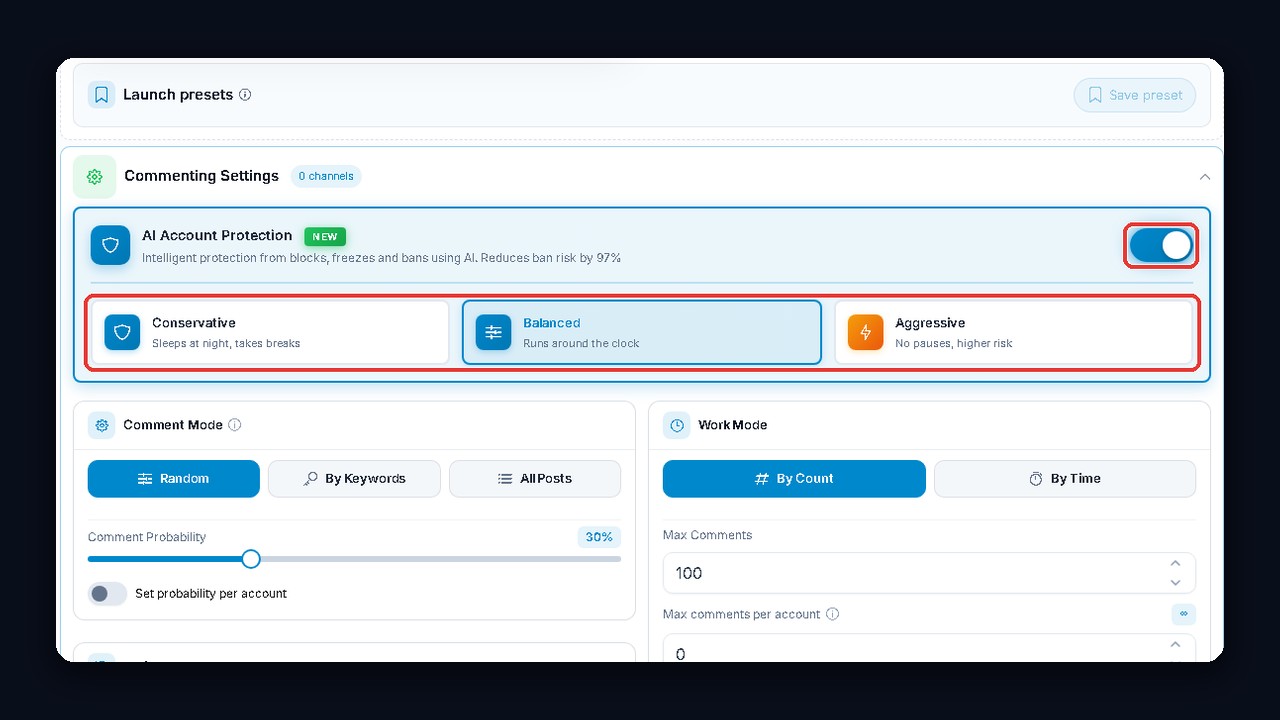
GramGPT.io has a feature for exactly this: AI account protection. It is not a separate tool but a block inside the promotion modules, including neuro chatting, neuro commenting, mailings and parsers. It changes how profiles behave while they work so their actions never form a pattern.
- Switch on the AI protection toggle in the module settings before launch.
- Pick a mode. Conservative stretches delays by 1.5x, types slowly and puts accounts to "sleep" from 01:00 to 07:00. Balanced suits most tasks. Aggressive is faster but riskier.
- Run the module. They will open other users' pages, scroll feeds, pause for varying lengths and occasionally make a typo, the way real people do.
To be clear about the limits: AI protection does not stop recipients from flagging you, and it does not guard against hijacking or scammers. What it removes is one of the biggest triggers for a ban, which is robotic behavior. The modes are explained in detail in our AI protection review.